
Terminal AI agent with built-in execution tracing and observability

Project description
Understand, debug, and control AI agent behavior.
Structured tracing, context management, and reproducible runs — all from the terminal.
Quickstart · Tracing · Testing · Models · Roadmap · License





| BlueClaw | Typical agent frameworks | |
|---|---|---|
| Structured execution traces | Every run, automatic | None or manual logging |
| Regression testing | YAML specs, TAP/JUnit, Wilson CI | Not available |
| Trace replay | Step-through debugger | Not available |
| Trace diff | A/B test prompt changes | Not available |
| Trace explain | LLM post-hoc analysis | Not available |
| Aggregate stats | Cost, timing, failure rates | Not available |
| CLI-first debugging | No dashboards required | Dashboard or nothing |
Quickstart
pip install blueclaw
blueclaw init
echo "ANTHROPIC_API_KEY=sk-ant-..." > .env
blueclaw
Tracing & Observability
Every agent run produces a structured JSON trace. Nine CLI commands let you inspect runs after the fact — no dashboards, no external services, no setup.
See what happened: trace graph
$ blueclaw trace graph 20260315-054426

search for Python 3.13 new features
├── web_search (1ms) ✓  query: Python 3.13 new features
├── web_search (1ms) ✓  query: Python 3.13 new features list 2024
└── http_request (366ms) ✓  url: https://docs.python.org/3.13/whatsnew/3.13.html
Find the bottleneck: trace timeline
$ blueclaw trace timeline 20260315-054426

Goal: search for Python 3.13 new features
Model: claude-sonnet-4-6 · 3 steps · 1840 tokens · $0.0073

 #  Tool          Start    Duration  Cumulative  Bar
 1  web_search      +0ms      1ms         1ms    █
 2  web_search    +120ms      1ms         2ms    █
 3  http_request  +250ms    366ms       368ms    ██████████████████████

Tool time: 368ms · Wall time: 4100ms · Overhead: 91%
Understand why: trace explain
Feed a recorded trace to an LLM for post-hoc explanation.
$ blueclaw trace explain 20260315-054426

The agent searched for Python 3.13 features, found the results too generic,
refined its query to include "list 2024", then fetched the official changelog
from docs.python.org. The two-step search pattern suggests the first results
didn't contain enough detail...

Post-hoc explanation · not the agent's actual reasoning
Compare two runs: trace diff
$ blueclaw trace diff 20260315-054426 20260315-071830

Run A: 20260315-054426  Run B: 20260315-071830
Goal A: search for Python 3.13 new features
Goal B: search for Python 3.13 new features

Steps:  3 → 2 (-1)
Tokens: 1840 → 1200 (-640)
Cost:   $0.0073 → $0.0048
Time:   368ms → 420ms (+52ms)
Debug step by step: trace replay
$ blueclaw trace replay 20260315-054426

Step 1: web_search (1ms) ✓
  input query: Python 3.13 new features
  output: Found 10 results...
[Enter] next · [q] quit >
Track performance: trace stats
$ blueclaw trace stats --since 7

Trace Stats · 23 runs · last 7 days

Overview
  Total runs:     23
  Total steps:    87
  Avg steps/run:  3.8
  Avg tokens/run: 2,450
  Avg cost/run:   $0.0082
  Total cost:     $0.19

Timing
  Avg duration:    5.1s
  Median duration: 4.2s
  p95 duration:    12.3s
  Avg tool time:   2.1s (41% of wall)

Top Tools (by frequency)
  shell_command        34 calls (39%)
  web_search           28 calls (32%)
  http_request         18 calls (21%)
  file_read             7 calls (8%)

Failed Steps (3 across 2 runs · 3.4% step failure rate)
  timeout              2 (67%)
  network              1 (33%)
All trace commands
| Command | Use case |
|---|---|
trace list |
Find a run ID to inspect |
trace show <id> |
Detailed step table with timing |
trace graph <id> |
Quick tree view of tool sequence |
trace timeline <id> |
Find bottlenecks — where does time go? |
trace explain <id> |
LLM explains what happened and why |
trace diff <id1> <id2> |
Compare two runs (A/B test prompts) |
trace replay <id> |
Step-through debugger for tool calls |
trace replay <id> --stub-tools |
Re-run with recorded outputs, compare tool sequence |
trace stats |
Aggregate performance across all runs |
trace purge |
Delete old traces (default: 30 days) |
Regression Testing
Define expected agent behavior in YAML, run it as a test suite, get CI-friendly output.
Test spec
# test-spec.yaml
tests:
  - goal: search for Python web frameworks and save to frameworks.txt
    expected_tools: [web_search, shell_command]
    expected_file_contains:
      frameworks.txt: "Django"
    tool_order: [web_search, shell_command]
    forbidden_tools: [http_request]
    max_steps: 5

  - goal: check the current weather in Tokyo using wttr.in
    expected_tools: [http_request]
    expected_output_contains: Tokyo
    max_cost: 0.05
    runs: 5
    threshold: 0.55

model: anthropic/claude-haiku-4-5-20251001
allowlist_domains:
  - wttr.in
Run tests
$ blueclaw test test-spec.yaml

TAP version 13
1..2
ok 1 - search for Python web frameworks and save to frameworks.txt
ok 2 - check the current weather in Tokyo using wttr.in
Assertions
| Field | Check |
|---|---|
expected_tools |
Every listed tool was called (subset match) |
expected_output_contains |
Case-insensitive substring match on response |
max_steps |
Agent used no more than N tool calls |
max_cost |
Run cost stayed under budget |
forbidden_tools |
None of these tools were called |
expected_files |
Each path exists in workspace after the run |
expected_file_contains |
File exists AND contains substring (case-insensitive) |
forbidden_output_contains |
Substring must NOT appear in response |
output_regex |
Regex pattern must match response |
tool_order |
Tools appear in this subsequence order |
max_duration_s |
Wall-clock time under budget |
Spec-level fields
| Field | Purpose |
|---|---|
model |
Override model for all tests in the spec |
allowlist_domains |
Domains allowed for http_request (merged with blueclaw.yaml) |
Multi-run with Wilson CI
LLMs are non-deterministic. Set runs: N (N > 1) to execute multiple times and get a statistically valid verdict instead of brittle pass/fail:
- Pass — Wilson CI lower bound >= threshold
- Fail — Wilson CI upper bound < threshold
- Inconclusive — CI straddles the threshold (needs more runs)
Inconclusive tests exit 0 so they don't break CI, but surface as # INCONCLUSIVE in TAP and <skipped> in JUnit XML.
Output formats
blueclaw test spec.yaml                          # TAP to stdout (default)
blueclaw test spec.yaml --format junit           # JUnit XML to stdout
blueclaw test spec.yaml -o results.xml -f junit  # write to file
blueclaw test spec.yaml --dry-run                # validate spec, no API calls
blueclaw test spec.yaml --keep-workspace         # preserve workspaces for inspection
blueclaw test spec.yaml --model anthropic/claude-haiku-4-5-20251001  # override model
Exit code: 0 on all pass/inconclusive, 1 on any failure.
Per-run diagnostics
With --keep-workspace, each run directory contains .blueclaw/result.json — the full TestResult with verdict, failures, tools called, cost, and duration. Inspect individual runs to understand why a multi-run case passed or failed:
$ cat /tmp/blueclaw-test-.../case-007/run-002/.blueclaw/result.json
{
  "goal": "check the current weather in Tokyo using wttr.in",
  "passed": true,
  "verdict": "pass",
  "tools_called": ["http_request"],
  "cost": 0.009,
  "duration_s": 4.4
}
Stub replay
Re-run a recorded trace with stubbed tool outputs — no real execution, no API cost for tools:
$ blueclaw trace replay 20260315-054426 --stub-tools

Original: web_search -> http_request
Replayed: web_search -> http_request
Result: MATCH (same tool sequence)
Use --model to test whether a different model makes the same tool choices given the same context.
Model Support
blueclaw                                    # Anthropic (default)
blueclaw --model ollama/llama3              # Ollama (local)
blueclaw --model openai/gpt-4.1-mini       # OpenAI
blueclaw --model litellm/gemini/gemini-2.0-flash  # Gemini via LiteLLM
Set API keys in .env:
ANTHROPIC_API_KEY=sk-ant-...
OPENAI_API_KEY=sk-...
Configuration
blueclaw.yaml in your project root:
model:
  provider: anthropic
  model_id: claude-sonnet-4-6

workspace:
  path: ~/blueclaw/workspace/
  trace_retention_days: 30             # auto-purge old traces; 0 = keep forever

tools:
  - web
  - shell
  - pdf
  - mcp:https://localhost:8080/sse     # custom MCP server

allowlist_domains:
  - github.com
  - docs.python.org
Architecture
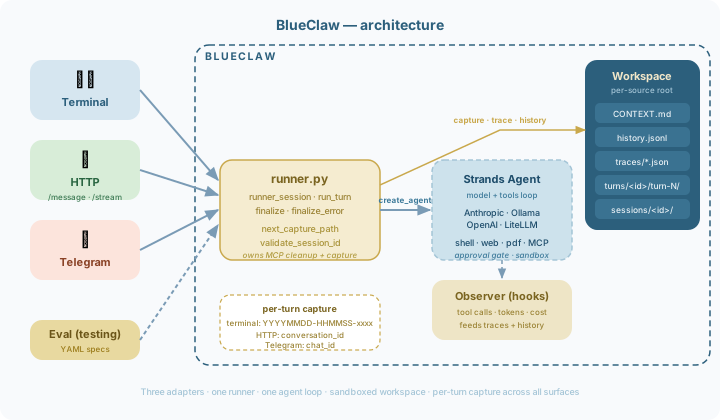
| Module | Purpose |
|---|---|
cli.py |
Typer entrypoints, welcome banner, trace tooling |
session.py |
Config, model factory, agent, chat loop, background context updater |
workspace.py |
Sandbox enforcement, context/history/trace I/O |
observer.py |
Structured tool tracing + output truncation |
models.py |
Pydantic models, trace schema, cost calculation, error classification |
testing.py |
Test spec loading, runner, assertions, formatters, stub replay |
tools/ |
Web, shell, MCP wiring (factory pattern) |
approval.py |
Shell command + domain allowlist hooks |
Built on Strands Agents SDK. The agent loop, tool execution, streaming, and model switching are all handled by Strands.
Roadmap
See docs/roadmap.md for the full roadmap with milestone details.
Development
pip install -e ".[dev]"
pytest
flake8 blueclaw/ tests/
black --check blueclaw/ tests/
License
Release history Release notifications | RSS feed


Download files
Download the file for your platform. If you're not sure which to choose, learn more about installing packages.
Source Distribution
Built Distribution
Filter files by name, interpreter, ABI, and platform.
If you're not sure about the file name format, learn more about wheel file names.
Copy a direct link to the current filters
File details
Details for the file blueclaw-1.4.1.tar.gz.
File metadata
- Download URL: blueclaw-1.4.1.tar.gz
- Upload date:
- Size: 70.5 kB
- Tags: Source
- Uploaded using Trusted Publishing? No
- Uploaded via: twine/6.2.0 CPython/3.13.12
File hashes
| Algorithm | Hash digest | |
|---|---|---|
| SHA256 |
c656fd009d9b7df7ab86105c63336d41df8a0379f0481d54411b05702793b273
|
|
| MD5 |
c6e7c886c846fd40c74d4b78987ba5a3
|
|
| BLAKE2b-256 |
c4a0c58fb9724f10955f6e4706e109e9c4e24303e6b00b95ab3b7be6a66bf0c1
|
File details
Details for the file blueclaw-1.4.1-py3-none-any.whl.
File metadata
- Download URL: blueclaw-1.4.1-py3-none-any.whl
- Upload date:
- Size: 40.5 kB
- Tags: Python 3
- Uploaded using Trusted Publishing? No
- Uploaded via: twine/6.2.0 CPython/3.13.12
File hashes
| Algorithm | Hash digest | |
|---|---|---|
| SHA256 |
9fffbcb3d04510dd5aef9f88684034005e06732f6102fca6890327a41867564a
|
|
| MD5 |
4f89effedb2a69d3251ca2f747b05d80
|
|
| BLAKE2b-256 |
f81970cabf3a16856cc73f20ec9c789f71b8041e05ba387facafb54fa9fd0c5a
|






