
Terminal AI agent with built-in execution tracing and observability

Project description
Understand, debug, and control AI agent behavior.
Structured tracing, context management, and reproducible runs — all from the terminal.
Quickstart · Features · Models · Configuration · Roadmap · Contributing · License






- Structured traces — every run writes a structured JSON trace, queryable from the terminal with no external service
- Regression testing — define expected behavior in YAML; run as CI with TAP or JUnit output and Wilson CI scoring
- Context management — observation masking keeps token cost low across long sessions without losing quality
- Trace replay & diff — step through any recorded run interactively, or compare steps, tokens, and cost between two runs
- HTTP API + stateful conversations —
blueclaw serveexposes the agent over HTTP with bearer auth, SSE streaming, a concurrency cap, per-conversation_idhistory persisted viaFileSessionManager, plusPOST /uploadfor attaching files (PDF, text, images, csv, json, zip) to a conversation - File attachments with native vision — drop
@<path>(or just paste a bare/quoted absolute path) into any CLI prompt; PNG/JPEG/GIF/WEBP attachments reach vision-capable models as Strandsimageblocks, while PDFs and text reuse the shell/pdf-mcp tools. Works the same way over HTTP viaPOST /upload+file_ids - Built-in playground —
GET /playgroundships a single-page chat UI withblueclaw servefor manual stateful + streaming testing, including paperclip + drag-drop file attachments
Quickstart
pip install blueclaw
blueclaw init
echo "ANTHROPIC_API_KEY=sk-ant-..." > .env
blueclaw
Install the extra for the model provider you want:
pip install "blueclaw[anthropic]"  # Claude (default)
pip install "blueclaw[ollama]"     # local models via Ollama
pip install "blueclaw[openai]"     # OpenAI
pip install "blueclaw[gemini]"     # Google Gemini (via LiteLLM)
Attach a file in one shot — @<path> or a bare absolute/quoted path both work:
blueclaw run "@~/Downloads/screenshot.png what is this?"
blueclaw run "'/Users/me/notes.pdf' summarize this"
Features
Tracing & Observability — docs/tracing.md
Every run produces a structured JSON trace. Ten CLI commands let you inspect, compare, and replay runs without a hosted dashboard.
$ blueclaw trace graph 20260315-054426

search for Python 3.13 new features
├── web_search (1ms) ✓  query: Python 3.13 new features
├── web_search (1ms) ✓  query: Python 3.13 new features list 2024
└── http_request (366ms) ✓  url: https://docs.python.org/3.13/whatsnew/3.13.html
trace list · trace show · trace graph · trace timeline · trace diff · trace explain · trace replay · trace stats · trace ui · trace purge
Regression Testing — docs/testing.md
Define expected behavior in YAML, run as a CI test suite with TAP or JUnit output. Multi-run Wilson CI scoring handles non-determinism.
blueclaw test spec.yaml
blueclaw test spec.yaml --format junit -o results.xml
11 deterministic assertions: tools called, output content, file existence, cost, step count, duration, tool order.
Context Management
Tool outputs from older turns are automatically masked to keep token cost low across long sessions without losing model reasoning quality. A hybrid summarization mode is available for very long conversations.
HTTP API — docs/api.md
Expose the agent over HTTP for programmatic access or tool integration.
blueclaw serve                          # http://127.0.0.1:8420
curl -X POST http://127.0.0.1:8420/message \
  -d '{"message": "what is in the workspace?"}' | jq .

# Stream tokens as they're generated:
curl -N -X POST http://127.0.0.1:8420/message/stream \
  -d '{"message": "what is in the workspace?"}'

# Attach a file, then reference its file_id in /message:
FID=$(curl -s -X POST http://127.0.0.1:8420/upload \
  -F "file=@photo.jpg" -F "conversation_id=c-1" | jq -r .file_id)
curl -X POST http://127.0.0.1:8420/message \
  -d "{\"message\":\"describe this\",\"conversation_id\":\"c-1\",\"file_ids\":[\"$FID\"]}"
Bearer token auth (BLUECLAW_API_KEY), 1 MB body cap on JSON, 25 MB on /upload, 300 s timeout, CORS for localhost. A shared asyncio.Semaphore (default 4, configurable via --max-concurrent) caps simultaneous agent runs. Every API request writes a trace visible in blueclaw trace ui.
Model Support — docs/models.md
blueclaw                                    # Anthropic (default)
blueclaw --model ollama/llama3.1:8b         # Ollama (local)
blueclaw --model openai/gpt-4.1-mini       # OpenAI
blueclaw --model litellm/gemini/gemini-2.0-flash  # Gemini via LiteLLM
Set API keys in .env:
ANTHROPIC_API_KEY=sk-ant-...
OPENAI_API_KEY=sk-...
Configuration
blueclaw.yaml in your project root:
model:
  provider: anthropic
  model_id: claude-sonnet-4-6

workspace:
  path: ~/blueclaw/workspace/
  trace_retention_days: 30

tools:
  - web
  - shell
  - pdf
  - mcp:http://localhost:8080/sse        # SSE MCP server (use mcp:<command> for stdio)

allowlist_domains:
  - github.com
  - docs.python.org
Architecture
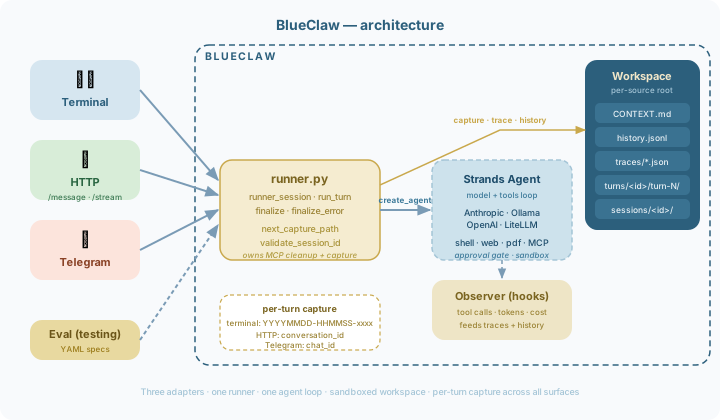
| Module | Purpose |
|---|---|
cli.py |
Typer entrypoints, welcome banner, trace tooling |
session.py |
Config, model factory, agent, chat loop, background context updater |
server.py |
HTTP API gateway (blueclaw serve) — /message, /message/stream, /playground, /health, /api/traces; bearer auth, CORS, per-conversation locks |
workspace.py |
Sandbox enforcement, context/history/trace I/O |
observer.py |
Structured tool tracing + output truncation |
context.py |
Observation masking and hybrid summarization for context management |
lessons.py |
Extracts behavioral hints from past traces and injects into system prompt |
models.py |
Pydantic models, trace schema, cost calculation, error classification |
testing.py |
Test spec loading, runner, assertions, formatters, stub replay |
tools/ |
Web, shell, MCP wiring (factory pattern) |
approval.py |
Shell command + domain allowlist hooks |
Built on Strands Agents SDK.
Roadmap
See docs/roadmap.md for the full roadmap with milestone details.
Contributing
pip install -e ".[dev]"
pip install pre-commit && pre-commit install   # mirrors CI lint locally
pytest
flake8 blueclaw/ tests/
black --check blueclaw/ tests/
Bug reports and pull requests are welcome. See docs/contributing.md for the full guide.
Links
- AI Agent Observability Without a Dashboard — The story behind blueclaw's design: why we built structured tracing into the terminal instead of a hosted service
- I Cut My AI Agent's Token Costs 21% Without Changing the Model — Benchmarks behind blueclaw's
ObservationMaskingManager: why replacing stale tool outputs with placeholders beats LLM summarization on cost and speed - How I Debug AI Agents Like Code (Not Guesswork) — A walkthrough of blueclaw's 10
traceCLI commands:trace list→show→timeline→diffturns "re-run and guess" debugging into actual inspection in under a minute
License
Release history Release notifications | RSS feed


Download files
Download the file for your platform. If you're not sure which to choose, learn more about installing packages.
Source Distribution
Built Distribution
Filter files by name, interpreter, ABI, and platform.
If you're not sure about the file name format, learn more about wheel file names.
Copy a direct link to the current filters
File details
Details for the file blueclaw-2.3.0.tar.gz.
File metadata
- Download URL: blueclaw-2.3.0.tar.gz
- Upload date:
- Size: 292.0 kB
- Tags: Source
- Uploaded using Trusted Publishing? No
- Uploaded via: twine/6.2.0 CPython/3.13.13
File hashes
| Algorithm | Hash digest | |
|---|---|---|
| SHA256 |
d35ea6f35224daffe2609e373b2fb1ea068692529ed84bb70d3c31b5b449daac
|
|
| MD5 |
5441a0630b7dc459ba52b499a3e7acda
|
|
| BLAKE2b-256 |
362384c9d444f37b6fb15ba1fbd760197db327e3cbcb433a3fedeb4e994815d1
|
File details
Details for the file blueclaw-2.3.0-py3-none-any.whl.
File metadata
- Download URL: blueclaw-2.3.0-py3-none-any.whl
- Upload date:
- Size: 248.2 kB
- Tags: Python 3
- Uploaded using Trusted Publishing? No
- Uploaded via: twine/6.2.0 CPython/3.13.13
File hashes
| Algorithm | Hash digest | |
|---|---|---|
| SHA256 |
076a77e62b8960e2d0569fe993a46a01e74138387f90711300b0c07978d28bde
|
|
| MD5 |
1622bc73d4d7530b58e2db749b1edd89
|
|
| BLAKE2b-256 |
42a440b0af8763e2dda14095696a1482defa0f95371cc7c9b4ef731e75beb218
|






