
🌀 Options for Bash.

Project description
🌀 bluer-options
🌀 bluer_options implements an options argument for Bash.
installation
pip install bluer_options
if using outside the bluer-ai ecosystem, add this line to ~/.bash_profile or ~/.bashrc,
source $(python3 -m bluer_options locate)/.bash/bluer_options.sh
for more refer to 🔻 giza.
usage
let the function receive one or more options arguments (example below) then parse them with bluer_ai_option, bluer_ai_option_int, and bluer_ai_option_choice.
function func() {
    local options=$1

    local var=$(bluer_ai_option "$options" var default)
    local key=$(bluer_ai_option_int "$options" key 0)
    local choice=$(bluer_ai_option_choice "$options" value_1,value_2,value_3 default)

    :
}
this enables the user to call func as,
func var=12,~key,value_1
all options have defaults and order doesn't matter.
example 1
here is an example use of an options in the vancouver-watching 🌈 ingest command:
> @help vanwatch ingest
vanwatch \
	ingest \
	[area=<area>,count=<-1>,~download,dryrun,~upload] \
	[-|<object-name>] \
	[process,count=<-1>,~download,dryrun,gif,model=<model-id>,publish,~upload] \
	[--detect_objects 0] \
	[--overwrite 1] \
	[--verbose 1]
this command takes in an options, an object, and args. an options is a string representation of a dictionary, such as,
area=<vancouver>,~batch,count=<-1>,dryrun,gif,model=<model-id>,~process,publish,~upload
which is equivalent, in json notation, to,
{
    "area": "vancouver",
    "batch": false,
    "count": -1,
    "dryrun": true,
    "gif": true,
    "model": "<model-id>",
    "process": false,
    "publish": true,
    "upload": false,
}
example 2
from reddit
How can I automate these tree commands I frequently need to type out? I would like to run:
git add .
git commit -m "Initial "commit"
git push
I got bored of typing them out each time. Can I make an alias or something like "gc" (for git commit). The commit message is always the same "Initial commit".
first, install bluer-options. this will also install blueness.
pip install bluer_options
then, copy example1.sh to your machine and add this line to the end of your bash_profile,
source <path/to/example1.sh>
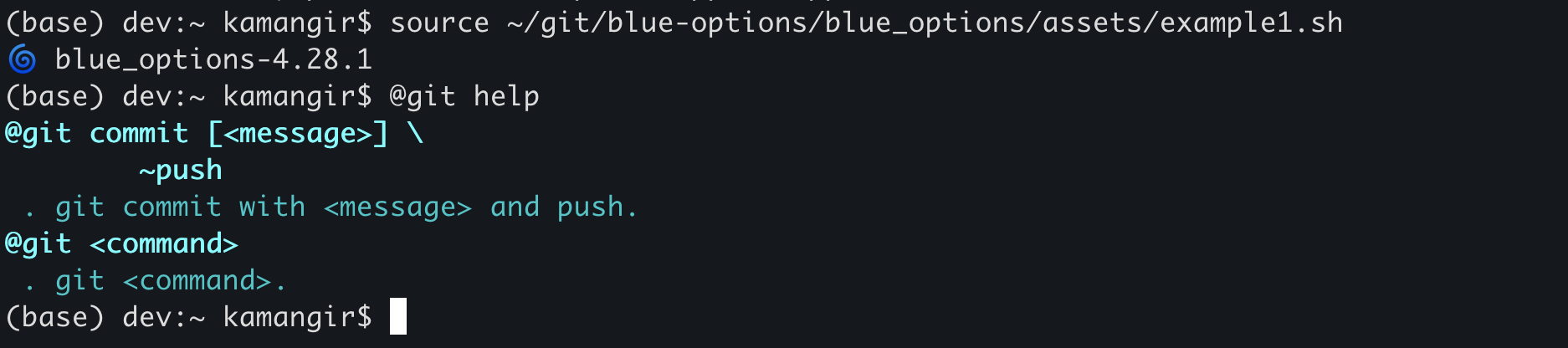
now, you have access to the @git super command. here is how it works.
@git helpshows usage instructions (see below).@git commitruns the three commands. you can customize the message by running@git commit <message>. you can also avoid the push by running@git commit <message> ~push.- for any
<task>other thancommit,@git <task> <args>runsgit <task> <args>.
 > @git help
 @git commit [<message>] \
	~push
 . git commit with <message> and push.
@git <command>
 . git <command>.
🌀
blue-optionsfor the Global South.




built by 🌀 blueness-3.122.1.
Release history Release notifications | RSS feed


Download files
Download the file for your platform. If you're not sure which to choose, learn more about installing packages.
Source Distribution
Built Distribution
Filter files by name, interpreter, ABI, and platform.
If you're not sure about the file name format, learn more about wheel file names.
Copy a direct link to the current filters
File details
Details for the file bluer_options-5.344.1.tar.gz.
File metadata
- Download URL: bluer_options-5.344.1.tar.gz
- Upload date:
- Size: 34.7 kB
- Tags: Source
- Uploaded using Trusted Publishing? No
- Uploaded via: twine/6.1.0 CPython/3.12.9
File hashes
| Algorithm | Hash digest | |
|---|---|---|
| SHA256 |
d57ca7b2ca0a2f0f7311a6f3bc454432efad7807606a12d68034d77112248598
|
|
| MD5 |
c4f9cb1628204bd53169b80ca8d5164e
|
|
| BLAKE2b-256 |
149efe4f20e51520b0ccbc09268416448c1c0667776c77622f013192c2deb915
|
File details
Details for the file bluer_options-5.344.1-py3-none-any.whl.
File metadata
- Download URL: bluer_options-5.344.1-py3-none-any.whl
- Upload date:
- Size: 52.2 kB
- Tags: Python 3
- Uploaded using Trusted Publishing? No
- Uploaded via: twine/6.1.0 CPython/3.12.9
File hashes
| Algorithm | Hash digest | |
|---|---|---|
| SHA256 |
0f3911cf3adc774ed6487349ec9d408ad02ef100f6bf35f951fb0bf9e6f07991
|
|
| MD5 |
4c2a3028edb18aa49e33669442f5fc83
|
|
| BLAKE2b-256 |
de637532867b224d3e72a5ce1e56927cf5beeb5a268349dcbe09c395f37f94ad
|






