
bookreader-tui




A terminal EPUB reader and personal library, built with Textual.
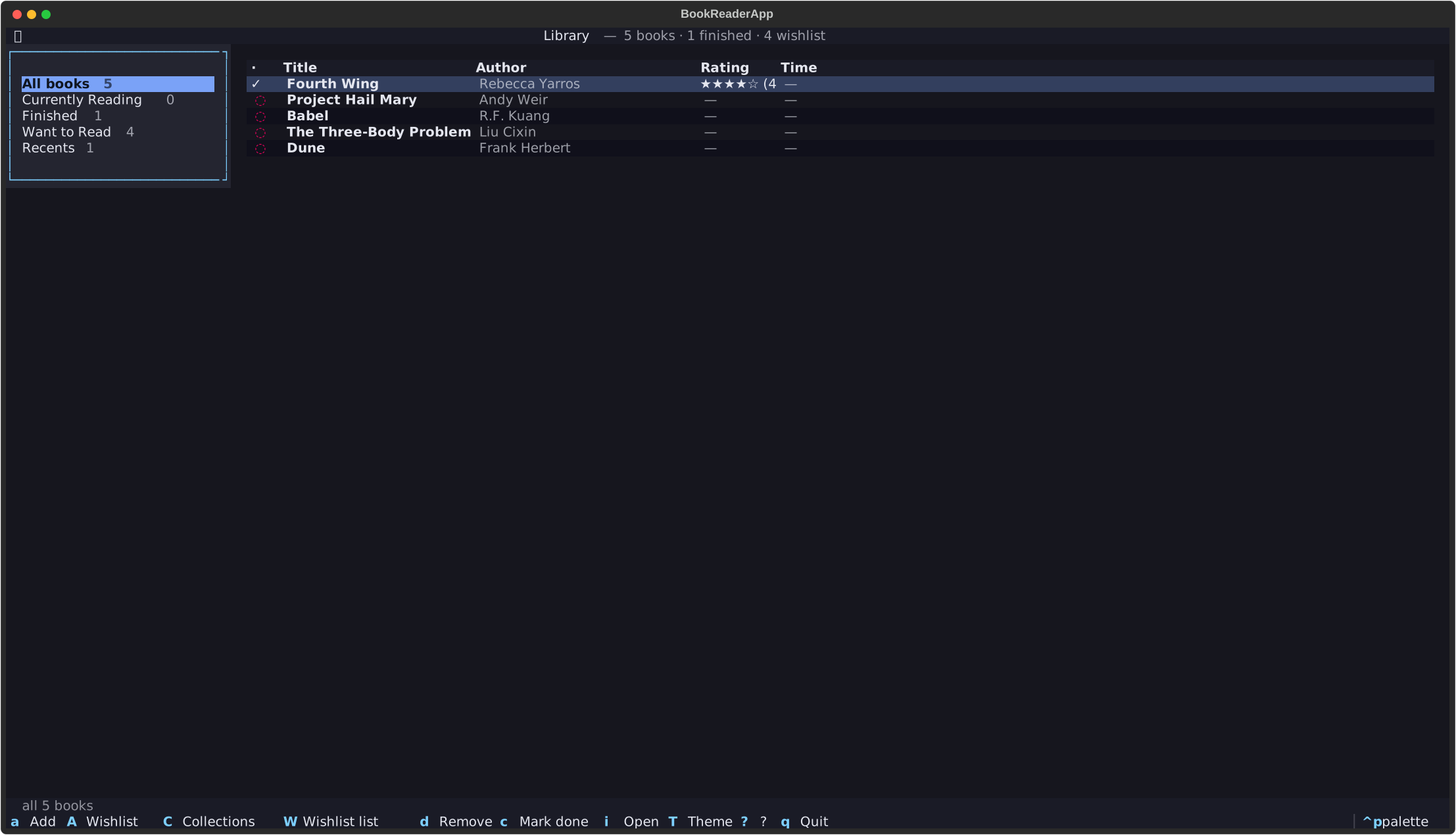
Open an EPUB in a focused two-column or two-page TUI, remember where you left off, organize what you've read into a small SQLite library, and render figures inline in kitty, iTerm2, WezTerm, or any sixel-capable terminal — automatically, with placeholders elsewhere.
pipx install bookreader-tui && bookreader path/to/book.epub
Why bookreader-tui?
- vs Calibre — no Qt, no GUI process, no separate viewer. Lives in your terminal where the rest of your workflow already is.
- vs
epy— full library: collections, ratings, wishlist, reading-time stats, bookmarks with notes, multi-book session continuity. - vs
mdcat/ piping to a pager — proper EPUB rendering (chapters, TOC, two-page mode, inline images) instead of a flat text dump. - vs reading on your phone — keyboard-driven, distraction-free, themed, scriptable. Your reading position syncs by EPUB identifier so the same book at a different path resumes in the same place.
Features
- Distraction-free reader — centered reading column with a typographically sane width cap, TOC sidebar, optional two-page spread.
- Persistent position — picks up exactly where you left off, per book, identified by EPUB
dc:identifier. - Library — SQLite-backed, with collections (Currently Reading, Finished, Want to Read), ratings, bookmarks with notes, per-book reading time.
- Wishlist books — track titles you intend to read before you have the file. Attach a real EPUB later.
- Inline images — kitty / iTerm2 / WezTerm / sixel via textual-image; auto-detected, runtime-toggleable with
I. - Three built-in themes (
dark,light,sepia) plus the standard Textual command palette. - Pure Python, no external services — your library lives in
~/.local/share/bookreader/. Nothing leaves your machine.
Install
The PyPI package is named bookreader-tui. The bare bookreader name was already taken on PyPI; the import path and the console script are still bookreader.
Recommended: pipx or uv tool
For end-user CLI tools, prefer an isolated install over pip install into your system Python — that path is blocked on most modern Linux distros by PEP 668 anyway.
# pipx (most popular)
pipx install bookreader-tui

# OR uv tool (faster, same idea)
uv tool install bookreader-tui
Either gives you a global bookreader command with its dependencies sandboxed in their own venv.
pip (inside a venv)
If you're already managing a virtualenv:
python -m venv .venv
source .venv/bin/activate          # Linux/macOS
# .venv\Scripts\activate           # Windows
pip install bookreader-tui
From source
git clone https://github.com/prajwalmahajan101/BookReader
cd BookReader
pipx install -e .                  # or: pip install -e . inside a venv
Requirements
- Python ≥ 3.11
- A terminal with at least 80 columns. 120+ recommended.
- For inline images: kitty, iTerm2, WezTerm, Ghostty, or a sixel-capable terminal (foot, mlterm, xterm with
--enable-sixel-graphics, Konsole, Windows Terminal).
Quick start
# Open a book directly — gets added to your library on first open
bookreader path/to/book.epub

# Land on the library home; pick a book with Enter
bookreader

# One-off read without touching the library
bookreader --no-library path/to/book.epub
That's it. Position, bookmarks, and reading time persist automatically.
Inline images — terminal setup
bookreader ships inline-image rendering via textual-image. On launch it sniffs your terminal and enables images if it recognizes a graphics-capable one.
What works out of the box (no config)
| Terminal | Protocol used | Notes |
|---|---|---|
| kitty | Kitty Graphics (TGP) | Best fidelity. Auto-detected via TERM=xterm-kitty or KITTY_WINDOW_ID. |
| Ghostty | Kitty Graphics (TGP) | Native support; behaves like kitty. |
| iTerm2 | iTerm2 inline images | macOS. Auto-detected via TERM_PROGRAM=iTerm.app. |
| WezTerm | Kitty / iTerm / Sixel | Supports all three; auto-detected via TERM_PROGRAM=WezTerm. |
| Konsole | Kitty (partial) | Recent versions only. |
| VS Code terminal | iTerm2 inline images | Works for static images. |
Sixel terminals (force-enable)
foot, mlterm, xterm (built with --enable-sixel-graphics), mintty, Contour, Windows Terminal. Auto-detection doesn't cover these — set the override:
BOOKREADER_IMAGES_ENABLED=1 bookreader path/to/book.epub
Terminals without graphics support
Anything else (e.g. plain xterm, gnome-terminal, Terminal.app, tmux without a graphics-capable host) renders figures as [image: alt] placeholders. Everything else works normally.
Toggle at runtime
Press I inside the reader to flip images on/off mid-session — useful for comparing or when an image is breaking your layout.
Screenshots
| Scroll mode | Two-page spread |
|---|---|
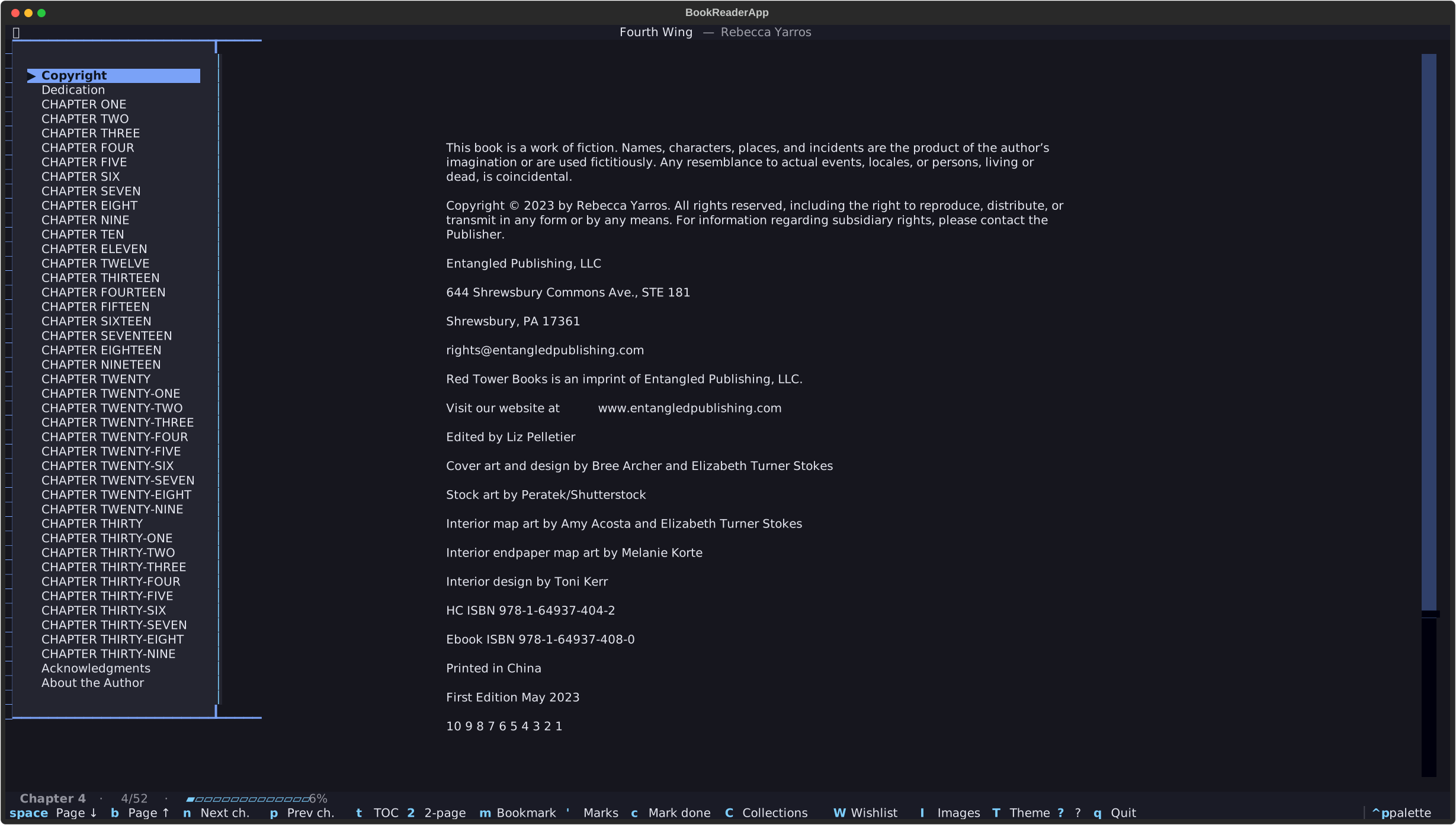 |
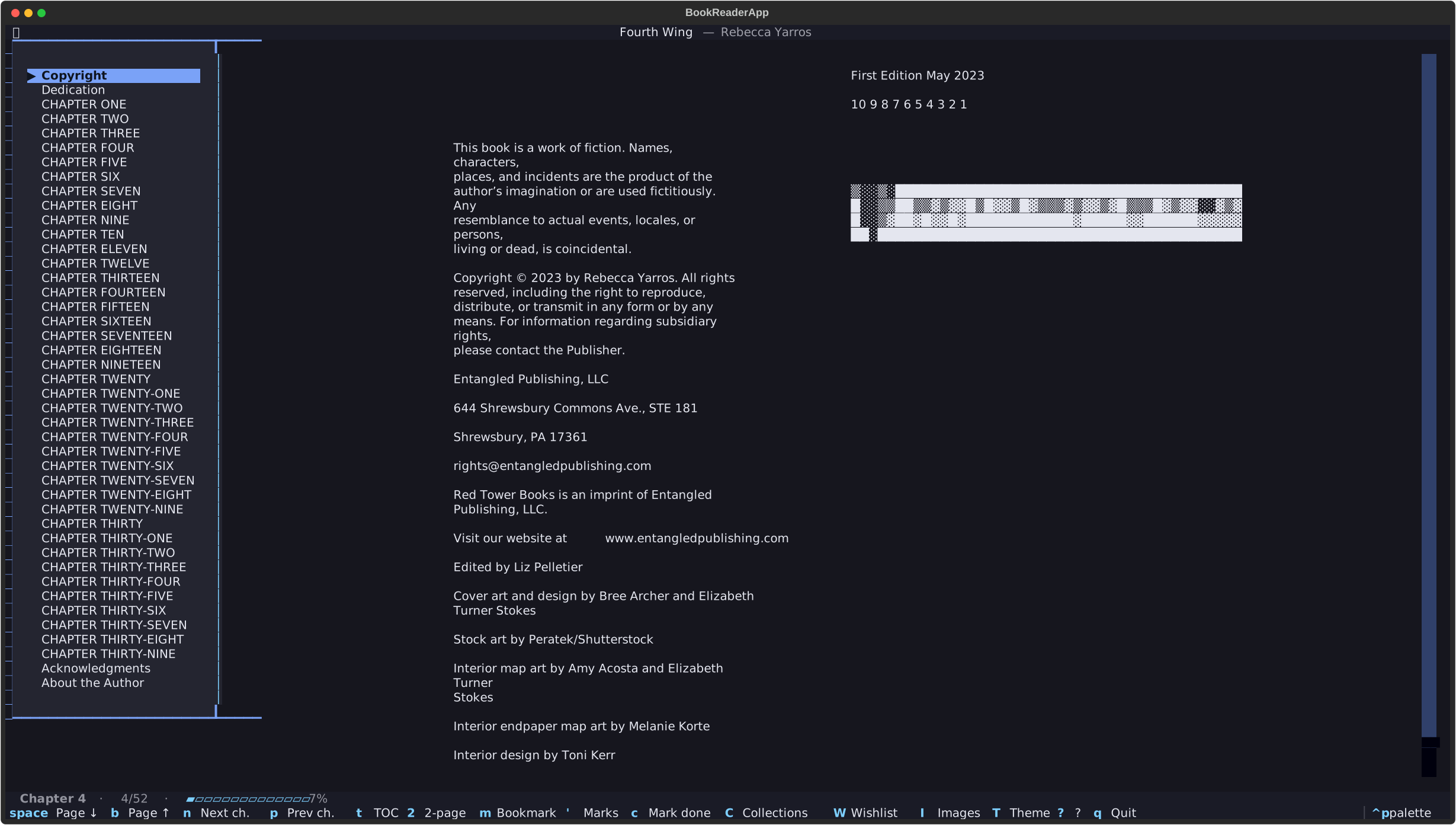 |
Key bindings
Reader
| Key | Action |
|---|---|
j / k |
Scroll line down / up |
space / b |
Page down / up |
n / p |
Next / previous chapter |
g / G |
Top / bottom of chapter |
t |
Toggle TOC sidebar |
2 |
Toggle two-page mode |
m |
Add a bookmark (with optional note) |
' |
List bookmarks — Enter jumps |
c |
Toggle completion of the current book |
C |
Open Collections overview |
W |
Open Wishlist overview |
I |
Toggle inline image rendering |
T |
Cycle theme |
? |
Show key hints |
q |
Save and back (or quit) |
Scrolling past the end of a chapter flows into the next one; going back from the start flows into the previous chapter's end.
Library
| Key | Action |
|---|---|
Enter / i |
Open the highlighted book |
a |
Add a book (prompts for path) |
A |
Add a wishlist entry (title + author) |
C |
Browse books grouped by collection |
W |
Browse the wishlist |
d / Delete |
Remove the highlighted book |
c |
Toggle completion |
1 … 5 |
Set rating; 0 clears |
| Tab | Switch focus between sidebar and table |
T / ? / q |
Theme / help / quit |
CLI subcommands
bookreader add path/to/book.epub                          # add without opening
bookreader add --wishlist --title "T" --author "A"        # phantom entry, no file
bookreader attach <book-id> path/to/book.epub             # promote a wishlist row
bookreader list                                           # print every book
bookreader stats                                          # minutes read per book
bookreader --version
Configuration
All settings are environment variables prefixed BOOKREADER_. Set them in your shell rc, your .env, or per-invocation:
| Variable | Default | Effect |
|---|---|---|
BOOKREADER_IMAGES_ENABLED |
auto-detect | 1 to force inline images on; 0 to force off. |
BOOKREADER_READING_WIDTH |
110 |
Single-column reading width in cells (60–200). |
BOOKREADER_THEME |
dark |
dark, light, or sepia. |
BOOKREADER_TWO_PAGE_DEFAULT |
0 |
1 to launch in two-page mode. |
BOOKREADER_LINE_SCROLL |
1 |
Lines per j/k press (1–10). |
BOOKREADER_PAGE_SCROLL_PCT |
90 |
Page jump as a percentage of viewport (10–100). |
BOOKREADER_SHOW_TOC_DEFAULT |
1 |
0 to start with the TOC sidebar collapsed. |
NO_COLOR |
unset | Honoured by textual — falls back to a safe palette. |
File locations (XDG)
| What | Default path |
|---|---|
| Library DB | ~/.local/share/bookreader/library.db |
| Reading-position cache | ~/.local/state/bookreader/positions.json |
| JSON bookmark fallback | ~/.local/state/bookreader/bookmarks.json |
| Log file (rotating) | ~/.local/state/bookreader/log/bookreader.log |
Honors XDG_DATA_HOME and XDG_STATE_HOME if set. Safe to back up the whole ~/.local/share/bookreader/ directory.
Upgrading from 0.x JSON store
On first launch the library service migrates ~/.local/state/bookreader/positions.json entries that match books already added; the JSON is renamed to positions.json.migrated once data flows. No manual step needed.
Troubleshooting
bookreader: command not found
You installed with pip install bookreader-tui directly into your system Python and PEP 668 blocked it, or you installed into a venv that isn't activated. Use pipx install bookreader-tui (recommended) or activate the venv.
Images render as [image: alt] placeholders even in kitty
Check that the env var hasn't been turned off: echo $BOOKREADER_IMAGES_ENABLED. If it's set to 0, unset it or set to 1. Inside the reader, press I to force-toggle. If it still doesn't render, your kitty session may be inside tmux/screen without graphics passthrough — start kitty directly to test.
Images render at low quality
The image is being upscaled into a column that's too narrow. Raise BOOKREADER_READING_WIDTH (try 140 or 160) and re-launch.
q quits while I'm typing in a wishlist title
It shouldn't — modals isolate keystrokes. If you hit this, please open an issue with your terminal + Textual version.
My EPUB has no images at all
Confirm: bookreader list shows it. Then python -c "from ebooklib import epub; b=epub.read_epub('path.epub'); print(sum(1 for i in b.get_items() if i.media_type.startswith('image/')))". If that prints 0, the EPUB itself has no embedded images.
Library got corrupted
Stop the app. Move the file aside: mv ~/.local/share/bookreader/library.db ~/.local/share/bookreader/library.db.bak. Re-launch — a fresh library is created. Use bookreader add <path> to repopulate.
I want a clean slate
rm -rf ~/.local/share/bookreader ~/.local/state/bookreader. Removes the library, positions, and logs.
Development
git clone https://github.com/prajwalmahajan101/BookReader
cd BookReader
python -m venv .venv && source .venv/bin/activate
pip install -e ".[dev]"
pre-commit install

# The full local gate (matches CI):
pytest -q
ruff format --check . && ruff check src/ tests/
mypy src/
Project layout
src/bookreader/
  core/      # config, paths, logging, exceptions    (no I/O)
  epub/      # parsing + rendering                   (no UI, no DB)
  state/     # JSON position + bookmark fallback
  library/   # SQLite library: db, repo, service, migrations
  ui/        # Textual app, screens, widgets, themes
tests/
  unit/         # parsers, renderer, config
  integration/  # service + screen pilot tests
docs/adr/    # architecture decision records
UI never imports a repository directly — it talks to a service.
Releasing
Tag-driven, fully automated:
# Bump version in src/bookreader/__init__.py and pyproject.toml,
# add a [X.Y.Z] section to CHANGELOG.md, commit, then:
git tag -a vX.Y.Z -m "Release X.Y.Z"
git push origin main vX.Y.Z
.github/workflows/release.yml builds the sdist + wheel, verifies the tag matches pyproject.toml, publishes to PyPI via trusted publishing, and creates a GitHub Release with the CHANGELOG-extracted notes and dist files attached.
Project background
Built solo as a phase-driven exercise: each phase is a feature branch with its own ADR, atomic commits, and merge-clean history.
- Phase 1 — Reader Core
- Phase 1.5 — Two-page mode
- Phase 2 — SQLite Library
- Phase 3 — Polish (bookmarks, sessions, phantom books, inline images)
- Phase 4 — Library curation (collections + wishlist overview)
- Phase 5 — UX polish + first PyPI release as
bookreader-tui
Architecture decisions live in docs/adr/. Version-by-version notes in CHANGELOG.md.
License
Apache-2.0 — Copyright 2026 Prajwal Mahajan.
1 maintainer

Metadata
1 maintainer
Release files for bookreader-tui 1.0.0
For a detailed explanation of source distributions (sdists) and built distributions (wheels), please see the package formats documentation.
Source distribution (sdist)
| File | Size | Uploaded | |
|---|---|---|---|
| bookreader_tui-1.0.0.tar.gz | 68.5 kB | Details |
Built distribution (wheel)
| File | Interpreter | ABI | Platform | Reset |
|---|---|---|---|---|
| bookreader_tui-1.0.0-py3-none-any.whl | Python 3 | none | any | Details |
Total release size: 150.0 kB
Release files / bookreader_tui-1.0.0.tar.gz
| Download URL | bookreader_tui-1.0.0.tar.gz |
|---|---|
| Size | 68.5 kB |
| Tags | Source |
|
SHA-256 checksum How to use checksums |
6cb59377747be689f9ae6fb58681db05be16c198ea421af83375196f39aae749
|
|
BLAKE2b-256 checksum How to use checksums |
3cc36d1ee4305116995f84759d305407ec91689f48348bec5f15f15982c10032
|
| Upload date | |
|
Uploaded using Trusted Publishing? What is trusted publishing? |
Yes |
| Uploaded via |
twine/6.1.0 CPython/3.13.12
|
Provenance
Provenance describes where a file came from. On PyPI, provenance is shared via attestations, which provide a verifiable record of the build or publishing details. View details, limitations and caveats.


PyPI Publish Attestation
PyPI verified that this artifact, at this checksum, originated from the publisher listed below.
Signed by GitHub Actions, verified by PyPI on Jun 10, 2026.
Transparency logRelease files / bookreader_tui-1.0.0-py3-none-any.whl
| Download URL | bookreader_tui-1.0.0-py3-none-any.whl |
|---|---|
| Size | 81.5 kB |
| Tags | Python 3 |
|
SHA-256 checksum How to use checksums |
66dc923d04d6800d0aba895a2a59add1b3e52517756ece4d32b513acb39f2d05
|
|
BLAKE2b-256 checksum How to use checksums |
4f1f1229423157d0cf9f76fb18cdd08e0778ab6b03a5a8a40291cb592bfda4ab
|
| Upload date | |
|
Uploaded using Trusted Publishing? What is trusted publishing? |
Yes |
| Uploaded via |
twine/6.1.0 CPython/3.13.12
|
Provenance
Provenance describes where a file came from. On PyPI, provenance is shared via attestations, which provide a verifiable record of the build or publishing details. View details, limitations and caveats.
PyPI Publish Attestation
PyPI verified that this artifact, at this checksum, originated from the publisher listed below.
Signed by GitHub Actions, verified by PyPI on Jun 10, 2026.
Transparency log













