
A terminal EPUB reader and personal library built with Textual.
Verified details
These details have been verified by PyPIProject links
GitHub Statistics
Maintainers

Project description
BookReader




A terminal EPUB reader and personal library, built with Textual — for people who'd rather read in their terminal than launch a desktop app.
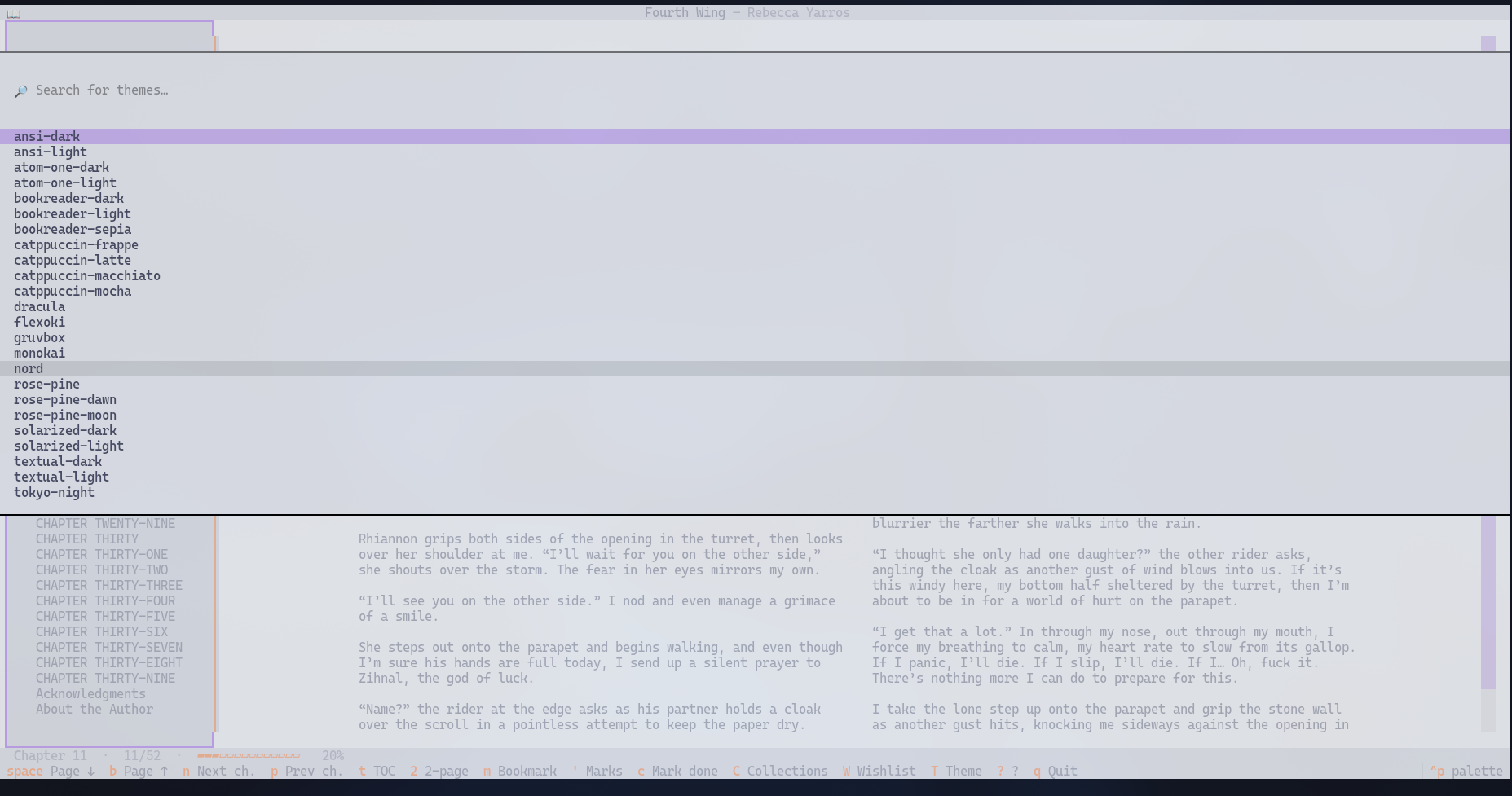
BookReader opens any EPUB in a focused two-column or two-page TUI, remembers where you left off, indexes everything you've added into a small SQLite library, and tracks per-book reading time and bookmarks. Inline kitty / iTerm2 / sixel image rendering is auto-enabled when your terminal advertises a graphics protocol; otherwise figures fall back to [image: alt] placeholders.
Built solo as a phase-driven exercise: each phase is a feature branch with its own ADR, atomic commits, and merge-clean history. Currently shipped: Phase 1 (Reader Core), Phase 1.5 (Two-page mode), Phase 2 (SQLite Library), Phase 3 (Polish — bookmarks, sessions, phantom / wishlist books, inline images), Phase 4 (Library curation — collections + wishlist overview).
How it's built
- Layered architecture —
core(config/paths/logging, no I/O) ·epub(parse + render, no UI/DB) ·library(persistence + service) ·ui(Textual screens + widgets). The UI never imports a repository directly; it goes through a service. Decisions live indocs/adr/. - Strict typing + linting — mypy strict, ruff (format + lint), pre-commit enforced. PEP 257 + Google docstrings; module-level logger via
bookreader.core.logging.get_logger(__name__). - Dependencies —
pip-toolswith layeredrequirements/*.in → *.txt(runtime / dev / test split). - Async-first —
pytest-asynciowithasyncio_mode = auto. - Commit discipline — conventional commits, atomic, on
feature/phaseN_<topic>branches;mainis always releasable. History stays linear: each phase is its own feature branch, fast-forward-merged into main with atomic conventional commits.
Install
From PyPI:
pip install bookreader-tui
bookreader path/to/book.epub
The PyPI package name is bookreader-tui (the bare bookreader was
taken); the import path and the console script are still bookreader.
Development install
python -m venv .venv
source .venv/bin/activate
pip install -e ".[dev]"
pre-commit install
If you pulled new commits that added runtime dependencies (e.g.
textual-image), re-runpip install -e ".[dev]"inside the activated venv so the editable install refreshes its metadata.
Run
bookreader                            # library home
bookreader open path/to/book.epub     # open a single book (adds it to the library)
bookreader path/to/book.epub          # same as 'open'
bookreader --no-library <path>        # stateless reader (no library writes)

bookreader add path/to/book.epub      # add without opening
bookreader add --wishlist --title "T" --author "A"   # wishlist (TBR) entry, no file
bookreader attach <book-id> path.epub # promote a wishlist row to a real book
bookreader list                       # print every book in the library
bookreader stats                      # minutes read per book
Keys — reader
| Key | Action |
|---|---|
j / k |
Scroll line down / up |
space / b |
Page down / up |
n / p |
Next / prev chapter |
t |
Toggle TOC sidebar |
2 |
Toggle two-page mode |
m |
Add a bookmark (with optional note) |
' |
List bookmarks — Enter jumps |
c |
Toggle completion of the current book |
C (shift+c) |
Open Collections overview from inside the reader |
W (shift+w) |
Open Wishlist overview from inside the reader |
I (shift+i) |
Toggle inline image rendering at runtime |
g / G |
Top / bottom of chapter |
T |
Cycle theme (dark/light/sepia) |
? |
Show key hints |
q |
Save and back (or quit) |
Scrolling past the end of a chapter flows into the next one automatically; going back from the start flows into the previous chapter's end.
Keys — library
| Key | Action |
|---|---|
Enter / i |
Open the highlighted book |
a |
Add a book (prompts for path) |
A (shift+a) |
Add a wishlist entry (title + author) |
C (shift+c) |
Browse all books grouped by collection (title + path) |
W (shift+w) |
Browse wishlist (title + author); d removes |
d / Delete |
Remove the highlighted book |
c |
Toggle completion |
1 … 5 |
Set rating; 0 clears |
| Tab | Switch focus between sidebar & table |
T / ? / q |
Theme / help / quit |
Project layout
src/bookreader/
  core/      # config, paths, logging, exceptions
  epub/      # parsing + rendering (no UI)
  state/     # Phase-1 JSON position store
  library/   # SQLite library (Phase 2): db, repo, service, migrations
  ui/        # Textual app, screens, widgets, themes
Storage
| What | Where |
|---|---|
| Library DB | <XDG_DATA_HOME>/bookreader/library.db |
| Phase-1 positions JSON | <XDG_STATE_HOME>/bookreader/positions.json |
| Log file (rotating) | <XDG_STATE_HOME>/bookreader/log/bookreader.log |
Upgrading from Phase 1: on first launch the library service migrates
positions.json entries that match books already added; the JSON is
renamed to positions.json.migrated once data flows.
Environment overrides
| Variable | Effect |
|---|---|
BOOKREADER_IMAGES_ENABLED |
1 forces inline images on; 0 forces off. Defaults to auto-detect in kitty / iTerm2 / WezTerm. |
BOOKREADER_READING_WIDTH |
Single-column reading width in cells (60–200, default 110). |
BOOKREADER_THEME |
dark, light, sepia. |
BOOKREADER_TWO_PAGE_DEFAULT |
1 to start in two-page mode. |
NO_COLOR |
Honoured by textual — falls back to safe color set. |
Status
Phase 1 (Reader Core) + Phase 1.5 (Two-page mode) + Phase 2 (Library) +
Phase 3 (Polish — bookmarks, sessions, phantom books, inline images) +
Phase 4 (Library Curation — collections + wishlist overview screens)
all live. ADRs at docs/adr/.
Phase 4 highlights
Con the library opens a Collections overview screen — every book grouped by collection, title + path per row.Wopens a Wishlist overview — every phantom (TBR) entry as title + author;dremoves.- Both screens are integration-tested (
tests/integration/test_library_modals.py).
Phase 3 highlights
bookreader add --wishlist --title …tracks TBR titles before you have the EPUB;bookreader attach <id> path.epubpromotes them.m/'add and list per-book bookmarks (with optional notes).- Reading time per book accrues automatically; see it in the library
"Time" column or via
bookreader stats. - Inline kitty/sixel images render when
BOOKREADER_IMAGES_ENABLED=1is set and the terminal supports a graphics protocol. Otherwise a[image: alt]placeholder takes the figure's place. Paged mode (2) always uses the placeholder.
Changelog
See CHANGELOG.md for the version-by-version history.
License
Apache-2.0 — Copyright 2026 Prajwal Mahajan.
Project details
Verified details
These details have been verified by PyPIProject links
GitHub Statistics
Maintainers
Release history Release notifications | RSS feed


Download files
Download the file for your platform. If you're not sure which to choose, learn more about installing packages.
Source Distribution
Built Distribution
Filter files by name, interpreter, ABI, and platform.
If you're not sure about the file name format, learn more about wheel file names.
Copy a direct link to the current filters
File details
Details for the file bookreader_tui-0.4.0.tar.gz.
File metadata
- Download URL: bookreader_tui-0.4.0.tar.gz
- Upload date:
- Size: 63.9 kB
- Tags: Source
- Uploaded using Trusted Publishing? Yes
- Uploaded via: twine/6.1.0 CPython/3.13.12
File hashes
| Algorithm | Hash digest | |
|---|---|---|
| SHA256 |
ff47cf12a3ae025096bad879cfa002ce903c7c4f2d4fab285a67b6b5bd59bd56
|
|
| MD5 |
9b6a7391025591a75a7020d4dd1d43fc
|
|
| BLAKE2b-256 |
21ba71b2387270a407ce30861e278ee04e5046b71f62da17b22a5eee01e712f9
|
Provenance
The following attestation bundles were made for bookreader_tui-0.4.0.tar.gz:
Publisher:
release.yml on prajwalmahajan101/BookReader
-
Statement:
-
Statement type:
https://in-toto.io/Statement/v1 -
Predicate type:
https://docs.pypi.org/attestations/publish/v1 -
Subject name:
bookreader_tui-0.4.0.tar.gz -
Subject digest:
ff47cf12a3ae025096bad879cfa002ce903c7c4f2d4fab285a67b6b5bd59bd56 - Sigstore transparency entry: 1778812530
- Sigstore integration time:
-
Permalink:
prajwalmahajan101/BookReader@c3bd300530bcea9b86a71c28c503b09ba6981d64 -
Branch / Tag:
refs/tags/v0.4.0 - Owner: https://github.com/prajwalmahajan101
-
Access:
public
-
Token Issuer:
https://token.actions.githubusercontent.com -
Runner Environment:
github-hosted -
Publication workflow:
release.yml@c3bd300530bcea9b86a71c28c503b09ba6981d64 -
Trigger Event:
push
-
Statement type:
File details
Details for the file bookreader_tui-0.4.0-py3-none-any.whl.
File metadata
- Download URL: bookreader_tui-0.4.0-py3-none-any.whl
- Upload date:
- Size: 79.4 kB
- Tags: Python 3
- Uploaded using Trusted Publishing? Yes
- Uploaded via: twine/6.1.0 CPython/3.13.12
File hashes
| Algorithm | Hash digest | |
|---|---|---|
| SHA256 |
24695062b68217525fbe5bddf229daa3d16600debb8ff08ad858ccf5418fce11
|
|
| MD5 |
e6a609bd1816be5997458a6a27b16e05
|
|
| BLAKE2b-256 |
e2535a9ca25e1873219abae8e4598e13575c5216ca5de6cad1f2791dd8255c35
|
Provenance
The following attestation bundles were made for bookreader_tui-0.4.0-py3-none-any.whl:
Publisher:
release.yml on prajwalmahajan101/BookReader
-
Statement:
-
Statement type:
https://in-toto.io/Statement/v1 -
Predicate type:
https://docs.pypi.org/attestations/publish/v1 -
Subject name:
bookreader_tui-0.4.0-py3-none-any.whl -
Subject digest:
24695062b68217525fbe5bddf229daa3d16600debb8ff08ad858ccf5418fce11 - Sigstore transparency entry: 1778812938
- Sigstore integration time:
-
Permalink:
prajwalmahajan101/BookReader@c3bd300530bcea9b86a71c28c503b09ba6981d64 -
Branch / Tag:
refs/tags/v0.4.0 - Owner: https://github.com/prajwalmahajan101
-
Access:
public
-
Token Issuer:
https://token.actions.githubusercontent.com -
Runner Environment:
github-hosted -
Publication workflow:
release.yml@c3bd300530bcea9b86a71c28c503b09ba6981d64 -
Trigger Event:
push
-
Statement type:






