








Full documentation is at bootstack.org.
Desktop apps in pure Python — Tk underneath, none of the boilerplate.
bootstack is built on Tk, so the install is light and your app ships as a small standalone executable. But you'll never
write a StringVar or call .pack() — the API is its own. 60+ widgets, reactive state, and a CLI that scaffolds and
packages the whole thing.
Why bootstack?
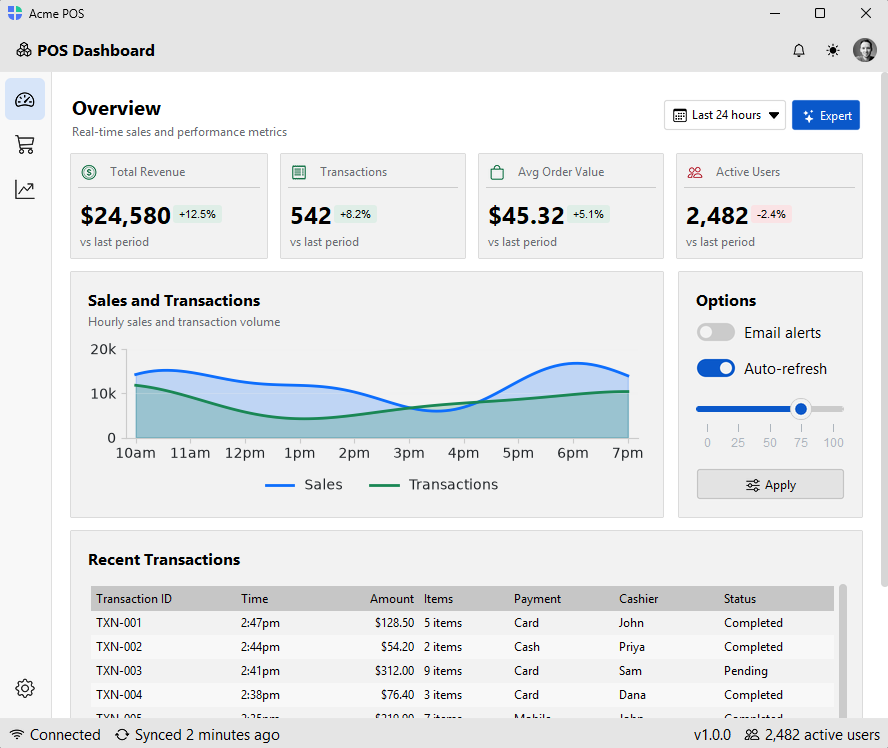
Most Python desktop frameworks make you fight the framework. bootstack gets out of the way.
- 30% less code — the declarative, context-manager layout eliminates geometry calls, explicit parenting, and most of the wiring boilerplate
- Reads like Python — nested
withblocks mirror your UI structure; the code hierarchy is the layout - Modern layout system —
Row,Column, andGridcontainers handle spacing, alignment, and growth automatically; a screen-axis vocabulary (gap,padding,margin,horizontal,vertical,grow) without writing CSS - 60+ widgets out of the box — primitives through full composites: tables, trees, calendars, date pickers, gauges, sliders, and more — including a full
CodeEditorwith syntax highlighting, line numbers, bracket matching, smart indent, and search; no external editor dependency required - Reactive signals — observable state that flows between widgets; bind once, update everywhere
- Event and stream pipelines — compose, filter, debounce, and throttle UI events with a chainable stream API
- Built-in icons — the full Bootstrap Icons catalog, theme-aware and recolorable, bundled with the framework
- Built-in localization — 23 language catalogs, locale-aware number/date/time formatting, runtime language switching
- Semantic styling —
accent="primary",variant="outline"— no hard-coded colors; looks right across every theme automatically - 10 paired light/dark themes — popular dev color schemes plus Bootstrap, with a runtime switcher and a custom-theme API
- Forms and validation — field-level validators, inline error messages, and a
FormDialogfor quick modal forms - DataSource abstraction — one interface over SQLite, in-memory, and file backends with filtering, sorting, pagination, and CRUD
- Data visualization — embed
matplotlib(andseaborn) figures withChart; they recolor with the theme and live-update from aSignalorDataSource(optionalvizextra) - A real CLI — scaffold, run, add pages/views/dialogs/themes, and package for distribution
- Hot reload —
bootstack dev app.pyupdates the running app on save and keeps your place; module-level state and the active page survive the reload - PyInstaller packaging built in —
bootstack buildproduces a standalone executable; no separate toolchain required
Hot reload
Edit and save — the running window updates in place. bootstack dev app.py
reloads the UI on every save while keeping your window position, module-level
state, and active page, so you never lose your spot.
Installation
Requires Python 3.12+ and Tk/Tcl (bundled with most Python distributions). Install with pip:
python -m pip install bootstack
See the installation guide for platform-specific Tk setup and the optional data-format extras.
See it
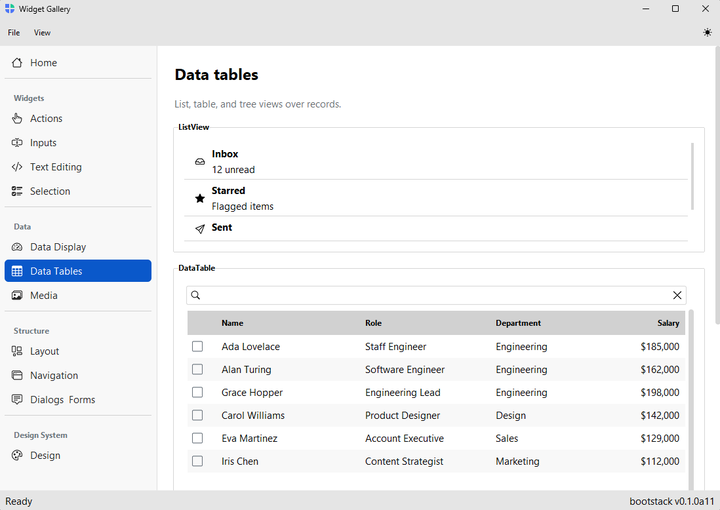
The widget gallery is a single-window tour of everything bootstack ships — every widget, theme switcher, accent variants, and layout containers. Fastest way to see the framework in action without writing a line of code:
bootstack gallery
Quick Start
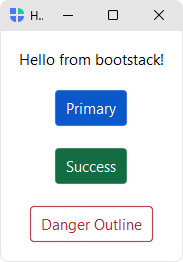
import bootstack as bs

with bs.App(title="Hello", padding=16, gap=16) as app:
    bs.Label("Hello from bootstack!")
    bs.Button("Primary", accent="primary")
    bs.Button("Success", accent="success")
    bs.Button("Danger Outline", accent="danger", variant="outline")

app.run()
For navigation-based apps, use AppShell — it gives you stacked toolbars, a sidebar, and a page stack in one call:
import bootstack as bs

shell = bs.AppShell(title="My App", size=(1000, 650))

with shell.page_nav() as nav:
    with nav.add_page("home", text="Home", icon="house"):
        bs.Label("Welcome!")
    with nav.add_page("docs", text="Documents", icon="file-earmark-text"):
        bs.Label("Your documents.")

shell.run()
How it works
Layout containers
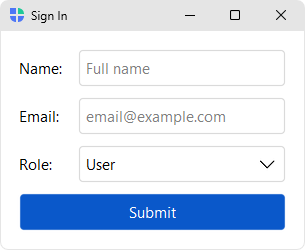
Column, Row, and Grid let you describe a layout once instead of repeating geometry calls on each child:
with bs.App(title="Sign In") as app:
    with bs.Grid(columns=["auto", 1], gap=(12, 6), horizontal_items="stretch", padding=16):
        bs.Label("Name:")
        bs.TextField(placeholder="Full name")
        bs.Label("Email:")
        bs.TextField(placeholder="email@example.com")
        bs.Label("Role:")
        bs.Select(options=["Admin", "User", "Viewer"], value="User")
        bs.Button("Submit", accent="primary", columnspan=2)

app.run()
Semantic styling
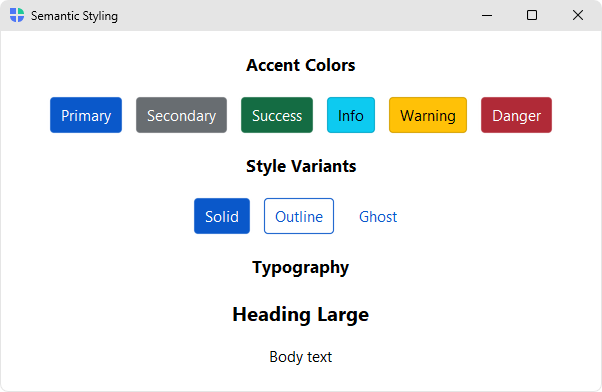
Widgets take an accent (color intent) and variant (visual weight) instead of hard-coded colors, so the same code looks right across themes and light/dark modes:
bs.Button("Save", accent="primary")
bs.Button("Cancel", accent="secondary", variant="outline")
bs.Label("Heading", font="heading-lg")
Signals (optional)
Plain callbacks work fine for most things. When state needs to flow between widgets, signals give you a small reactive primitive with two-way binding:
with bs.App(title="Hello") as app:
    name = bs.Signal("World")
    bs.Label(textsignal=name)      # updates automatically when name changes
    bs.TextField(textsignal=name)  # two-way binding to the same state

app.run()
Features
- Application scaffolding —
Appfor blank windows,AppShellfor toolbar + sidebar + page-stack apps,Workbenchfor two-tier workspace apps,Splashfor a startup intro screen, undecorated windows with custom chrome - 60+ themed widgets — primitives plus higher-level composites (DataTable, Tree, ListView, Calendar, DateField, Form, Gauge, ToggleGroup, PageStack, Carousel, Tooltip, and more)
- Dialogs and messages —
alert()/confirm()/ask_*()prompts andFormDialog/FontDialog/FilterDialog, plus non-blockingtoast(),Notification, andSnackbarsurfaces - Layout containers —
Column,Row,Grid, andSpacerfor declarative layouts;Card,GroupBox,ScrollView,SplitView,Accordion,Divider - Design system — semantic
accentcolors (primary, secondary, success, danger, warning, info) andvarianttokens (solid, outline, ghost), consistent across widgets - Built-in themes — 10 paired light/dark variants (bootstrap, catppuccin, dracula, everforest, gruvbox, nord, one, pydata, solarized, tokyo-night) with runtime theme switching and a custom-theme API
- Reactive signals — observable state with subscribe/set, integrates with widgets via
signal=/textsignal= - Forms & validation —
Formwith built-in field-level validators and inline error messages - DataSource — common interface over in-memory, SQLite, and file backends, with pagination, filtering, sorting, CRUD, and CSV/TSV/Excel export
- Data visualization —
Chartembedsmatplotlib/seabornfigures that theme themselves and live-update from aSignalorDataSource; managed render, blitting animation, and a themed navigation toolbar (optionalviz/viz-seabornextras) - Localization (i18n) — 23 bundled message catalogs, locale-aware number/date/time formatting via Babel, runtime language switching
- Icons & images — Bootstrap Icons catalog with theme-aware recoloring and caching
- Platform support — DPI awareness, multi-monitor centering, mica/acrylic effects on Windows
- CLI (
bootstack) — project scaffolding, run, add components, theme/i18n setup, doctor, build/package
Widget Categories
| Category | Widgets |
|---|---|
| Actions | Button, ButtonGroup, MenuButton, ContextMenu, Toolbar, ThemeToggle |
| Inputs | TextField, PasswordField, PathField, NumberField, SpinnerField, Slider, RangeSlider, TextArea, CodeEditor, DateField, TimeField |
| Selection | Checkbox, Switch, ToggleButton, Radio, RadioGroup, ToggleGroup, Select, SelectButton, Calendar |
| Data Display | Label, Badge, ListView, Tree, DataTable, ProgressBar, Gauge |
| Media | Avatar, Picture, Gallery, Carousel |
| Layout | Column, Row, Grid, Spacer, Card, GroupBox, SplitView, ScrollView, Accordion, Divider |
| Navigation | AppShell, Workbench, Window, Splash, StatusBar, Tabs, PageStack |
| Dialogs | alert(), confirm(), ask_*() prompts, FormDialog, FontDialog, FilterDialog |
| Overlays | toast(), Notification, Snackbar, Tooltip |
| Forms | Form, with field-level validation |
CLI
bootstack ships with an optional CLI for scaffolding, running, and packaging applications:
bootstack gallery                           # Launch the interactive widget gallery
bootstack icons                             # Browse the built-in icon catalog
bootstack appicon                           # Design an app icon and export it
bootstack start MyApp                       # Create a new project (basic template)
bootstack start MyApp --template appshell   # ...or with sidebar navigation
bootstack run                               # Run the app defined in the project config
bootstack dev app.py                        # Run with hot reload (live edit-and-save)
bootstack add page Dashboard                # Add a new page (appshell)
bootstack add view Settings                 # Add a new view (basic)
bootstack add dialog Preferences            # Add a new dialog
bootstack doctor                            # Diagnose project & environment
bootstack promote                           # Make the project packaging-ready
bootstack build                             # Package for distribution
Documentation
Full documentation — guides, the widget catalog, and the API reference — lives at bootstack.org.
Contributing
Contributions are welcome — code, bug reports, and especially translations. See CONTRIBUTING.md for development setup, the pull-request workflow, and how to review the bundled language catalogs.
Links
1 maintainer

Release files for bootstack 0.4.5
For a detailed explanation of source distributions (sdists) and built distributions (wheels), please see the package formats documentation.
Source distribution (sdist)
| File | Size | Uploaded | |
|---|---|---|---|
| bootstack-0.4.5.tar.gz | 1.3 MB | Details |
Built distribution (wheel)
| File | Interpreter | ABI | Platform | Reset |
|---|---|---|---|---|
| bootstack-0.4.5-py3-none-any.whl | Python 3 | none | any | Details |
Total release size: 2.9 MB
Release files / bootstack-0.4.5.tar.gz
| Download URL | bootstack-0.4.5.tar.gz |
|---|---|
| Size | 1.3 MB |
| Tags | Source |
|
SHA-256 checksum How to use checksums |
1425d6c1bfbdf5757f49afcdf0a8d714085d4d7f24a5607819677842c3448094
|
|
BLAKE2b-256 checksum How to use checksums |
7b7db0c56342cbe9f8b2a1c6e26f4a071213a5b872ff490b508befff0cdcf15b
|
| Upload date | |
|
Uploaded using Trusted Publishing? What is trusted publishing? |
Yes |
| Uploaded via |
twine/7.0.0 CPython/3.13.14
|
Provenance
Provenance describes where a file came from. On PyPI, provenance is shared via attestations, which provide a verifiable record of the build or publishing details. View details, limitations and caveats.


PyPI Publish Attestation
PyPI verified that this artifact, at this checksum, originated from the publisher listed below.
Signed by GitHub Actions, verified by PyPI on Sep 15, 2026.
Transparency logRelease files / bootstack-0.4.5-py3-none-any.whl
| Download URL | bootstack-0.4.5-py3-none-any.whl |
|---|---|
| Size | 1.6 MB |
| Tags | Python 3 |
|
SHA-256 checksum How to use checksums |
d9d951335eb36f74af5c7d68eb1588bfcfe90fc14b066f49a361bab32bf54499
|
|
BLAKE2b-256 checksum How to use checksums |
d7ee8c8ed4025d40acd05f519bd98a52907d6fdd0e91bb498df019551907c468
|
| Upload date | |
|
Uploaded using Trusted Publishing? What is trusted publishing? |
Yes |
| Uploaded via |
twine/7.0.0 CPython/3.13.14
|
Provenance
Provenance describes where a file came from. On PyPI, provenance is shared via attestations, which provide a verifiable record of the build or publishing details. View details, limitations and caveats.
PyPI Publish Attestation
PyPI verified that this artifact, at this checksum, originated from the publisher listed below.
Signed by GitHub Actions, verified by PyPI on Sep 15, 2026.
Transparency log













