
Borgitory











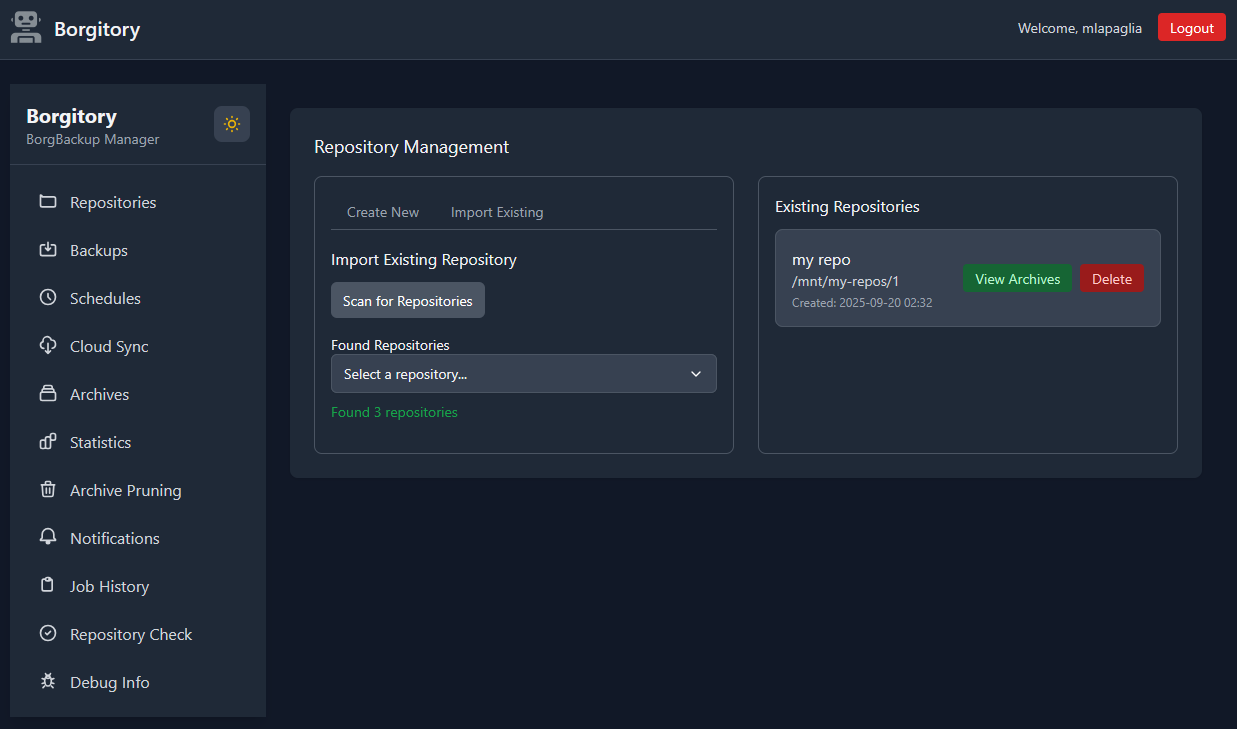
Borgitory is a comprehensive web-based management interface for BorgBackup repositories that provides real-time monitoring, automated scheduling, and cloud synchronization capabilities. It offers complete backup lifecycle management including on-demand backups, automated pruning policies, interactive archive browsing with file downloads, and cloud sync to S3-compatible storage via Rclone. The FastAPI powered system features a modern responsive web interface built with HTMX, and Tailwind CSS.
Quick Start
- full documentation is available at https://borgitory.com
Prerequisites
- Docker Installation (Recommended): Docker with Docker Compose for containerized deployment
- PyPI Installation: Python 3.14+ for direct installation from PyPI
Installation
Option 1: Docker Installation (Recommended)
-
Pull and run the Docker image
# Using Docker directly
docker run -d \
  -p 8000:8000 \
  -v ./data:/app/data \
  -v /path/to/backup/sources:/backup/sources:ro \
  -v /path/to/borg/repos:/repos \
  --cap-add SYS_ADMIN \
  --device /dev/fuse \
  --name borgitory \
  mlapaglia/borgitory:latest
Or using Docker Compose (create a
docker-compose.yml):version: '3.8' services: borgitory: image: mlapaglia/borgitory:latest ports: - "8000:8000" volumes: - ./data:/app/data # database and encryption key location - /path/to/backup/sources:/sources:ro - /path/to/any/backup/repos:/repos:ro cap_add: - SYS_ADMIN # optional, needed to mount borg archives and browse them devices: - /dev/fuse # borg uses FUSE to mount archives restart: unless-stopped
docker-compose up -d
-
Access the web interface
- Open http://localhost:8000 in your browser
- Create your first admin account on initial setup
Option 2: PyPI Installation
Install Borgitory directly from PyPI:
# Install stable release from PyPI
pip install borgitory

# Start the server
borgitory serve

# Or run with custom settings
borgitory serve --host 0.0.0.0 --port 8000
PyPI Installation Requirements:
- Python 3.14 or higher
- BorgBackup installed and available in PATH
- Rclone (optional, for cloud sync features)
- FUSE (optional, for browsing archives)
Windows Requirements:
- WSL2 (Windows Subsystem for Linux) must be installed and configured
- Inside WSL2, you need:
- BorgBackup installed (
sudo apt install borgbackupor similar) - Python 3.14+ installed
- Rclone installed (optional, for cloud sync features)
- BorgBackup installed (
- BorgBackup does not have a native Windows executable, so WSL2 is required for all backup operations
Remote Repositories (SSH)
Borgitory can back up directly to a repository on a remote borg server, such as BorgBase, a Hetzner Storage Box, or another machine running borg. This keeps an off-site copy that is a separate borg repository rather than an rclone mirror of a local one, so corruption of the local repository does not spread to it. This is not full ransomware protection on its own: a backup that runs after files are encrypted stores the encrypted files, and prune can remove older clean archives. Use append-only mode (below) and a retention policy that keeps older archives.
Remote repositories need an SSH client (ssh) on the machine running borg. The Docker image includes one; for PyPI installs, install it alongside borg (for example sudo apt install openssh-client).
When creating or importing a repository, enter an ssh:// URL as the path:
- BorgBase:
ssh://abcd1234@abcd1234.repo.borgbase.com/./repo - Hetzner Storage Box:
ssh://u123456@u123456.your-storagebox.de:23/./backups/repo(set Remote Borg Path toborg-1.4) - Your own server:
ssh://borg@nas.example.com/./borg/repo(/./means relative to the user's home directory)
Paste the SSH private key into the form and add its public key to the server's authorized_keys. The key is stored encrypted in the database. The server's host key is trusted on first connection and saved in <data dir>/ssh/known_hosts. If the host key later changes deliberately, remove the old entry with ssh-keygen -R host -f <data dir>/ssh/known_hosts for port 22, or ssh-keygen -R "[host]:port" -f <data dir>/ssh/known_hosts for any other port.
For backups that can't be deleted from the client, restrict the key on the server to append-only mode in authorized_keys, for example command="borg serve --append-only --restrict-to-path /home/borg/repo",restrict ssh-ed25519 AAAA.... Borgitory can't enforce this itself, and in append-only mode prune and compact won't free space on the server.
Cloud sync only applies to local repositories and is skipped for remote ones.
1 maintainer

Metadata
1 maintainer
Release files for borgitory 3.1.0
For a detailed explanation of source distributions (sdists) and built distributions (wheels), please see the package formats documentation.
Source distribution (sdist)
| File | Size | Uploaded | Provenance | Actions |
|---|---|---|---|---|
| borgitory-3.1.0.tar.gz | 1.0 MB | With provenance | Details for borgitory-3.1.0.tar.gz |
Built distribution (wheel)
| File | Interpreter | ABI | Platform | Actions Reset |
|---|---|---|---|---|
| borgitory-3.1.0-py3-none-any.whl | Python 3 | none | any | Details for borgitory-3.1.0-py3-none-any.whl |
Total release size: 2.0 MB
Release files / borgitory-3.1.0.tar.gz
| Download URL | borgitory-3.1.0.tar.gz |
|---|---|
| Size | 1.0 MB |
| Tags | Source |
|
SHA-256 checksum How to use checksums |
bec085e3cd7bd0f7c4ff16754123bb76f0a56875e729a64f42fa3ca2478a42b8
|
|
BLAKE2b-256 checksum How to use checksums |
bba0bb0868548395aa70bf090a367f0efb5cf5515d1af5352e80dacf83d5f86f
|
| Upload date | |
|
Uploaded using Trusted Publishing? What is trusted publishing? |
Yes |
| Uploaded via |
twine/7.0.0 CPython/3.13.16
|
Provenance
Provenance describes where a file came from. On PyPI, provenance is shared via attestations, which provide a verifiable record of the build or publishing details. View details, limitations and caveats.


PyPI Publish Attestation
PyPI verified that this artifact, at this checksum, originated from the publisher listed below.
Signed by GitHub Actions, verified by PyPI on Nov 15, 2026.
Transparency logRelease files / borgitory-3.1.0-py3-none-any.whl
| Download URL | borgitory-3.1.0-py3-none-any.whl |
|---|---|
| Size | 938.1 kB |
| Tags | Python 3 |
|
SHA-256 checksum How to use checksums |
647d2ce8c878593e1c4df9ccf8240da29ee5b8c9265d836dc74ba46e39ed4850
|
|
BLAKE2b-256 checksum How to use checksums |
2cb102017a58b31e85daff0df26469b88e05f2e90e45623c622997189de0aac3
|
| Upload date | |
|
Uploaded using Trusted Publishing? What is trusted publishing? |
Yes |
| Uploaded via |
twine/7.0.0 CPython/3.13.16
|
Provenance
Provenance describes where a file came from. On PyPI, provenance is shared via attestations, which provide a verifiable record of the build or publishing details. View details, limitations and caveats.
PyPI Publish Attestation
PyPI verified that this artifact, at this checksum, originated from the publisher listed below.
Signed by GitHub Actions, verified by PyPI on Nov 15, 2026.
Transparency logSecurity for borgitory 3.1.0
Provenance
Provenance describes where a file came from. On PyPI, provenance is shared via attestations, which provide a verifiable record of the build or publishing details. View details, limitations and caveats.
Full provenance
Both files in this release have been uploaded with provenance metadata.
Attestation for borgitory-3.1.0.tar.gz
PyPI Publish Attestation
PyPI verified that this artifact, at this checksum, originated from the publisher listed below.
Signed by GitHub Actions, verified by PyPI on Nov 15, 2026.
Transparency logA note on package security
PyPI is a repository for distributing packages, not a service for auditing them. While third-party security researchers and our staff do their best to detect and remove malicious packages, PyPI cannot guarantee the quality, security or suitability of any given package.
To learn more about protecting yourself from malicious actors, visit our package security documentation.














