

Brain Framework 🧠
🧠 Brain Framework: from information to informed actions.
Collect information from your tools, connect it to your decisions and pick up work with the evidence at hand. Reusable context for you and your AI agents.


Your meeting notes, issues and project decisions live in different places. Brain Framework (BF) brings selected information into a folder of Markdown notes and collected records you own. Search it across sessions, trace decisions to their sources and use the same context with different agents.
Try it · Connect an agent · Four-tool demo · Documentation
What can you do with it?
| When you need to… | BF helps you… |
|---|---|
| Resume a project | Find the last verified outcome and next step. |
| Explain a decision | Read the original reasoning and linked evidence. |
| Check work across tools | Follow explicit connections between briefs, issues and deployments. |
| Notice what changed | See which conclusions newer evidence has overtaken. |
In the runnable four-tool demo, GitHub says the implementation is merged and Gcloud shows a healthy preview, but Jira still blocks launch on accessibility review. You record that conclusion in the project; when Jira later moves to Done, BF flags the project for review. The records are fictional and everything runs locally. The examples also cover decision reviews, retrieval checks, hooks, routines, monitoring and teams.
Try it
Start with one decision you can find again. You need Linux or macOS and uv, which installs the tested Python 3.14 if needed (install details). No model or provider account is required.
uv tool install --python 3.14 brain-framework
bf --version
If your shell cannot find bf, run uv tool update-shell and open a new shell. Then create your brain:
bf init ~/brain
cd ~/brain
Create projects/new-website.md in your editor, or ask your agent to save this fictional decision. Use today's date for updated:
---
type: project
status: draft
updated: 2026-09-27
summary: Launch a product website that helps visitors understand the product.
---

# New website

## Decision

Start with a single product page because visitors need a clear explanation before signing up.

## Next actions

- [ ] Draft the product page.
Find the reason, read its source and check the brain:
bf search "visitors clear explanation"
bf read projects/new-website.md#decision
bf validate
Search returns this match in items (other fields omitted):
{ "ref": "projects/new-website.md#decision", "title": "New website — Decision" }
read returns the original Decision section, and validation reports "valid":true. Edit the note and search again: BF notices changes on its own. The getting-started guide continues with a first collected source and a link from the decision to its evidence.
Agents
Use the same brain with Claude Code, Codex, GitHub Copilot or another agent host. Give your terminal agent this prompt:
Work in ~/brain and use the bf CLI. Find why we chose a single product page. Read the source, cite its ref and tell me the project's next action.
Check that it cites projects/new-website.md#decision and names “Draft the product page.” as the next task. For ongoing use, install the packaged skills into your host's skills folder:
bf skills ~/.agents/skills
Each host reads its own folder: for Claude Code, use ~/.claude/skills instead.
bf-use finds evidence and keeps notes and actions current, bf-setup onboards brains and sources, and bf-maintain runs integrations and checks. Hosts that prefer tools can call search and read through MCP. See the agent guide.
How it works
Gather → normalize → organize and connect → act → learn. Sensors, small programs you review, collect selected evidence; field mappings give records from different tools the same field names and explicit relations. You and your agents do the work, then keep the outcome and next step in the brain.
brain/
├── bf.yaml      # configuration: fields, sensors and routines
├── AGENTS.md    # instructions for agents working in the brain
├── projects/    # what you're working on and why
├── concepts/    # what you've learned and can reuse
├── actions/     # work sessions to start, resume and review
├── evals/       # questions the brain must keep answering
├── memories/    # records collected by your sensors
└── logs/        # each program's recent output, ignored by Git
Notes are Markdown with structured metadata; each record is a JSON file. Open them in any editor and use Git for history; the search cache is disposable. Links and backlinks connect decisions to evidence. Every connection is explicit: BF never links two subjects because their names look alike. See the file conventions and team brains.
Bring your tools
A sensor is a small program that reads a CLI, API or file and prints JSON records; BF validates, maps and saves them. Start with a reviewed example or write one for another source:
| Source | Starting point |
|---|---|
| Local files, highlights and Git | Document, highlight and Git history sensors. |
| Google Calendar and Drive | Calendar and Drive folder sensors using gws. |
| GitHub, Jira, Confluence and Google Cloud | The GitHub history sensor, or your own using acli, gcloud or their APIs. |
Start with one local source, then connect sources through field mappings. Provider tools handle authentication; your program selects what to collect. For example, collect Calendar notes and ask your agent to draft GitHub issues from them for your review.
After reviewing your sensors, run bf watch to keep them refreshed and see failures as they happen. Routines run your own programs, such as a weekly review or a Git pre-commit validation. See Watch and schedule updates for timing, alerts and native schedules.
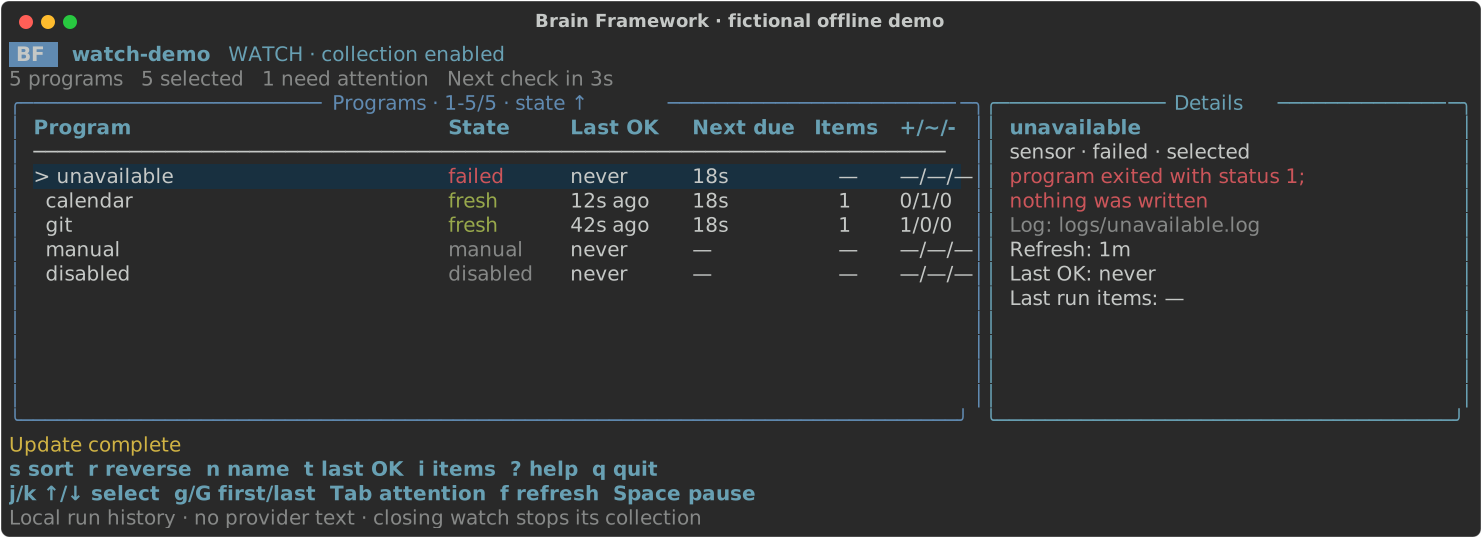
The dashboard shows the fictional offline watch demo, which needs no provider account.
Fit and limits
BF fits projects where decisions and evidence must outlive a chat session. Start with one recurring question and the sources that answer it.
- Your files, your control. BF sends no telemetry or personal data to us. A connected cloud agent may send what it reads to its provider; see privacy and security.
- Offline retrieval. Search and read never contact providers or run programs. Collect again when you need newer evidence; incomplete results say so.
- People and agents supply the judgment. BF matches words and explicit identities, runs no model and learns nothing on its own. See what BF does not do.
Browse the commands · Report an issue · Contribute · MIT licensed · Third-party notices
1 maintainer

Metadata
1 maintainer
Release files for brain-framework 17.0.0
For a detailed explanation of source distributions (sdists) and built distributions (wheels), please see the package formats documentation.
Source distribution (sdist)
| File | Size | Uploaded | |
|---|---|---|---|
| brain_framework-17.0.0.tar.gz | 210.1 kB | Details |
Built distribution (wheel)
| File | Interpreter | ABI | Platform | Reset |
|---|---|---|---|---|
| brain_framework-17.0.0-py3-none-any.whl | Python 3 | none | any | Details |
Total release size: 457.0 kB
Release files / brain_framework-17.0.0.tar.gz
| Download URL | brain_framework-17.0.0.tar.gz |
|---|---|
| Size | 210.1 kB |
| Tags | Source |
|
SHA-256 checksum How to use checksums |
cfc95efba3058d5bdb9ec40a11218b781050292af92e4b248a7093dfd8d659dd
|
|
BLAKE2b-256 checksum How to use checksums |
e23ca196f23c75f89c340cc131c368d07fc69ee6bdc2b9c2d5e8ee983c947d72
|
| Upload date | |
|
Uploaded using Trusted Publishing? What is trusted publishing? |
Yes |
| Uploaded via |
twine/7.0.0 CPython/3.13.14
|
Provenance
Provenance describes where a file came from. On PyPI, provenance is shared via attestations, which provide a verifiable record of the build or publishing details. View details, limitations and caveats.


PyPI Publish Attestation
PyPI verified that this artifact, at this checksum, originated from the publisher listed below.
Signed by GitHub Actions, verified by PyPI on Oct 2, 2026.
Transparency logRelease files / brain_framework-17.0.0-py3-none-any.whl
| Download URL | brain_framework-17.0.0-py3-none-any.whl |
|---|---|
| Size | 246.9 kB |
| Tags | Python 3 |
|
SHA-256 checksum How to use checksums |
748f91d4fe539c442945b9194df150a1f0798e8fe7376ff4c1f2a7d36c6d17e5
|
|
BLAKE2b-256 checksum How to use checksums |
127873743d1c1b0bc6eb3cf816cab580d47aedeb76c3d23ea9fa75d776d1fdad
|
| Upload date | |
|
Uploaded using Trusted Publishing? What is trusted publishing? |
Yes |
| Uploaded via |
twine/7.0.0 CPython/3.13.14
|
Provenance
Provenance describes where a file came from. On PyPI, provenance is shared via attestations, which provide a verifiable record of the build or publishing details. View details, limitations and caveats.
PyPI Publish Attestation
PyPI verified that this artifact, at this checksum, originated from the publisher listed below.
Signed by GitHub Actions, verified by PyPI on Oct 2, 2026.
Transparency log













