

Brain Framework 🧠
🧠 Brain Framework: from information to informed actions.
A second brain for you, your team and your AI agents, on your own computer. Gather what matters from every tool you work with, connect it into one knowledge graph and open your agent there, so it acts with everything you know instead of starting from scratch.


Why · How it works · Try it · Agents · Good to know · Four-tool demo · Documentation
Stop starting from scratch
Open an agent anywhere on your computer and it knows nothing: not your projects, not what you decided last week, not what changed overnight in the tools you rely on. It asks you to paste context, queries the same APIs again and forgets its conclusion when the session ends. Everyone starts from zero, every time.
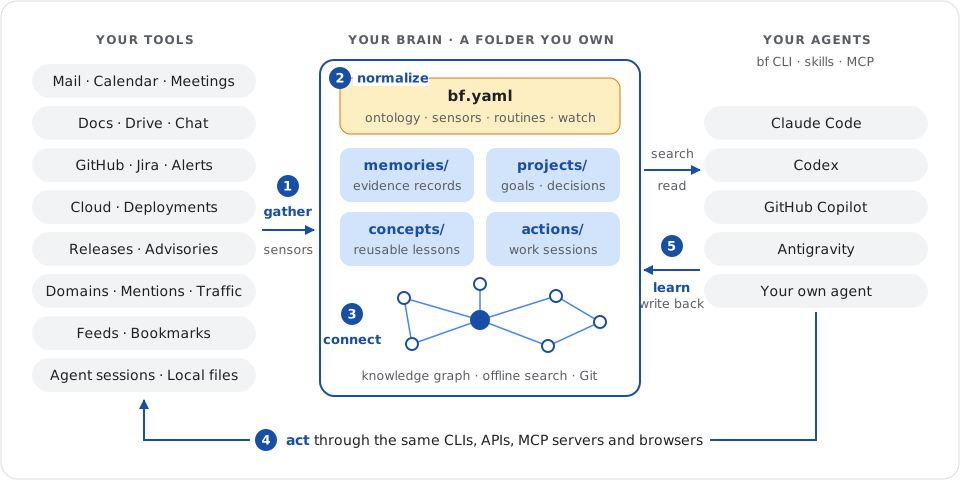
Brain Framework (BF) changes the starting point. Create a brain, a plain folder, and let small programs called sensors fill it with evidence from your tools. Open your agent there: it searches your projects, decisions and collected records, cites where each fact comes from, acts through the tools you already use and writes the outcome and next step back for the next session.
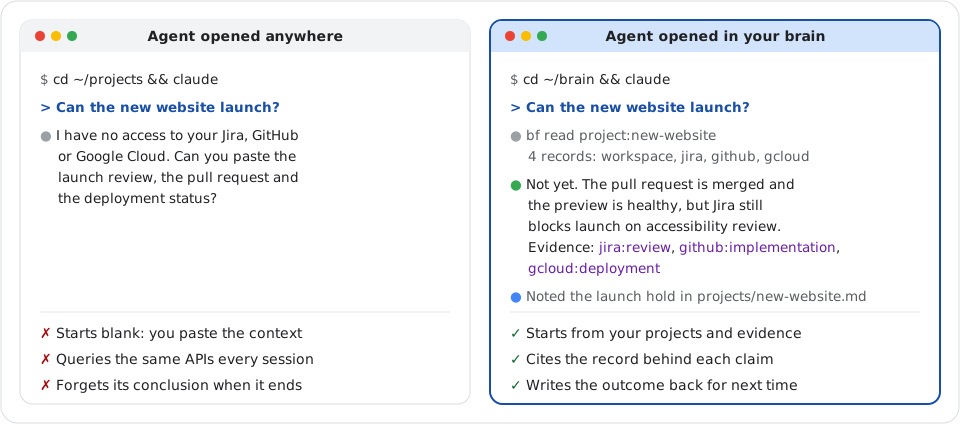
Questions that once took a tour of your tools become one prompt, once you write or adapt a sensor for each source:
| Ask your agent | Gathered from |
|---|---|
| “Can the new website launch?” | The brief in Google Drive, the review in Jira, the pull request in GitHub and the deployment in Google Cloud, all linked to the project note. |
| “Prepare my two o'clock meeting.” | The Google Calendar event, the last Google Meet notes, the attendees' recent Gmail and Slack threads and the projects they own. |
| “Where did we leave the migration?” | The last action's next step, the Notion spec and the latest GitHub commits. |
| “What did the team decide on pricing?” | Google Meet notes, Slack threads and Confluence pages in the team brain, and the decision recorded in the project note. |
| “Which decisions need another look?” | Projects whose linked Jira issues, GitHub pull requests or Drive documents changed since their last update. |
| “What changed in my stack this week?” | Release notes from RSS feeds, GitHub and OSV security advisories, Dependabot alerts and the model deprecation pages of your providers. |
| “Who is talking about my project?” | Mentions on GitHub, Hacker News and Bluesky, beside GitHub traffic and Google Search Console. |
Why a second brain?
- Every source, even the ones no product connects. Mail, calendar, documents, chat, issues and pull requests, of course. But also the release notes and security advisories of the tools you depend on, model retirement dates, provider incidents, mentions of your projects on Hacker News or Bluesky, your domains' certificates and mail security, repository traffic that GitHub forgets after 14 days and your past agent sessions. If you can script it, you can collect it.
- Unlimited integrations, both ways. A sensor is a small program that prints JSON: wrap a CLI such as
gh,gwsorgcloud, call an API, drive a browser, query a database or parse an export. The same CLIs, APIs and MCP servers then let your agent act on what it learned: draft the issue, answer the thread, fix the alert. - One vocabulary, one knowledge graph. Each tool names things its own way. You declare a small ontology in
bf.yamland sensors map provider fields into it at collection, so the same project, person or repository connects across every tool. BF turns those explicit links into a graph you navigate in one read, each claim pointing back to its evidence. - Private by design. Your brain is a folder on your disk. BF has no account, server or telemetry and never runs a model itself: prompts launch your agent harness. Search and read work offline.
- Portable and versioned. Markdown notes, JSON records and scripts: open them in any editor, grep them, copy them to another machine. Keep the brain in a private Git repository for history, rollback, review and conflict resolution.
- For you or your whole team. A personal brain stays on your laptop. A team brain is a private Git repository with one clone per teammate, so decisions, reviewed evidence and next steps are shared by everyone and their agents. Your personal brain can include the team's in its searches.
- Any agent, guided by skills. Claude Code, Codex, GitHub Copilot, Antigravity or your own agent reach the same brain through the
bfcommand, packaged skills or MCP. The skills teach them to find evidence, keep notes current, connect sources and maintain the brain.
Hosted personal agents run on someone else's computer, connect the sources their vendor chose and keep your context on their servers. You already have a computer, with your files, your credentials and every tool you can script. Keep the data, the code and the control.
This project has been a game changer for me, and I hope it will be for you. — Médéric Hurier (Fmind), author of Brain Framework
What one brain can gather
The author's own brain runs more than 50 sensors and holds over 60,000 records (counted on 2026-10-04):
| Area | Collected evidence |
|---|---|
| Work | Mail, calendar events and meeting notes, Drive documents, chat, tasks, contacts and form responses. |
| Code | Commits, issues, pull requests, reviews, notifications, Dependabot and security alerts. |
| Agents | Claude Code, Codex, Copilot and other agent sessions and memories, so a past conclusion is one search away. |
| Your stack | Release notes, security bulletins and advisories of the tools you use, model retirements and provider outages. |
| Your presence | Mentions on GitHub, Hacker News and Bluesky; domain expiry, mail security and certificate transparency; site and repository traffic. |
| Reading | RSS feeds, newsletters, bookmarks, highlights and Hacker News. |
These are personal sensors, not bundled connectors. The repository ships reviewed starting points, and the bf-setup skill helps your agent connect a new source.
How it works
A brain gives your work the structure of a detective's case file, in plain files: evidence bags labeled with where and when each item was collected, case notes with the current theory and next step, and a board with string from each conclusion to its evidence. Five steps run in a loop: gather → normalize → organize and connect → act → learn.
A folder for each kind of knowledge
| Folder | Holds | Example |
|---|---|---|
memories/ |
One JSON file per collected item: what a source said, its URL and its time. | The Jira launch review, as collected on Tuesday. |
sensors/ |
Programs you review that print JSON records from a tool. | A script that lists the Jira issues of your projects. |
projects/ |
One Markdown note per project: goal, current state, decisions and tasks. | “Start with a single product page because visitors need…” |
concepts/ |
Knowledge you will reuse elsewhere, with its evidence and limits. | “Explain the product before asking for signup.” |
actions/ |
One work session: objective, inputs, outputs, outcome and next step. | actions/2026-09-27_website-review/ACTION.md, resumed the next day. |
routines/ |
Deterministic programs you review, run on demand, on a schedule or from Git. | A weekly review that drafts an action listing projects to revisit. |
prompts/ |
Markdown prompts your agent harness runs on a schedule or on demand. | An assistant that reviews new mail and chat every half hour. |
evals/ |
Saved questions with the evidence that search or read must return. | “Why one page?” must return the project's Decision section. |
Notes are Markdown with YAML metadata, records are JSON, and bf validate checks both. The SQLite search cache in .bf/ is disposable and rebuilds itself from the files. See the file conventions.
bf.yaml, the coordination hub
One file declares what the brain knows how to name, collect and check:
# https://fmind.github.io/brain-framework/docs/configuration/
version: 7
name: brain
fields: # the ontology: shared fields and typed relations
  project: { type: identity, cardinality: one, relation: true, description: Project the source names. }
  kind: { type: string, cardinality: one, description: Common kind of item. }
  status: { type: string, cardinality: one, description: The item's state in its own tool. }
sensors: # what to collect, how often, mapped into the ontology
  jira:
    command: [sensors/jira.py]
    mode: snapshot
    refresh: 3600
    fields:
      project: { path: /attributes/workstream }
      kind: { value: issue }
      status: { path: /attributes/status }
routines: # deterministic reviews and checks
  weekly-review:
    command: [routines/weekly-review.py, "{{brain}}", "{{end}}"]
    refresh: 604800
    output: action
watch: # keep sources fresh and alert on failure
  interval: 300
  notifications: failure
BF runs each program with its configured arguments and no shell, bounds its time and output, validates what it prints and keeps its stderr in logs/. A failed run never changes your evidence. bf watch keeps due sensors, routines and prompts fresh in a terminal dashboard, and bf schedule generates native systemd, launchd or cron jobs for you to install. See sensors, routines and watch and schedule.
One vocabulary, set at collection
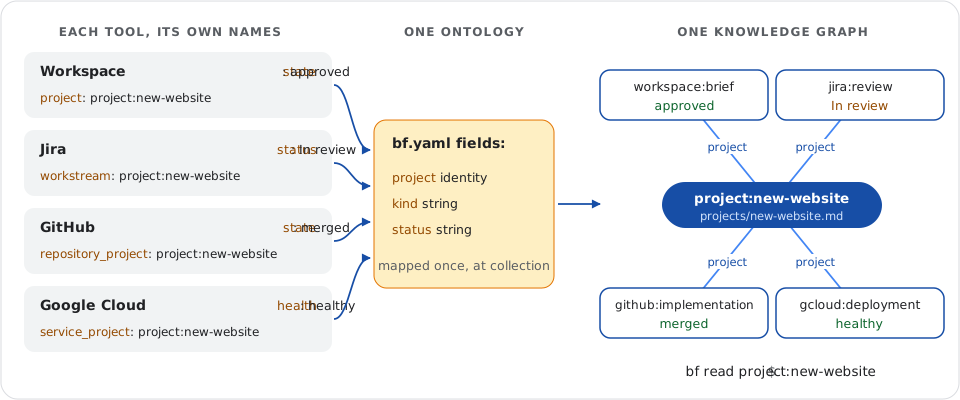
Jira calls the project workstream, GitHub repository_project and Google Cloud service_project. Their states read In review, merged and healthy. Left as is, every reader (you, a script or an agent) translates each tool on every question. BF translates once, at the door: each sensor maps its provider's fields into the shared fields: of bf.yaml, and BF validates every value before saving the record.
Because project is a relation, records from all four tools point to the same identity, project:new-website, which the project note declares as an alias. People and repositories work the same way: map a mail sender, a calendar attendee and a commit author to identities such as person:email/alice@example.test, declare them on Alice's note, and one read lists what she sent, attended and wrote. Mappings are explicit: BF never decides that two similar names are the same subject. See shared fields and sensor mappings.
A knowledge graph across sources
Reading files gives you one document at a time, and grep finds words, not connections: it cannot say which deployment belongs to which project or what blocks a decision. BF indexes every explicit connection (Markdown links between notes, declared identities and aliases, relation fields on records) into a knowledge graph, so one read assembles a subject from every source:
bf read project:new-website
The reply holds the project note and its backlinks, grouped by relation: four records from four tools, side by side, in the shared vocabulary (trimmed here to refs, kinds and statuses):
{
  "relation": "project",
  "total": 4,
  "items": [
    { "ref": "gcloud:deployment", "fields": { "kind": "deployment", "status": "healthy" } },
    { "ref": "github:implementation", "fields": { "kind": "pull-request", "status": "merged" } },
    { "ref": "jira:review", "fields": { "kind": "issue", "status": "In review" } },
    { "ref": "workspace:brief", "fields": { "kind": "brief", "status": "approved" } }
  ]
}
From there, follow typed relations such as author, owner, depends-on or your own. Each claim keeps the note section or record that asserted it, so an answer can always cite its evidence. bf export prints the whole graph as JSON Lines for DuckDB or networkx.
Act, then learn
Retrieval assembles the context; people and agents do the work, through the CLIs, APIs and MCP servers they already use. An action keeps each session's objective, inputs, outputs and next step, so the next session, yours or an agent's, resumes instead of starting over.
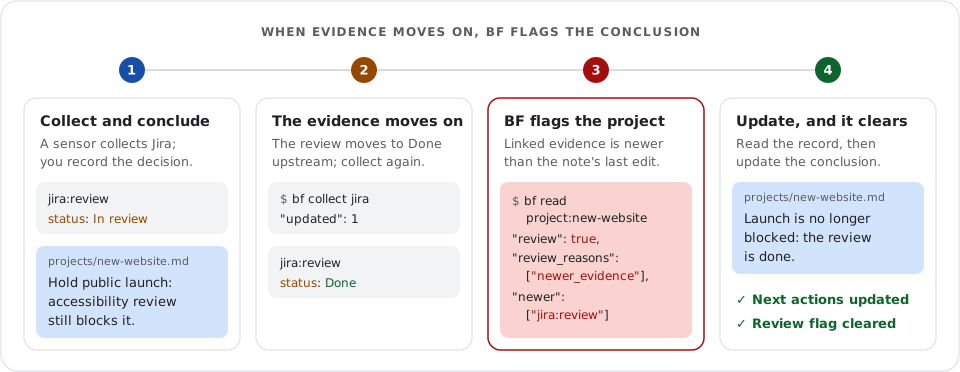
The graph keeps conclusions current. Each project knows the evidence it links to: when a linked record changes after the note's last edit, bf read flags the project for review and names the record to read first, so a decision does not silently outlive its linked evidence. Try it in the four-tool demo. Routines run deterministic reviews and checks, such as a weekly review action or bf validate before each Git commit, and retrieval cases in evals/ confirm that the questions you rely on still find their evidence as the brain grows.
Try it
Start with one decision you can find again. You need Linux or macOS and uv, which installs the tested Python 3.14 if needed (install details). No model or provider account is required.
uv tool install --python 3.14 brain-framework
bf --version
If your shell cannot find bf, run uv tool update-shell and open a new shell. Then create your brain:
bf init ~/brain
cd ~/brain
Create projects/new-website.md in your editor, or ask your agent to save this fictional decision. Use today's date for updated:
---
type: project
status: draft
updated: 2026-09-27
summary: Launch a product website that helps visitors understand the product.
---

# New website

## Decision

Start with a single product page because visitors need a clear explanation before signing up.

## Next actions

- [ ] Draft the product page.
Find the reason, read its source and check the brain:
bf search "visitors clear explanation"
bf read projects/new-website.md#decision
bf validate
Search returns this match in items (other fields omitted):
{ "ref": "projects/new-website.md#decision", "title": "New website — Decision" }
read returns the original Decision section with its note's status and date, and validation reports "valid":true. Edit the note and search again: BF notices changes on its own. The getting-started guide continues with a first collected source and a link from the decision to its evidence, and the four-tool demo runs the whole loop offline on fictional Workspace, Jira, GitHub and Gcloud records.
Open your agent in your brain
Use the same brain with Claude Code, Codex, GitHub Copilot or any agent host that can run a command. Start your terminal agent in ~/brain and give it this prompt:
Use the bf CLI. Find why we chose a single product page. Read the source, cite its ref and tell me the project's next action.
Check that it cites projects/new-website.md#decision and names “Draft the product page.” as the next task. For ongoing use, install the packaged skills into your host's skills folder:
bf skills ~/.agents/skills
Each host reads its own folder: for Claude Code, use ~/.claude/skills instead. Claude Code 2.1.277+ loads the brain's AGENTS.md when no CLAUDE.md sits in the brain or a folder above it, so do not add one; the agent guide gives the fallback for older versions.
| Skill | Teaches your agent to… |
|---|---|
bf-use |
Find evidence, cite it, and keep projects and concepts current. |
bf-action |
Start, resume and hand off a tracked work session: /bf-action website-review. |
bf-setup |
Install BF, create a brain, connect the agent and choose sources worth adding. |
bf-maintain |
Run sensors, routines and prompts, check the brain and upgrade it safely. |
Working in a code repository instead? The example session hook prints the project that declares the repository, its next task and linked evidence when the session starts. During collection, a usable cached reply carries an “Index refreshing” note. Hosts that prefer tools can call search and read through MCP. See the agent guide.
Agents can read this documentation as Markdown: llms.txt indexes every guide with a summary, llms-full.txt holds their full text, and each guide's Markdown sits at its URL followed by index.md.
Bring your tools
Start with a reviewed sensor, copy it into your brain's sensors/ and adapt it, or write one for another source:
| Source | Starting point |
|---|---|
| Local files, highlights and Git | Document, highlight and Git history sensors. |
| Google Calendar, Gmail and Drive | Calendar, Gmail headers and Drive folder sensors using gws. |
| GitHub, Jira, Confluence and Google Cloud | The GitHub history sensor, or your own using acli, gcloud or their APIs. |
| Anything you can script | An API, a database query, a browser session or an export: any source you can script becomes a sensor. |
Start with one local source, then connect sources through field mappings. Provider tools handle authentication; your program selects what to collect. Nothing is a black box: sensors, routines, hooks, the ontology and the agent instructions are files in your brain. Read them, edit them or ask your agent to adapt one, such as “keep only meetings with notes in the calendar sensor”, and review the change in Git. For example, collect Calendar notes and ask your agent to draft GitHub issues from them for your review.
After reviewing your sensors, run bf watch to keep them refreshed and see failures as they happen:
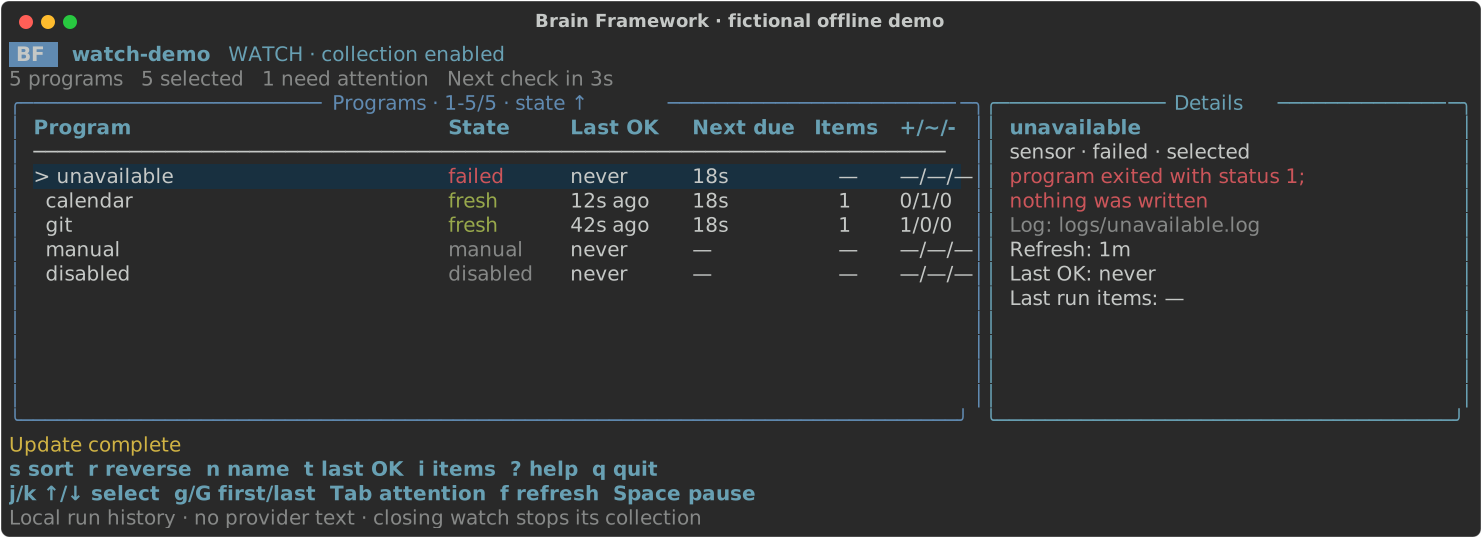
The dashboard shows the fictional offline watch demo, which needs no provider account.
Share it with Git
A brain is a folder, so Git gives it history, rollback, review and conflict resolution. By default, bf init keeps collected records, logs and the search cache out of Git: commit your curated notes and programs, then share selected sources when an audience may read them. Push a personal brain to a private repository to sync your machines, or give a team its own private brain repository with one clone per teammate and a collecting laptop per source. Personal and team knowledge stay in separate brains, and a personal brain can include the team's in its searches. See team setup and the two-contributor example.
Good to know
- It runs on your computer, not in someone else's cloud. That is a feature: your agent works where you can watch it, interrupt it and inspect every file it reads or writes, instead of a black box on a remote server. Sensors collect while your machine is on, through
bf watchor a native schedule. - It takes some setup. Each source needs its access: an API key,
gh auth login,gwsorgcloudauthentication, then a sensor you review. Providers ship better CLIs and MCP servers every month, so this keeps getting easier, and thebf-setupskill walks your agent through it. - It needs an agent harness for the reasoning. BF never runs a model itself: it collects, validates, searches and connects, and its prompts launch your harness. Claude Code, Codex, Copilot, Antigravity or another harness does the thinking, so the privacy of what your agent reads depends on that harness's data terms. BF sends no telemetry or personal data to us; see privacy and security for a fully local setup.
- It finds what was said and linked, not what was meant. Search matches words and explicit identities, without embeddings, and incomplete results say so. Search and read never contact providers: collect again when you need newer evidence. See what BF does not do.
Browse the commands · Report an issue · Contribute · MIT licensed · Third-party notices
1 maintainer

Metadata
1 maintainer
Release files for brain-framework 18.4.0
For a detailed explanation of source distributions (sdists) and built distributions (wheels), please see the package formats documentation.
Source distribution (sdist)
| File | Size | Uploaded | |
|---|---|---|---|
| brain_framework-18.4.0.tar.gz | 267.7 kB | Details |
Built distribution (wheel)
| File | Interpreter | ABI | Platform | Reset |
|---|---|---|---|---|
| brain_framework-18.4.0-py3-none-any.whl | Python 3 | none | any | Details |
Total release size: 566.3 kB
Release files / brain_framework-18.4.0.tar.gz
| Download URL | brain_framework-18.4.0.tar.gz |
|---|---|
| Size | 267.7 kB |
| Tags | Source |
|
SHA-256 checksum How to use checksums |
bc60c7b742304dde6815fe56ce56483789ed69c5759fb813de85ed9191104ae8
|
|
BLAKE2b-256 checksum How to use checksums |
b596dc8c93e3a726ccb49f3c4555081c3eea9e8b14e127ed9926fabb0027aa9d
|
| Upload date | |
|
Uploaded using Trusted Publishing? What is trusted publishing? |
Yes |
| Uploaded via |
twine/7.0.0 CPython/3.13.14
|
Provenance
Provenance describes where a file came from. On PyPI, provenance is shared via attestations, which provide a verifiable record of the build or publishing details. View details, limitations and caveats.


PyPI Publish Attestation
PyPI verified that this artifact, at this checksum, originated from the publisher listed below.
Signed by GitHub Actions, verified by PyPI on Oct 13, 2026.
Transparency logRelease files / brain_framework-18.4.0-py3-none-any.whl
| Download URL | brain_framework-18.4.0-py3-none-any.whl |
|---|---|
| Size | 298.6 kB |
| Tags | Python 3 |
|
SHA-256 checksum How to use checksums |
c1777479c1367339ced36b9bbce04affade105adceabf0e1b85cffadf0e3ff0d
|
|
BLAKE2b-256 checksum How to use checksums |
4a9aa7ff8bad262bde45db381ff1ba89c4323104acbed7811be7f1006c81c1e6
|
| Upload date | |
|
Uploaded using Trusted Publishing? What is trusted publishing? |
Yes |
| Uploaded via |
twine/7.0.0 CPython/3.13.14
|
Provenance
Provenance describes where a file came from. On PyPI, provenance is shared via attestations, which provide a verifiable record of the build or publishing details. View details, limitations and caveats.
PyPI Publish Attestation
PyPI verified that this artifact, at this checksum, originated from the publisher listed below.
Signed by GitHub Actions, verified by PyPI on Oct 13, 2026.
Transparency log













