

brainkeeper




A standard for structured Markdown Second Brain vaults: a folder of .md files with YAML frontmatter, organized into six base PARA-style layers (extensible).
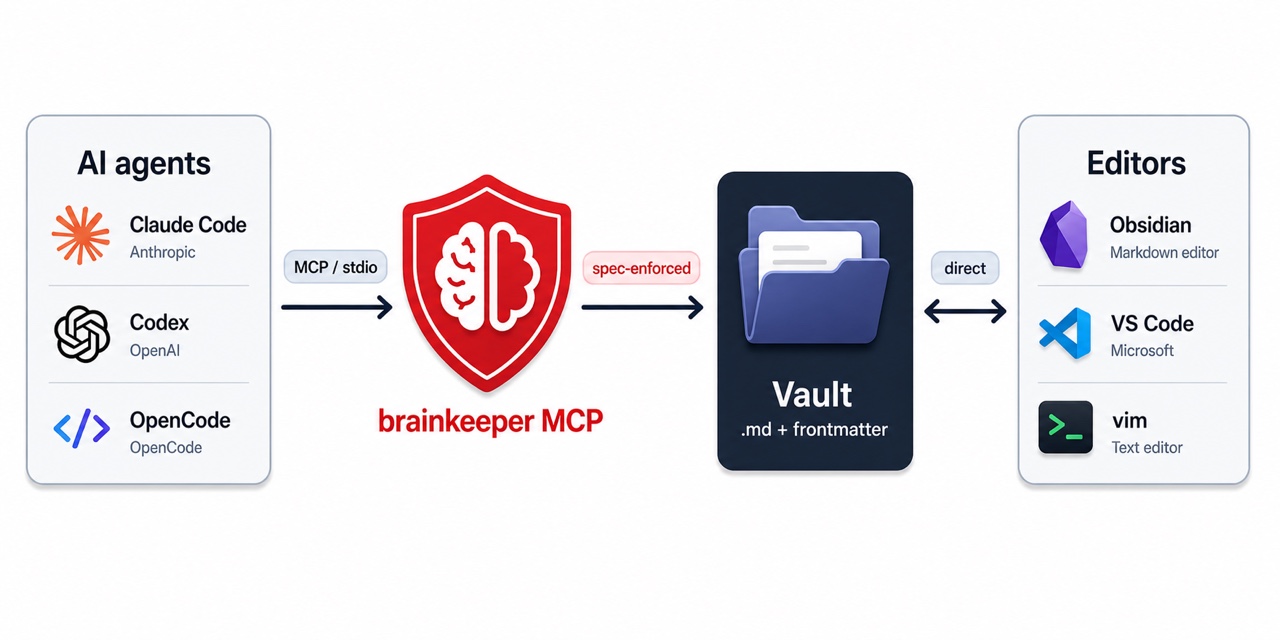
brainkeeper sits between AI agents and your notes. The Model Context Protocol (MCP) server enforces the vault spec on every read and write that agents make, while you keep editing files directly with Obsidian, VS Code, or any text editor.
Why an MCP layer?
The vault is just a folder of Markdown. You could skip brainkeeper entirely and point an agent at it with filesystem tools. That works for the first few notes. By the tenth, consistency starts to break: similar notes land in different folders, tags drift between forms (pkm vs topic/pkm), some files carry rich metadata and others have none, "deleted" notes keep their active status forever, and your edits race against the agent's. By the hundredth note, a second problem shows up: the agent has to scan the whole vault on every query, which gets slow and eats its context window with file paths and irrelevant content.
brainkeeper prevents both. Every read and write the agent does goes through the MCP, which validates writes against the spec and serves reads from a live in-memory index. Conventions hold no matter how the agent's session went last time, and lookups stay fast even as the vault grows past thousands of notes.
| Without brainkeeper | With brainkeeper |
|---|---|
| Each note has its own structure | Every note follows the same structure |
| The agent guesses which folder a note belongs to | Notes land in the right folder automatically |
| Timestamps drift or get forgotten | Dates set on creation, refreshed on edit |
| Deleting a note loses it | Deleted notes archive by year, with lifecycle preserved |
| Your edits and the agent's overwrite each other | The agent can't overwrite changes you just made |
| Searching the vault gets slower the more notes you have | Lookups stay fast at any vault size |
Telling an LLM "follow these conventions" works inconsistently across sessions and degrades over time. brainkeeper enforces them at the protocol boundary, so the conventions hold whether the agent remembers them or not. Humans (and editors like Obsidian or VS Code) keep writing to the vault directly; only the agent side gets mediated.
Quick start
1. Install
The recommended way to run brainkeeper is with uvx, which fetches and executes the package on demand without polluting your environment:
# No install needed; uvx handles it.
uvx brainkeeper --help
If you prefer a persistent install:
pip install brainkeeper
Either way, you need Python 3.11 or newer.
2. Bootstrap a vault
If you don't already have a brainkeeper vault, create one:
uvx brainkeeper init
This scaffolds the vault at ~/.brainkeeper/vault: the six layer directories plus a brainkeeper.yaml (the minimal reference config) at the vault root. Open the YAML to adjust folder names and area substructure to taste. Validate against the schema at any time:
uvx check-jsonschema \
  --schemafile https://raw.githubusercontent.com/dasirra/brainkeeper/main/spec/schema/brainkeeper.schema.json \
  ~/.brainkeeper/vault/brainkeeper.yaml
Already have a vault elsewhere? Move it into place instead of running init (the target must not exist yet):
mkdir -p ~/.brainkeeper
mv ~/MyVault ~/.brainkeeper/vault
3. Configure your MCP client
The MCP server is launched by your LLM harness over stdio. Pick the snippet for your client.
Claude Code (one command):
claude mcp add --scope user brainkeeper -- uvx brainkeeper serve
Claude Desktop: edit the config file at
- macOS:
~/Library/Application Support/Claude/claude_desktop_config.json - Windows:
%APPDATA%/Claude/claude_desktop_config.json
and add:
{
  "mcpServers": {
    "brainkeeper": {
      "command": "uvx",
      "args": ["brainkeeper", "serve"]
    }
  }
}
Then restart Claude Desktop.
Other clients: any MCP-capable harness that speaks stdio works. The command is uvx brainkeeper serve (or brainkeeper serve if you pip installed).
4. Verify
Once your client restarts, the LLM gains a brainkeeper toolset (mcp__brainkeeper__list_layers, mcp__brainkeeper__find_by_tag, etc.). Ask it something like "list the layers in my vault" or "find all notes tagged pkm" to confirm the connection.
What's in the package
The brainkeeper distribution installs four Python modules:
| Module | Purpose |
|---|---|
brainkeeper.core |
Vault engine: parser, validator, indexer, atomic writer. Usable as a library. |
brainkeeper.mcp |
FastMCP server that exposes the vault to LLMs over stdio. |
brainkeeper.cli |
The brainkeeper command (init, serve, stats). |
brainkeeper.spec |
Bundled spec data: SPEC.md, JSON Schema, reference configs. |
The CLI is the user surface. The MCP server is what your LLM talks to. The library is for anyone building their own tooling on top of brainkeeper-shaped vaults.
MCP tool surface
The server registers thirteen tools across three layers. All vault access goes through these; bypassing them with raw filesystem tools produces non-compliant data.
Primitives (file operations):
| Tool | Description |
|---|---|
read_note |
Read a note. Returns parsed frontmatter, body, and mtime. |
list_notes |
List managed notes, optionally filtered by layer or path glob. |
write_note_atomic |
Create or overwrite a note. Auto-fills created and updated. |
move_note |
Move or rename a note. Does not rewrite wikilinks (v1 limitation). |
delete_note |
Delete a note. soft=True (default) moves it to <archive>/<YYYY>/. |
Convention (spec-aware lookups):
| Tool | Description |
|---|---|
read_convention |
Return the parsed brainkeeper.yaml. |
list_layers |
Resolve the six canonical layer keys to their on-disk folder names. |
get_template |
Fetch a per-layer template from <layer>/_templates/. |
Semantic (spec-level queries):
| Tool | Description |
|---|---|
find_by_tag |
Find notes by tag. Prefix match by default; exact match optional. |
find_orphans |
List notes that fail spec validation. |
validate_frontmatter |
Validate a single note against the spec contract. |
update_frontmatter |
Patch frontmatter fields on an existing note. Refreshes updated. |
list_tags |
List all tags in the vault, optionally filtered by prefix. |
The server's instructions block (sent to every connected client) covers the recommended workflow and the access rule.
MCP prompts
In addition to tools, the server exposes prompts (slash commands the user invokes from their MCP client):
| Prompt | Description |
|---|---|
triage_inbox |
Walk the inbox layer and propose a destination for each managed note. |
Vault stats
Beyond serving agents, the CLI reports on the vault itself. brainkeeper stats prints a one-screen summary: a progress zone (note counts, 7- and 30-day creation split by layer, journal streak), a health zone with opinionated flags (inbox notes older than 14 days, orphans, sync-conflict files), and a structure zone (top tags, notes per layer).
uvx brainkeeper stats
Two other surfaces build on the same one-shot scan:
--jsonemits the complete metrics structure, including the full series too long for the terminal: per-day created activity for the last 52 weeks, weekly and monthly creation counts, per-layer cumulative growth, per-tag counts, and tag co-occurrence pairs. Everything the summary shows is present, plus more, so you can build your own tooling without parsing text.--html [PATH]writes a single self-contained, offline HTML report (inline SVG, zero external requests, light and dark aware): stat tiles, an interactive cumulative growth curve split by layer, notes-per-layer and top-tag breakdowns, and a GitHub-style 52-week activity heatmap. It prints the file path and never opens a browser, so it is predictable in scripts and over SSH.
An empty vault produces valid, structurally complete output with zeroed values on every surface; a missing vault gives the same init-suggesting error as the rest of the CLI.
The spec
The format and lifecycle rules live in spec/SPEC.md. It is a standalone document. You do not need this Python package to build a brainkeeper-compatible tool: implement against the spec, validate brainkeeper.yaml against the JSON Schema, and you can interoperate.
The current spec version is v0.1.4. See CHANGELOG.md for revision history. Spec and package version independently.
Limitations
This is the first public release. Known constraints:
- One vault per server instance. The server always serves the fixed vault at
~/.brainkeeper/vault. Multiple vaults are not supported. move_notedoes not rewrite wikilinks. Inbound links to a moved note become stale until you fix them manually. Planned for a later release.- No always-on indexing. The MCP runs only while its host (Claude Code, Claude Desktop, etc.) is running. There is no background daemon.
- The MCP encodes the spec contract. If you let an LLM use raw filesystem tools (Read, Write, Edit) on the vault path, it will produce notes that violate the frontmatter contract or land in the wrong layer. Tell your agent to use only the brainkeeper tools when working inside the vault.
Project layout
brainkeeper/
├── spec/                   # the standard (versioned independently)
│   ├── SPEC.md
│   ├── schema/             # JSON Schema for brainkeeper.yaml
│   └── examples/           # reference configs
├── src/brainkeeper/
│   ├── core/               # vault engine library
│   ├── mcp/                # MCP server + tools/
│   ├── cli/                # `brainkeeper` command
│   └── spec/               # bundled spec assets (installed alongside code)
├── tests/
├── docs/                   # design notes, plans
│   └── branding/           # logo and brand assets
├── pyproject.toml
├── CHANGELOG.md
└── README.md
Links
- Spec:
spec/SPEC.md - Changelog:
CHANGELOG.md - Issues: https://github.com/dasirra/brainkeeper/issues
- Repository: https://github.com/dasirra/brainkeeper
License
MIT. See LICENSE.
1 maintainer

Metadata
1 maintainer
Release files for brainkeeper 0.4.0
For a detailed explanation of source distributions (sdists) and built distributions (wheels), please see the package formats documentation.
Source distribution (sdist)
| File | Size | Uploaded | Provenance | Actions |
|---|---|---|---|---|
| brainkeeper-0.4.0.tar.gz | 347.4 kB | With provenance | Details for brainkeeper-0.4.0.tar.gz |
Built distribution (wheel)
| File | Interpreter | ABI | Platform | Actions Reset |
|---|---|---|---|---|
| brainkeeper-0.4.0-py3-none-any.whl | Python 3 | none | any | Details for brainkeeper-0.4.0-py3-none-any.whl |
Total release size: 396.3 kB
Release files / brainkeeper-0.4.0.tar.gz
| Download URL | brainkeeper-0.4.0.tar.gz |
|---|---|
| Size | 347.4 kB |
| Tags | Source |
|
SHA-256 checksum How to use checksums |
a111cfce21f9d1a17c2d1065513dd1b6bfa9f6c318797b02a5be5a58c998824c
|
|
BLAKE2b-256 checksum How to use checksums |
31cef87e889772753ebace49317d21f768ba15cddcec75cb5e322f5700526f44
|
| Upload date | |
|
Uploaded using Trusted Publishing? What is trusted publishing? |
Yes |
| Uploaded via |
twine/6.1.0 CPython/3.13.12
|
Provenance
Provenance describes where a file came from. On PyPI, provenance is shared via attestations, which provide a verifiable record of the build or publishing details. View details, limitations and caveats.


PyPI Publish Attestation
PyPI verified that this artifact, at this checksum, originated from the publisher listed below.
Signed by GitHub Actions, verified by PyPI on Jul 8, 2026.
Transparency logRelease files / brainkeeper-0.4.0-py3-none-any.whl
| Download URL | brainkeeper-0.4.0-py3-none-any.whl |
|---|---|
| Size | 48.8 kB |
| Tags | Python 3 |
|
SHA-256 checksum How to use checksums |
103641363896afae6332e298c8c876f096dd3945f4e83529f1bc0f62ce2647d6
|
|
BLAKE2b-256 checksum How to use checksums |
e28ec673afa2e1f5cd6dc2a313603a095da9ad19f1e4dae67c708ec201fb31cf
|
| Upload date | |
|
Uploaded using Trusted Publishing? What is trusted publishing? |
Yes |
| Uploaded via |
twine/6.1.0 CPython/3.13.12
|
Provenance
Provenance describes where a file came from. On PyPI, provenance is shared via attestations, which provide a verifiable record of the build or publishing details. View details, limitations and caveats.
PyPI Publish Attestation
PyPI verified that this artifact, at this checksum, originated from the publisher listed below.
Signed by GitHub Actions, verified by PyPI on Jul 8, 2026.
Transparency logSecurity for brainkeeper 0.4.0
Provenance
Provenance describes where a file came from. On PyPI, provenance is shared via attestations, which provide a verifiable record of the build or publishing details. View details, limitations and caveats.
Full provenance
Both files in this release have been uploaded with provenance metadata.
Attestation for brainkeeper-0.4.0.tar.gz
PyPI Publish Attestation
PyPI verified that this artifact, at this checksum, originated from the publisher listed below.
Signed by GitHub Actions, verified by PyPI on Jul 8, 2026.
Transparency logA note on package security
PyPI is a repository for distributing packages, not a service for auditing them. While third-party security researchers and our staff do their best to detect and remove malicious packages, PyPI cannot guarantee the quality, security or suitability of any given package.
To learn more about protecting yourself from malicious actors, visit our package security documentation.














