












brainrender
A user-friendly python library to create high-quality, 3D neuro-anatomical renderings combining data from publicly available brain atlases with user-generated experimental data.
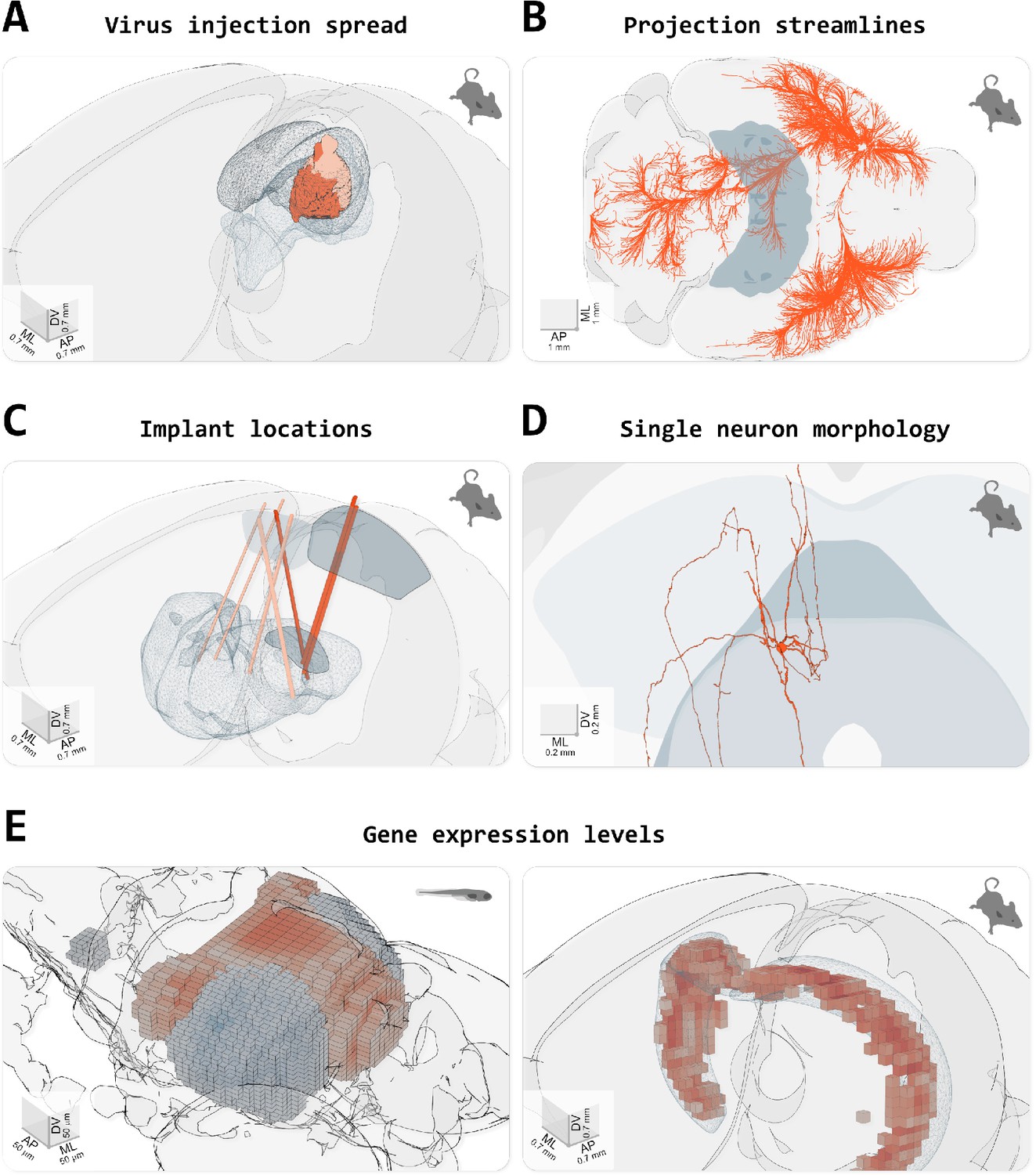
From: Claudi et al. (2021) Visualizing anatomically registered data with brainrender. eLife
Documentation
brainrender is a project of the BrainGlobe Initiative, which is a collaborative effort to develop a suite of Python-based software tools for computational neuroanatomy. A comprehensive online documentation for brainrender can be found on the BrainGlobe website here.
Furthermore, an open-access journal article describing BrainRender has been published in eLife, available here.
Installation
From PyPI:
pip install brainrender
Quickstart
import random

import numpy as np

from brainrender import Scene
from brainrender.actors import Points

def get_n_random_points_in_region(region, N):
    """
    Gets N random points inside (or on the surface) of a mesh
    """

    region_bounds = region.mesh.bounds()
    X = np.random.randint(region_bounds[0], region_bounds[1], size=10000)
    Y = np.random.randint(region_bounds[2], region_bounds[3], size=10000)
    Z = np.random.randint(region_bounds[4], region_bounds[5], size=10000)
    pts = [[x, y, z] for x, y, z in zip(X, Y, Z)]

    ipts = region.mesh.inside_points(pts).coordinates
    return np.vstack(random.choices(ipts, k=N))


# Display the Allen Brain mouse atlas.
scene = Scene(atlas_name="allen_mouse_25um", title="Cells in primary visual cortex")

# Display a brain region
primary_visual = scene.add_brain_region("VISp", alpha=0.2)

# Get a numpy array with (fake) coordinates of some labelled cells
coordinates = get_n_random_points_in_region(primary_visual, 2000)

# Create a Points actor
cells = Points(coordinates)

# Add to scene
scene.add(cells)

# Add label to the brain region
scene.add_label(primary_visual, "Primary visual cortex")

# Display the figure.
scene.render()
Seeking help or contributing
We are always happy to help users of our tools, and welcome any contributions. If you would like to get in contact with us for any reason, please see the contact page of our website.
Citing brainrender
If you use brainrender in your scientific work, please cite:
Claudi, F., Tyson, A. L., Petrucco, L., Margrie, T.W., Portugues, R., Branco, T. (2021) "Visualizing anatomically registered data with Brainrender" <i>eLife</i> 2021;10:e65751 [doi.org/10.7554/eLife.65751](https://doi.org/10.7554/eLife.65751)
BibTeX:
@article{Claudi2021,
author = {Claudi, Federico and Tyson, Adam L. and Petrucco, Luigi and Margrie, Troy W. and Portugues, Ruben and Branco, Tiago},
doi = {10.7554/eLife.65751},
issn = {2050084X},
journal = {eLife},
pages = {1--16},
pmid = {33739286},
title = {{Visualizing anatomically registered data with brainrender}},
volume = {10},
year = {2021}
}
3 maintainers


Metadata
3 maintainers
Release files for brainrender 2.2.3
For a detailed explanation of source distributions (sdists) and built distributions (wheels), please see the package formats documentation.
Source distribution (sdist)
| File | Size | Uploaded | |
|---|---|---|---|
| brainrender-2.2.3.tar.gz | 46.5 kB | Details |
Built distribution (wheel)
| File | Interpreter | ABI | Platform | Reset |
|---|---|---|---|---|
| brainrender-2.2.3-py3-none-any.whl | Python 3 | none | any | Details |
Total release size: 97.1 kB
Release files / brainrender-2.2.3.tar.gz
| Download URL | brainrender-2.2.3.tar.gz |
|---|---|
| Size | 46.5 kB |
| Tags | Source |
|
SHA-256 checksum How to use checksums |
dc3df521707854bb5b8d6db5518362459d1c0027b2b350f4878e86090ddb64a7
|
|
BLAKE2b-256 checksum How to use checksums |
05e7c353dc797ea92d134dd29a629fa9abf9bdc6884d93a0f50ace355f13ca70
|
| Upload date | |
|
Uploaded using Trusted Publishing? What is trusted publishing? |
No |
| Uploaded via |
twine/7.0.0 CPython/3.13.14
|
Release files / brainrender-2.2.3-py3-none-any.whl
| Download URL | brainrender-2.2.3-py3-none-any.whl |
|---|---|
| Size | 50.7 kB |
| Tags | Python 3 |
|
SHA-256 checksum How to use checksums |
dec83fbab471aa772edc54086ce1bb3a86a34a4395db15ab36ed07a5e733452f
|
|
BLAKE2b-256 checksum How to use checksums |
43fb1ff74aa0cd39c39ef0f0bc21d532f7a9bd0ac95360c1413357f2980b3787
|
| Upload date | |
|
Uploaded using Trusted Publishing? What is trusted publishing? |
No |
| Uploaded via |
twine/7.0.0 CPython/3.13.14
|














