
BTC Flex Forms
Some form mixins, styles and scripts for fast form development.
Detailed documentation is in the “docs” directory.
Quick start
Add “flex_forms” to your INSTALLED_APPS setting like this:
INSTALLED_APPS = (
    ...
    'flex_forms',
)
Add static files css:
<link type="text/css" rel="stylesheet" href="{% static 'flex_forms/css/default.css' %}">Classes for usage: StaticFieldset designed for rendering only static fieldsets:
# Usage: when you need to display arbitrary static information on the page. # For example: # In view: static_data = StaticFieldset(model_1=some_model, model_2=another_model) # In form: grid = { ['field_1', 'field_2'], # etc. ... } field_1 = StaticFlexField(label='Data 1', help_text='Field 1') field_2 = StaticFlexField(data='Some data', label='Data 2') def __init__(*args, **kwargs) self.model_1 = kwargs.pop('model_1', None) self.model_2 = kwargs.pop('model_2', None) super().__init__(*args, **kwargs) self.static_fieldset['field_1'].data = self.model_1.field_1 + self.model_2.field_1 ...StaticModelFieldset:
# Usage: when you need to display static information on a page based on model data. # For example: # In view: my_model = get_object_or_404(MyModel, pk=self.kwargs.get('pk')) static_model_data = StaticModelFieldset(instance=my_model) # In form: # Support is for StaticFlexField only. grid = { '_1': ['model_field_1', 'model_field_2'], '_2': ['separate_static_field'], # etc. ... } separate_field = StaticFlexField('This is a static field') # only static fields can be defined.MixedFlexForm:
# Usage: when you need to display multiple forms on a page with a mixed arrangement of fields. # For example: # In view: mix = MixedFlexForm([form_1, form_2, formset_1]) # form_1, form_2, formset_1 - must be are flex too! # In form: static field from the form_2 grid = { / '_1': ['form_1_field_2', 'form_2_static_field_1', [formset_1_field_1, form_1_field_1]], '_2': ['separate_field', 'form_1_field_3', 'separate_static_field'], # etc. ... \ } field defined below (non-forms field) # You can define separate non-forms fields and specify them in grid. separate_field = forms.CharField() separate_static_field = StaticFlexField('This is a static field') # If you use prefixes for forms (this will be needed if the forms have the same field names (formset)), # you must specify fields with prefixes: grid = { ['form_1_prefix-form_1_field_2', 'form_2_prefix-form_2_field_1'], # etc. ... }FlexForm, FlexModelForm designed for rendering good known django forms - Form, ModelForm with flex layout:
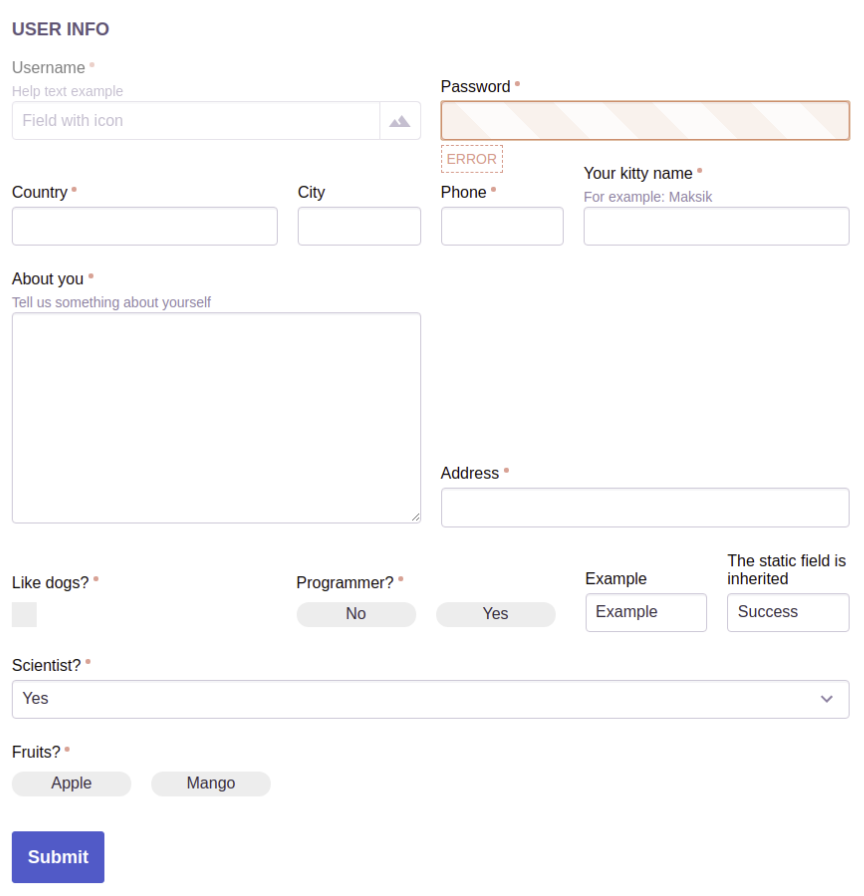
class CustomFlexForm(FlexForm): grid = { 'Fields': ['field_1', 'field_2'], 'New row': ['field_3'], 'Controls': ['button'], ... } field_1 = forms.MultipleChoiceField( label='Fruits?', choices=(('0', 'Apple'), ('1', 'Mango')), widget=forms.CheckboxSelectMultiple(attrs={ 'field_group_class': 'checkbox-as-button checkbox-as-row', }) ) # static fields support field_2 = StaticFlexField( data='Example', label='Example', help_text='Example') ) field_3 = StaticFlexField(data='Example', label='Example') button = FlexButton('Submit') ...FlexFormset, FlexModelFormset, FlexInlineFormset - respectively implementation of BaseFormSet, BaseModelFormSet, BaseInlineFormSet:
formset = formset_factory(CustomFlexForm, FlexFormset, extra=4)
Grid: to locate fields you must specify them in grid variable as shown below. The dict key is a row title that allows you to horizontally split field rows. If the title is not needed, it must starts with _ symbol:
grid = {
    'User Info': ['field_1', 'field_2'],
    '_1': ['field_3', ['field_4', 'field_5'], 'field_6'],
    '_2': ['field_7', 'field_8'],
    '_3': ['field_9', 'field_10', 'field_14'],
    '_4': ['field_11'],
    '_5': ['field_12'],
    '_6': ['button'],
}
Template tags:
{% load flex_forms %}

{% as_flex form_object %}  # use this tag for rendering form or formset
{% flex_form_grid form %}  # use this tag for rendering form body generated with form_grid (visible fields)
{% complex_flex_field field %}  # use this tag for rendering a single flex field of the form
Manual template building:
# Create template for the form (or fieldset).
# For example, custom template:
# custom_form_template.html:

{% load flex_forms %}

<form {{ html_params|safe }}>
    {% csrf_token %}
    {% for field in form.hidden_fields %}
        {{ field }}
    {% endfor %}

    <div class="flex-fields-column">
        <div class="flex-fields-row_title">Title</div>
        <div class="flex-fields-row">
            <div class="flex-fields-block block-with-padding">
                {% complex_flex_field form.field_1 %}
                {% complex_flex_field form.static_fieldset.field_44 default_value='No value' %}
                {% complex_flex_field form.static_fieldset.button %}
            </div>
        </div>
    </div>
    <div class="flex-fields-column">
        <div class="flex-fields-row_title">Controls</div>
        <div class="flex-fields-row">
            <div class="flex-fields-block block-with-padding">
                {% complex_flex_field form.static_fieldset.button %}
            </div>
        </div>
    </div>
</form>

# In form class set template path:
class MyForm(FlexForm):

    template = 'custom_form_template.html'

# In this case form grid does not need to be set up.
The appearance of forms should be configured through css-properties, use :nth-of-type() and :nth-child(n+x):nth-child(-n+x+y) selectors to style rows. Default forms style involved through built-in style ‘flex-form’.
Example
1 maintainer

Metadata
1 maintainer
Release files for btc-flex-forms 2.2
For a detailed explanation of source distributions (sdists) and built distributions (wheels), please see the package formats documentation.
Source distribution (sdist)
| File | Size | Uploaded | |
|---|---|---|---|
| btc-flex-forms-2.2.tar.gz | 16.4 kB | Details |
Release files / btc-flex-forms-2.2.tar.gz
| Download URL | btc-flex-forms-2.2.tar.gz |
|---|---|
| Size | 16.4 kB |
| Tags | Source |
|
SHA-256 checksum How to use checksums |
25dd0417edd8336369e850a4386c2cf4f1a1d8152f18001be35d16c2736404c7
|
|
BLAKE2b-256 checksum How to use checksums |
7e6e7c2883dda52f27a9888e219ab05d24e8f516c676945303734e38295ea720
|
| Upload date | |
|
Uploaded using Trusted Publishing? What is trusted publishing? |
No |
| Uploaded via |
twine/3.1.1 pkginfo/1.5.0.1 requests/2.22.0 setuptools/41.6.0 requests-toolbelt/0.9.1 tqdm/4.40.0 CPython/3.7.5
|














