
Some form mixins, styles and scripts for fast form development.

Project description
Some form mixins, styles and scripts for fast form development.
Detailed documentation is in the “docs” directory.
Quick start
Add “flex_forms” to your INSTALLED_APPS setting like this:
INSTALLED_APPS = (
    ...
    'flex_forms',
)
Add static files css:
<link type="text/css" rel="stylesheet" href="{% static 'flex_forms/css/default.css' %}">Classes for usage: StaticFieldset designed for rendering only static fieldsets:
# Usage: when you need to display arbitrary static information on the page. # For example: # In view: static_data = StaticFieldset(model_1=some_model, model_2=another_model) # In form: grid = { ['field_1', 'field_2'], # etc. ... } field_1 = StaticFlexField(label='Data 1', help_text='Field 1') field_2 = StaticFlexField(data='Some data', label='Data 2') def __init__(*args, **kwargs) self.model_1 = kwargs.pop('model_1', None) self.model_2 = kwargs.pop('model_2', None) super().__init__(*args, **kwargs) self.static_fieldset['field_1'].data = self.model_1.field_1 + self.model_2.field_1 ...StaticModelFieldset:
# Usage: when you need to display static information on a page based on model data. # For example: # In view: my_model = get_object_or_404(MyModel, pk=self.kwargs.get('pk')) static_model_data = StaticModelFieldset(instance=my_model) # In form: # Support is for StaticFlexField only. grid = { '_1': ['model_field_1', 'model_field_2'], '_2': ['separate_static_field'], # etc. ... } separate_field = StaticFlexField('This is a static field') # only static fields can be defined.MixedFlexForm:
# Usage: when you need to display multiple forms on a page with a mixed arrangement of fields. # For example: # In view: mix = MixedFlexForm([form_1, form_2, formset_1]) # form_1, form_2, formset_1 - must be are flex too! # In form: static field from the form_2 grid = { / '_1': ['form_1_field_2', 'form_2_static_field_1', [formset_1_field_1, form_1_field_1]], '_2': ['separate_field', 'form_1_field_3', 'separate_static_field'], # etc. ... \ } field defined below (non-forms field) # You can define separate non-forms fields and specify them in grid. separate_field = forms.CharField() separate_static_field = StaticFlexField('This is a static field') # If you use prefixes for forms (this will be needed if the forms have the same field names (formset)), # you must specify fields with prefixes: grid = { ['form_1_prefix-form_1_field_2', 'form_2_prefix-form_2_field_1'], # etc. ... }FlexForm, FlexModelForm designed for rendering good known django forms - Form, ModelForm with flex layout:
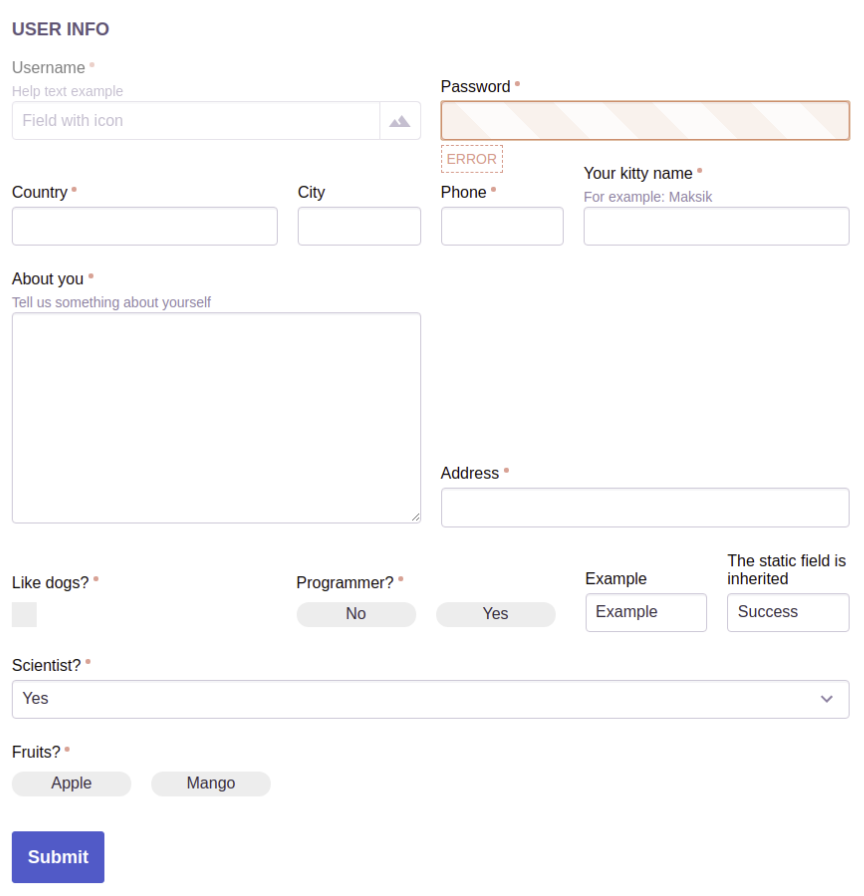
class CustomFlexForm(FlexForm): grid = { 'Fields': ['field_1', 'field_2'], 'New row': ['field_3'], 'Controls': ['button'], ... } field_1 = forms.MultipleChoiceField( label='Fruits?', choices=(('0', 'Apple'), ('1', 'Mango')), widget=forms.CheckboxSelectMultiple(attrs={ 'field_group_class': 'checkbox-as-button checkbox-as-row', }) ) # static fields support field_2 = StaticFlexField( data='Example', label='Example', help_text='Example') ) field_3 = StaticFlexField(data='Example', label='Example') button = FlexButton(BaseButton('Submit')) ...FlexFormset, FlexModelFormset, FlexInlineFormset - respectively implementation of BaseFormSet, BaseModelFormSet, BaseInlineFormSet:
formset = formset_factory(CustomFlexForm, FlexFormset, extra=4)
Grid: to locate fields you must specify them in grid variable as shown below. The dict key is a row title that allows you to horizontally split field rows. If the title is not needed, it must starts with _ symbol:
grid = {
    'User Info': ['field_1', 'field_2'],
    '_1': ['field_3', ['field_4', 'field_5'], 'field_6'],
    '_2': ['field_7', 'field_8'],
    '_3': ['field_9', 'field_10', 'field_14'],
    '_4': ['field_11'],
    '_5': ['field_12'],
    '_6': ['button'],
}
Template tags:
{% load flex_forms %}

{% as_flex form_object %}  # use this tag for rendering form or formset
{% flex_form_grid form %}  # use this tag for rendering form body generated with form_grid (visible fields)
{% complex_flex_field field %}  # use this tag for rendering a single flex field of the form
The appearance of forms should be configured through css-properties, use :nth-of-type() and :nth-child(n+x):nth-child(-n+x+y) selectors to style rows. Default forms style involved through built-in style ‘flex-form’.
Example
Release history Release notifications | RSS feed


Download files
Download the file for your platform. If you're not sure which to choose, learn more about installing packages.
Source Distribution
File details
Details for the file btc-flex-forms-1.0.tar.gz.
File metadata
- Download URL: btc-flex-forms-1.0.tar.gz
- Upload date:
- Size: 18.5 kB
- Tags: Source
- Uploaded using Trusted Publishing? No
- Uploaded via: twine/3.1.1 pkginfo/1.5.0.1 requests/2.22.0 setuptools/41.6.0 requests-toolbelt/0.9.1 tqdm/4.40.0 CPython/3.7.5
File hashes
| Algorithm | Hash digest | |
|---|---|---|
| SHA256 |
b1eaff1fb75e6ad0ae62d4f0b66b17a004c86d27cab8d6dbe014392e7eaeb360
|
|
| MD5 |
2460df6ebb5d6b0a6bdae71f601b2508
|
|
| BLAKE2b-256 |
e66261d270ba99fe6734de3e08b635895b7158dfa0211e6ce6976e7b28245582
|






