
Cloud-native LLM Agent Development and Testing Toolkit
Verified details
These details have been verified by PyPIProject links
GitHub Statistics
Maintainers

Project description
Agent-Lab | 🤖🧪
Cloud-native framework for building, simulating and testing LLM agents






Table of Contents
- What is Agent-Lab?
- Install
- Quickstart
- How it works
- Project Principles
- Key Features
- MCP Server
- Reference Implementation
- Documentation
- Contributing
- License
What is Agent-Lab?
Agent-Lab is a cloud-native Python framework for building, simulating and testing LLM agents on top of FastAPI, LangChain/LangGraph and PostgreSQL.
You pip install it as a library, define your agents by extending its base classes, and assemble a production-ready FastAPI application with a single create_app() call — no need to fork or edit the framework. Everything an agent needs is included: a REST API, an MCP server, relational and vector persistence, agent memory (LangGraph checkpoints), OpenTelemetry observability, and a batteries-included simulation and testing harness with LLM-as-judge evaluation.
Agent-Lab covers three things well:
- 🏗️ Build — Define agents by subclassing
WorkflowAgentBase(LangGraph state graphs) and registering them with a decorator.create_app()wires up the REST API, MCP server, persistence, auth and observability around them. Extend via subclassing and configuration, never by editing framework code. - 🧪 Simulate — Exercise agents end-to-end against live LLMs with conversational scenarios (a user simulator + judge agent) and dataset-driven experiments, scored by an LLM-as-judge and tracked over time in Langfuse and LangWatch.
- ✅ Test — Validate every change with an integration suite that spins up real infrastructure (Postgres, Redis, Keycloak, embeddings, headless Chrome) via testcontainers.
The repository also ships a complete reference implementation — a standalone, deployable app with a set of ready-to-use agents (RAG, browser automation, voice memos, vision, multi-agent supervisors) — that doubles as a working example of how to consume the framework. See Reference Implementation.
Install
pip install btech-agent-lab
Requires Python 3.12+. Agents are served through FastAPI and persist to PostgreSQL (relational data, pgvector embeddings, and LangGraph checkpoints); see the Setup guide for provisioning those in development or production.
Quickstart
Scaffold a complete, runnable project from the bundled project template:
uvx cookiecutter gh:btech-software/agent-lab --directory cookiecutter
Answer the prompts (project name, optional docker / GitHub Actions / testcontainers support) and you get a ready-made thin consumer of the framework:
my-agent-app/
├── my_agent_app/
│   ├── main.py              # app = create_app(container=..., scan_packages=[...])
│   ├── core/container.py    # your DI container — add providers here
│   ├── agents/              # example echo agent + single-node ReAct workflow agent
│   └── mcp/                 # example MCP tool and prompt, exposed at /mcp
├── config-dev.yml / config-test.yml / config-docker.yml
├── tests/                   # no-container smoke tests (+ optional testcontainers suite)
├── compose.yml              # app + postgres (pgvector) + redis + vault
└── docker/, .github/, Makefile, pyproject.toml
Run it:
cd my-agent-app
uv lock && uv sync --group dev --group test
make test_unit                  # boots the app with no infrastructure needed
docker compose up --build -d    # full local stack
curl http://localhost:18000/status/liveness
Your agents are reachable over the REST API (/agents, /messages, ...), exposed through the MCP server at /mcp, and the interactive OpenAPI docs live at /docs.
Prefer wiring the app by hand? Add btech-agent-lab to any project, subclass the agent base classes, register them with @discoverable_agent, and call create_app() — the Developer's Guide walks through the manual path, configuration, the DI container, and routers.
How it works
Tech stack: Python 3.12, FastAPI, LangChain/LangGraph, PostgreSQL (3 databases: relational, vectors via pgvector, LangGraph checkpoints), Redis for pub/sub, Keycloak for auth, OpenTelemetry for observability.
Architecture — Clean Architecture with Dependency Injection:
- Interface — FastAPI routers + MCP server
- Services — Business logic, agent implementations
- Domain — SQLAlchemy models, repository interfaces
- Infrastructure — DB, auth, metrics (OpenTelemetry)
The public API — everything you need to consume Agent-Lab as a library is exported from the top-level agent_lab package and designed to be extended without editing framework code:
| Export | Purpose |
|---|---|
create_app(...) |
Composition root — builds the FastAPI app from your agents, container, config and routers. |
discoverable_agent |
Decorator that registers an AgentBase subclass under an agent_type. |
AgentBase, WorkflowAgentBase, SupervisedWorkflowAgentBase, WebAgentBase, ContactSupportAgentBase |
Base classes to extend, from simple message handlers to multi-agent supervisors. |
Container |
Subclass to add your own providers (services, MCP registrars, tracing backends). |
ConfigSource, YamlConfigSource, VaultConfigSource |
Supply configuration from YAML, Vault, or a custom source. |
RouterMount |
Mount extra FastAPI routers with their auth policy. |
McpRegistrar |
Extend the MCP server with additional tools. |
Agent system — Agents extend WorkflowAgentBase (which uses LangGraph state graphs). The hierarchy goes from simple (echo, adaptive RAG) to complex (coordinator-planner-supervisor multi-agent). Agents process messages, have configurable settings (Jinja2-templated prompts), and persist state in the checkpoints database. Registering an agent with @discoverable_agent makes it discoverable, resolvable through the DI container, and valid at the API — no manual registry or schema edits required.
Project Principles
- Give researchers and developers a framework with everything they need to build, test, and experiment with LLM agents, plus ready-to-use reference implementations.
- Extend through the public API — subclassing, decorators and configuration — never by editing framework code.
- Expose an MCP server for agent discovery, conversation history, and agent-to-agent communication.
- Ship with integration and simulation test suites so every agent change is validated automatically.
- Provide full observability through logs, metrics, and traces for explainability and evaluation.
- Run anywhere with a cloud-native architecture built for containerized deployment and horizontal scaling.
Key Features
- Agent Framework: Build agents by extending base classes and assembling the app with
create_app(); discover them via package scanning or entry points. - Agent Simulations: Evaluate agent behavior end-to-end with
langwatch-scenarioconversational simulations and dataset-driven experiments, scored by an LLM-as-judge and tracked in Langfuse and LangWatch. See the testing guide. - Integration Testing: Ensure reliability and correctness with a comprehensive integration test suite backed by testcontainers.
- REST API: Manage integrations with AI suppliers, LLM settings, agents, and conversation histories through the built-in REST API.
- MCP Server: Utilize the Model Context Protocol (MCP) server for agent discovery, dialog history, and agent-to-agent communication.
- Observability: Obtain detailed insights through logs, metrics, and traces powered by OpenTelemetry, with reference implementations for Grafana and OpenSearch Dashboards.
- Relational Persistence: Store data reliably using PostgreSQL to support the entity domain model for prompts, agent-specific settings, conversations, and more.
- Secrets Management: Securely store and retrieve secrets with Vault.
- Vector Storage and Search: Efficiently manage vector data using PgVector for similarity search and retrieval.
- Agent Memory: Use the PostgreSQL checkpointer to store and retrieve agent memory, enabling agents to maintain context across interactions.
- Cloud-Native: Optimized for cloud environments with Docker, Kubernetes, and Terraform scripts for streamlined deployment.
MCP Server
Agent-Lab features a MCP Server that allows agent discovery (get_agent_list tool), dialog history (get_message_list tool) and agent-to-agent communication (post_message tool).
The following example shows MCP Server discovering and obtaining dialog history of a supervised coder agent instance:
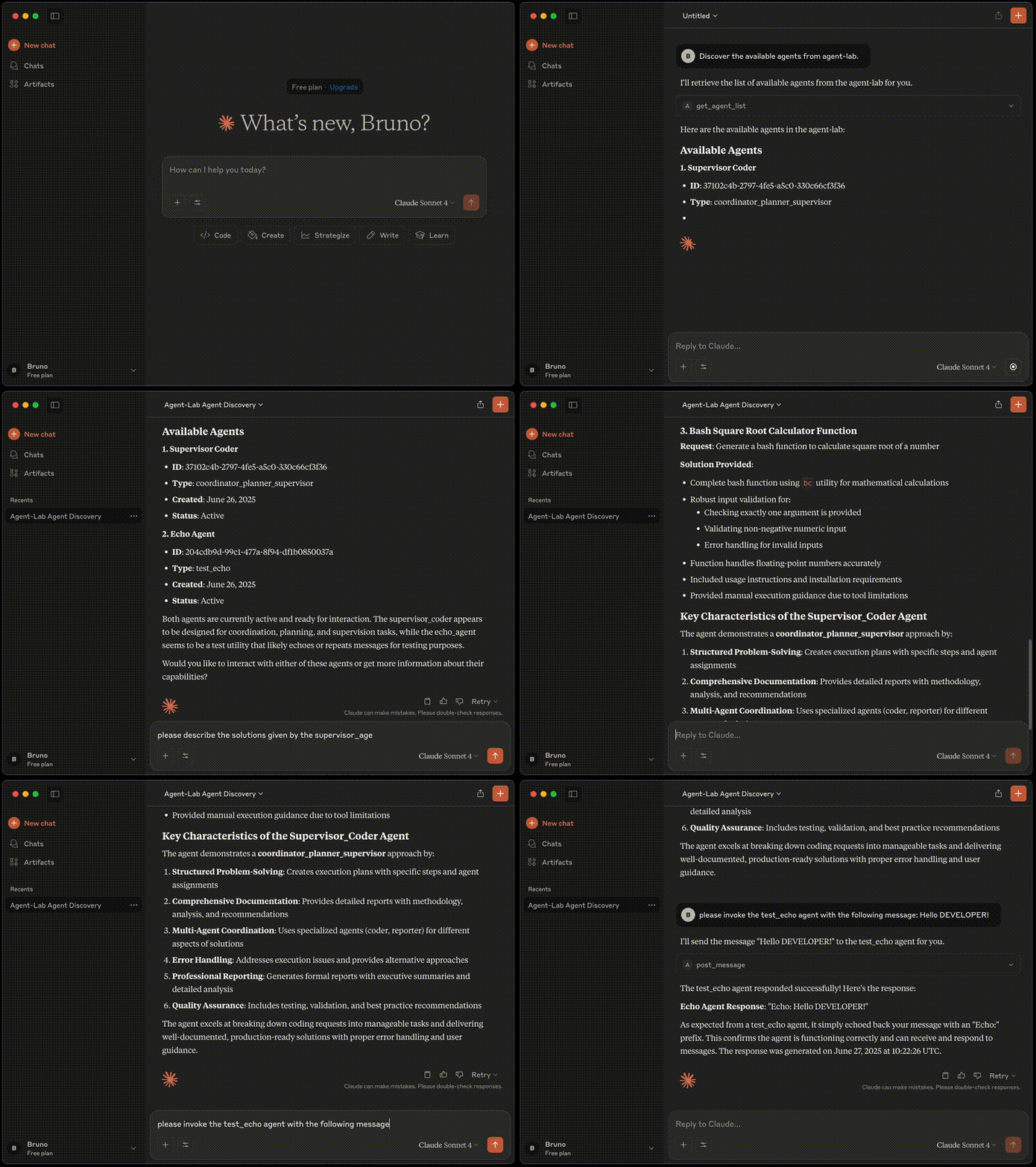
Please refer to MCP guide for more details.
Note: Claude Desktop is used only for demonstration purposes. This project is not affiliated with Anthropic AI.
Reference Implementation
The repository ships a complete, deployable reference application (agent_lab.main) that registers every built-in agent — RAG, browser automation, voice memos, vision, and multi-agent supervisors. It's both a product you can run and the canonical example of how to consume the framework.
You can run it in two ways:
# As a standalone app (the reference implementation)
uvicorn agent_lab.main:app --reload
# Or with the bundled observability stack
docker compose -f compose-grafana.yml up --build      # Grafana
docker compose -f compose-opensearch.yml up --build    # OpenSearch Dashboards
It ships with Helm charts (charts/) for Kubernetes and Terraform scripts (terraform/) for provisioning cloud infrastructure — databases, auth realms, and secrets. See the Setup guide for details.
Agent-Lab is the generic base for downstream reference implementations. Only generic, reusable capabilities belong in the framework; product-specific agents and services live in the apps that consume it.
Documentation
Documentation is organized around how you use Agent-Lab:
- Developer's Guide — for developers building agents and applications on Agent-Lab (as a library or in-repo): setup, the extension model, and development practices. See the Developer's Guide.
- Researcher's Guide — for researchers running experiments: the MCP server, managing agents, tuning prompts, and prototyping new agents in Jupyter. See the Researcher's Guide.
- Testing & Simulations — the integration and simulation suites and LLM-as-judge evaluation. See the testing guide.
Contributing
Community support is greatly appreciated. If you encounter any issues or have suggestions for enhancements, please report them by creating an issue on our GitHub Issues page.
Refer to our Developer's Guide for instructions on how to contribute to the project.
License
This project is licensed under the MIT License. See the LICENSE file for details.
Project details
Verified details
These details have been verified by PyPIProject links
GitHub Statistics
Maintainers


Download files
Download the file for your platform. If you're not sure which to choose, learn more about installing packages.
Source Distribution
Built Distribution
Filter files by name, interpreter, ABI, and platform.
If you're not sure about the file name format, learn more about wheel file names.
Copy a direct link to the current filters
File details
Details for the file btech_agent_lab-1.12.0.tar.gz.
File metadata
- Download URL: btech_agent_lab-1.12.0.tar.gz
- Upload date:
- Size: 85.6 kB
- Tags: Source
- Uploaded using Trusted Publishing? Yes
- Uploaded via: twine/6.1.0 CPython/3.13.13
File hashes
| Algorithm | Hash digest | |
|---|---|---|
| SHA256 |
eb0673fb67efc6e5953fc7690f911e1e63b3d07d81e3cdda2423aa0a6751353e
|
|
| MD5 |
27d45c9b77a45e026da449e7fb9f95db
|
|
| BLAKE2b-256 |
6cb3a3804f470e6a672b2ea3faa7079ce7c6db1fdca5221ec71276fd0f51f55e
|
Provenance
The following attestation bundles were made for btech_agent_lab-1.12.0.tar.gz:
Publisher:
pypi-publish.yml on btech-software/agent-lab
-
Statement:
-
Statement type:
https://in-toto.io/Statement/v1 -
Predicate type:
https://docs.pypi.org/attestations/publish/v1 -
Subject name:
btech_agent_lab-1.12.0.tar.gz -
Subject digest:
eb0673fb67efc6e5953fc7690f911e1e63b3d07d81e3cdda2423aa0a6751353e - Sigstore transparency entry: 2190413835
- Sigstore integration time:
-
Permalink:
btech-software/agent-lab@2ee70e47599f830536b7675b1c0911fc0d98bc10 -
Branch / Tag:
refs/heads/main - Owner: https://github.com/btech-software
-
Access:
public
-
Token Issuer:
https://token.actions.githubusercontent.com -
Runner Environment:
github-hosted -
Publication workflow:
pypi-publish.yml@2ee70e47599f830536b7675b1c0911fc0d98bc10 -
Trigger Event:
workflow_run
-
Statement type:
File details
Details for the file btech_agent_lab-1.12.0-py3-none-any.whl.
File metadata
- Download URL: btech_agent_lab-1.12.0-py3-none-any.whl
- Upload date:
- Size: 130.9 kB
- Tags: Python 3
- Uploaded using Trusted Publishing? Yes
- Uploaded via: twine/6.1.0 CPython/3.13.13
File hashes
| Algorithm | Hash digest | |
|---|---|---|
| SHA256 |
32a11e2718fee9c942e152f1696d9bf41686e228fba2b47b16e6a42f1c459713
|
|
| MD5 |
aad464414baf9f3a3f5ce1b36b59be93
|
|
| BLAKE2b-256 |
59683775040e1571de75405869de1f12e63da7cd7c647234a4c25788d51a5a0f
|
Provenance
The following attestation bundles were made for btech_agent_lab-1.12.0-py3-none-any.whl:
Publisher:
pypi-publish.yml on btech-software/agent-lab
-
Statement:
-
Statement type:
https://in-toto.io/Statement/v1 -
Predicate type:
https://docs.pypi.org/attestations/publish/v1 -
Subject name:
btech_agent_lab-1.12.0-py3-none-any.whl -
Subject digest:
32a11e2718fee9c942e152f1696d9bf41686e228fba2b47b16e6a42f1c459713 - Sigstore transparency entry: 2190414021
- Sigstore integration time:
-
Permalink:
btech-software/agent-lab@2ee70e47599f830536b7675b1c0911fc0d98bc10 -
Branch / Tag:
refs/heads/main - Owner: https://github.com/btech-software
-
Access:
public
-
Token Issuer:
https://token.actions.githubusercontent.com -
Runner Environment:
github-hosted -
Publication workflow:
pypi-publish.yml@2ee70e47599f830536b7675b1c0911fc0d98bc10 -
Trigger Event:
workflow_run
-
Statement type:






