
Cloud-native LLM Agent Development and Testing Toolkit
Verified details
These details have been verified by PyPIProject links
GitHub Statistics
Maintainers

Project description
Agent-Lab | 🤖🧪
LLM Agent Development and Testing Toolkit






Table of Contents
- What is Agent-Lab?
- Overview
- Project Principles
- Key Features
- MCP Server
- Getting Started
- Contributing
- License
What is Agent-Lab?
Agent-Lab is a cloud-native toolkit for building, testing, and deploying LLM-powered autonomous agents. Think of it as a platform where you wire up different AI agent types (RAG, browser automation, voice memos, vision, multi-agent supervisors) and interact with them via a REST API.
It features relational persistence with PostgreSQL, secure secrets management using Vault, observability through OpenTelemetry, and PgVector for vector storage and similarity search.
Overview
Tech stack: Python 3.12, FastAPI, LangChain/LangGraph, PostgreSQL (3 databases: relational, vectors via pgvector, LangGraph checkpoints), Redis for pub/sub, Keycloak for auth, Docker Compose for orchestration.
Architecture — Clean Architecture with Dependency Injection:
- Interface — FastAPI routers + MCP server
- Services — Business logic, agent implementations
- Domain — SQLAlchemy models, repository interfaces
- Infrastructure — DB, auth, metrics (OpenTelemetry)
All wiring lives in agent_lab/core/container.py via dependency-injector.
Agent system — Agents extend WorkflowAgentBase (which uses LangGraph state graphs). Each agent type lives under agent_lab/services/agent_types/ and is registered in a registry. The hierarchy goes from simple (echo, adaptive RAG) to complex (coordinator-planner-supervisor multi-agent). Agents process messages, have configurable settings (Jinja2-templated prompts), and persist state in the checkpoints database.
Testing — Two layers:
- Integration tests spin up real infrastructure via testcontainers (Postgres, Redis, Keycloak, Ollama as an OpenAI-compatible embeddings mock, headless Chrome).
- Simulation tests use
langwatch-scenariowith LLM judges to evaluate agent behavior end-to-end.
Deployment — Ships with Helm charts (charts/) for Kubernetes and Terraform scripts (terraform/) for provisioning cloud infrastructure including databases, auth realms, and secrets. See Setup guide for details.
Project Principles
- Give researchers and developers everything they need to build, test, and experiment with LLM agents, with ready-to-use reference implementations.
- Expose an MCP server for agent discovery, conversation history, and agent-to-agent communication.
- Ship with integration and simulation test suites so every agent change is validated automatically.
- Provide full observability through logs, metrics, and traces for explainability and evaluation.
- Make it easy to create new custom agents by extending base classes and registering them in the agent registry.
- Run anywhere with a cloud-native architecture built for containerized deployment and horizontal scaling.
Key Features
- REST API: Manage integrations with AI suppliers, LLMs settings, agents, and conversation histories with our REST API.
- MCP Server: Utilize the Model Control Protocol (MCP) server for agent discovery, dialog history, and agent-to-agent communication.
- Observability: Obtain detailed insights through logs, metrics, and traces powered by OpenTelemetry.
- Includes reference implementations for Grafana and OpenSearch Dashboards.
- Cloud-Native: Optimized for cloud environments with Docker, Kubernetes, and Terraform scripts for streamlined deployment.
- Relational Persistence: Store data reliably using PostgreSQL to support the entity domain model for prompts, agent-specific settings, conversations, and more.
- Secrets Management: Securely store and retrieve secrets with Vault.
- Vector Storage and Search: Efficiently manage vector data using PgVector for similarity search and retrieval.
- Agent Memory: Using PostgreSQL checkpointer to store and retrieve agent memory, enabling agents to maintain context across interactions.
- Integration Testing: Ensure reliability and correctness with a comprehensive integration test suite.
MCP Server
Agent-Lab features a MCP Server that allows agent discovery (get_agent_list tool), dialog history (get_message_list tool) and agent-to-agent communication (post_message tool).
The following example shows MCP Server discovering and obtaining dialog history of a supervised coder agent instance:
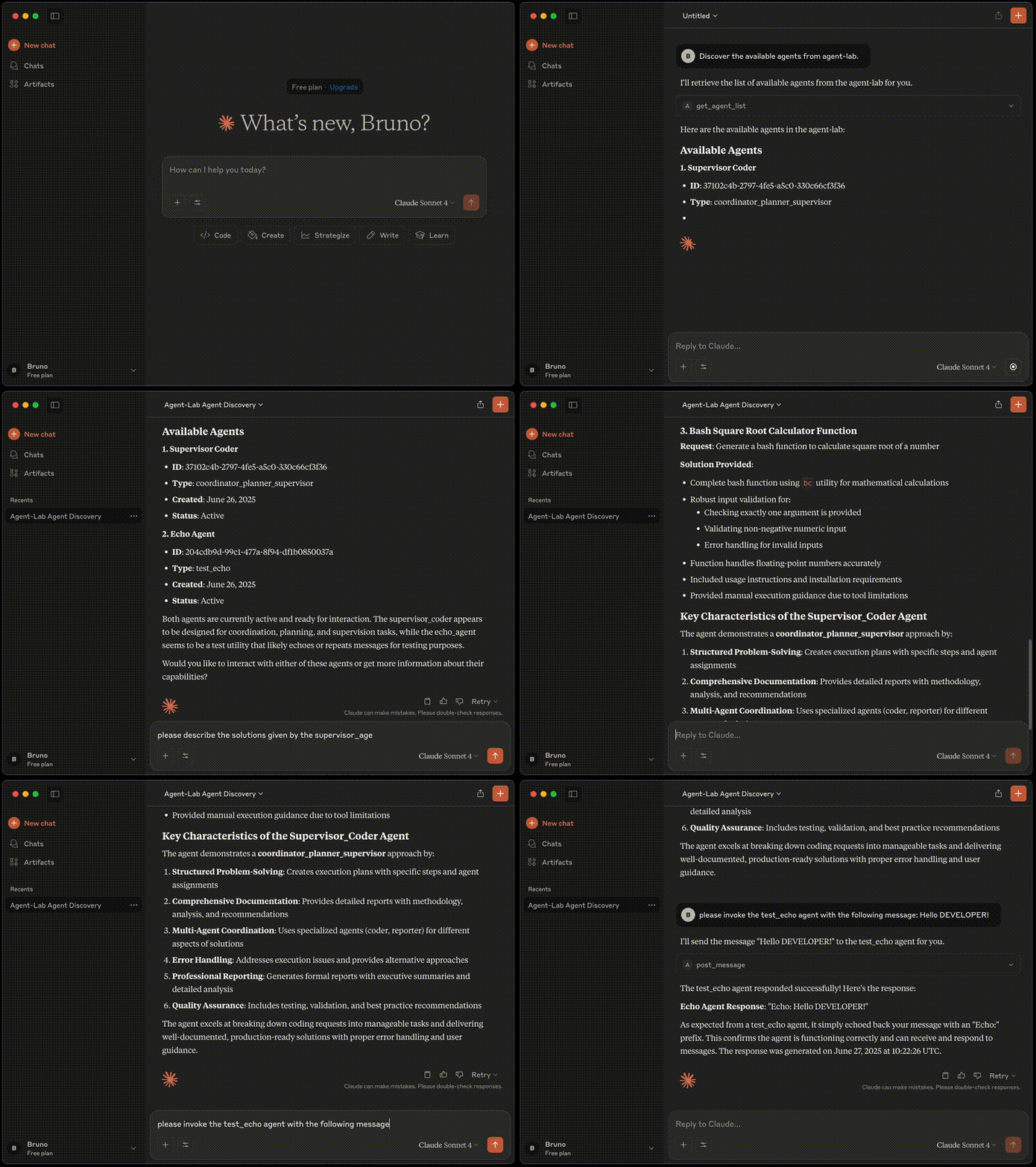
Please refer to MCP guide for more details.
Note: Claude Desktop is used only for demonstration purposes. This project is not affiliated with Anthropic AI.
Getting Started
Agent-Lab is designed for ease of setup and use, whether you're a developer building LLM agents or a researcher experimenting with agentic workflows.
Documentation in this repository is divided into two main sections:
- Developer's Guide: Tailored for developers who want to customize Agent-Lab or build agentic workflows. It includes setup instructions and development practices. Please refer to our developer's guide.
- Researcher's Guide: Provides detailed instructions for researchers on setting up and using Agent-Lab, including how to run the MCP server, manage agents, conduct experiments, tune prompts, and prototype new agents. Please refer to our researcher's guide.
Please consult these guides for detailed instructions on getting started with Agent-Lab.
Contributing
Community support is greatly appreciated. If you encounter any issues or have suggestions for enhancements, please report them by creating an issue on our GitHub Issues page.
Refer to our developer's guide for instructions on how to contribute to the project.
License
This project is licensed under the MIT License. See the LICENSE file for details.
Project details
Verified details
These details have been verified by PyPIProject links
GitHub Statistics
Maintainers


Download files
Download the file for your platform. If you're not sure which to choose, learn more about installing packages.
Source Distribution
Built Distribution
Filter files by name, interpreter, ABI, and platform.
If you're not sure about the file name format, learn more about wheel file names.
Copy a direct link to the current filters
File details
Details for the file btech_agent_lab-1.9.0.tar.gz.
File metadata
- Download URL: btech_agent_lab-1.9.0.tar.gz
- Upload date:
- Size: 76.9 kB
- Tags: Source
- Uploaded using Trusted Publishing? Yes
- Uploaded via: twine/6.1.0 CPython/3.13.13
File hashes
| Algorithm | Hash digest | |
|---|---|---|
| SHA256 |
e59b15008c666124bf11e71248a7dbffdc57b3f80c05d0958e9dad4576b6b0ff
|
|
| MD5 |
f82c4d18190de4e13eaa95e955a8efbc
|
|
| BLAKE2b-256 |
fc30f062f801d191c00177e124ee49c88fdd9f3b4931583f3e9edbc197c8c0ee
|
Provenance
The following attestation bundles were made for btech_agent_lab-1.9.0.tar.gz:
Publisher:
pypi-publish.yml on btech-software/agent-lab
-
Statement:
-
Statement type:
https://in-toto.io/Statement/v1 -
Predicate type:
https://docs.pypi.org/attestations/publish/v1 -
Subject name:
btech_agent_lab-1.9.0.tar.gz -
Subject digest:
e59b15008c666124bf11e71248a7dbffdc57b3f80c05d0958e9dad4576b6b0ff - Sigstore transparency entry: 2176019979
- Sigstore integration time:
-
Permalink:
btech-software/agent-lab@71e74b4208c6ebc8ae5b8c757bd2f42261992244 -
Branch / Tag:
refs/heads/main - Owner: https://github.com/btech-software
-
Access:
public
-
Token Issuer:
https://token.actions.githubusercontent.com -
Runner Environment:
github-hosted -
Publication workflow:
pypi-publish.yml@71e74b4208c6ebc8ae5b8c757bd2f42261992244 -
Trigger Event:
workflow_run
-
Statement type:
File details
Details for the file btech_agent_lab-1.9.0-py3-none-any.whl.
File metadata
- Download URL: btech_agent_lab-1.9.0-py3-none-any.whl
- Upload date:
- Size: 119.8 kB
- Tags: Python 3
- Uploaded using Trusted Publishing? Yes
- Uploaded via: twine/6.1.0 CPython/3.13.13
File hashes
| Algorithm | Hash digest | |
|---|---|---|
| SHA256 |
9a9bc7aac70d439c6273c6033fc632da663430622ec2ca8e694350c4aead4584
|
|
| MD5 |
c95fe7af6c6aa204a06a4a7f180b9935
|
|
| BLAKE2b-256 |
72178735588ac419bb59cc0337785e7f4fab87c4d4b9283581a06f3dbfd98d3b
|
Provenance
The following attestation bundles were made for btech_agent_lab-1.9.0-py3-none-any.whl:
Publisher:
pypi-publish.yml on btech-software/agent-lab
-
Statement:
-
Statement type:
https://in-toto.io/Statement/v1 -
Predicate type:
https://docs.pypi.org/attestations/publish/v1 -
Subject name:
btech_agent_lab-1.9.0-py3-none-any.whl -
Subject digest:
9a9bc7aac70d439c6273c6033fc632da663430622ec2ca8e694350c4aead4584 - Sigstore transparency entry: 2176020034
- Sigstore integration time:
-
Permalink:
btech-software/agent-lab@71e74b4208c6ebc8ae5b8c757bd2f42261992244 -
Branch / Tag:
refs/heads/main - Owner: https://github.com/btech-software
-
Access:
public
-
Token Issuer:
https://token.actions.githubusercontent.com -
Runner Environment:
github-hosted -
Publication workflow:
pypi-publish.yml@71e74b4208c6ebc8ae5b8c757bd2f42261992244 -
Trigger Event:
workflow_run
-
Statement type:






