
A Python package for sending Unhandled Exceptions to BugSplat

Project description

BugSplat
Crash and error reporting built for busy developers.


👋 Introduction
This repo contains the source code for bugsplat-py, a BugSplat integration for reporting Unhandled Exceptions in Python.
🏗 Installation
BugSplat recommends you use bugsplat-py with a Python virtual environment. To create a virtual environment for your project please run the following command at your project's root directory:
python -m venv venv
Activate your virtual environment by running the following command:
# unix/macos
source venv/bin/activate

# windows
.\env\Scripts\activate
Install the bugsplat package using pip:
pip install bugsplat
⚙️ Configuration
- Import the BugSplat class
from bugsplat import BugSplat
- Create a new BugSplat instance passing it the name of your BugSplat database, application and version
bugsplat = BugSplat(database, application, version)
- Optionally, you set default values for appKey, description, email, user and additionaFilePaths
bugsplat.set_default_app_key('key!')
bugsplat.set_default_description('description!')
bugsplat.set_default_email('fred@bugsplat.com')
bugsplat.set_default_user('Fred')
bugsplat.set_default_additional_file_paths([
    './path/to/additional-file.txt',
    './path/to/additional-file-2.txt'
])
- Wrap your application code in a try except block. In the except block call post. You can override any of the default properties that were set in step 3
try:
    crash()
except Exception as e:
    bugsplat.post(
        e,
        additional_file_paths=[],
        app_key='other key!',
        description='other description!',
        email='barney@bugsplat.com',
        user='Barney'
    )
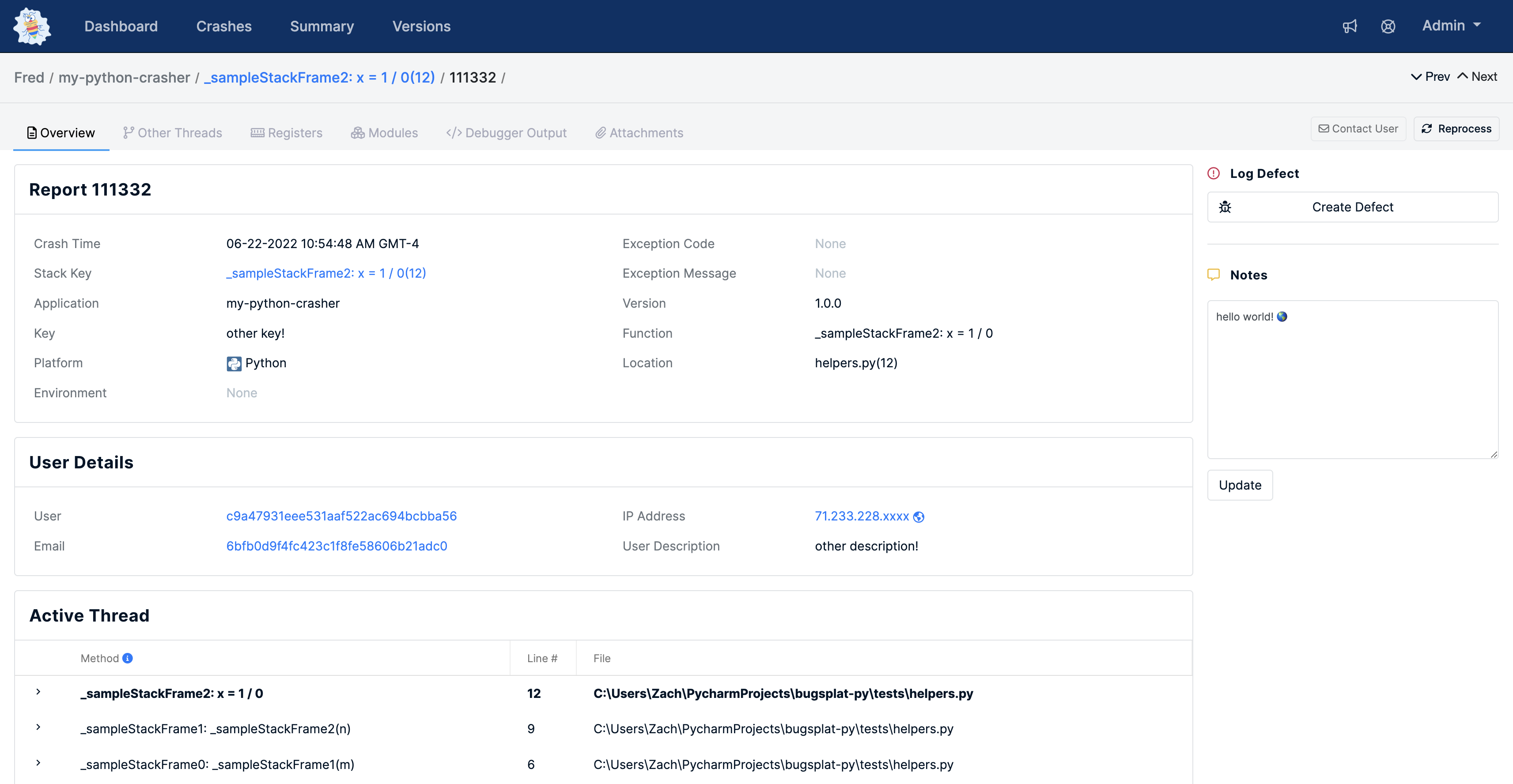
- Once you've posted a crash, navigate to the Crashes page and click the link in the ID column to be see the crash's details
🧑💻 Development
To configure a development environment:
- Clone the repository
git clone https://github.com/BugSplat-Git/bugsplat-py.git
- Create a virtual environment
python -m venv .venv
- Activate the virtual environment
# unix/macos
source .venv/bin/activate

# windows
.\.venv\Scripts\activate
- Install the project's dependencies
pip install .
Thanks for using BugSplat ❤️
Release history Release notifications | RSS feed


Download files
Download the file for your platform. If you're not sure which to choose, learn more about installing packages.
Source Distribution
Built Distribution
Filter files by name, interpreter, ABI, and platform.
If you're not sure about the file name format, learn more about wheel file names.
Copy a direct link to the current filters
File details
Details for the file bugsplat-1.1.0.tar.gz.
File metadata
- Download URL: bugsplat-1.1.0.tar.gz
- Upload date:
- Size: 5.9 kB
- Tags: Source
- Uploaded using Trusted Publishing? No
- Uploaded via: twine/6.2.0 CPython/3.10.5
File hashes
| Algorithm | Hash digest | |
|---|---|---|
| SHA256 |
7be93c892a44c22ec4b5ed8068dcb9e25d664d186d220524ebb69f4237b33979
|
|
| MD5 |
dce852d8f1b821c52cb5abcaaffb0063
|
|
| BLAKE2b-256 |
672e7309da4bbe0399190d26ef4524d4fea1646b995c308e7bfc66a0938eb7ef
|
File details
Details for the file bugsplat-1.1.0-py3-none-any.whl.
File metadata
- Download URL: bugsplat-1.1.0-py3-none-any.whl
- Upload date:
- Size: 5.9 kB
- Tags: Python 3
- Uploaded using Trusted Publishing? No
- Uploaded via: twine/6.2.0 CPython/3.10.5
File hashes
| Algorithm | Hash digest | |
|---|---|---|
| SHA256 |
1a4fdb25053bb2c83f65ca3f87ba38105b08db69326ea52b2d3b34770a38f47f
|
|
| MD5 |
92ccfa8a2ab36c693dd84f37506405bd
|
|
| BLAKE2b-256 |
505ab7334717a217539c106986c577b959f43cfe0bfd50e4b570e8bcdeb5949b
|






