








busdayaxis
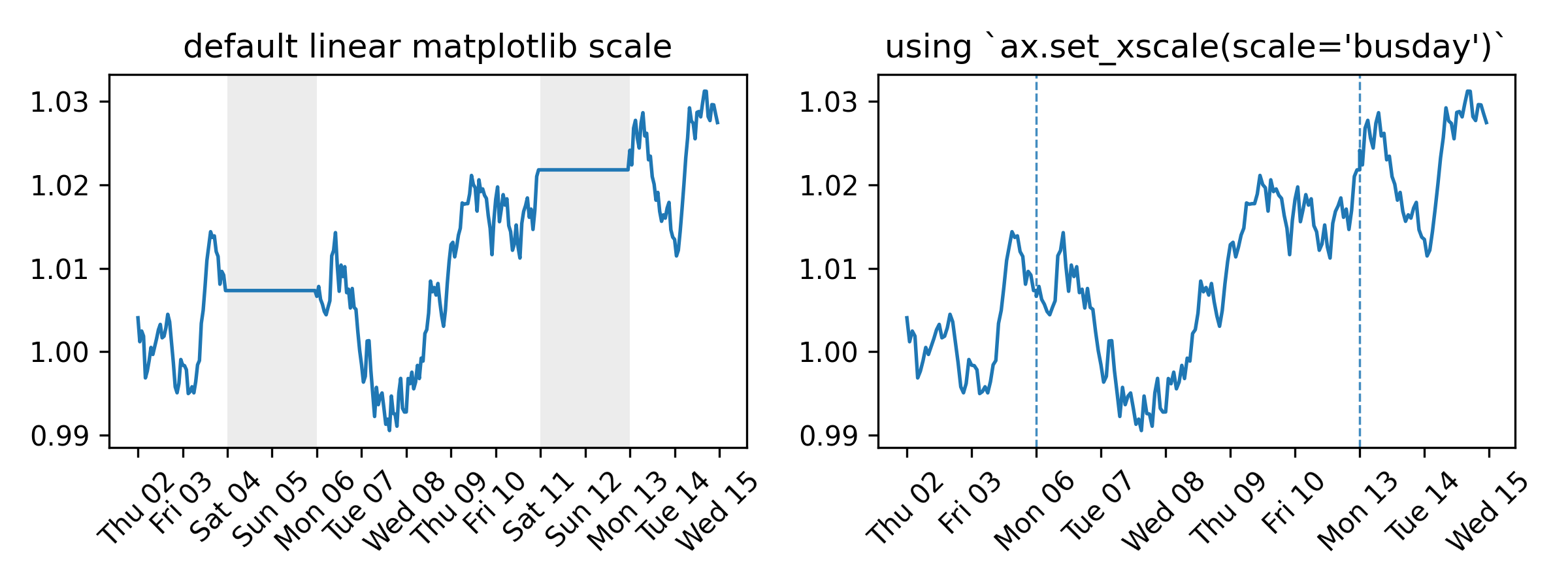
A Matplotlib scale that compresses non-business days and off-hours. Every visible unit on the axis corresponds to active time — no gaps for weekends, holidays, or overnight periods. No data preprocessing needed.
Full documentation at saemeon.github.io/busdayaxis
Installation
pip install busdayaxis
Quick Start
import matplotlib.pyplot as plt
import pandas as pd
import busdayaxis  # scale is registered automatically on import

dates = pd.date_range("2026-01-01", periods=10, freq="B")
values = range(len(dates))

fig, ax = plt.subplots()
ax.plot(dates, values)
ax.set_xscale("busday", bushours=(9, 17))  # compress weekends (Mon–Fri default) and off-hours (business hours: 09:00–17:00)
plt.show()
Why
Time series that only evolve on business days — prices, signals, operational metrics — look distorted on a standard calendar axis. Weekends and holidays introduce flat gaps that compress active periods and visually skew slopes. busdayaxis removes these gaps entirely.
What it provides
-
Compress weekends, holidays, and overnight gaps by adding an
axis scalewith a single call:ax.set_xscale("busday", weekmask=..., holidays=..., busdaycal=..., bushours=...)
-
weekmask,holidays,busdaycal: standardnumpy.is_busdayparameters to configure which days are considered business days -
bushours: define uniform or weekday-specific business hours -
Implemented as a proper
matplotlib.scale— autoscaling, shared axes, and all standard artists work without any changes to your plotting code
-
-
Business-day-aware
DateLocatorwrappers for all standardmatplotlib.dateslocators — automatically filter out ticks on off-days and off-hours -
BusdayLocatorbase class to wrap any custom or third-party date locator with the same business-day filtering logic -
MidBusdayLocatorto place a tick at the midpoint of each business session, useful for centering day labels -
mark_gapsto draw visual indicators (vlines or broken-axis slash marks) at every session boundary on a busday axis -
holidays_from_exchangeto build theholidays=list automatically from anyexchange_calendarsorpandas_market_calendarscalendar object
Under the Hood
-
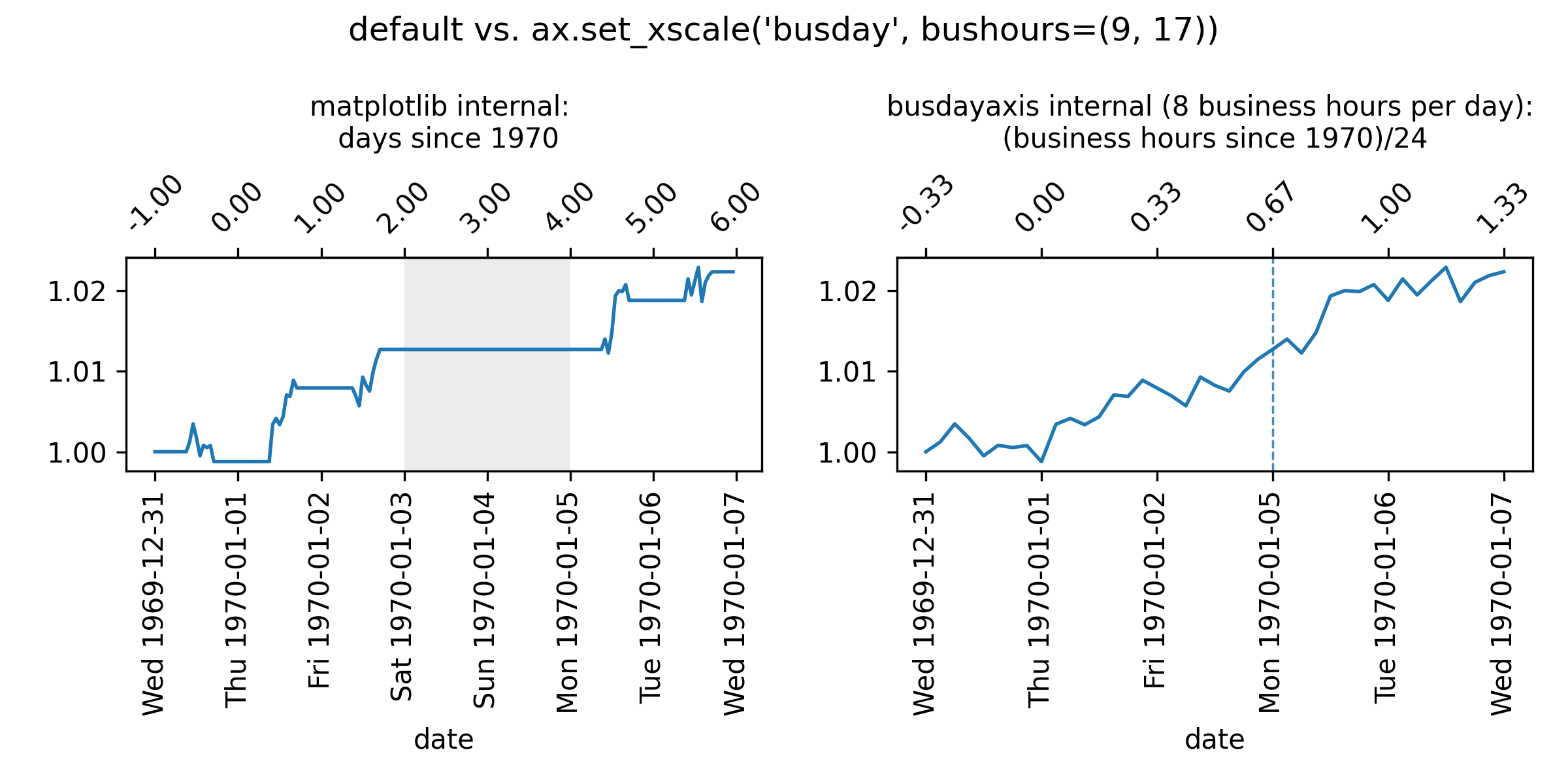
matplotlibinternally handles dates as floating-point numbers representing days since 1970-01-01, or stated alternatively, as$$\text{ matplotlib-representation}=\frac{\text{hours\ since\ 1970-01-01}}{24\ \text{hours}}$$
-
busdayaxistransforms these coordinates to floating-point numbers representing$$\text{busdayaxis-representation} = \frac{\text{business-hours since 1970-01-01}}{24 \text{ hours}}$$
This conversion implies that datetime values that fall on non-business days or outside of business hours will be mapped to the same coordinate as the nearest preceding business hour. For example, if business hours are defined as 9:00 to 17:00, then "1970-01-05 08:00" (Mon 08:00) is mapped to the same coordinate as "1970-01-05 09:00" (Mon 09:00), because the earlier timestamp lies outside the defined business hours.
Example: "1970-01-05 10:00" (Mon 10:00)
-
Matplotlib representation (all hours counted):
Thu 1970-01-01 24h (00:00 - 24:00) + Fri 1970-01-02 24h (00:00 - 24:00) + Sat 1970-01-03 24h (00:00 - 24:00) + Sun 1970-01-04 24h (00:00 - 24:00) + Mon 1970-01-05 10h (00:00 - 10:00) --------------------------------------- = 106h (Total hours since epoch) / 24h --------------------------------------- = 4.41666... (matplotlib coordinate) -
Busdayaxis representation:
- We assume here that business hours are from 9:00 to 17:00. This can be configured by setting
ax.set_xscale("busday", bushours=(9, 17)).
To get the floating-point representation of "1970-01-05 10:00" (Mon 10:00), we count the business hours that have elapsed since 1970-01-01 00:00:
Thu 1970-01-01 8h (9:00 - 17:00) + Fri 1970-01-02 8h (9:00 - 17:00) + Sat 1970-01-03 0h + Sun 1970-01-04 0h + Mon 1970-01-05 1h (09:00 - 10:00) --------------------------------------- = 17h (business hours since epoch) / 24h --------------------------------------- = 0.708333... (busdayaxis coordinate) - We assume here that business hours are from 9:00 to 17:00. This can be configured by setting
License
MIT


Release files for busdayaxis 0.3.0
For a detailed explanation of source distributions (sdists) and built distributions (wheels), please see the package formats documentation.
Source distribution (sdist)
| File | Size | Uploaded | |
|---|---|---|---|
| busdayaxis-0.3.0.tar.gz | 515.9 kB | Details |
Built distribution (wheel)
| File | Interpreter | ABI | Platform | Reset |
|---|---|---|---|---|
| busdayaxis-0.3.0-py3-none-any.whl | Python 3 | none | any | Details |
Total release size: 538.0 kB
Release files / busdayaxis-0.3.0.tar.gz
| Download URL | busdayaxis-0.3.0.tar.gz |
|---|---|
| Size | 515.9 kB |
| Tags | Source |
|
SHA-256 checksum How to use checksums |
f4d5576048d290b27e27c7425f5ccbcf01cb33ed75769579932617f41f9dfbe8
|
|
BLAKE2b-256 checksum How to use checksums |
2ed36036eb84c0dfaba226b162a49ddaee41df7c24e71417462a61a8fc9659f7
|
| Upload date | |
|
Uploaded using Trusted Publishing? What is trusted publishing? |
No |
| Uploaded via |
twine/7.0.0 CPython/3.13.14
|
Release files / busdayaxis-0.3.0-py3-none-any.whl
| Download URL | busdayaxis-0.3.0-py3-none-any.whl |
|---|---|
| Size | 22.0 kB |
| Tags | Python 3 |
|
SHA-256 checksum How to use checksums |
2fa0846af18e399203d51247b6646c6a7a0c4bb5a9ea0b6253267948f4980645
|
|
BLAKE2b-256 checksum How to use checksums |
1c38db209af454a7e95d0bb410eab1a252801c6e782f09743ada0f5ea1b787c4
|
| Upload date | |
|
Uploaded using Trusted Publishing? What is trusted publishing? |
No |
| Uploaded via |
twine/7.0.0 CPython/3.13.14
|














