
No project description provided

Project description


Python Stateful Stream Processing Framework
Bytewax is a Python framework that simplifies event and stream processing. Because Bytewax couples the stream and event processing capabilities of Flink, Spark, and Kafka Streams with the friendly and familiar interface of Python, you can re-use the Python libraries you already know and love. Connect data sources, run stateful transformations and write to various different downstream systems with built-in connectors or existing Python libraries.
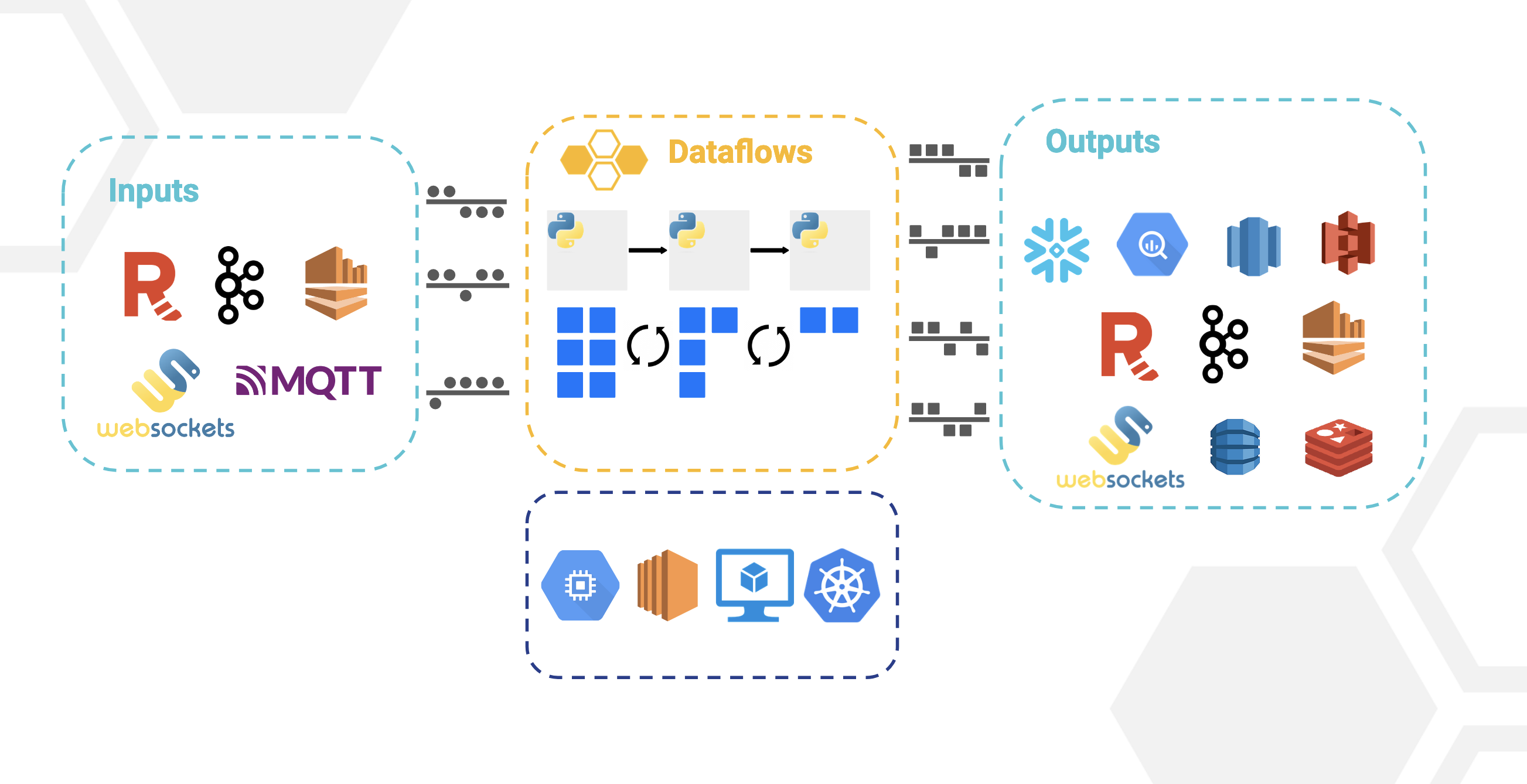
How it all works
Bytewax is a Python framework and Rust distributed processing engine that uses a dataflow computational model to provide parallelizable stream processing and event processing capabilities similar to Flink, Spark, and Kafka Streams. You can use Bytewax for a variety of workloads from moving data à la Kafka Connect style all the way to advanced online machine learning workloads. Bytewax is not limited to streaming applications but excels anywhere that data can be distributed at the input and output.
Bytewax has an accompanying command line interface, waxctl, which supports the deployment of dataflows on cloud vms or kuberentes. You can download it here.
Getting Started with Bytewax
pip install bytewax
A Bytewax dataflow is Python code that will represent an input, a series of processing steps, and an output. The inputs could range from a Kafka stream to a WebSocket and the outputs could vary from a data lake to a key-value store.
from bytewax.dataflow import Dataflow
from bytewax.inputs import KafkaInputConfig
from bytewax.outputs import ManualOutputConfig

# Bytewax has input and output helpers for common input and output data sources
# but you can also create your own with the ManualOutputConfig.
At a high-level, the dataflow compute model is one in which a program execution is conceptualized as data flowing through a series of operator-based steps. Operators like map and filter are the processing primitives of Bytewax. Each of them gives you a “shape” of data transformation, and you give them regular Python functions to customize them to a specific task you need. See the documentation for a list of the available operators
import json


def deserialize(key_bytes__payload_bytes):
    key_bytes, payload_bytes = key_bytes__payload_bytes
    key = json.loads(key_bytes) if key_bytes else None
    event_data = json.loads(payload_bytes) if payload_bytes else None
    return event_data["user_id"], event_data


def anonymize_email(user_id__event_data):
    user_id, event_data = user_id__event_data
    event_data["email"] = "@".join(["******", event_data["email"].split("@")[-1]])
    return user_id, event_data


def remove_bytewax(user_id__event_data):
    user_id, event_data = user_id__event_data
    return "bytewax" not in event_data["email"]


flow = Dataflow()
flow.input("inp", KafkaInputConfig(brokers=["localhost:9092"], topic="web_events"))
flow.map(deserialize)
flow.map(anonymize_email)
flow.filter(remove_bytewax)
Bytewax is a stateful stream processing framework, which means that some operations remember information across multiple events. Windows and aggregations are also stateful, and can be reconstructed in the event of failure. Bytewax can be configured with different state recovery mechanisms to durably persist state in order to recover from failure.
There are multiple stateful operators available like reduce, stateful_map and fold_window. The complete list can be found in the API documentation for all operators. Below we use the fold_window operator with a tumbling window based on system time to gather events and calculate the number of times events have occurred on a per-user basis.
import datetime
from collections import defaultdict

from bytewax.window import TumblingWindowConfig, SystemClockConfig

cc = SystemClockConfig()
wc = TumblingWindowConfig(length=datetime.timedelta(seconds=5))


def build():
    return defaultdict(lambda: 0)


def count_events(results, event):
    results[event["type"]] += 1
    return results


flow.fold_window("session_state_recovery", cc, wc, build, count_events)
Output mechanisms in Bytewax are managed in the capture operator. There are a number of helpers that allow you to easily connect and write to other systems (output docs). If there isn’t a helper built, it is easy to build a custom version, which we will do below. Similar the input, Bytewax output can be parallelized and the client connection will occur on the worker.
import json

import psycopg2


def output_builder(worker_index, worker_count):
    # create the connection at the worker level
    conn = psycopg2.connect("dbname=website user=bytewax")
    conn.set_session(autocommit=True)
    cur = conn.cursor()

    def write_to_postgres(user_id__user_data):
        user_id, user_data = user_id__user_data
        query_string = """
                    INSERT INTO events (user_id, data)
                    VALUES (%s, %s)
                    ON CONFLICT (user_id)
                    DO
                        UPDATE SET data = %s;"""
        cur.execute(
            query_string, (user_id, json.dumps(user_data), json.dumps(user_data))
        )

    return write_to_postgres


flow.capture(ManualOutputConfig(output_builder))
Bytewax dataflows can be executed on a single host with multiple Python processes, or on multiple hosts. Below is an example of running bytewax across multiple hosts. When processing data in a distributed fashion, Bytewax will ensure that all items with the same key are routed to the same host.
if __name__ == "__main__":
    addresses = ["localhost:2101"]

    cluster_main(flow, addresses=addresses, proc_id=0, worker_count_per_proc=2)
Deploying and Scaling
Bytewax can be run on a local machine or remote machine, just like a regular Python script.
python my_dataflow.py
It can also be run in a Docker container as described further in the documentation.
Kubernetes
The recommended way to run dataflows at scale is to leverage the kubernetes ecosystem. To help manage deployment, we built waxctl, which allows you to easily deploy dataflows that will run at huge scale across multiple compute nodes.
waxctl df deploy my_dataflow.py --name my-dataflow
Why Bytewax?
At a high level, Bytewax provides a few major benefits:
- The operators in Bytewax are largely “data-parallel”, meaning they can operate on independent parts of the data concurrently.
- Bytewax offers the ability to express higher-level control constructs, like iteration.
- Bytewax allows you to develop and run your code locally, and then easily scale that code to multiple workers or processes without changes.
- Bytewax can be used in both a streaming and batch context
- Ability to leverage the Python ecosystem directly
Community
Slack Is the main forum for communication and discussion.
GitHub Issues is reserved only for actual issues. Please use the slack community for discussions.
Usage
Install the latest release with pip:
pip install bytewax
Building From Source
To build a specific branch, you will need to use Maturin and have Rust installed on your machine. Once those have been installed run
maturin develop -E dev
Important: If you are testing with a maturin built version from source, you should use maturin build --release since maturin develop will be slower.
More Examples
For a more complete example, and documentation on the available operators, check out the User Guide and the Examples
For an exhaustive list of examples, checkout the /examples folder
License
Bytewax is licensed under the Apache-2.0 license.
Contributing
Contributions are welcome! This community and project would not be what it is without the contributors. All contributions, from bug reports to new features, are welcome and encouraged. Please view the contribution guidelines before getting started.
With ❤️ Bytewax


Release history Release notifications | RSS feed


Download files
Download the file for your platform. If you're not sure which to choose, learn more about installing packages.
Source Distributions
Built Distributions
Filter files by name, interpreter, ABI, and platform.
If you're not sure about the file name format, learn more about wheel file names.
Copy a direct link to the current filters
File details
Details for the file bytewax-0.14.0-cp310-cp310-manylinux_2_31_x86_64.whl.
File metadata
- Download URL: bytewax-0.14.0-cp310-cp310-manylinux_2_31_x86_64.whl
- Upload date:
- Size: 8.8 MB
- Tags: CPython 3.10, manylinux: glibc 2.31+ x86-64
- Uploaded using Trusted Publishing? No
- Uploaded via: twine/4.0.2 CPython/3.9.16
File hashes
| Algorithm | Hash digest | |
|---|---|---|
| SHA256 |
615728e381209d9203a237ccece912234e84e1116205837a06db1c46cc0b843b
|
|
| MD5 |
3b950d3cc5747106bf65ca57f5feef9d
|
|
| BLAKE2b-256 |
8d1ea02f8899195f31cea3fb81b347298107be66ed95ef5aea36848f5fec8874
|
File details
Details for the file bytewax-0.14.0-cp310-cp310-manylinux_2_27_x86_64.whl.
File metadata
- Download URL: bytewax-0.14.0-cp310-cp310-manylinux_2_27_x86_64.whl
- Upload date:
- Size: 8.7 MB
- Tags: CPython 3.10, manylinux: glibc 2.27+ x86-64
- Uploaded using Trusted Publishing? No
- Uploaded via: twine/4.0.2 CPython/3.9.16
File hashes
| Algorithm | Hash digest | |
|---|---|---|
| SHA256 |
fc8b85566f60fcb2bab1db23ce59b85c28c12c198f9dfa12c85d560d970d0683
|
|
| MD5 |
2114148359236fe01b76943868571387
|
|
| BLAKE2b-256 |
a667dfe24ac656bb418ff3c4543f4cf43965e51128658ed4fa05138098c620b1
|
File details
Details for the file bytewax-0.14.0-cp310-cp310-macosx_11_0_arm64.whl.
File metadata
- Download URL: bytewax-0.14.0-cp310-cp310-macosx_11_0_arm64.whl
- Upload date:
- Size: 6.4 MB
- Tags: CPython 3.10, macOS 11.0+ ARM64
- Uploaded using Trusted Publishing? No
- Uploaded via: twine/4.0.2 CPython/3.9.16
File hashes
| Algorithm | Hash digest | |
|---|---|---|
| SHA256 |
90b3039ebfde65588119048a0918cfbeecb203c7867b4271dfa052be9a8be520
|
|
| MD5 |
f37722a0eaa7f8393f03e9d051f1c358
|
|
| BLAKE2b-256 |
48f06fd3fd684ab72db28c56e0bf35a4526a2aa68cecfae28404622ce91d305e
|
File details
Details for the file bytewax-0.14.0-cp310-cp310-macosx_10_7_x86_64.whl.
File metadata
- Download URL: bytewax-0.14.0-cp310-cp310-macosx_10_7_x86_64.whl
- Upload date:
- Size: 6.9 MB
- Tags: CPython 3.10, macOS 10.7+ x86-64
- Uploaded using Trusted Publishing? No
- Uploaded via: twine/4.0.2 CPython/3.9.16
File hashes
| Algorithm | Hash digest | |
|---|---|---|
| SHA256 |
a7fb95badd62ba4a1e21860e86a144d561b3f9a861c168604c46770f4b6c4b87
|
|
| MD5 |
dc565e34fcd5d02f47113e731f19493b
|
|
| BLAKE2b-256 |
1d0244c6193063fc7f0678d671953e0d7d9d3f8f0bf520af0d55f4522729885f
|
File details
Details for the file bytewax-0.14.0-cp39-cp39-manylinux_2_31_x86_64.whl.
File metadata
- Download URL: bytewax-0.14.0-cp39-cp39-manylinux_2_31_x86_64.whl
- Upload date:
- Size: 8.8 MB
- Tags: CPython 3.9, manylinux: glibc 2.31+ x86-64
- Uploaded using Trusted Publishing? No
- Uploaded via: twine/4.0.2 CPython/3.9.16
File hashes
| Algorithm | Hash digest | |
|---|---|---|
| SHA256 |
c6a2f27f08fd592101f60b049fc89761350f9aa900de8c06455a6f9abb715e67
|
|
| MD5 |
9073deb5ffac01bae5c67615ea5314ff
|
|
| BLAKE2b-256 |
207b8c0b0477f7d665e6b05c5e20b6f9916f7132240559ef92f8823ba845aef2
|
File details
Details for the file bytewax-0.14.0-cp39-cp39-manylinux_2_27_x86_64.whl.
File metadata
- Download URL: bytewax-0.14.0-cp39-cp39-manylinux_2_27_x86_64.whl
- Upload date:
- Size: 8.7 MB
- Tags: CPython 3.9, manylinux: glibc 2.27+ x86-64
- Uploaded using Trusted Publishing? No
- Uploaded via: twine/4.0.2 CPython/3.9.16
File hashes
| Algorithm | Hash digest | |
|---|---|---|
| SHA256 |
52297755b1664905f290d66d52e7a999e14a00e3696481ef5c14750b569f5e0a
|
|
| MD5 |
8c406fb8f4b3e522b5550a4800dba7e5
|
|
| BLAKE2b-256 |
5f4f963d0f999305b5d8b4c70e669d31a93adf05e9923b1afc46e8b7975f5071
|
File details
Details for the file bytewax-0.14.0-cp39-cp39-macosx_11_0_arm64.whl.
File metadata
- Download URL: bytewax-0.14.0-cp39-cp39-macosx_11_0_arm64.whl
- Upload date:
- Size: 6.4 MB
- Tags: CPython 3.9, macOS 11.0+ ARM64
- Uploaded using Trusted Publishing? No
- Uploaded via: twine/4.0.2 CPython/3.9.16
File hashes
| Algorithm | Hash digest | |
|---|---|---|
| SHA256 |
1bbdcf4fc1e32c1a8ccaf8ffe18c6b70b12544d13c3ee430820a438c6798b991
|
|
| MD5 |
713f75660c34ce4c920cfb7984ebd13e
|
|
| BLAKE2b-256 |
4ba001d7799f20db352289c2ca9eacc95ae8cf511a37844bbd9ff0382212ef33
|
File details
Details for the file bytewax-0.14.0-cp39-cp39-macosx_10_7_x86_64.whl.
File metadata
- Download URL: bytewax-0.14.0-cp39-cp39-macosx_10_7_x86_64.whl
- Upload date:
- Size: 6.9 MB
- Tags: CPython 3.9, macOS 10.7+ x86-64
- Uploaded using Trusted Publishing? No
- Uploaded via: twine/4.0.2 CPython/3.9.16
File hashes
| Algorithm | Hash digest | |
|---|---|---|
| SHA256 |
6d1f64493f76674a44c3384e37d2b36df9d8d4c1d8857821a4d80dc5b7c8c60e
|
|
| MD5 |
0430bd30304b41a628fb1eedc3c4475e
|
|
| BLAKE2b-256 |
4df479bcfdc576913d2bab837018997885051abe3ba6167774643408d9dcb0e3
|
File details
Details for the file bytewax-0.14.0-cp38-cp38-manylinux_2_31_x86_64.whl.
File metadata
- Download URL: bytewax-0.14.0-cp38-cp38-manylinux_2_31_x86_64.whl
- Upload date:
- Size: 8.8 MB
- Tags: CPython 3.8, manylinux: glibc 2.31+ x86-64
- Uploaded using Trusted Publishing? No
- Uploaded via: twine/4.0.2 CPython/3.9.16
File hashes
| Algorithm | Hash digest | |
|---|---|---|
| SHA256 |
f5ecdd6d3ec4aeb2016ee006fbab8a1c1637ae49329eb38ad531699a39dde851
|
|
| MD5 |
2b1fbdf1ae4aa1bda5b6702b009cfb60
|
|
| BLAKE2b-256 |
9b60b3f5929b9b3c4c693ffa68362569a0276b65aaeb2b3d5dceb0fb42b94f58
|
File details
Details for the file bytewax-0.14.0-cp38-cp38-manylinux_2_27_x86_64.whl.
File metadata
- Download URL: bytewax-0.14.0-cp38-cp38-manylinux_2_27_x86_64.whl
- Upload date:
- Size: 8.7 MB
- Tags: CPython 3.8, manylinux: glibc 2.27+ x86-64
- Uploaded using Trusted Publishing? No
- Uploaded via: twine/4.0.2 CPython/3.9.16
File hashes
| Algorithm | Hash digest | |
|---|---|---|
| SHA256 |
b705bb0dbeda32cf1230afbf210f48c77b27ffa772f3d255bc89e63ba08c46e6
|
|
| MD5 |
9a8051076751827a8034069ef91c4542
|
|
| BLAKE2b-256 |
432d875e1f55037407564fe16a199a3a4dd78ceccc1469904bc06b53d61b2b45
|
File details
Details for the file bytewax-0.14.0-cp38-cp38-macosx_11_0_arm64.whl.
File metadata
- Download URL: bytewax-0.14.0-cp38-cp38-macosx_11_0_arm64.whl
- Upload date:
- Size: 6.4 MB
- Tags: CPython 3.8, macOS 11.0+ ARM64
- Uploaded using Trusted Publishing? No
- Uploaded via: twine/4.0.2 CPython/3.9.16
File hashes
| Algorithm | Hash digest | |
|---|---|---|
| SHA256 |
358f6ff91d45d1270639eedc8173ddc918613bba2956d715d1ba74c6ed260719
|
|
| MD5 |
05f74fe2ee088ad5e108fd7e618fa2de
|
|
| BLAKE2b-256 |
fd79edf576ba43600b023c735e3c66d4eb655457e38a2e032d5ab9560c8cb1f5
|
File details
Details for the file bytewax-0.14.0-cp38-cp38-macosx_10_7_x86_64.whl.
File metadata
- Download URL: bytewax-0.14.0-cp38-cp38-macosx_10_7_x86_64.whl
- Upload date:
- Size: 6.9 MB
- Tags: CPython 3.8, macOS 10.7+ x86-64
- Uploaded using Trusted Publishing? No
- Uploaded via: twine/4.0.2 CPython/3.9.16
File hashes
| Algorithm | Hash digest | |
|---|---|---|
| SHA256 |
94095e1b8757fc8f10015c085c852ec029ac5cddc426dddd6646dc6c982b9587
|
|
| MD5 |
b26a808059de0daac8ea3fbce5fba860
|
|
| BLAKE2b-256 |
6a5f8c6ef93b7a9646a2400d68283baac0e7b6d0433188869bc2545700dadce9
|
File details
Details for the file bytewax-0.14.0-cp37-cp37m-manylinux_2_31_x86_64.whl.
File metadata
- Download URL: bytewax-0.14.0-cp37-cp37m-manylinux_2_31_x86_64.whl
- Upload date:
- Size: 8.8 MB
- Tags: CPython 3.7m, manylinux: glibc 2.31+ x86-64
- Uploaded using Trusted Publishing? No
- Uploaded via: twine/4.0.2 CPython/3.9.16
File hashes
| Algorithm | Hash digest | |
|---|---|---|
| SHA256 |
f6514cda861aecdbfbefca15776ed563fa29e316d41827386c2780cee815fe83
|
|
| MD5 |
2f22e4f118b6984f04fcb4f908577ebd
|
|
| BLAKE2b-256 |
3297829289c3fa05cf377cae48e188c6c8df55883204859720e69bff14bfca56
|
File details
Details for the file bytewax-0.14.0-cp37-cp37m-manylinux_2_27_x86_64.whl.
File metadata
- Download URL: bytewax-0.14.0-cp37-cp37m-manylinux_2_27_x86_64.whl
- Upload date:
- Size: 8.7 MB
- Tags: CPython 3.7m, manylinux: glibc 2.27+ x86-64
- Uploaded using Trusted Publishing? No
- Uploaded via: twine/4.0.2 CPython/3.9.16
File hashes
| Algorithm | Hash digest | |
|---|---|---|
| SHA256 |
d7cea2cc32c35c7f2ef556d72f3bef8055f7a7a3cb740679cb48774eb95f12d5
|
|
| MD5 |
547eff0436a838fef17dbc373314a536
|
|
| BLAKE2b-256 |
ff02c09b452f144f02369fb2d9bbef9767e4572962349b0568caab4d0e8465b0
|
File details
Details for the file bytewax-0.14.0-cp37-cp37m-macosx_11_0_arm64.whl.
File metadata
- Download URL: bytewax-0.14.0-cp37-cp37m-macosx_11_0_arm64.whl
- Upload date:
- Size: 6.4 MB
- Tags: CPython 3.7m, macOS 11.0+ ARM64
- Uploaded using Trusted Publishing? No
- Uploaded via: twine/4.0.2 CPython/3.9.16
File hashes
| Algorithm | Hash digest | |
|---|---|---|
| SHA256 |
36959ce7b9a8ba63a69c2fe26bc888dab540df5e4c1bad3db705ffd82570cbb3
|
|
| MD5 |
f493209cadf735c187b16eba844d31ca
|
|
| BLAKE2b-256 |
d11565e2f8fe710fe75560b8eb121989ccfa76f17846156b02c3d8883a684903
|
File details
Details for the file bytewax-0.14.0-cp37-cp37m-macosx_10_7_x86_64.whl.
File metadata
- Download URL: bytewax-0.14.0-cp37-cp37m-macosx_10_7_x86_64.whl
- Upload date:
- Size: 7.0 MB
- Tags: CPython 3.7m, macOS 10.7+ x86-64
- Uploaded using Trusted Publishing? No
- Uploaded via: twine/4.0.2 CPython/3.9.16
File hashes
| Algorithm | Hash digest | |
|---|---|---|
| SHA256 |
13a2b18c70dfacb53c15eded9193e23b3c1cd06f92de898807cf5c5a0d2c6611
|
|
| MD5 |
df3ec2c6abf529f79e755494b22b18f6
|
|
| BLAKE2b-256 |
6bb56277e2cf4ce154ce15170a3b5608fa9be3e893d8e7ccfce183f86ca805f0
|






