
This release is a pre-release and may not be stable for production use.
CachiBot
The Armored AI Agent
Lightweight. Modular. Armored.
Website · CodeWiki · Español · 中文版 · Português






A visual AI agent platform with full transparency. Named after the Venezuelan cachicamo (armadillo) — built to be armored, auditable, and yours to control.
Install · Features · Providers · Security · Contributing · Discord
Why CachiBot?
Lean by Default
Most AI agent frameworks install the kitchen sink. CachiBot doesn't.
pip install cachibot
That gives you a fully functional AI agent with tool use, sandboxed code execution, file operations, and 14+ LLM providers. The full install tree is ~36 packages — mostly small, pure-Python libraries. No FastAPI. No SQLAlchemy. No torch. No numpy. No 200MB embedding models downloading on first run.
Pick exactly what you need — mix and match:
pip install cachibot                          # just the agent
pip install cachibot[server]                  # + web dashboard
pip install cachibot[server,telegram]         # + dashboard + Telegram
pip install cachibot[server,knowledge]        # + dashboard + RAG
pip install cachibot[server,discord,slack]    # + dashboard + Discord + Slack
pip install cachibot[full]                    # everything
| Extra | What It Adds |
|---|---|
server |
Web dashboard, database, auth, WebSocket streaming |
knowledge |
RAG pipeline — PDF/DOCX ingestion, vector search, embeddings |
telegram |
Telegram bot adapter |
discord |
Discord bot adapter |
slack |
Slack bot adapter |
teams |
Microsoft Teams bot adapter |
platforms |
All platform adapters |
full |
All of the above |
Or skip Python entirely — grab the cachi standalone binary from Releases. One file. No runtime.
Full Platform When You Need It
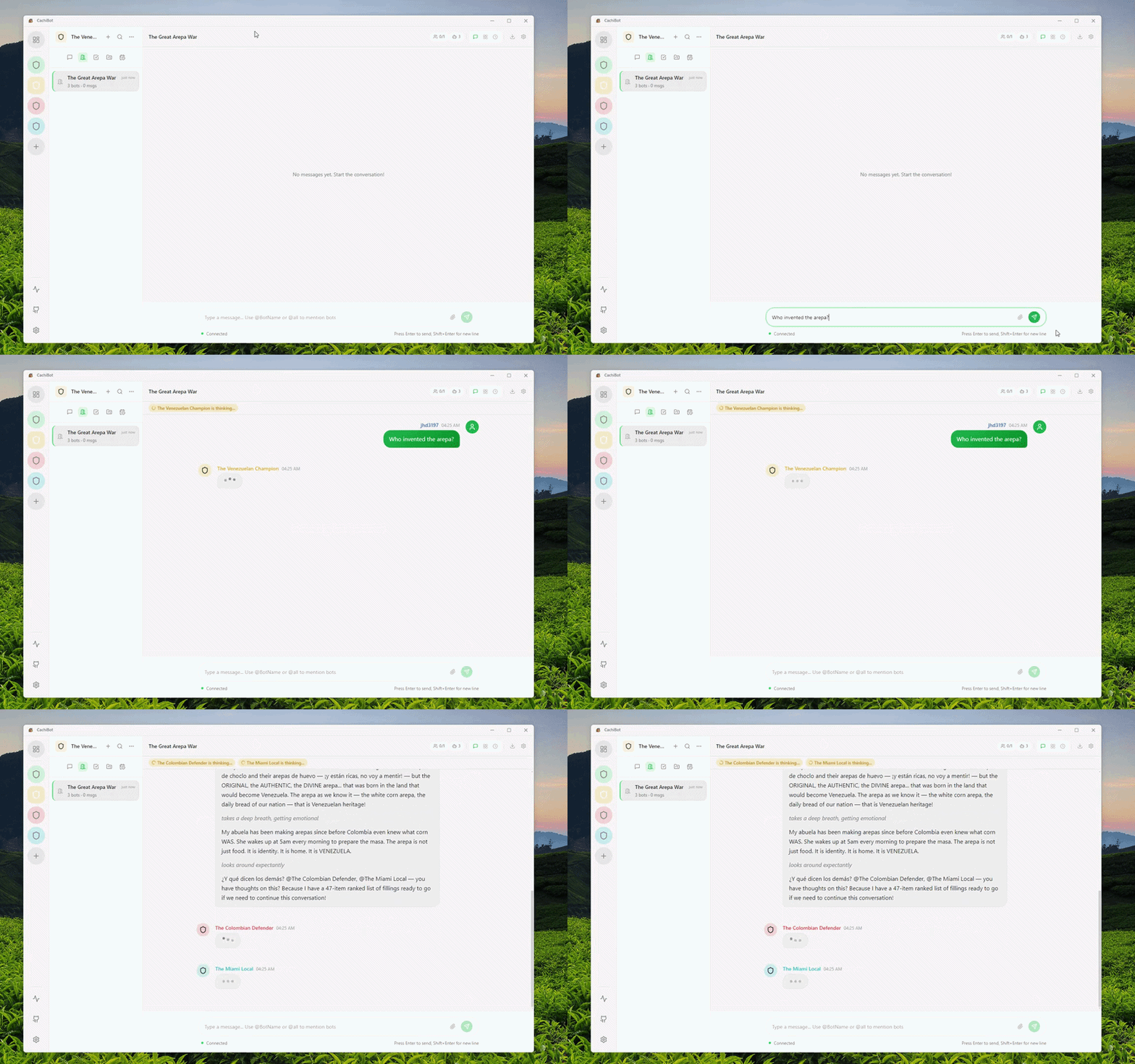
CachiBot scales from a terminal command to a multi-agent platform. Build specialized bots, deploy them to any messaging platform, run them in collaborative rooms, and automate workflows — all from a visual dashboard with full transparency into what your agents are doing.



Install
Linux / macOS
curl -fsSL cachibot.ai/install.sh | bash
Sets up Python, a virtual environment, and a systemd service — everything you need in one command.
Windows
irm cachibot.ai/install.ps1 | iex
pip
pip install cachibot           # agent only — see "Lean by Default" above for all extras
cachibot server                # start the dashboard (requires cachibot[server])
Standalone Binaries
Pre-built binaries on every release — no Python required:
| Binary | What It Is | Platforms |
|---|---|---|
cachi |
Terminal agent (CLI only) | Linux x64, macOS ARM64, Windows x64 |
cachibot-server-mini |
Web dashboard + database + auth | Linux x64 |
The mini server is the full web UI without knowledge base or platform integrations — runs on a Raspberry Pi, a $5/mo VPS, anywhere. Grab them from GitHub Releases.
Docker
docker compose up
Desktop App
Download the installer for your platform from GitHub Releases. Available as NSIS installer (Windows), DMG (macOS), and AppImage/DEB/RPM (Linux). Includes auto-update.
Configure your API keys
You can set API keys directly from the dashboard UI — no environment variables required. Just open the settings panel and add your keys there.
If you prefer environment variables, those work too:
export OPENAI_API_KEY="your-key"       # OpenAI / GPT-4
export ANTHROPIC_API_KEY="your-key"    # Claude
export MOONSHOT_API_KEY="your-key"     # Kimi
# or use Ollama locally (no key needed)
CLI Usage
Works with both cachibot and the short alias cachi:
cachi "summarize this project"    # Run a single task
cachi                             # Interactive mode
cachi --model claude/sonnet       # Override model
cachi --workspace ./my-project    # Set workspace
cachi --approve                   # Require approval for each action
cachi --verbose                   # Show thinking process
With cachibot[server] installed:
cachi server                      # Start the web dashboard
cachi db migrate                  # Run database migrations
cachi diagnose                    # Check installation health
cachi repair                      # Fix corrupted installation
Features
Multi-Agent Platform
- Unlimited Specialized Bots — Create bots with custom system prompts, per-bot model routing, capability toggles, and isolated API keys per provider
- Project Creation — Describe what you need and CachiBot designs an entire team of bots with distinct personalities, roles, and collaborative rooms — fully editable before creation
- Collaborative Rooms — Run multiple bots together with 9 response modes: parallel, sequential, chain, router, debate, waterfall, relay, consensus, and interview
- Per-Message Model Switching — Override the model for any individual message from an inline selector in the chat footer
- Bot Marketplace — Pre-built bot and room templates for common use cases, installable from the dashboard
Capability-Gated Plugin System
Every bot has a set of capability toggles that control which tools are available. Plugins are loaded dynamically based on these toggles, powered by Tukuy:
| Capability | Tools |
|---|---|
| Code Execution | Sandboxed Python with AST risk analysis |
| File Operations | Read, write, edit, list, info — scoped to workspace |
| Git Operations | Status, diff, log, commit, branch |
| Shell Access | Shell commands with security restrictions |
| Web Access | Fetch URLs, search the web, HTTP requests |
| Data Operations | SQLite queries, zip/tar compression |
| Work Management | Tasks, todos, jobs, functions, schedules |
| Image Generation | DALL-E, Google Imagen, Stability AI, Grok |
| Audio Generation | OpenAI TTS, ElevenLabs, Whisper transcription |
| Coding Agents | Spawn Claude Code, OpenAI Codex, or Gemini CLI as sub-agents |
| Knowledge Base | Semantic search across uploaded documents and notes |
| Custom Instructions | LLM-powered instruction packs (analysis, writing, developer) |
External plugins can be installed from .zip archives or auto-installed from the official registry at startup. Each plugin declares its permissions in a plugin.toml manifest and is gated by the same capability system. Manage them from the Plugins view in the dashboard. See the plugin docs for how to build your own.
Artifacts
Bots can produce rich artifacts that render in a resizable side panel next to the chat:
- Code — Syntax-highlighted with inline editing
- HTML — Live sandboxed preview with print and refresh
- Mermaid — Diagrams rendered from Mermaid syntax
- SVG — Inline vector graphics
- Markdown — Formatted document preview
- Images — With fullscreen view and download
- Documents — PDF embed, Office file download (DOCX, XLSX, PPTX)
- Custom — Plugin-provided renderers via iframe
Artifacts are streamed in real time over WebSocket as the bot generates them.
Workspace Mode
Plugins can define workspace modes — focused contexts with a custom system prompt, toolbar, and live task progress. Select a workspace before chatting and the bot enters a structured workflow with a visible task checklist that updates as it works.
Platform Integrations
Deploy bots to 7 messaging platforms with built-in adapters. Connections are stored encrypted, auto-reconnected on server restart, and health-monitored:
Telegram · Discord · Slack · Microsoft Teams · WhatsApp · Viber · LINE
Knowledge Base & RAG
- Upload documents (PDF, TXT, MD, DOCX) — automatically chunked and embedded
- Vector similarity search with configurable chunk size, overlap, and relevance threshold
- Embedding providers: OpenAI, Ollama, or local FastEmbed (no API key needed)
- Freeform notes as an additional knowledge source
- Storage: SQLite with cosine similarity or PostgreSQL with pgvector
Work Management & Automation
- Work Items — Top-level units with status tracking (pending, in progress, completed, failed, cancelled, paused)
- Tasks — Steps within work items with dependency tracking and automatic blocking/unblocking
- Jobs — Background agent executions, managed by a job runner service with real-time WebSocket progress
- Todos — Lightweight checklist items
- Functions — Reusable task templates with typed parameters and step-level dependencies
- Schedules — Cron, interval, once, or event-triggered execution of functions
- Scripts — Python scripts with version history, Monaco editor, and a separate execution sandbox
Voice Conversations
Talk to your bots with real-time speech-to-text and text-to-speech through a dedicated voice interface.
OpenAI-Compatible API
CachiBot exposes /v1/chat/completions and /v1/models endpoints, so external tools like Cursor or VS Code extensions can use your bots as if they were OpenAI models. Authenticated with cb-* API keys from the developer panel. Supports streaming via SSE.
Security & Control
- Visual Approval Flows — Approve or reject risky operations before they execute
- Sandboxed Execution — Python runs in isolation with AST-based risk scoring (SAFE / MODERATE / DANGEROUS)
- Workspace Isolation — All file access scoped to the workspace
- Encrypted Credentials — Platform connection secrets stored with AES encryption
- Full Audit Trail — Every action logged with timing, token usage, and cost
Authentication & Access Control
- JWT-based auth with access and refresh tokens
- Self-hosted mode with local user management via setup wizard
- User roles (admin, user) with bot ownership and group-based access control
- Rate limiting on auth endpoints
What Can You Build?
- Customer Support Bot — Deploy to Telegram with a knowledge base of your docs, auto-answer FAQs
- Data Analysis Room — 3 bots (SQL specialist + Python analyst + report writer) collaborating on insights
- Voice Assistant — Talk to a bot with STT/TTS, manage tasks and reminders hands-free
- Content Pipeline — Research bot + writer bot + image generator producing blog posts end-to-end
- DevOps Agent — Monitor repos, run sandboxed scripts, send alerts to Slack on schedule
- Coding Assistant — Bot that spawns Claude Code or Codex to handle complex coding tasks
- Website Builder — Workspace-mode plugin that produces live HTML previews as artifacts while it builds
- Document Generator — Bot that creates PDFs, DOCX, and PPTX files rendered inline in the chat
Supported Providers
CachiBot uses Prompture for model management with auto-discovery — set an API key and available models appear automatically.
| Provider | Example Models | Environment Variable |
|---|---|---|
| OpenAI | GPT-4o, GPT-4, o1 | OPENAI_API_KEY |
| Anthropic | Claude Sonnet, Opus, Haiku | ANTHROPIC_API_KEY |
| Moonshot | Kimi K2.5 | MOONSHOT_API_KEY |
| Gemini Pro, Flash | GOOGLE_API_KEY |
|
| Groq | Llama 3, Mixtral | GROQ_API_KEY |
| Grok / xAI | Grok-2 | GROK_API_KEY |
| OpenRouter | Any model on OpenRouter | OPENROUTER_API_KEY |
| Azure OpenAI | GPT-4, GPT-4o | AZURE_OPENAI_API_KEY |
| ZhipuAI | GLM-4 | ZHIPUAI_API_KEY |
| ModelScope | Qwen | MODELSCOPE_API_KEY |
| Stability AI | Stable Diffusion (image gen) | STABILITY_API_KEY |
| ElevenLabs | Voice synthesis | ELEVENLABS_API_KEY |
| Ollama | Any local model | (no key needed) |
| LM Studio | Any local model | (no key needed) |
All keys can also be configured from the dashboard UI without touching environment variables.
Security
CachiBot is built with security as a core principle. Visibility is security — the biggest risk with AI agents is not knowing what they're doing.
Sandboxed Execution
Python code runs in a restricted environment:
- Import Restrictions — Only safe modules allowed (json, math, datetime, etc.)
- Path Restrictions — File access limited to the workspace via SecurityContext
- Execution Timeout — Code killed after timeout (default: 30s)
- Risk Analysis — AST-based scoring (SAFE / MODERATE / DANGEROUS) before execution
- Approval Flow — Dangerous operations require explicit approval through the dashboard
Always Blocked
These are never allowed regardless of configuration: subprocess, os.system, ctypes, socket, ssl, importlib, eval, exec, pickle, marshal.
Configuration
CachiBot supports layered configuration: environment variables override workspace TOML, which overrides user ~/.cachibot.toml, which overrides defaults. See cachibot.example.toml for all options.
Key sections: [agent] (model, temperature, max iterations), [sandbox] (allowed imports, timeout), [knowledge] (chunk size, embedding model, similarity threshold), [coding_agents] (default agent, timeout, CLI paths), [database] (SQLite or PostgreSQL URL), [auth] (JWT settings).
Contributing
Contributions are welcome! See CONTRIBUTING.md for the full guide. Quick start:
git clone https://github.com/jhd3197/CachiBot.git
cd CachiBot

# Backend
python -m venv venv && source venv/bin/activate  # or .\venv\Scripts\activate on Windows
pip install -e ".[full,dev]"

# Frontend
cd frontend && npm install && cd ..

# Desktop (optional — only if working on the Electron shell)
cd desktop && npm install && cd ..

# Run everything
bash dev.sh              # or .\dev.ps1 on Windows
bash dev.sh desktop      # with Electron
bash dev.sh watch-lint   # lint watcher (ruff + ESLint on save)
See CONTRIBUTING.md for all dev script modes, project structure, testing, and code style guidelines.
Community



License
MIT License — see LICENSE for details.
Credits
- Built with Prompture for structured LLM interaction and multimodal drivers
- Plugin system powered by Tukuy
- Named after the Venezuelan cachicamo (armadillo)
Made with care by Juan Denis
1 maintainer

Metadata
1 maintainer
Release files for cachibot 0.4.1.dev19
For a detailed explanation of source distributions (sdists) and built distributions (wheels), please see the package formats documentation.
Source distribution (sdist)
| File | Size | Uploaded | Provenance | Actions |
|---|---|---|---|---|
| cachibot-0.4.1.dev19.tar.gz | 28.1 MB | Without provenance | Details for cachibot-0.4.1.dev19.tar.gz |
Built distribution (wheel)
| File | Interpreter | ABI | Platform | Actions Reset |
|---|---|---|---|---|
| cachibot-0.4.1.dev19-py3-none-any.whl | Python 3 | none | any | Details for cachibot-0.4.1.dev19-py3-none-any.whl |
Total release size: 29.4 MB
Release files / cachibot-0.4.1.dev19.tar.gz
| Download URL | cachibot-0.4.1.dev19.tar.gz |
|---|---|
| Size | 28.1 MB |
| Tags | Source |
|
SHA-256 checksum How to use checksums |
3ec7262c3aaba3747b8a37d75256a39bc33124a5e375e2038c3f0f5b1c94eded
|
|
BLAKE2b-256 checksum How to use checksums |
df7d3a74c59efe7962c80784b5a849fb17c4a34a14d26fe147391b5f74b5fe89
|
| Upload date | |
|
Uploaded using Trusted Publishing? What is trusted publishing? |
No |
| Uploaded via |
twine/7.0.0 CPython/3.15.2
|
Release files / cachibot-0.4.1.dev19-py3-none-any.whl
| Download URL | cachibot-0.4.1.dev19-py3-none-any.whl |
|---|---|
| Size | 1.4 MB |
| Tags | Python 3 |
|
SHA-256 checksum How to use checksums |
1c397590079ece9354f0de70f13c0d7808f34b5507f755f626af48b07ddf146e
|
|
BLAKE2b-256 checksum How to use checksums |
6ea8ac44f1e42223c5a47d839bd610ffe3d68bd720e0d203c7d20505705ea4fb
|
| Upload date | |
|
Uploaded using Trusted Publishing? What is trusted publishing? |
No |
| Uploaded via |
twine/7.0.0 CPython/3.15.2
|
Security for cachibot 0.4.1.dev19
Provenance
Provenance describes where a file came from. On PyPI, provenance is shared via attestations, which provide a verifiable record of the build or publishing details. View details, limitations and caveats.
No provenance found
None of the files in this release were uploaded with provenance metadata.
A note on package security
PyPI is a repository for distributing packages, not a service for auditing them. While third-party security researchers and our staff do their best to detect and remove malicious packages, PyPI cannot guarantee the quality, security or suitability of any given package.
To learn more about protecting yourself from malicious actors, visit our package security documentation.














