
CadCore
CadCore is a standalone agentic pipeline that translates natural language descriptions into parametric 3D CAD models (.step, .stl), 2D technical drawings (.svg), and interactive 3D Web Viewers (.html) with an automated self-healing execution loop.
Blog post: CadCore: Agentic CAD builder
Architecture
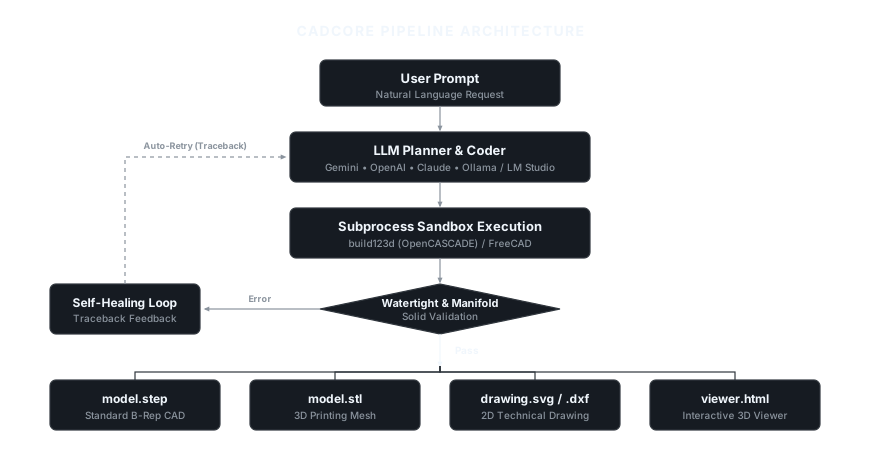
View Mermaid Flowchart Definition
flowchart TD
    User("User Prompt<br/>(Natural Language)") --> LLM("LLM Planner & Coder<br/>(Gemini / OpenAI / Anthropic / Ollama)")
    LLM --> Code("Generated Parametric Script<br/>(build123d / FreeCAD)")
    Code --> Sandbox("Subprocess Sandbox Executor")
    Sandbox --> Validate{"Execution & Solid Validation"}

    Validate -- "Error / Invalid Solid" --> Heal("Self-Healing Feedback<br/>(Traceback + Code Context)")
    Heal -->|"Retry (Up to max_retries)"| LLM

    Validate -- "Success" --> Exporter("Multi-Format Exporter")

    Exporter --> STEP("model.step<br/>(Standard B-Rep CAD)")
    Exporter --> STL("model.stl<br/>(3D Printing Mesh)")
    Exporter --> SVG("drawing.svg<br/>(2D Technical Drawing)")
    Exporter --> HTML("viewer.html<br/>(Interactive 3D Web Viewer)")
    Exporter --> META("cadcore_meta.json<br/>(Metrics & Metadata)")

    classDef prompt fill:#1e293b,stroke:#38bdf8,stroke-width:2px,color:#f8fafc;
    classDef llm fill:#1e1b4b,stroke:#818cf8,stroke-width:2px,color:#f8fafc;
    classDef script fill:#0f172a,stroke:#94a3b8,stroke-width:2px,color:#f8fafc;
    classDef decision fill:#172554,stroke:#60a5fa,stroke-width:2px,color:#f8fafc;
    classDef healing fill:#451a03,stroke:#f59e0b,stroke-width:2px,color:#f8fafc;
    classDef exporter fill:#064e3b,stroke:#10b981,stroke-width:2px,color:#f8fafc;
    classDef artifact fill:#0c4a6e,stroke:#38bdf8,stroke-width:1.5px,color:#f8fafc;

    class User prompt;
    class LLM llm;
    class Code,Sandbox script;
    class Validate decision;
    class Heal healing;
    class Exporter exporter;
    class STEP,STL,SVG,HTML,META artifact;
Key Features
- Multi-Backend CAD Support:
build123d(Default): Modern OpenCASCADE-based Pythonic CAD engine. Fast, headless, and runs in pure Python.freecad: Executes native FreeCAD scripts headlessly viaFreeCADCmd.
- Pluggable LLM Providers: Built-in support for Google Gemini (
google-genai), OpenAI / Ollama (openai), Anthropic (anthropic), and offlinemocktesting. - Self-Healing Loop: Captures runtime errors, missing imports, or invalid topology, then sends tracebacks back to the LLM for automatic correction.
- Multi-Format Export: Generates STEP files for CAD exchange, STL meshes for 3D printing, SVG for 2D engineering drawings, and standalone HTML 3D viewers.
- Geometric Validation: Analyzes exported meshes for volume, bounding box dimensions, and watertight manifold status.
Installation
Prerequisites
- Python 3.10, 3.11, or 3.12 (Python 3.11 recommended).
- Optional: FreeCAD 0.20+ if using the FreeCAD backend.
1. From PyPI
pip install cadcore-ai
2. From Source
# Clone repository
git clone https://github.com/kXborg/CadCore.git
cd CadCore

# Create and activate virtual environment
python -m venv .venv
.\.venv\Scripts\activate     # On Windows
# source .venv/bin/activate  # On Linux/macOS

# Install dependencies in editable mode
pip install -e .
Configuration
1. Interactive Setup Wizard (Recommended)
Run the guided configuration wizard to select your provider, input API keys, or configure local endpoints (LM Studio / Ollama):
cadcore configure
Settings are saved automatically to your user profile (~/.cadcore/.env) or local directory.
2. Manual Environment Variables
Alternatively, export credentials in your shell or .env file:
# Google Gemini (Default)
export GEMINI_API_KEY="your-gemini-key"

# OpenAI / GPT-4o
export OPENAI_API_KEY="your-openai-key"

# Anthropic Claude
export ANTHROPIC_API_KEY="your-anthropic-key"

# Local LLM (LM Studio / Ollama)
export OPENAI_BASE_URL="http://localhost:1234/v1"
CLI Usage
CadCore provides a CLI interface through cadcore or python -m cadcore.
1. Check Supported Backends
python -m cadcore list-backends
2. Generate a CAD Part
python -m cadcore generate "NEMA 17 stepper motor mount plate 42x42mm with central 22mm hole and 4 corner M3 holes at 31mm spacing" --output ./outputs/nema17
3. Generate and Open Interactive 3D Viewer
python -m cadcore generate "L-bracket 50x50x25mm with 4mm thickness and 2 M5 mounting holes on each leg" --output ./outputs/l_bracket --view
4. CLI Options Reference
Arguments:
  PROMPT                       Natural language description of the CAD model.

Options:
  -o, --output PATH            Directory to save generated artifacts. [default: ./output]
  -b, --backend [build123d|freecad]
                               CAD engine backend. [default: build123d]
  -p, --provider [gemini|openai|anthropic|ollama|mock]
                               LLM Provider. [default: gemini]
  -m, --model TEXT             LLM model identifier override.
  -r, --retries INTEGER        Maximum self-healing retry attempts. [default: 3]
  -v, --view                   Open 3D interactive viewer in browser upon completion.
Python API Usage
CadCore can be embedded directly into Python workflows:
from pathlib import Path
from cadcore.config import PipelineConfig, CADBackendType, LLMConfig, LLMProvider
from cadcore.pipeline import CADAgentPipeline

# Configure pipeline
config = PipelineConfig(
    backend=CADBackendType.BUILD123D,
    output_dir=Path("./outputs/flange"),
    max_retries=2,
    export_step=True,
    export_stl=True,
    export_svg=True,
    generate_viewer=True,
    llm=LLMConfig(
        provider=LLMProvider.GEMINI,
        model="gemini-2.5-flash",
    ),
)

# Run pipeline
pipeline = CADAgentPipeline(config)
result = pipeline.run("Round pipe flange 60mm OD, 30mm ID, 8mm thickness with 4 bolt holes of 5mm diameter")

if result.success:
    print(f"Generated successfully in {result.execution_time_seconds:.2f}s ({result.iterations} attempt(s))")
    print(f"STEP: {result.artifacts['model.step']}")
    print(f"STL:  {result.artifacts['model.stl']}")
    print(f"SVG:  {result.artifacts['drawing.svg']}")
    print(f"3D Viewer: {result.artifacts['viewer.html']}")
    print(f"Volume: {result.metrics.get('volume_mm3')} mm³")
else:
    print(f"Generation failed: {result.error_message}")
Repository Structure
CadCore/
├── cadcore/
│   ├── __init__.py
│   ├── __main__.py          # Entrypoint for python -m cadcore
│   ├── cli.py               # Typer & Rich CLI
│   ├── config.py            # Configuration & provider settings
│   ├── executor.py          # Subprocess sandbox & trimesh validation
│   ├── pipeline.py          # Orchestrator & self-healing loop
│   ├── viewer.py            # Three.js 3D/2D HTML viewer generator
│   ├── backends/
│   │   ├── base.py          # Abstract CADBackend
│   │   ├── build123d_backend.py
│   │   └── freecad_backend.py
│   └── llm/
│       ├── client.py        # Pluggable LLM clients
│       └── prompts.py       # CAD prompts & few-shot examples
├── examples/
│   └── basic_pipeline_demo.py
├── tests/
│   └── test_pipeline.py
├── pyproject.toml
├── requirements.txt
└── README.md
Testing
Run the test suite with pytest:
pytest tests/ -v
License
MIT License.
1 maintainer

Metadata
1 maintainer
Release files for cadcore-ai 0.1.4
For a detailed explanation of source distributions (sdists) and built distributions (wheels), please see the package formats documentation.
Source distribution (sdist)
| File | Size | Uploaded | |
|---|---|---|---|
| cadcore_ai-0.1.4.tar.gz | 30.4 kB | Details |
Built distribution (wheel)
| File | Interpreter | ABI | Platform | Reset |
|---|---|---|---|---|
| cadcore_ai-0.1.4-py3-none-any.whl | Python 3 | none | any | Details |
Total release size: 61.0 kB
Release files / cadcore_ai-0.1.4.tar.gz
| Download URL | cadcore_ai-0.1.4.tar.gz |
|---|---|
| Size | 30.4 kB |
| Tags | Source |
|
SHA-256 checksum How to use checksums |
aff8d1d5ca5fa80ced025ec4f7002fbbb0c2cc9011b3f90cf437fc1e6923cf78
|
|
BLAKE2b-256 checksum How to use checksums |
cbf13bf786a2ee5cf2f9dc6a01e020cefc33dc4e7c7609fb69047b2c4596357b
|
| Upload date | |
|
Uploaded using Trusted Publishing? What is trusted publishing? |
No |
| Uploaded via |
twine/7.0.0 CPython/3.11.14
|
Release files / cadcore_ai-0.1.4-py3-none-any.whl
| Download URL | cadcore_ai-0.1.4-py3-none-any.whl |
|---|---|
| Size | 30.6 kB |
| Tags | Python 3 |
|
SHA-256 checksum How to use checksums |
1ad11a312dfd30bc4766d08b7627e055a1bb88cad7c707241c019d04f25954a9
|
|
BLAKE2b-256 checksum How to use checksums |
a72b9473e8f2a54cac3f744923a66301c1692ec7844494512339ddbba97d9c5f
|
| Upload date | |
|
Uploaded using Trusted Publishing? What is trusted publishing? |
No |
| Uploaded via |
twine/7.0.0 CPython/3.11.14
|














