
CadCore
CadCore is a standalone agentic pipeline that translates natural language descriptions into parametric 3D CAD models (.step, .stl), 2D technical drawings (.svg), and interactive 3D Web Viewers (.html) with an automated self-healing execution loop.
Blog post: CadCore: Agentic CAD builder
Architecture
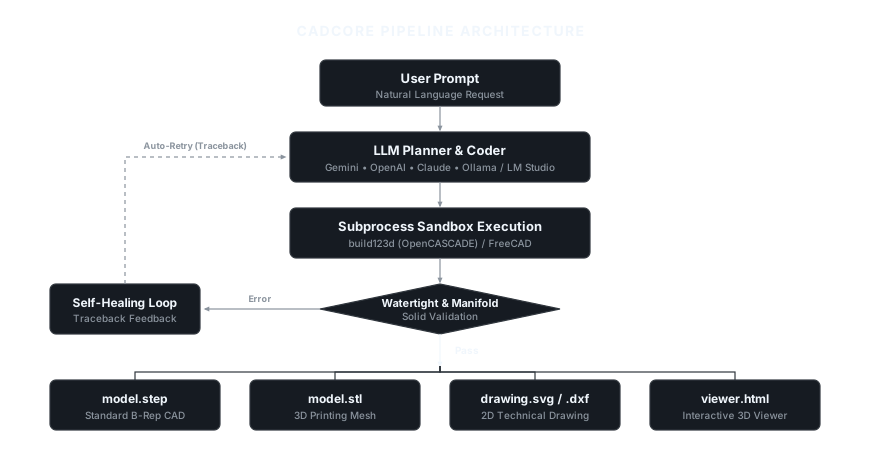
View Mermaid Flowchart Definition
flowchart TD
    User("User Prompt<br/>(Natural Language)") --> LLM("LLM Planner & Coder<br/>(Gemini / OpenAI / Anthropic / Ollama)")
    LLM --> Code("Generated Parametric Script<br/>(build123d / FreeCAD)")
    Code --> Sandbox("Subprocess Sandbox Executor")
    Sandbox --> Validate{"Execution & Solid Validation"}

    Validate -- "Error / Invalid Solid" --> Heal("Self-Healing Feedback<br/>(Traceback + Code Context)")
    Heal -->|"Retry (Up to max_retries)"| LLM

    Validate -- "Success" --> Exporter("Multi-Format Exporter")

    Exporter --> STEP("model.step<br/>(Standard B-Rep CAD)")
    Exporter --> STL("model.stl<br/>(3D Printing Mesh)")
    Exporter --> SVG("drawing.svg<br/>(2D Technical Drawing)")
    Exporter --> HTML("viewer.html<br/>(Interactive 3D Web Viewer)")
    Exporter --> META("cadcore_meta.json<br/>(Metrics & Metadata)")

    classDef prompt fill:#1e293b,stroke:#38bdf8,stroke-width:2px,color:#f8fafc;
    classDef llm fill:#1e1b4b,stroke:#818cf8,stroke-width:2px,color:#f8fafc;
    classDef script fill:#0f172a,stroke:#94a3b8,stroke-width:2px,color:#f8fafc;
    classDef decision fill:#172554,stroke:#60a5fa,stroke-width:2px,color:#f8fafc;
    classDef healing fill:#451a03,stroke:#f59e0b,stroke-width:2px,color:#f8fafc;
    classDef exporter fill:#064e3b,stroke:#10b981,stroke-width:2px,color:#f8fafc;
    classDef artifact fill:#0c4a6e,stroke:#38bdf8,stroke-width:1.5px,color:#f8fafc;

    class User prompt;
    class LLM llm;
    class Code,Sandbox script;
    class Validate decision;
    class Heal healing;
    class Exporter exporter;
    class STEP,STL,SVG,HTML,META artifact;
Key Features
- Multi-Backend CAD Support:
build123d(Default): Modern OpenCASCADE-based Pythonic CAD engine. Fast, headless, and runs in pure Python.freecad: Executes native FreeCAD scripts headlessly viaFreeCADCmd.
- Pluggable LLM Providers: Built-in support for Google Gemini (
google-genai), OpenAI / Ollama (openai), Anthropic (anthropic), and offlinemocktesting. - Self-Healing Loop: Captures runtime errors, missing imports, or invalid topology, then sends tracebacks back to the LLM for automatic correction.
- Multi-Format Export: Generates STEP files for CAD exchange, STL meshes for 3D printing, SVG for 2D engineering drawings, and standalone HTML 3D viewers.
- Geometric Validation: Analyzes exported meshes for volume, bounding box dimensions, and watertight manifold status.
Installation
Prerequisites
- Python 3.10, 3.11, or 3.12 (Python 3.11 recommended).
- Optional: FreeCAD 0.20+ if using the FreeCAD backend.
1. From PyPI
pip install cadcore-ai
2. From Source
# Clone repository
git clone https://github.com/kXborg/CadCore.git
cd CadCore

# Create and activate virtual environment
python -m venv .venv
.\.venv\Scripts\activate     # On Windows
# source .venv/bin/activate  # On Linux/macOS

# Install dependencies in editable mode
pip install -e .
Configuration
1. Interactive Setup Wizard (Recommended)
Run the guided configuration wizard to select your provider, input API keys, or configure local endpoints (LM Studio / Ollama):
cadcore configure
Settings are saved automatically to your user profile (~/.cadcore/.env) or local directory.
2. Manual Environment Variables
Alternatively, export credentials in your shell or .env file:
# Google Gemini (Default)
export GEMINI_API_KEY="your-gemini-key"

# OpenAI / GPT-4o
export OPENAI_API_KEY="your-openai-key"

# Anthropic Claude
export ANTHROPIC_API_KEY="your-anthropic-key"

# Local LLM (LM Studio / Ollama)
export OPENAI_BASE_URL="http://localhost:1234/v1"
CLI Usage
CadCore provides a CLI interface through cadcore or python -m cadcore.
1. Check Supported Backends
python -m cadcore list-backends
2. Generate a CAD Part
python -m cadcore generate "NEMA 17 stepper motor mount plate 42x42mm with central 22mm hole and 4 corner M3 holes at 31mm spacing" --output ./outputs/nema17
3. Generate and Open Interactive 3D Viewer
python -m cadcore generate "L-bracket 50x50x25mm with 4mm thickness and 2 M5 mounting holes on each leg" --output ./outputs/l_bracket --view
4. CLI Options Reference
Arguments:
  PROMPT                       Natural language description of the CAD model.

Options:
  -o, --output PATH            Directory to save generated artifacts. [default: ./output]
  -b, --backend [build123d|freecad]
                               CAD engine backend. [default: build123d]
  -p, --provider [gemini|openai|anthropic|ollama|mock]
                               LLM Provider. [default: gemini]
  -m, --model TEXT             LLM model identifier override.
  -r, --retries INTEGER        Maximum self-healing retry attempts. [default: 3]
  -v, --view                   Open 3D interactive viewer in browser upon completion.
Python API Usage
CadCore can be embedded directly into Python workflows:
from pathlib import Path
from cadcore.config import PipelineConfig, CADBackendType, LLMConfig, LLMProvider
from cadcore.pipeline import CADAgentPipeline

# Configure pipeline
config = PipelineConfig(
    backend=CADBackendType.BUILD123D,
    output_dir=Path("./outputs/flange"),
    max_retries=2,
    export_step=True,
    export_stl=True,
    export_svg=True,
    generate_viewer=True,
    llm=LLMConfig(
        provider=LLMProvider.GEMINI,
        model="gemini-2.5-flash",
    ),
)

# Run pipeline
pipeline = CADAgentPipeline(config)
result = pipeline.run("Round pipe flange 60mm OD, 30mm ID, 8mm thickness with 4 bolt holes of 5mm diameter")

if result.success:
    print(f"Generated successfully in {result.execution_time_seconds:.2f}s ({result.iterations} attempt(s))")
    print(f"STEP: {result.artifacts['model.step']}")
    print(f"STL:  {result.artifacts['model.stl']}")
    print(f"SVG:  {result.artifacts['drawing.svg']}")
    print(f"3D Viewer: {result.artifacts['viewer.html']}")
    print(f"Volume: {result.metrics.get('volume_mm3')} mm³")
else:
    print(f"Generation failed: {result.error_message}")
Repository Structure
CadCore/
├── cadcore/
│   ├── __init__.py
│   ├── __main__.py          # Entrypoint for python -m cadcore
│   ├── cli.py               # Typer & Rich CLI
│   ├── config.py            # Configuration & provider settings
│   ├── executor.py          # Subprocess sandbox & trimesh validation
│   ├── pipeline.py          # Orchestrator & self-healing loop
│   ├── viewer.py            # Three.js 3D/2D HTML viewer generator
│   ├── backends/
│   │   ├── base.py          # Abstract CADBackend
│   │   ├── build123d_backend.py
│   │   └── freecad_backend.py
│   └── llm/
│       ├── client.py        # Pluggable LLM clients
│       └── prompts.py       # CAD prompts & few-shot examples
├── examples/
│   └── basic_pipeline_demo.py
├── tests/
│   └── test_pipeline.py
├── pyproject.toml
├── requirements.txt
└── README.md
Testing
Run the test suite with pytest:
pytest tests/ -v
License
MIT License.
1 maintainer

Download files
Download the file for your platform. If you're not sure which to choose, learn more about installing packages.
Source Distribution
Built Distribution
Filter files by name, interpreter, ABI, and platform.
If you're not sure about the file name format, learn more about wheel file names.
Copy a direct link to the current filters
File details
Details for the file cadcore_ai-0.1.2.tar.gz.
File metadata
- Download URL: cadcore_ai-0.1.2.tar.gz
- Upload date:
- Size: 29.7 kB
- Tags: Source
- Uploaded using Trusted Publishing? No
- Uploaded via:
twine/7.0.0 CPython/3.11.14
File hashes
| Algorithm | Hash digest | |
|---|---|---|
| SHA256 |
1019853241163e64026c1f2a4230bbca06ae33beedee0eb998bf81d55eea2e62
|
|
| MD5 |
3b50c9b0ad39b1b67569e5abdae9c406
|
|
| BLAKE2b-256 |
5daab5ce67a75a40c36d28ec74b64e1d60df11c2831c75b06d937c000ca7d552
|
File details
Details for the file cadcore_ai-0.1.2-py3-none-any.whl.
File metadata
- Download URL: cadcore_ai-0.1.2-py3-none-any.whl
- Upload date:
- Size: 30.0 kB
- Tags: Python 3
- Uploaded using Trusted Publishing? No
- Uploaded via:
twine/7.0.0 CPython/3.11.14
File hashes
| Algorithm | Hash digest | |
|---|---|---|
| SHA256 |
67a970d4916827fd4b6fc9806a492fb89cae58e81321be7490212cbadf7ff650
|
|
| MD5 |
0057909588bfe4d5763bbba038e735cd
|
|
| BLAKE2b-256 |
4d36b4869a3ba187e15fef1a4bcf0d55686525095345c384023fab8be9df8a13
|







