
Web app for browsing, reading and downloading eBooks stored in a Calibre database.

Project description
About
Calibre-Web is a web app providing a clean interface for browsing, reading and downloading eBooks using an existing Calibre database.






This software is a fork of library and licensed under the GPL v3 License.
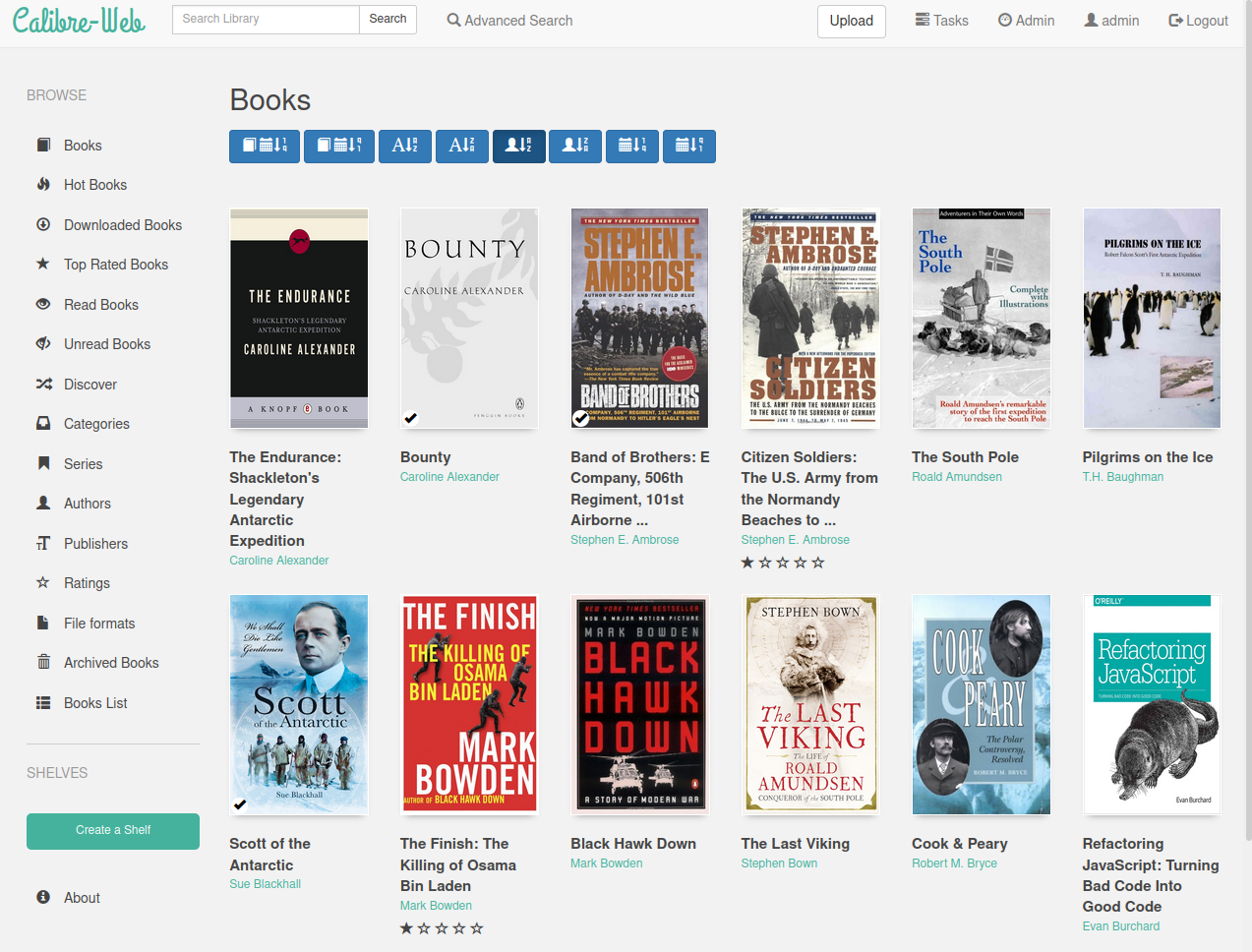
Features
- Bootstrap 3 HTML5 interface
- full graphical setup
- User management with fine-grained per-user permissions
- Admin interface
- User Interface in brazilian, czech, dutch, english, finnish, french, german, greek, hungarian, italian, japanese, khmer, polish, russian, simplified and traditional chinese, spanish, swedish, turkish, ukrainian
- OPDS feed for eBook reader apps
- Filter and search by titles, authors, tags, series and language
- Create a custom book collection (shelves)
- Support for editing eBook metadata and deleting eBooks from Calibre library
- Support for converting eBooks through Calibre binaries
- Restrict eBook download to logged-in users
- Support for public user registration
- Send eBooks to Kindle devices with the click of a button
- Sync your Kobo devices through Calibre-Web with your Calibre library
- Support for reading eBooks directly in the browser (.txt, .epub, .pdf, .cbr, .cbt, .cbz, .djvu)
- Upload new books in many formats, including audio formats (.mp3, .m4a, .m4b)
- Support for Calibre Custom Columns
- Ability to hide content based on categories and Custom Column content per user
- Self-update capability
- "Magic Link" login to make it easy to log on eReaders
- Login via LDAP, google/github oauth and via proxy authentication
Quick start
Install via pip
- Install calibre web via pip with the command
pip install calibreweb(Depending on your OS and or distro the command could also bepip3). - Optional features can also be installed via pip, please refer to this page for details
- Calibre-Web can be started afterwards by typing
cpsorpython3 -m cps
Manual installation
- Install dependencies by running
pip3 install --target vendor -r requirements.txt(python3.x). Alternativly set up a python virtual environment. - Execute the command:
python3 cps.py(ornohup python3 cps.py- recommended if you want to exit the terminal window)
Point your browser to http://localhost:8083 or http://localhost:8083/opds for the OPDS catalog
Set Location of Calibre database to the path of the folder where your Calibre library (metadata.db) lives, push "submit" button
Optionally a Google Drive can be used to host the calibre library -> Using Google Drive integration
Go to Login page
Default admin login:
Username: admin
Password: admin123
Issues with Ubuntu:
Please note that running the above install command can fail on some versions of Ubuntu, saying "can't combine user with prefix". This is a known bug and can be remedied by using the command pip install --system --target vendor -r requirements.txt instead.
Requirements
python 3.5+
Optionally, to enable on-the-fly conversion from one ebook format to another when using the send-to-kindle feature, or during editing of ebooks metadata:
Download and install the Calibre desktop program for your platform and enter the folder including program name (normally /opt/calibre/ebook-convert, or C:\Program Files\calibre\ebook-convert.exe) in the field "calibre's converter tool" on the setup page.
Download Kepubify tool for your platform and place the binary starting with kepubify in Linux: \opt\kepubify Windows: C:\Program Files\kepubify.
Docker Images
A pre-built Docker image is available in these Docker Hub repository (maintained by the LinuxServer team):
LinuxServer - x64, armhf, aarch64
-
Docker Hub - https://hub.docker.com/r/linuxserver/calibre-web
-
Github - (Optional Calibre layer) - https://github.com/linuxserver/docker-calibre-web/tree/calibre
This image has the option to pull in an extra docker manifest layer to include the Calibre
ebook-convertbinary. Just include the environmental variableDOCKER_MODS=linuxserver/calibre-web:calibrein your docker run/docker compose file. (x64 only)If you do not need this functionality then this can be omitted, keeping the image as lightweight as possible.
Both the Calibre-Web and Calibre-Mod images are rebuilt automatically on new releases of Calibre-Web and Calibre respectively, and on updates to any included base image packages on a weekly basis if required.
- The "path to convertertool" should be set to
/usr/bin/ebook-convert - The "path to unrar" should be set to
/usr/bin/unrar
- The "path to convertertool" should be set to
Contact
Just reach us out on Discord
For further information, How To's and FAQ please check the Wiki
Contributing to Calibre-Web
Please have a look at our Contributing Guidelines
Release history Release notifications | RSS feed


Download files
Download the file for your platform. If you're not sure which to choose, learn more about installing packages.
Source Distribution
Built Distribution
Filter files by name, interpreter, ABI, and platform.
If you're not sure about the file name format, learn more about wheel file names.
Copy a direct link to the current filters
File details
Details for the file calibreweb-0.6.14.tar.gz.
File metadata
- Download URL: calibreweb-0.6.14.tar.gz
- Upload date:
- Size: 5.9 MB
- Tags: Source
- Uploaded using Trusted Publishing? No
- Uploaded via: twine/3.3.0 pkginfo/1.7.0 requests/2.22.0 setuptools/51.3.1 requests-toolbelt/0.9.1 tqdm/4.56.0 CPython/3.8.10
File hashes
| Algorithm | Hash digest | |
|---|---|---|
| SHA256 |
f40cfe46cbba0786670490b4774a9cb36d02423c58a3400c8b5a0caddaac2258
|
|
| MD5 |
f51c6aa8bb0e0f6b3a8d9984b1faf964
|
|
| BLAKE2b-256 |
72c597b0369bcf58099380eef859b70b510314bf473ed05acf4109f373a079fe
|
File details
Details for the file calibreweb-0.6.14-py3-none-any.whl.
File metadata
- Download URL: calibreweb-0.6.14-py3-none-any.whl
- Upload date:
- Size: 6.7 MB
- Tags: Python 3
- Uploaded using Trusted Publishing? No
- Uploaded via: twine/3.3.0 pkginfo/1.7.0 requests/2.22.0 setuptools/51.3.1 requests-toolbelt/0.9.1 tqdm/4.56.0 CPython/3.8.10
File hashes
| Algorithm | Hash digest | |
|---|---|---|
| SHA256 |
ed2ca7f827fdb8729228ca536e474e2b30dce31f9a33e343bf5ac2b15d0c5ad2
|
|
| MD5 |
006e6f36bd86a16b46ae36d90ce1b294
|
|
| BLAKE2b-256 |
62529aafce83b9257a30f330ecab4ba5269e9a464de68c87a8042e3b67933416
|






