

Documentation | Tutorials | Discussions
Typical research workflows are horizontally-siloed, i.e., various stages--data collection, analysis, writing--are performed in disconnected systems, turning research into a slow, error-prone, and tedious waterfall process.
Calkit helps you integrate code, data, figures, results, publications, and more into a cohesive, traceable, and portable knowledge creation system, so every output can be traced back to its source (provenance) and reproduced with a single command.
With industry standard tools combined into a unified and simplified experience tailored for research, you can reap the rewards of reproducibility and automation without the cognitive overhead.

Features
- A simplified version control interface that unifies Git and DVC (Data Version Control), so everything can be kept in the same project repository. This way, code doesn't need to be siloed away from other important artifacts like datasets, models, figures, or article PDFs, allowing you to work on all parts of a project without hopping around to different tools.
- Computational environment management with support for many languages and environment managers: Conda, Docker, uv, Julia, Renv, and more. No need to create and update environments on your own. Calkit will handle them as needed.
- An environment-aware build system or pipeline with
a simple declarative syntax and
output caching so you don't need to think about which steps or stages
need to be rerun after changing any part of the project.
Simply call
calkit run. Compose your pipeline from many different kinds of stages, including simple scripts, commands, Jupyter Notebooks, LaTeX, and more. - A complementary self-hostable and GitHub-integrated hub to facilitate backup, collaboration, and sharing throughout the entire research lifecycle.
- Overleaf integration, so analysis, visualization, and writing can all stay in sync (no more manual uploads!)
- Support for running on high performance computing (HPC) systems that use PBS or SLURM schedulers.
- Support for automated running with GitHub Actions.
- Extensions for doing all of the above graphically in JupyterLab and VS Code.
- A browser extension for collecting references directly to BibTeX (optionally synced with Zotero), viewing DVC-stored files on GitHub, and syncing figures and results with Overleaf directly in Chrome, Microsoft Edge, and more.
Installation
On Linux, macOS, or Windows Git Bash, install Calkit and uv (if not already installed) with:
curl -LsSf install.calkit.org | sh
Or with Windows Command Prompt or PowerShell:
powershell -ExecutionPolicy ByPass -c "irm install-ps1.calkit.org | iex"
If you already have uv installed, install Calkit with:
uv tool install calkit-python
You can also install with your system Python:
pip install calkit-python
To effectively use Calkit, you'll want to ensure Git is installed and properly configured. You may also want to install Docker, since that is the default method by which LaTeX environments are created. If you want to use a Calkit hub for collaboration and backup as a DVC remote, you can connect to the hub with:
calkit hub login
If you use AI agents like Claude, Copilot, or Codex, see AI tools to learn how to install agent skills for working with Calkit.
Use without installing
If you want to use Calkit without installing it,
you can use uv's uvx command to run it directly:
uvx calk9 --help
Nix
Calkit ships a flake at the root of its repo, so Nix users can pull the CLI into their environments alongside their other tools.
Run it ad hoc without installing:
nix run github:calkit/calkit -- --help
Drop into a shell that has calkit, git, and uv on PATH:
nix shell github:calkit/calkit
Add it to your own flake.nix as an input:
{
  inputs.calkit.url = "github:calkit/calkit";
  inputs.nixpkgs.url = "github:NixOS/nixpkgs/nixos-unstable";

  outputs = { self, nixpkgs, calkit }: {
    devShells.x86_64-linux.default =
      nixpkgs.legacyPackages.x86_64-linux.mkShell {
        packages = [ calkit.packages.x86_64-linux.default ];
      };
  };
}
Then nix develop will give you a shell with the Calkit CLI ready to
use. To pin a specific Calkit release inside the shell, set the
CALKIT_VERSION environment variable (e.g. CALKIT_VERSION=0.41.0)
before invoking calkit.
The flake is currently a thin wrapper around uvx --from calkit-python calkit. It depends on uv from nixpkgs and fetches the published
wheel from PyPI on first use. This trades a fully Nix-native build for
zero version-drift maintenance, and avoids the macOS docx2pdf /
appscript and JupyterLab labextension build issues that block a pure
nixpkgs derivation today. If you want a fully nixpkgs-native build,
see the community calkit-nix
flake.
Nix isn't supported natively on Windows; run Calkit inside WSL2 and use the flake there.
Running against a specific version
If a project requires a Calkit version other than the one you have
installed, use the top-level --use-version flag to re-invoke the CLI
under that release without changing your installation:
calkit --use-version 0.38 run
This re-execs the CLI via uvx --from calkit-python@<version> calkit,
so it requires uv on PATH.
You can also declare a minimum version in calkit.yaml;
see
Pinning the Calkit CLI version.
Calkit Assistant
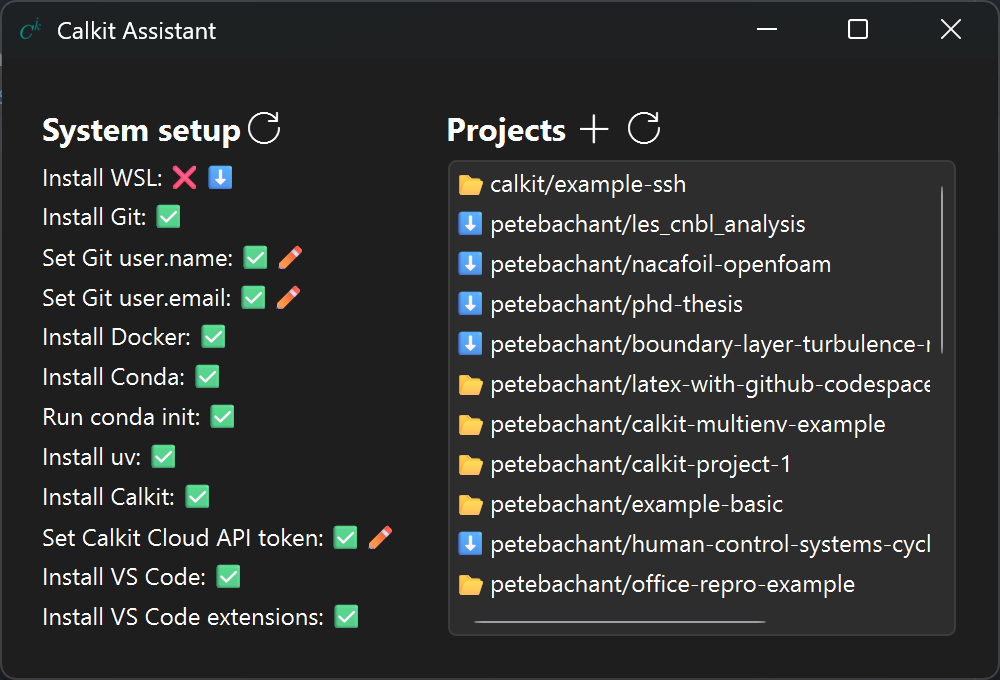
For Windows users, the Calkit Assistant app is the easiest way to get everything set up and ready to work in VS Code, which can then be used as the primary app for working on all scientific or analytical computing projects.
Quickstart
!!! note
ck is an abbreviated alias for the calkit executable.
All calkit commands can be run as ck instead, e.g., ck save -am "...".
From an existing project
If you want to use Calkit with an existing project,
navigate into its working directory and use the xr command to start
executing and recording your scripts, notebooks, LaTeX files, etc.,
as reproducible pipeline stages.
For example:
calkit xr scripts/analyze.py

calkit xr notebooks/plot.ipynb

calkit xr paper/main.tex
Calkit will attempt to detect environments, inputs, and outputs and
save them in calkit.yaml.
If successful,
you'll be able to run the full pipeline with:
calkit run
Next, make a change to e.g., a script and look at the output of
calkit status.
You'll see that the pipeline has a stage that is out-of-date:
---------------------------- Pipeline ----------------------------
analyze:
        changed deps:
                modified:           scripts/analyze.py
This can be fixed with another call to calkit run.
You can save (add and commit) all changes with:
calkit save -am "Add to pipeline"
Fresh from a Calkit project template
Create a new project from the
calkit/example-basic
template with:
calkit new project my-research \
    --title "My research" \
    --template calkit/example-basic \
    --hub
Note the --hub flag requires a hub connection
to be set up, but can be omitted if the project doesn't need to be backed up to
the hub or shared with collaborators.
Hub integration can also be set up later.
Next, move into the project folder and run the pipeline,
which consists of several stages defined in calkit.yaml:
cd my-research
calkit run
Next, make some edits to a script or LaTeX file and run calkit status to
see what stages are out-of-date.
For example:
---------------------------- Pipeline ----------------------------
build-paper:
        changed deps:
                modified:           paper/paper.tex
Execute calkit run again to bring everything up-to-date.
To back up or save the project, call:
calkit save -am "Run pipeline"
With an AI coding agent
Simply tell the AI agent:
Turn this folder into a Calkit project
or
Create me a new Calkit project for investigating...
Get involved
We welcome all kinds of contributions! See CONTRIBUTING.md to learn how to get involved.
Acknowledgements
Calkit is supported by the Caltech Schmidt Academy of Software Engineering.


1 maintainer

Download files
Download the file for your platform. If you're not sure which to choose, learn more about installing packages.
Source Distribution
Built Distribution
Filter files by name, interpreter, ABI, and platform.
If you're not sure about the file name format, learn more about wheel file names.
Copy a direct link to the current filters
File details
Details for the file calkit_python-0.43.0.tar.gz.
File metadata
- Download URL: calkit_python-0.43.0.tar.gz
- Upload date:
- Size: 24.1 MB
- Tags: Source
- Uploaded using Trusted Publishing? Yes
- Uploaded via:
twine/7.0.0 CPython/3.13.14
File hashes
| Algorithm | Hash digest | |
|---|---|---|
| SHA256 |
453afb9a2fde58d90130d86fe7c056a10f43e7927a8fa8ed1b512e5031e2af6d
|
|
| MD5 |
251b1e38b6035dd31c1c05b0f52e286d
|
|
| BLAKE2b-256 |
581182d40d3df78b805e61c8ede765eb90ee71efe04b3be7e081b28e595148a1
|
Provenance
The following attestation bundles were made for calkit_python-0.43.0.tar.gz:
Publisher:
publish.yml on calkit/calkit
-
Statement:
-
Statement type:
https://in-toto.io/Statement/v1 -
Predicate type:
https://docs.pypi.org/attestations/publish/v1 -
Subject name:
calkit_python-0.43.0.tar.gz -
Subject digest:
453afb9a2fde58d90130d86fe7c056a10f43e7927a8fa8ed1b512e5031e2af6d - Sigstore transparency entry: 2477430775
- Sigstore integration time:
-
Permalink:
calkit/calkit@2e4ecae679cc45f6333bd8d1943f2875dc69fb51 -
Branch / Tag:
refs/tags/v0.43.0 - Owner: https://github.com/calkit
-
Access:
public
-
Token Issuer:
https://token.actions.githubusercontent.com -
Runner Environment:
github-hosted -
Publication workflow:
publish.yml@2e4ecae679cc45f6333bd8d1943f2875dc69fb51 -
Trigger Event:
release
-
Statement type:
File details
Details for the file calkit_python-0.43.0-py3-none-any.whl.
File metadata
- Download URL: calkit_python-0.43.0-py3-none-any.whl
- Upload date:
- Size: 705.2 kB
- Tags: Python 3
- Uploaded using Trusted Publishing? Yes
- Uploaded via:
twine/7.0.0 CPython/3.13.14
File hashes
| Algorithm | Hash digest | |
|---|---|---|
| SHA256 |
2a2f1db15b42ea6308ef313d8538540d21384cd83ba8f431ba662900d5162f67
|
|
| MD5 |
ef76b32894804fcaa7d546e28a879862
|
|
| BLAKE2b-256 |
9ecaf45b7393a9e67d4291763edfcef38d1332b73b3ed6b2f9633e7a114221a8
|
Provenance
The following attestation bundles were made for calkit_python-0.43.0-py3-none-any.whl:
Publisher:
publish.yml on calkit/calkit
-
Statement:
-
Statement type:
https://in-toto.io/Statement/v1 -
Predicate type:
https://docs.pypi.org/attestations/publish/v1 -
Subject name:
calkit_python-0.43.0-py3-none-any.whl -
Subject digest:
2a2f1db15b42ea6308ef313d8538540d21384cd83ba8f431ba662900d5162f67 - Sigstore transparency entry: 2477430813
- Sigstore integration time:
-
Permalink:
calkit/calkit@2e4ecae679cc45f6333bd8d1943f2875dc69fb51 -
Branch / Tag:
refs/tags/v0.43.0 - Owner: https://github.com/calkit
-
Access:
public
-
Token Issuer:
https://token.actions.githubusercontent.com -
Runner Environment:
github-hosted -
Publication workflow:
publish.yml@2e4ecae679cc45f6333bd8d1943f2875dc69fb51 -
Trigger Event:
release
-
Statement type:














