




Calliope Studio
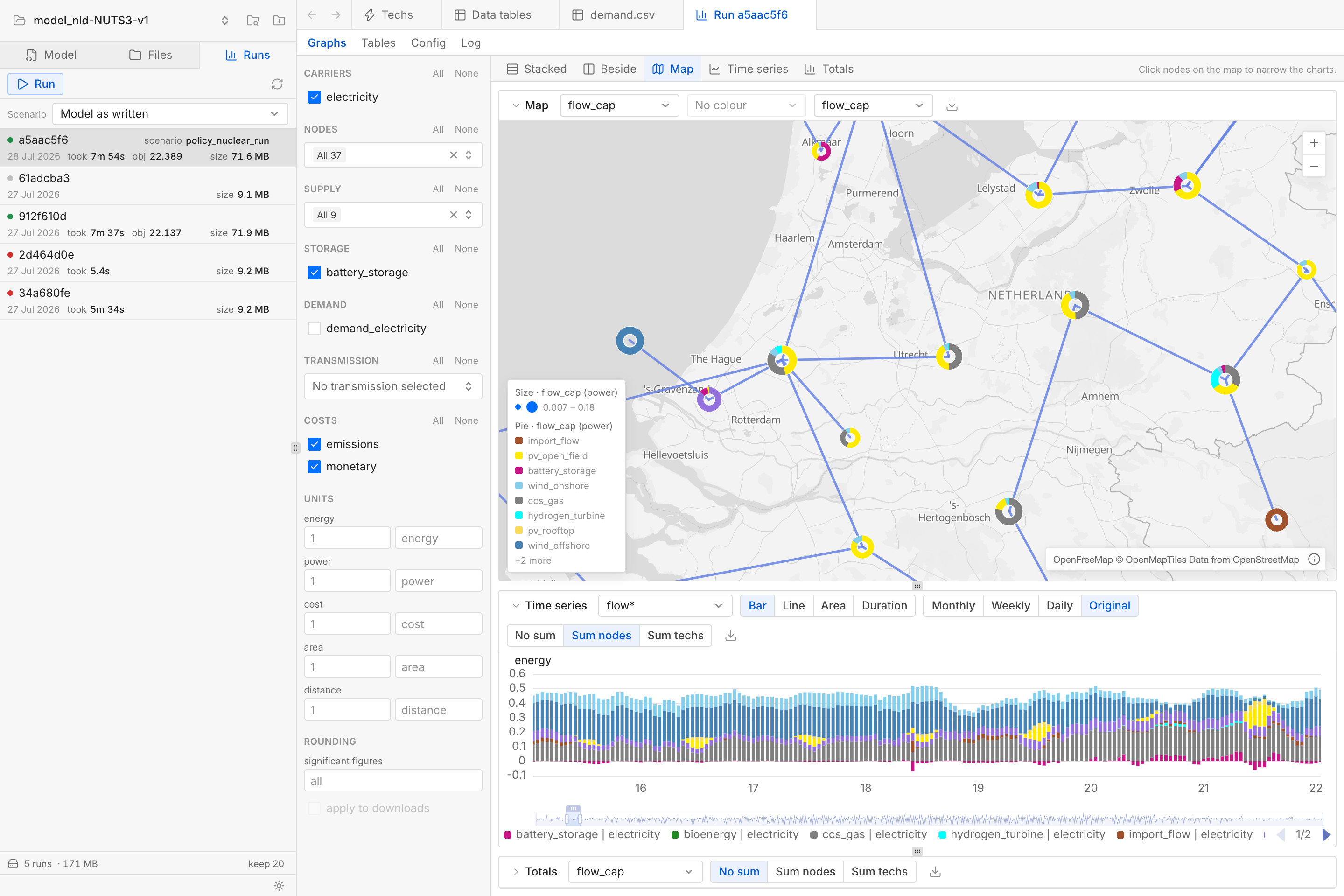
Calliope Studio is a web-based user interface for the Calliope energy system modelling framework.
It lets you define, edit, validate, run, and analyse Calliope models, all in a single tool.
It runs in a browser directly on your computer.
Installation
With uv:
# One-time setup for uv on macOS and Linux
curl -LsSf https://astral.sh/uv/install.sh | sh
# One-time setup for uv on Windows
#   powershell -c "irm https://astral.sh/uv/install.ps1 | iex"

uv tool install calliope-studio
Then:
calliope-studio my-model      # a model folder containing model.yaml or a solved results .nc
calliope-studio               # no argument opens Calliope Studio with a model picker
To quit Calliope Studio, close its terminal window or press Ctrl+C inside it.
[!IMPORTANT] Calliope needs a solver to actually solve models. You can still use Studio to edit a model or analyse results that somebody else solved, but pressing Run will fail without a solver. Refer to the Calliope documentation for solver installation.
Development builds
To install a development build based on the latest main branch commit:
uv tool install --reinstall --prerelease allow \
  --find-links https://github.com/sjpfenninger/calliope-studio/releases/expanded_assets/dev \
  calliope-studio
The same command updates an existing install to the newest development build. To go back to the stable (released) version:
uv tool install --reinstall calliope-studio
FAQ
- Why does "Run" fail with a solver error? See the note above: you probably have no solver installed.
- Why is the list of models wrong or outdated? The list of models you have opened lives in a small registry file, separate from the models themselves. Its location is reported as
registry_pathbyhttp://127.0.0.1:8000/api/healthwhile Calliope Studio is running. Deleting it resets the list without actually touching any of your models. - Where are model results stored? When running a model from inside Calliope Studio, results are saved in a
calliope-studio/folder next to themodel.yamlfile. This folder is created automatically when running a model for the first time and comes with its own.gitignorefile.
Development
Requires pixi.
pixi run serve      # API on port 8000 with auto-reload
pixi run web-dev    # Vite dev server, proxying /api to port 8000
serve opens ./example-model, scaffolding it from Calliope's national_scale template on first use.
Try pixi task list to see all the available development tasks. Some relevant ones:
pixi run solve-examplessolves both Calliope example models intoexamples/nc_files/. The data tests and the results smoke check read these files, and skip when they are absent.pixi run testruns the Python test suite.pixi run -e build buildproduces a wheel and an sdist with the frontend compiled in (the packaging tools live in thebuildenvironment).
The frontend tests run from web/:
cd web
pnpm test
Pixi is configured with a gurobi environment to test with Gurobi (needs a license):
pixi run -e gurobi calliope-studio my-model # Gurobi available as a solver
License
AGPL-3.0-or-later. See LICENSE.
1 maintainer

Download files
Download the file for your platform. If you're not sure which to choose, learn more about installing packages.
Source Distribution
Built Distribution
Filter files by name, interpreter, ABI, and platform.
If you're not sure about the file name format, learn more about wheel file names.
Copy a direct link to the current filters
File details
Details for the file calliope_studio-0.1.1.tar.gz.
File metadata
- Download URL: calliope_studio-0.1.1.tar.gz
- Upload date:
- Size: 4.9 MB
- Tags: Source
- Uploaded using Trusted Publishing? Yes
- Uploaded via:
twine/7.0.0 CPython/3.13.14
File hashes
| Algorithm | Hash digest | |
|---|---|---|
| SHA256 |
417379d0822e3cefd75236dc2a3c903fe5e30d1868c34eed489adc0fd8b40fd0
|
|
| MD5 |
7092bc2f5763b2d63d651821516bf8b3
|
|
| BLAKE2b-256 |
04249c6e64b9d1e231dc30be8fe1876b06eccbbd8e77b2dfe55d1c13b422fabf
|
Provenance
The following attestation bundles were made for calliope_studio-0.1.1.tar.gz:
Publisher:
release.yml on sjpfenninger/calliope-studio
-
Statement:
-
Statement type:
https://in-toto.io/Statement/v1 -
Predicate type:
https://docs.pypi.org/attestations/publish/v1 -
Subject name:
calliope_studio-0.1.1.tar.gz -
Subject digest:
417379d0822e3cefd75236dc2a3c903fe5e30d1868c34eed489adc0fd8b40fd0 - Sigstore transparency entry: 2680710370
- Sigstore integration time:
-
Permalink:
sjpfenninger/calliope-studio@c169cb3d111b0650fddece8f1461eb56c9ab4644 -
Branch / Tag:
refs/tags/v0.1.1 - Owner: https://github.com/sjpfenninger
-
Access:
public
-
Token Issuer:
https://token.actions.githubusercontent.com -
Runner Environment:
github-hosted -
Publication workflow:
release.yml@c169cb3d111b0650fddece8f1461eb56c9ab4644 -
Trigger Event:
push
-
Statement type:
File details
Details for the file calliope_studio-0.1.1-py3-none-any.whl.
File metadata
- Download URL: calliope_studio-0.1.1-py3-none-any.whl
- Upload date:
- Size: 4.2 MB
- Tags: Python 3
- Uploaded using Trusted Publishing? Yes
- Uploaded via:
twine/7.0.0 CPython/3.13.14
File hashes
| Algorithm | Hash digest | |
|---|---|---|
| SHA256 |
74f54d32eee24cbc5fe611e30b6777ea23b58edfad524fc499f9fcb5e6f82b31
|
|
| MD5 |
740c7adbdc6a3c9249f3559901fa76de
|
|
| BLAKE2b-256 |
fb0cd6d58f3fc47f22e61c57d9e6845af3675768ee7e6620a64e73a34c266487
|
Provenance
The following attestation bundles were made for calliope_studio-0.1.1-py3-none-any.whl:
Publisher:
release.yml on sjpfenninger/calliope-studio
-
Statement:
-
Statement type:
https://in-toto.io/Statement/v1 -
Predicate type:
https://docs.pypi.org/attestations/publish/v1 -
Subject name:
calliope_studio-0.1.1-py3-none-any.whl -
Subject digest:
74f54d32eee24cbc5fe611e30b6777ea23b58edfad524fc499f9fcb5e6f82b31 - Sigstore transparency entry: 2680710400
- Sigstore integration time:
-
Permalink:
sjpfenninger/calliope-studio@c169cb3d111b0650fddece8f1461eb56c9ab4644 -
Branch / Tag:
refs/tags/v0.1.1 - Owner: https://github.com/sjpfenninger
-
Access:
public
-
Token Issuer:
https://token.actions.githubusercontent.com -
Runner Environment:
github-hosted -
Publication workflow:
release.yml@c169cb3d111b0650fddece8f1461eb56c9ab4644 -
Trigger Event:
push
-
Statement type:














