
Analyze website anti-bot protections before you scrape

Project description
caniscrape 🔍
Know before you scrape. Analyze any website's anti-bot protections in seconds.
Stop wasting hours building scrapers only to discover the site has Cloudflare + JavaScript rendering + CAPTCHA + rate limiting. caniscrape does reconnaissance upfront so you know exactly what you're dealing with before writing a single line of code.
🎯 What It Does
caniscrape analyzes a URL and tells you:
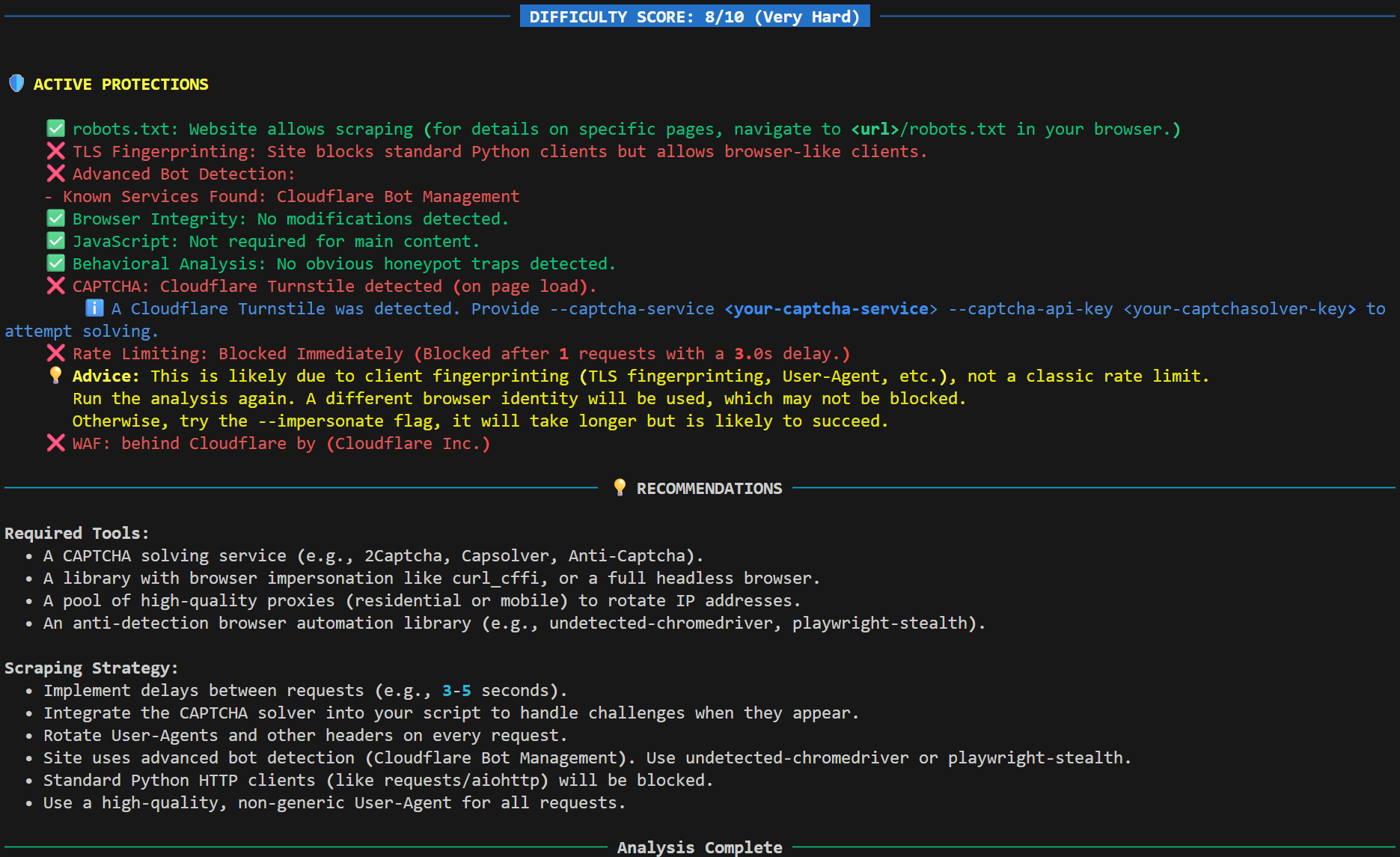
- What protections are active (WAF, CAPTCHA, rate limits, TLS fingerprinting, honeypots, bot detection services)
- Difficulty score (0-10 scale: Easy → Very Hard)
- Specific recommendations on what tools/proxies you'll need
- Estimated complexity so you can decide: build it yourself or use a service
- Historical changes track how protections evolve over time (NEW in v1.0.0)
- Advanced fingerprinting detection (v0.3.0)
- Browser integrity analysis (v0.3.0)
- CAPTCHA solving capability (v0.2.0)
- Proxy rotation support (v0.2.0)
🚀 Quick Start
Installation
pip install caniscrape
Required dependencies:
# Install wafw00f (WAF detection)
pipx install wafw00f

# Install Playwright browsers (for JS detection)
playwright install chromium
Basic Usage
# Analyze a website
caniscrape scan https://example.com
Cloud Integration (NEW in v1.0.0)
# One-time setup: link to cloud for scan history
caniscrape init

# Now all scans automatically sync to cloud
caniscrape scan https://example.com

# View scan history at https://caniscrape.org/projects
Example Output
🆕 What's New in v1.0.0
Cloud Integration ☁️
- Persistent scan history: Track how site protections change over time
- Automatic sync: Enable auto-upload to push every scan to the cloud
- Smart diffing: Automatically detect when protections change
- Offline support: Scans cache locally when offline, push them later
Privacy-First Telemetry 📊
- Usage telemetry: Anonymous CLI usage stats (opt-in)
- Public scan database: Contribute to a searchable database of site protections (opt-in)
- Full control: Easy opt-out and GDPR data deletion
Scan Comparison 🔄
- Automatically compares new scans against previous ones
- Highlights difficulty score changes, new/removed protections
- Shows exactly what changed and when
Previous updates:
- v0.3.0: Advanced fingerprinting detection and browser integrity analysis
- v0.2.0: Proxy rotation and CAPTCHA solving capabilities
- v0.1.0: Initial release with core detection features
🔬 What It Analyzes
1. WAF Detection
Identifies Web Application Firewalls (Cloudflare, Akamai, Imperva, DataDome, PerimeterX, etc.)
2. Rate Limiting
- Tests with burst and sustained traffic patterns
- Detects HTTP 429s, timeouts, throttling, soft bans
- Determines blocking threshold (requests/min)
3. JavaScript Rendering
- Compares content with/without JS execution
- Detects SPAs (React, Vue, Angular)
- Calculates percentage of content missing without JS
4. CAPTCHA Detection & Solving
- Scans for reCAPTCHA, hCaptcha, Cloudflare Turnstile
- Tests if CAPTCHA appears on load or after rate limiting
- Monitors network traffic for challenge endpoints
- Attempts to solve detected CAPTCHAs using Capsolver or 2Captcha
5. TLS Fingerprinting
- Compares standard Python clients vs browser-like clients
- Detects if site blocks based on TLS handshake signatures
6. Behavioral Analysis
- Scans for invisible "honeypot" links (bot traps)
- Detects if site is monitoring mouse/scroll behavior
7. Advanced Fingerprinting Detection
- Identifies enterprise bot detection services (PerimeterX, DataDome, Akamai Bot Manager, etc.)
- Detects canvas fingerprinting attempts
- Monitors which user events are being tracked (mouse, keyboard, scroll)
- Catches client-side bot detection that traditional tools miss
8. Browser Integrity Analysis
- Forensic-level check of browser function modifications
- Detects tampering with canvas APIs, timing functions
- Identifies anti-debugging techniques
- Explains what each modification indicates (fingerprinting, evasion detection, etc.)
9. robots.txt
- Checks scraping permissions
- Extracts recommended crawl-delay
10. Change Detection ✨ v1.0.0
- Compares scans against previous results
- Highlights new/removed protections
- Tracks difficulty score changes over time
🛠️ Advanced Usage
Cloud Commands (NEW in v1.0.0)
# Link this directory to a cloud project
caniscrape init

# Connect to an existing project
caniscrape link

# Push cached scans to cloud
caniscrape push

# Configure auto-upload
caniscrape config set auto-upload on
caniscrape config set auto-upload off

# View current configuration
caniscrape config show
Telemetry Management (NEW in v1.0.0)
# Manage usage telemetry
caniscrape telemetry usage on
caniscrape telemetry usage off

# Manage public scan contributions
caniscrape telemetry scans on
caniscrape telemetry scans off

# Delete all telemetry data (GDPR)
caniscrape telemetry delete

# View telemetry status
caniscrape telemetry status
Aggressive WAF Detection
# Find ALL WAFs (slower, may trigger rate limits)
caniscrape scan https://example.com --find-all
Browser Impersonation
# Use curl_cffi for better stealth (slower but more likely to succeed)
caniscrape scan https://example.com --impersonate
Deep Honeypot Scanning
# Check 2/3 of links (more accurate, slower)
caniscrape scan https://example.com --thorough

# Check ALL links (most accurate, very slow on large sites)
caniscrape scan https://example.com --deep
Proxy Rotation
# Use a single proxy
caniscrape scan https://example.com --proxy "http://user:pass@host:port"

# Use multiple proxies (random rotation)
caniscrape scan https://example.com \
  --proxy "http://user:pass@host1:port" \
  --proxy "socks5://user:pass@host2:port" \
  --proxy "http://host3:port"
Proxy rotation features:
- Supports
httpandsocks5protocols - Randomly rotates through proxy pool for each request
- Works with all analyzers including WAF detection and headless browser sessions
- Helps bypass basic IP-based blocks and rate limits
CAPTCHA Solving
# Detect and attempt to solve CAPTCHAs
caniscrape scan https://example.com \
  --captcha-service capsolver \
  --captcha-api-key "YOUR_API_KEY"

# Supported services: capsolver, 2captcha
caniscrape scan https://example.com \
  --captcha-service 2captcha \
  --captcha-api-key "YOUR_API_KEY"
CAPTCHA solving notes:
- By default,
caniscrapeonly detects CAPTCHAs - To attempt solving, you must provide
--captcha-serviceand--captcha-api-key - Only attempts solving if a CAPTCHA is detected
- Provides deeper analysis of site defenses when solving is enabled
Combine Options
caniscrape scan https://example.com \
  --impersonate \
  --find-all \
  --thorough \
  --proxy "http://proxy1:port" \
  --proxy "http://proxy2:port" \
  --captcha-service capsolver \
  --captcha-api-key "YOUR_KEY"
📊 Difficulty Scoring
The tool calculates a 0-10 difficulty score based on:
| Factor | Impact | Version Added |
|---|---|---|
| CAPTCHA on page load | +5 points | v0.1.0 |
| CAPTCHA after rate limit | +4 points | v0.1.0 |
| DataDome/PerimeterX WAF | +4 points | v0.1.0 |
| Akamai/Imperva WAF | +3 points | v0.1.0 |
| Aggressive rate limiting | +3 points | v0.1.0 |
| High-tier bot detection (PerimeterX, DataDome, etc.) | +2 points | v0.3.0 |
| Cloudflare WAF | +2 points | v0.1.0 |
| Honeypot traps detected | +2 points | v0.2.0 |
| Canvas fingerprinting | +1 point | v0.3.0 |
| Browser function modifications | +1 point | v0.3.0 |
| Medium-tier bot detection | +1 point | v0.3.0 |
| TLS fingerprinting active | +1 point | v0.1.0 |
Score interpretation:
- 0-2: Easy (basic scraping will work)
- 3-4: Medium (need some precautions)
- 5-7: Hard (requires advanced techniques)
- 8-10: Very Hard (consider using a service)
🔧 Installation Details
System Requirements
- Python 3.9+
- pip or pipx
Full Installation
# 1. Install caniscrape
pip install caniscrape

# 2. Install wafw00f (WAF detection)
# Option A: Using pipx (recommended)
python -m pip install --user pipx
pipx install wafw00f

# Option B: Using pip
pip install wafw00f

# 3. Install Playwright browsers (for JS/CAPTCHA/behavioral detection)
playwright install chromium

# 4. (Optional) Set up cloud integration
caniscrape init
Dependencies
Core dependencies (installed automatically):
click- CLI frameworkrich- Terminal formattingaiohttp- Async HTTP requestsbeautifulsoup4- HTML parsingplaywright- Headless browser automationcurl_cffi- Browser impersonationrequests- HTTP client for API
External tools (install separately):
wafw00f- WAF detection
🎓 Use Cases
For Developers
- Before building a scraper: Check if it's even feasible
- Debugging scraper issues: Identify what protection broke your scraper
- Client estimates: Give accurate time/cost estimates for scraping projects
- Proxy testing: Verify your proxy pool works against target sites
- CAPTCHA assessment: Determine if CAPTCHA solving is required
- Fingerprinting analysis: Understand which evasion techniques you'll need
- Long-term monitoring: Track when sites upgrade their defenses (NEW in v1.0.0)
For Data Engineers
- Pipeline planning: Know what infrastructure you'll need (proxies, CAPTCHA solvers, anti-detection tools)
- Cost estimation: Calculate proxy/CAPTCHA costs before committing to a data source
- Vendor selection: Test different proxy and CAPTCHA solving services
- Protection monitoring: Track when sites upgrade their bot detection
- Historical analysis: Identify patterns in protection changes (NEW in v1.0.0)
For Researchers
- Site selection: Find the easiest data sources for your research
- Compliance: Check robots.txt before scraping
- Anonymity: Test data collection through proxy infrastructure
- Evasion research: Study real-world bot detection implementations
- Longitudinal studies: Track protection evolution over time (NEW in v1.0.0)
For Teams (NEW in v1.0.0)
- Centralized scan management: All team members can view scan history
- Onboarding: New team members see previous scans immediately
- Change alerts: Track when target sites upgrade their defenses
- Collaboration: Share scan URLs from cloud dashboard
⚠️ Limitations & Disclaimers
What It Can't Detect
- Dynamic protections: Some sites only trigger defenses under specific conditions
- Behavioral AI: Advanced ML-based bot detection that adapts in real-time
- Account-based restrictions: Protections that only activate for logged-in users
- Obfuscated custom solutions: Proprietary detection systems with heavy code obfuscation
Legal & Ethical Notes
- This tool is for reconnaissance only - it does not bypass protections
- Always respect
robots.txtand terms of service - Some sites may consider aggressive scanning hostile - use
--find-alland--deepsparingly - CAPTCHA solving should only be used for legitimate testing purposes
- You are responsible for how you use this tool and any scrapers you build
- Ensure your use of proxies and CAPTCHA solving complies with applicable laws and terms of service
Technical Notes
- Analysis takes 30-60 seconds per URL (longer with CAPTCHA solving)
- Some checks require making multiple requests (may trigger rate limits)
- Results are a snapshot - protections can change over time
- Proxy rotation adds latency but improves anonymity
- CAPTCHA solving success depends on service quality and site complexity
- Fingerprinting detection requires JavaScript execution (uses Playwright)
Privacy & Telemetry (NEW in v1.0.0)
- Usage telemetry: Optional, anonymous CLI usage stats
- Scan telemetry: Optional, public scan database contributions
- Cloud integration: Requires account but no personal data is required
- Data deletion: Full GDPR compliance with
caniscrape telemetry delete - See detailed privacy policy at https://caniscrape.org/privacy
🤝 Contributing
Found a bug? Have a feature request? Contributions are welcome!
- Fork the repo
- Create a feature branch (
git checkout -b feature/amazing-feature) - Commit your changes (
git commit -m 'Add amazing feature') - Push to the branch (
git push origin feature/amazing-feature) - Open a Pull Request
📝 License
MIT License - see LICENSE file for details
🙏 Acknowledgments
Built on top of:
- wafw00f - WAF detection
- Playwright - Browser automation
- curl_cffi - Browser impersonation
📬 Contact
Questions? Feedback? Open an issue on GitHub.
- GitHub Issues: https://github.com/ZA1815/caniscrape/issues
- Cloud Dashboard: https://caniscrape.org
- Documentation: https://docs.caniscrape.org (coming soon)
Remember: This tool tells you HOW HARD it will be to scrape. It doesn't do the scraping for you. Use it to make informed decisions before you start building.
Release history Release notifications | RSS feed


Download files
Download the file for your platform. If you're not sure which to choose, learn more about installing packages.
Source Distribution
Built Distribution
Filter files by name, interpreter, ABI, and platform.
If you're not sure about the file name format, learn more about wheel file names.
Copy a direct link to the current filters
File details
Details for the file caniscrape-1.0.0.tar.gz.
File metadata
- Download URL: caniscrape-1.0.0.tar.gz
- Upload date:
- Size: 39.2 kB
- Tags: Source
- Uploaded using Trusted Publishing? No
- Uploaded via: twine/6.2.0 CPython/3.13.7
File hashes
| Algorithm | Hash digest | |
|---|---|---|
| SHA256 |
819e4a65536a788a146c9d4f07d68502c4af9718ba4c8a3253fb5f5867f41601
|
|
| MD5 |
ceead8a11dd31c77b3ef4bb572096dad
|
|
| BLAKE2b-256 |
058c641dfbe4fb011965635f6c70554b8810c5de7b987dfc13519962ccbd041c
|
File details
Details for the file caniscrape-1.0.0-py3-none-any.whl.
File metadata
- Download URL: caniscrape-1.0.0-py3-none-any.whl
- Upload date:
- Size: 42.8 kB
- Tags: Python 3
- Uploaded using Trusted Publishing? No
- Uploaded via: twine/6.2.0 CPython/3.13.7
File hashes
| Algorithm | Hash digest | |
|---|---|---|
| SHA256 |
cec77c749ef6f03895238e6f2071942b590889a610c5ce7937abef9a338251ea
|
|
| MD5 |
9b7a1860e7c23deec30cd09c6b31b83b
|
|
| BLAKE2b-256 |
cf87bc4097ace7dc127ad1822874d05b9d267dce321f854733d09f3f895859cc
|






