


About
CAN BUS tools in Python 3.
CAN message encoding and decoding.
Simple and extended signal multiplexing.
Diagnostic DID encoding and decoding.
candump output decoder.
Node tester.
C source code generator.
CAN bus monitor.
Graphical plots of signals.
Project homepage: https://github.com/cantools/cantools
Documentation: https://cantools.readthedocs.io
Installation
python3 -m pip install cantoolsExample usage
Scripting
The example starts by parsing a small DBC-file and printing its messages and signals.
>>> import cantools
>>> from pprint import pprint
>>> db = cantools.database.load_file('tests/files/dbc/motohawk.dbc')
>>> db.messages
[message('ExampleMessage', 0x1f0, False, 8, 'Example message used as template in MotoHawk models.')]
>>> example_message = db.get_message_by_name('ExampleMessage')
>>> pprint(example_message.signals)
[signal('Enable', 7, 1, 'big_endian', False, 1.0, 0, 0.0, 0.0, '-', False, None, {0: 'Disabled', 1: 'Enabled'}, None),
 signal('AverageRadius', 6, 6, 'big_endian', False, 0.1, 0, 0.0, 5.0, 'm', False, None, None, ''),
 signal('Temperature', 0, 12, 'big_endian', True, 0.01, 250, 229.53, 270.47, 'degK', False, None, None, None)]
The example continues encoding a message and sending it on a CAN bus using the python-can package.
>>> import can
>>> can_bus = can.interface.Bus('vcan0', bustype='socketcan')
>>> data = example_message.encode({'Temperature': 250.1, 'AverageRadius': 3.2, 'Enable': 1})
>>> message = can.Message(arbitration_id=example_message.frame_id, is_extended_id=example_message.is_extended_frame, data=data)
>>> can_bus.send(message)
Alternatively, a message can be encoded using the encode_message() method on the database object.
The last part of the example receives and decodes a CAN message.
>>> message = can_bus.recv()
>>> db.decode_message(message.arbitration_id, message.data)
{'AverageRadius': 3.2, 'Enable': 'Enabled', 'Temperature': 250.09}
See examples for additional examples.
Command line tool
The decode subcommand
Decode CAN frames captured with the Linux program candump.
$ candump vcan0 | python3 -m cantools decode tests/files/dbc/motohawk.dbc
  vcan0  1F0   [8]  80 4A 0F 00 00 00 00 00 ::
ExampleMessage(
    Enable: 'Enabled' -,
    AverageRadius: 0.0 m,
    Temperature: 255.92 degK
)
  vcan0  1F0   [8]  80 4A 0F 00 00 00 00 00 ::
ExampleMessage(
    Enable: 'Enabled' -,
    AverageRadius: 0.0 m,
    Temperature: 255.92 degK
)
  vcan0  1F0   [8]  80 4A 0F 00 00 00 00 00 ::
ExampleMessage(
    Enable: 'Enabled' -,
    AverageRadius: 0.0 m,
    Temperature: 255.92 degK
)
Alternatively, the decoded message can be printed on a single line:
$ candump vcan0 | python3 -m cantools decode --single-line tests/files/dbc/motohawk.dbc
  vcan0  1F0   [8]  80 4A 0F 00 00 00 00 00 :: ExampleMessage(Enable: 'Enabled' -, AverageRadius: 0.0 m, Temperature: 255.92 degK)
  vcan0  1F0   [8]  80 4A 0F 00 00 00 00 00 :: ExampleMessage(Enable: 'Enabled' -, AverageRadius: 0.0 m, Temperature: 255.92 degK)
  vcan0  1F0   [8]  80 4A 0F 00 00 00 00 00 :: ExampleMessage(Enable: 'Enabled' -, AverageRadius: 0.0 m, Temperature: 255.92 degK)
The plot subcommand
The plot subcommand is similar to the decode subcommand but messages are visualized using matplotlib instead of being printed to stdout.
$ candump -l vcan0
$ cat candump-2021-01-04_180521.log
(1609779922.655421) vcan0 00000343#B204B9049C049C04
(1609779922.655735) vcan0 0000024A#120527052E051905
(1609779923.657524) vcan0 00000343#C404C404CB04C404
(1609779923.658086) vcan0 0000024A#8B058B058B059205
(1609779924.659912) vcan0 00000343#5C04790479045504
(1609779924.660471) vcan0 0000024A#44064B0659064406
(1609779925.662277) vcan0 00000343#15040704F203F203
(1609779925.662837) vcan0 0000024A#8B069906A706A706
(1609779926.664191) vcan0 00000343#BC03B503A703BC03
(1609779926.664751) vcan0 0000024A#A006A706C406C406

$ cat candump-2021-01-04_180521.log | python3 -m cantools plot tests/files/dbc/abs.dbc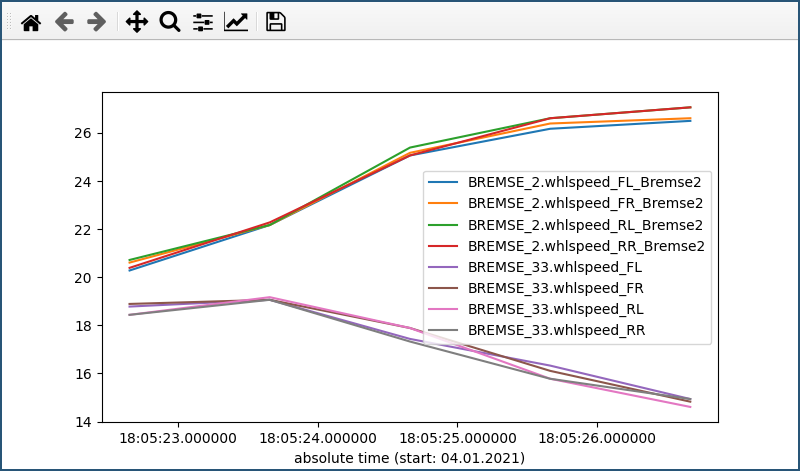
If you don’t want to show all signals you can select the desired signals with command line arguments. A * can stand for any number of any character, a ? for exactly one arbitrary character. Signals separated by a - are displayed in separate subplots. Optionally a format can be specified after a signal, separated by a colon.
$ cat candump-2021-01-04_180521.log | python3 -m cantools plot tests/files/dbc/abs.dbc '*33.*fl:-<' '*33.*fr:->' - '*33.*rl:-<' '*33.*rr:->'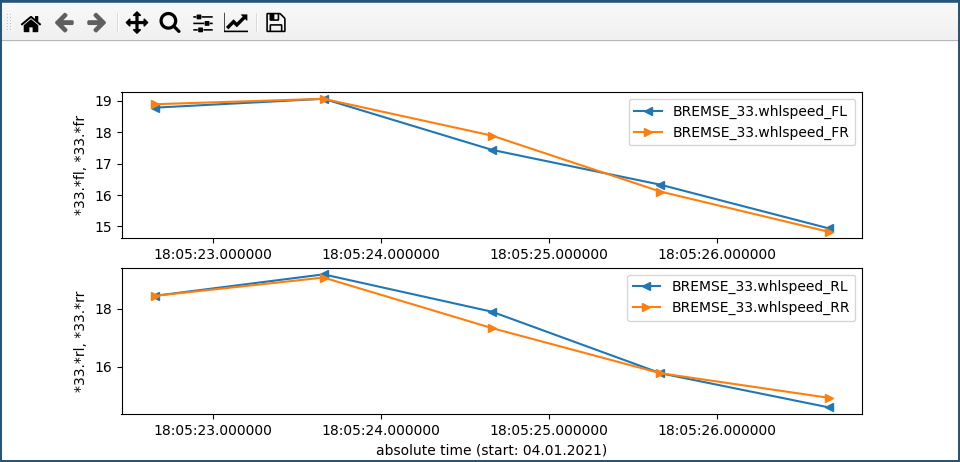
Signals with a different range of values can be displayed in the same subplot on different vertical axes by separating them with a comma.
$ cat candump-2021-01-04_180521.log | cantools plot --auto-color tests/files/dbc/abs.dbc -- \
   --ylabel 'Bremse 33' '*_33.*fl*:-<' '*_33.*fr*:>' '*_33.*rl*:3' '*_33.*rr*:4' , \
   --ylabel 'Bremse 2' '*_2.*fl*:-<' '*_2.*fr*:>' '*_2.*rl*:3' '*_2.*rr*:4'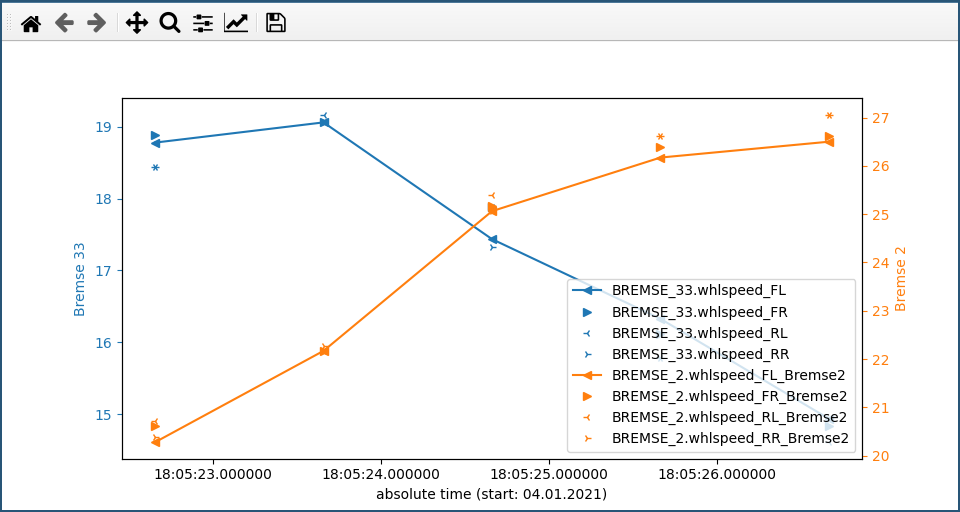
Matplotlib comes with different preinstalled styles that you can use:
$ cat candump-2021-01-04_180521.log | cantools plot tests/files/dbc/abs.dbc --style seaborn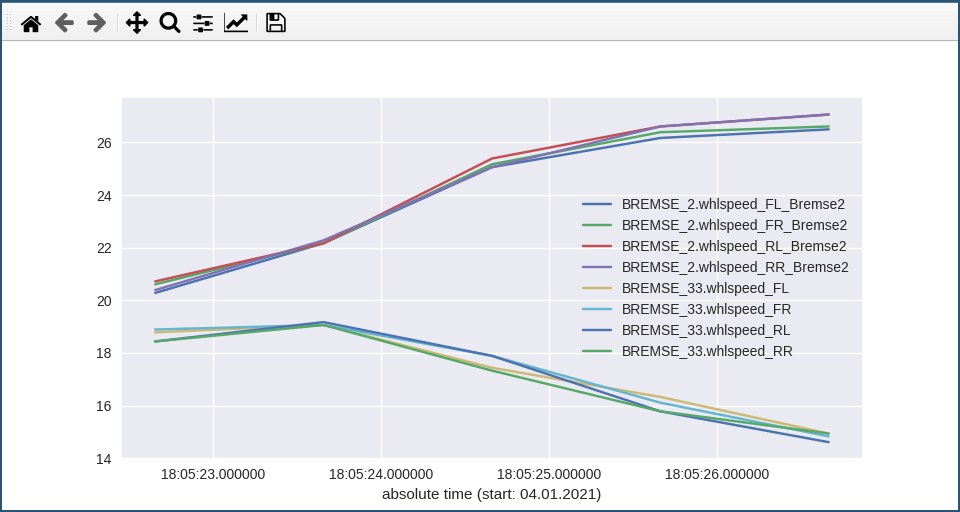
You can try all available styles with
$ cantools plot --list-styles . | sed -n '/^- /s/^- //p' | while IFS= read -r style; do
      cat candump-2021-01-04_180521.log | cantools plot tests/files/dbc/abs.dbc --style "$style" --title "--style '$style'"
  done
For more information see
$ python3 -m cantools plot --helpNote that by default matplotlib is not installed with cantools. But it can be by specifying an extra at installation:
$ python3 -m pip install cantools[plot]The dump subcommand
Dump given database in a human readable format:
$ python3 -m cantools dump tests/files/dbc/motohawk.dbc
================================= Messages =================================

  ------------------------------------------------------------------------

  Name:       ExampleMessage
  Id:         0x1f0
  Length:     8 bytes
  Cycle time: - ms
  Senders:    PCM1
  Layout:

                          Bit

             7   6   5   4   3   2   1   0
           +---+---+---+---+---+---+---+---+
         0 |<-x|<---------------------x|<--|
           +---+---+---+---+---+---+---+---+
             |                       +-- AverageRadius
             +-- Enable
           +---+---+---+---+---+---+---+---+
         1 |-------------------------------|
           +---+---+---+---+---+---+---+---+
         2 |----------x|   |   |   |   |   |
     B     +---+---+---+---+---+---+---+---+
     y               +-- Temperature
     t     +---+---+---+---+---+---+---+---+
     e   3 |   |   |   |   |   |   |   |   |
           +---+---+---+---+---+---+---+---+
         4 |   |   |   |   |   |   |   |   |
           +---+---+---+---+---+---+---+---+
         5 |   |   |   |   |   |   |   |   |
           +---+---+---+---+---+---+---+---+
         6 |   |   |   |   |   |   |   |   |
           +---+---+---+---+---+---+---+---+
         7 |   |   |   |   |   |   |   |   |
           +---+---+---+---+---+---+---+---+

  Signal tree:

    -- {root}
       +-- Enable
       +-- AverageRadius
       +-- Temperature

  Signal choices:

    Enable
        0 Disabled
        1 Enabled

  ------------------------------------------------------------------------
The list subcommand
Print all information of a given database in a human readable format. This is very similar to the “dump” subcommand, but the output is less pretty, slightly more comprehensive and easier to parse by shell scripts:
$ python3 -m cantools list -a tests/files/dbc/motohawk.dbc
ExampleMessage:
  Comment[None]: Example message used as template in MotoHawk models.
  Frame ID: 0x1f0 (496)
  Size: 8 bytes
  Is extended frame: False
  Signals:
    Enable:
      Type: Integer
      Start bit: 7
      Length: 1 bits
      Unit: -
      Is signed: False
      Named values:
        0: Disabled
The generate C source subcommand
Generate C source code from given database.
The generated code contains:
Known limitations:
The maximum signal size is 64 bits, which in practice is never exceeded.
Below is an example of how to generate C source code from a database. The database is tests/files/dbc/motohawk.dbc.
$ python3 -m cantools generate_c_source tests/files/dbc/motohawk.dbc
Successfully generated motohawk.h and motohawk.c.
See motohawk.h and motohawk.c for the contents of the generated files.
In this example we use --use-float so floating point numbers in the generated code are single precision (float) instead of double precision (double).
$ python3 -m cantools generate_c_source --use-float tests/files/dbc/motohawk.dbc
Successfully generated motohawk.h and motohawk.c.
In the next example we use --database-name to set a custom namespace for all generated types, defines and functions. The output file names are also changed by this option.
$ python3 -m cantools generate_c_source --database-name my_database_name tests/files/dbc/motohawk.dbc
Successfully generated my_database_name.h and my_database_name.c.
See my_database_name.h and my_database_name.c for the contents of the generated files.
In the next example we use --no-floating-point-numbers to generate code without floating point types, i.e. float and double.
$ python3 -m cantools generate_c_source --no-floating-point-numbers tests/files/dbc/motohawk.dbc
Successfully generated motohawk.h and motohawk.c.
See motohawk_no_floating_point_numbers.h and motohawk_no_floating_point_numbers.c for the contents of the generated files.
In the last example --node is used to generate message pack functions only for messages sent by the specified node and unpack functions only for messages with its signal receivers belonging to that node.
$ cantools generate_c_source tests/files/dbc/motohawk.dbc --node PCM1
Successfully generated motohawk.h and motohawk.c.
See motohawk_sender_node.h and motohawk_sender_node.c for the contents of the generated files.
Other C code generators:
The monitor subcommand
Monitor CAN bus traffic in a text based user interface.
$ python3 -m cantools monitor tests/files/dbc/motohawk.dbc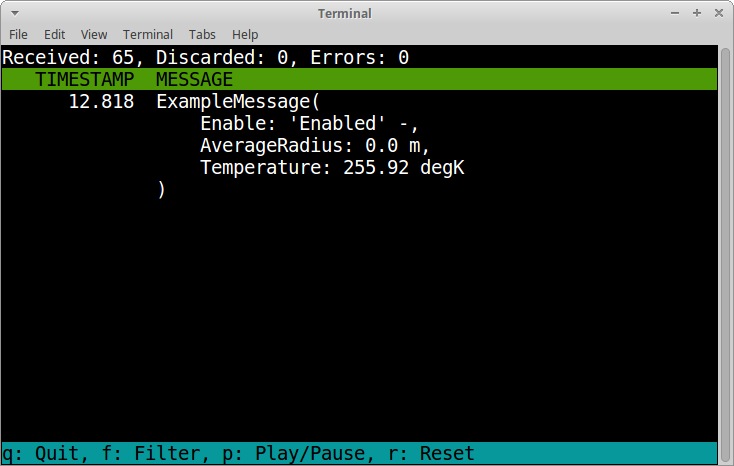
The menu at the bottom of the monitor shows the available commands.
Quit: Quit the monitor. Ctrl-C can be used as well.
Filter: Only display messages or signals matching given regular expression. Press <Enter> to return to the menu from the filter input line.
Play/Pause: Toggle between playing and paused (or running and freezed).
Reset: Reset the monitor to its initial state.
Contributing
Fork the repository.
Install prerequisites. You can skip this if you use tox.
python3 -m pip install -e .[dev]Implement the new feature or bug fix.
Implement test case(s) to ensure that future changes do not break legacy.
Run the linters
ruff check src
mypy src
or
tox -e ruff
tox -e mypy
Run the tests.
tox -e pyCheck test coverage.
tox -e cov
firefox htmlcov/index.html
Create a pull request.
3 maintainers


Download files
Download the file for your platform. If you're not sure which to choose, learn more about installing packages.
Source Distribution
Built Distribution
Filter files by name, interpreter, ABI, and platform.
If you're not sure about the file name format, learn more about wheel file names.
Copy a direct link to the current filters
File details
Details for the file cantools-43.0.2.tar.gz.
File metadata
- Download URL: cantools-43.0.2.tar.gz
- Upload date:
- Size: 1.1 MB
- Tags: Source
- Uploaded using Trusted Publishing? Yes
- Uploaded via:
twine/6.1.0 CPython/3.13.13
File hashes
| Algorithm | Hash digest | |
|---|---|---|
| SHA256 |
cfec8e2001b46e8c4b6260aadaa286e75496c446eaeb4ea3840d781322edcfc7
|
|
| MD5 |
b89e3be76b642c3ecccb3b9aa197da73
|
|
| BLAKE2b-256 |
3cb9f86999f365e26fec14d086f174b79b520e967cee6d2b25a85d9a065177fe
|
Provenance
The following attestation bundles were made for cantools-43.0.2.tar.gz:
Publisher:
pythonpackage.yml on cantools/cantools
-
Statement:
-
Statement type:
https://in-toto.io/Statement/v1 -
Predicate type:
https://docs.pypi.org/attestations/publish/v1 -
Subject name:
cantools-43.0.2.tar.gz -
Subject digest:
cfec8e2001b46e8c4b6260aadaa286e75496c446eaeb4ea3840d781322edcfc7 - Sigstore transparency entry: 2613725226
- Sigstore integration time:
-
Permalink:
cantools/cantools@66c689aaa9e56fd939fa5916339aa2f12aa625a1 -
Branch / Tag:
refs/tags/43.0.2 - Owner: https://github.com/cantools
-
Access:
public
-
Token Issuer:
https://token.actions.githubusercontent.com -
Runner Environment:
github-hosted -
Publication workflow:
pythonpackage.yml@66c689aaa9e56fd939fa5916339aa2f12aa625a1 -
Trigger Event:
push
-
Statement type:
File details
Details for the file cantools-43.0.2-py3-none-any.whl.
File metadata
- Download URL: cantools-43.0.2-py3-none-any.whl
- Upload date:
- Size: 165.2 kB
- Tags: Python 3
- Uploaded using Trusted Publishing? Yes
- Uploaded via:
twine/6.1.0 CPython/3.13.13
File hashes
| Algorithm | Hash digest | |
|---|---|---|
| SHA256 |
c5b9379649b8e656a035787def977ab288e3024e726d9d888e0a49b7feca84ef
|
|
| MD5 |
297e46ddf2bbccd1166145dbb8281580
|
|
| BLAKE2b-256 |
6abeeefba7620c714e0a684786ea389c8dc1e77abdb169132bc02411e3d6c816
|
Provenance
The following attestation bundles were made for cantools-43.0.2-py3-none-any.whl:
Publisher:
pythonpackage.yml on cantools/cantools
-
Statement:
-
Statement type:
https://in-toto.io/Statement/v1 -
Predicate type:
https://docs.pypi.org/attestations/publish/v1 -
Subject name:
cantools-43.0.2-py3-none-any.whl -
Subject digest:
c5b9379649b8e656a035787def977ab288e3024e726d9d888e0a49b7feca84ef - Sigstore transparency entry: 2613726030
- Sigstore integration time:
-
Permalink:
cantools/cantools@66c689aaa9e56fd939fa5916339aa2f12aa625a1 -
Branch / Tag:
refs/tags/43.0.2 - Owner: https://github.com/cantools
-
Access:
public
-
Token Issuer:
https://token.actions.githubusercontent.com -
Runner Environment:
github-hosted -
Publication workflow:
pythonpackage.yml@66c689aaa9e56fd939fa5916339aa2f12aa625a1 -
Trigger Event:
push
-
Statement type:














