
CaptionEvalKit-for-VLMs

Reproducible, all-in-one image captioning evaluation for VLMs.
- For metric developers:
- 🤔 Need a reliable way to reproduce Kendall's tau for captioning metrics?
- 😄 Evaluate metrics and reproduce reported results with a single command!
- For VLM developers:
- 🤔 Tired of preparing separate dependency environments for each metric?
- 😄 Score VLM-generated captions using a comprehensive set of established captioning metrics.
CaptionEvalKit currently supports:
- LLM-free metrics: Polos, CLIPScore, PAC-S, RefCLIPScore, RefPAC-S, and more
- LLM-as-a-Judge metrics: FLEUR, RefFLEUR, VELA, and EXPERT
- Classic captioning metrics: BLEU, ROUGE-L, METEOR, CIDEr, SPICE, and JaSPICE
- Benchmarks: Composite, Flickr8k-Ex, Flickr8k-CF, Polaris, Nebula, and LongCap-Arena
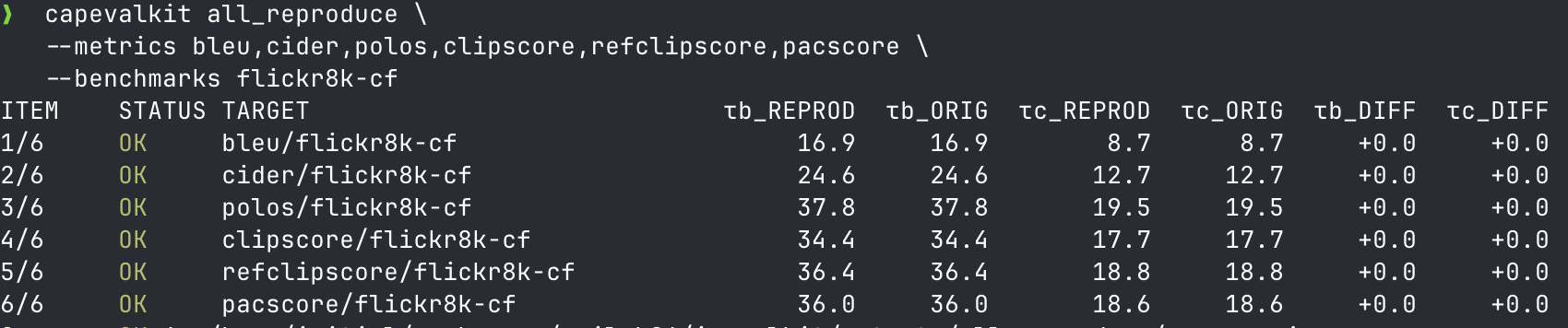
Table of Contents
- Install
- For VLM Developers
- For Metric Developers
- Reproduce Reported Results
- Reproduction Status
- Supported Metrics
- Supported Benchmarks
- Data and Assets
- Development
- Citation
Install
Requirements: Python 3.10+, git, and uv. Java is also required for METEOR/SPICE through pycocoevalcap. JaSPICE requires Docker; CaptionEvalKit builds and starts the local JaSPICE server automatically when needed.
From PyPI or a built wheel:
pip install capevalkit
capevalkit doctor
capevalkit list-metrics
From a source checkout:
git clone --recursive https://github.com/YuigaWada/CaptionEvalKit-for-VLMs.git
cd CaptionEvalKit-for-VLMs
uv tool install --editable "$PWD" --force
capevalkit list-metrics
Runtime Cache
Wheel installs use CAPEVALKIT_HOME as a runtime cache root. The default is ~/.cache/capevalkit.
~/.cache/capevalkit/
  runtime/<lock-digest>/
    metrics/
    metrics/upstreams/
    benchmarks/expected/
    overlays/
  uv/
  huggingface/
Set a different location when needed:
CAPEVALKIT_HOME=/scratch/capevalkit capevalkit doctor
Source checkouts use the repository tree directly and keep submodules in metrics/upstreams/.
For Metric Developers
Benchmark existing metrics, or evaluate your own metric without adopting a fixed metric signature.
When changing upstream submodule revisions for a release, regenerate the runtime lock:
python scripts/generate_upstream_lock.py
CLI
Run one metric on one benchmark:
capevalkit benchmark \
  --metric clipscore \
  --benchmark composite \
  --output outputs/clipscore/composite.json
Run the same metric across benchmarks:
capevalkit suite \
  --metrics clipscore \
  --benchmarks composite,flickr8k-ex,flickr8k-cf,nebula,polaris \
  --output-dir outputs/clipscore
To wire a metric through its own CLI runner, add metrics/mymetric/metric.toml:
[metric]
name = "mymetric"
python = ">=3.10,<3.12"
module = "capevalkit.metrics.mymetric"

[repository]
dir = "metrics/upstreams/mymetric"
uv_project = "metrics/upstreams/mymetric"

[runner]
command = ["python", "score.py"]
Add a minimal metrics/upstreams/mymetric/pyproject.toml:
[project]
name = "mymetric"
version = "0.1.0"
requires-python = ">=3.10,<3.12"
dependencies = []
Make metrics/upstreams/mymetric/score.py accept:
--predictions PREDICTIONS.jsonl
--references REFERENCES.jsonl
--output OUTPUT.json
Then benchmark it:
capevalkit benchmark \
  --metric mymetric \
  --benchmark composite \
  --output outputs/mymetric/composite.json
import capevalkit.api as capeval

class MyMetric:
    def __call__(self, samples):
        return {
            sample.id: float(bool(sample.prediction and sample.references))
            for sample in samples
        }

result = capeval.evaluate_metric(
    benchmark="flickr8k-cf",
    metric=MyMetric(),
    metric_name="MyMetric",
    output="outputs/mymetric/flickr8k-cf.json",
)
The callable receives CaptionSample objects and returns {sample_id: score}. Your metric can keep any internal signature.
For VLM Developers
Evaluate saved captions from files, or run your caption model on your own images.
CLI
predictions.jsonl:
{"id": "0001", "caption": "A dog runs through grass.", "image": "0001.jpg"}
{"id": "0002", "caption": "A person rides a bicycle.", "image": "0002.jpg"}
references.jsonl:
{"id": "0001", "references": ["A dog runs outside.", "A dog is in a grassy field."]}
{"id": "0002", "references": ["A cyclist rides on a road.", "A person rides a bike."]}
capevalkit score \
  --metric clipscore \
  --predictions predictions.jsonl \
  --references references.jsonl \
  --image-dir images \
  --output outputs/clipscore.json
{
  "CLIPScore": 0.73,
  "RefCLIPScore": 0.81,
  "per_item": {
    "0001": {"CLIPScore": 0.70, "RefCLIPScore": 0.78}
  }
}
Run these examples with uv run python from the repository, or install capevalkit into your own Python environment.
import capevalkit.api as capeval

def predict(batch):
    return ["A dog runs through grass." for _ in batch.images]

results = capeval.evaluate_caption_model(
    images=["images/0001.jpg", "images/0002.jpg"],
    metrics=["cider", "clipscore"],
    predict=predict,
    references=[
        ["A dog runs outside.", "A dog is in a grassy field."],
        ["A cyclist rides on a road.", "A person rides a bike."],
    ],
    batch_size=8,
    output_dir="outputs/my-model",
)
If captions are already generated, pass image-caption pairs directly:
import capevalkit.api as capeval

results = capeval.evaluate_captions(
    pairs=[
        {
            "id": "0001",
            "image": "images/0001.jpg",
            "caption": "A dog runs through grass.",
            "references": ["A dog runs outside.", "A dog is in a grassy field."],
        },
        {
            "id": "0002",
            "image": "images/0002.jpg",
            "caption": "A person rides a bicycle.",
            "references": ["A cyclist rides on a road.", "A person rides a bike."],
        },
    ],
    metrics=["cider", "clipscore"],
    output_dir="outputs/my-captions",
)
For manual caption-model control:
import capevalkit.api as capeval

def predict(batch):
    return ["A dog runs through grass." for _ in batch.images]

with capeval.CaptionEvalRun(
    images=["images/0001.jpg", "images/0002.jpg"],
    metrics=["cider", "clipscore"],
    references=[
        ["A dog runs outside.", "A dog is in a grassy field."],
        ["A cyclist rides on a road.", "A person rides a bike."],
    ],
    output_dir="outputs/my-model",
) as run:
    for batch in run.iter_batches(batch_size=8):
        run.record(batch.ids, predict(batch))

    results = run.evaluate()
Reproduce Reported Results
Preview the default reproducibility suite:
capevalkit all_reproduce --dry-run
Run one verified pair:
capevalkit all_reproduce \
  --metrics clipscore \
  --benchmarks composite
Run a launch smoke test for every default pair:
capevalkit all_reproduce --smoke --jobs 4 --gpu-jobs 1
--smoke runs one sample per pair and checks launch/output writing only. Omit it for full correlations.
Reproduction Status
Legend: ✅ reproduced, ⚠️ not reproduced, - no default target. For LongCap-Arena, unreproduced targets are also shown as -.
| Metric | Composite | Flickr8k-EX | Flickr8k-CF | Nebula | Polaris | LCA TestA | LCA TestB |
|---|---|---|---|---|---|---|---|
bleu |
✅ | ✅ | ✅ | ✅ | ✅ | - | - |
cider |
✅ | ✅ | ✅ | ✅ | ✅ | - | - |
clipscore |
✅ | ✅ | ✅ | ✅ | ✅ | - | - |
expert |
✅ | ✅ | ✅ | ✅ | ✅ | - | - |
fleur |
⚠️ | ⚠️ | ✅ | - | - | - | - |
meteor |
✅ | ✅ | ✅ | ✅ | ✅ | - | - |
pacscore |
✅ | ✅ | ✅ | ✅ | ✅ | - | - |
polos |
✅ | ✅ | ✅ | ✅ | ✅ | - | - |
refclipscore |
✅ | ✅ | ✅ | ⚠️ | ⚠️ | - | - |
reffleur |
✅ | ✅ | ✅ | - | - | - | - |
refpacscore |
✅ | ✅ | ✅ | ⚠️ | ⚠️ | - | - |
rouge |
✅ | ✅ | ✅ | ✅ | ✅ | - | - |
spice |
✅ | ✅ | ✅ | ✅ | ✅ | - | - |
vela |
- | - | - | - | - | ✅ | ✅ |
Supported Metrics
| Metric | Upstream | Notes |
|---|---|---|
bleu |
pycocoevalcap |
BLEU-1 to BLEU-4 |
rouge |
pycocoevalcap |
ROUGE-L |
meteor |
pycocoevalcap |
Java METEOR through upstream |
cider |
pycocoevalcap |
CIDEr |
spice |
pycocoevalcap |
SPICE |
jaspice |
JaSPICE | Japanese SPICE-style metric; starts the JaSPICE Docker server automatically |
expert |
EXPERT | reference-free LLaVA-based metric with structured-explanation training |
clipscore |
CLIPScore | image-caption CLIPScore |
refclipscore |
CLIPScore | reference-aware CLIPScore |
pacscore |
PACScore | PAC-S |
refpacscore |
PACScore | reference-aware PAC-S |
polos |
Polos | model-based reference-aware metric |
fleur |
FLEUR | LLaVA-based reference-free metric |
reffleur |
FLEUR | reference-aware FLEUR |
vela |
VELA | long-caption metric for desc, rel, flu |
Supported Benchmarks
| Benchmark | Source |
|---|---|
composite |
Hugging Face yuwd/Composite |
flickr8k-ex |
Hugging Face yuwd/Flickr8k-HumanEval, expert split |
flickr8k-cf |
Hugging Face yuwd/Flickr8k-HumanEval, CrowdFlower split |
nebula |
Hugging Face Ka2ukiMatsuda/Nebula |
polaris |
Hugging Face yuwd/Polaris |
longcaparena-testa-{desc,rel,flu} |
Hugging Face Ka2ukiMatsuda/LongCap-Arena |
longcaparena-testb-{desc,rel,flu} |
Hugging Face Ka2ukiMatsuda/LongCap-Arena |
Data and Assets
Benchmark datasets are cached on first use under <runtime-root>/.hf-cache/benchmarks/. In a source checkout, <runtime-root> is the repository root; in a wheel install, it is $CAPEVALKIT_HOME/runtime/<lock-digest>.
| Dataset | Loaded from |
|---|---|
| Composite | Hugging Face yuwd/Composite |
| Flickr8k-EX / Flickr8k-CF | Hugging Face yuwd/Flickr8k-HumanEval |
| Nebula | Hugging Face Ka2ukiMatsuda/Nebula |
| Polaris | Hugging Face yuwd/Polaris |
| Spica corrections | Hugging Face hiranohachiman/Spica |
| LongCap-Arena | Hugging Face Ka2ukiMatsuda/LongCap-Arena |
Model files and checkpoints are downloaded on first use by the corresponding metric runner or upstream library.
First-use downloads and runtime setup print Preparing..., Downloading..., and cache-completion status lines. Direct HTTP assets and checkpoints also report byte progress.
| Metric family | Model or checkpoint source |
|---|---|
| CLIPScore | OpenAI CLIP loader cache |
| PACScore | PACScore checkpoint URL, fetched on first PACScore run |
| Polos | upstream Polos model cache, fetched on first Polos run |
| FLEUR | Hugging Face liuhaotian/llava-v1.5-13b |
| EXPERT | Hugging Face liuhaotian/llava-v1.5-13b, hjkim811/EXPERT-llava-13b-lora |
| VELA | Hugging Face Qwen/Qwen2.5-3B-Instruct, BeichenZhang/LongCLIP-L, Ka2ukiMatsuda/vela |
Set IC_EVAL_REFRESH_HF_CACHE=1 to refresh cached benchmark rows and extracted images.
Local data layout
If you pass a non-repository data root, use this layout:
data/
  composite/
    en_test_composite_da2.csv
    images/
  flickr8k/
    flickr8k.json
    crowdflower_flickr8k.json
    images/
  nebula/
    images/
  polaris/
    images/
Development
uv run python -m unittest discover -s tests
Repository map:
.
├── capevalkit/
│   ├── api.py                 public Python API endpoint
│   ├── interfaces/            CLI entrypoint, Python API, presenters
│   ├── application/           use cases and verification services
│   ├── domain/                evaluation/reproduction policies and value objects
│   └── infrastructure/        runtime, metric execution, assets, manifests, benchmark loaders
├── metrics/
│   ├── */metric.toml          metric manifests
│   └── upstreams/*            upstream metric repositories
├── overlays/
│   └── metrics/upstreams/*    uv overlays for upstream repositories
└── benchmarks/
    └── expected/              default all_reproduce expected values
Citation
If you use this toolkit, cite the original metric and benchmark papers for the implementations and reported values you rely on.
1 maintainer

Metadata
1 maintainer
Release files for capevalkit 0.1.3
For a detailed explanation of source distributions (sdists) and built distributions (wheels), please see the package formats documentation.
Source distribution (sdist)
| File | Size | Uploaded | |
|---|---|---|---|
| capevalkit-0.1.3.tar.gz | 1.2 MB | Details |
Built distribution (wheel)
| File | Interpreter | ABI | Platform | Reset |
|---|---|---|---|---|
| capevalkit-0.1.3-py3-none-any.whl | Python 3 | none | any | Details |
Total release size: 1.4 MB
Release files / capevalkit-0.1.3.tar.gz
| Download URL | capevalkit-0.1.3.tar.gz |
|---|---|
| Size | 1.2 MB |
| Tags | Source |
|
SHA-256 checksum How to use checksums |
a0a61cd5970a3220a44fef8bf485b86198ee3d890870d8c16bc3e7e3cec49d0f
|
|
BLAKE2b-256 checksum How to use checksums |
797c9ba6932e165030439cb809d98eb7d2fb0bdf9818521d2a1546663ddc3036
|
| Upload date | |
|
Uploaded using Trusted Publishing? What is trusted publishing? |
No |
| Uploaded via |
twine/6.2.0 CPython/3.11.14
|
Release files / capevalkit-0.1.3-py3-none-any.whl
| Download URL | capevalkit-0.1.3-py3-none-any.whl |
|---|---|
| Size | 143.5 kB |
| Tags | Python 3 |
|
SHA-256 checksum How to use checksums |
2960f3909fbe482777c32390956623775e48eefc32b73d2f7d12d95b69b33db8
|
|
BLAKE2b-256 checksum How to use checksums |
84c5fac5a1c4898989b9ab89e25bae026fbd23fdb705e1cff8b41cc5f6998189
|
| Upload date | |
|
Uploaded using Trusted Publishing? What is trusted publishing? |
No |
| Uploaded via |
twine/6.2.0 CPython/3.11.14
|














