
A reproducible caption-evaluation toolkit for VLMs with per-metric uv environments.

Project description
CaptionEvalKit-for-VLMs

Reproducible, all-in-one image captioning evaluation for VLMs.
- For metric developers: Evaluate metrics and reproduce reported results with a single command.
- For VLM developers: Score VLM-generated captions using a comprehensive set of established captioning metrics.
CaptionEvalKit currently supports:
- LLM-free metrics: Polos, CLIPScore, PAC-S, RefCLIPScore, RefPAC-S, and more
- LLM-as-a-Judge metrics: FLEUR, RefFLEUR, and VELA
- Classic captioning metrics: BLEU, ROUGE-L, METEOR, CIDEr, and SPICE
- Benchmarks: Composite, Flickr8k-Ex, Flickr8k-CF, Polaris, Nebula, and LongCap-Arena
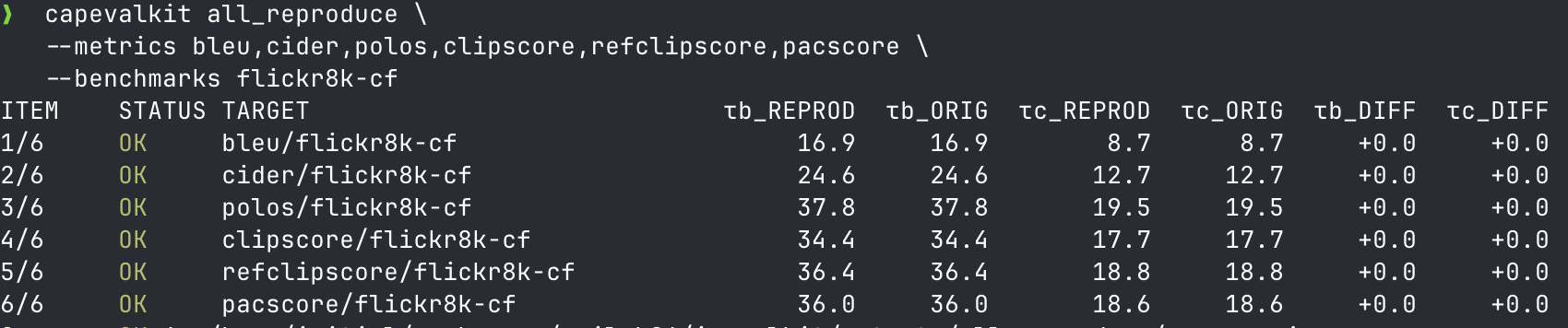
Table of Contents
- Install
- For VLM Developers
- For Metric Developers
- Reproduce Reported Results
- Reproduction Status
- Supported Metrics
- Supported Benchmarks
- Data and Assets
- TODO
- Development
- Citation
Install
Requirements: Python 3.10+, git, and uv. Java is also required for METEOR/SPICE through pycocoevalcap.
From PyPI or a built wheel:
pip install capevalkit
capevalkit doctor
capevalkit list-metrics
From a source checkout:
git clone --recursive https://github.com/YuigaWada/CaptionEvalKit-for-VLMs.git
cd CaptionEvalKit-for-VLMs
uv tool install --editable "$PWD" --force
capevalkit list-metrics
Runtime Cache
Wheel installs use CAPEVALKIT_HOME as a runtime cache root. The default is ~/.cache/capevalkit.
~/.cache/capevalkit/
  runtime/<lock-digest>/
    metrics/
    metrics/upstreams/
    benchmarks/expected/
    overlays/
  uv/
  huggingface/
Set a different location when needed:
CAPEVALKIT_HOME=/scratch/capevalkit capevalkit doctor
Source checkouts use the repository tree directly and keep submodules in metrics/upstreams/.
For Metric Developers
Benchmark existing metrics, or evaluate your own metric without adopting a fixed metric signature.
When changing upstream submodule revisions for a release, regenerate the runtime lock:
python scripts/generate_upstream_lock.py
CLI
Run one metric on one benchmark:
capevalkit benchmark \
  --metric clipscore \
  --benchmark composite \
  --limit 8 \
  --output outputs/clipscore/composite.json
Run the same metric across benchmarks:
capevalkit suite \
  --metrics clipscore \
  --benchmarks composite,flickr8k-ex,flickr8k-cf,nebula,polaris \
  --limit 8 \
  --output-dir outputs/clipscore
To wire a metric through its own CLI runner, add metrics/mymetric/metric.toml:
[metric]
name = "mymetric"
python = ">=3.10,<3.12"
module = "capevalkit.metrics.mymetric"

[repository]
dir = "metrics/upstreams/mymetric"
uv_project = "metrics/upstreams/mymetric"

[runner]
command = ["python", "score.py"]
Add a minimal metrics/upstreams/mymetric/pyproject.toml:
[project]
name = "mymetric"
version = "0.1.0"
requires-python = ">=3.10,<3.12"
dependencies = []
Make metrics/upstreams/mymetric/score.py accept:
--predictions PREDICTIONS.jsonl
--references REFERENCES.jsonl
--output OUTPUT.json
Then benchmark it:
capevalkit benchmark \
  --metric mymetric \
  --benchmark composite \
  --output outputs/mymetric/composite.json
import capevalkit as capeval

class MyMetric:
    def __call__(self, samples):
        return {
            sample.id: float(bool(sample.prediction and sample.references))
            for sample in samples
        }

result = capeval.evaluate_metric(
    benchmark="flickr8k-cf",
    metric=MyMetric(),
    metric_name="MyMetric",
    limit=8,
    output="outputs/mymetric/flickr8k-cf.json",
)
The callable receives CaptionSample objects and returns {sample_id: score}. Your metric can keep any internal signature.
For VLM Developers
Evaluate saved captions from files, or run your caption model on your own images.
CLI
predictions.jsonl:
{"id": "0001", "caption": "A dog runs through grass.", "image": "0001.jpg"}
{"id": "0002", "caption": "A person rides a bicycle.", "image": "0002.jpg"}
references.jsonl:
{"id": "0001", "references": ["A dog runs outside.", "A dog is in a grassy field."]}
{"id": "0002", "references": ["A cyclist rides on a road.", "A person rides a bike."]}
capevalkit score \
  --metric clipscore \
  --predictions predictions.jsonl \
  --references references.jsonl \
  --image-dir images \
  --output outputs/clipscore.json
{
  "CLIPScore": 0.73,
  "RefCLIPScore": 0.81,
  "per_item": {
    "0001": {"CLIPScore": 0.70, "RefCLIPScore": 0.78}
  }
}
Run these examples with uv run python from the repository, or install capevalkit into your own Python environment.
import capevalkit as capeval

def predict(batch):
    return ["A dog runs through grass." for _ in batch.images]

results = capeval.evaluate_caption_model(
    images=["images/0001.jpg", "images/0002.jpg"],
    metrics=["cider", "clipscore"],
    predict=predict,
    references=[
        ["A dog runs outside.", "A dog is in a grassy field."],
        ["A cyclist rides on a road.", "A person rides a bike."],
    ],
    batch_size=8,
    output_dir="outputs/my-model",
)
If captions are already generated, pass image-caption pairs directly:
import capevalkit as capeval

results = capeval.evaluate_captions(
    pairs=[
        {
            "id": "0001",
            "image": "images/0001.jpg",
            "caption": "A dog runs through grass.",
            "references": ["A dog runs outside.", "A dog is in a grassy field."],
        },
        {
            "id": "0002",
            "image": "images/0002.jpg",
            "caption": "A person rides a bicycle.",
            "references": ["A cyclist rides on a road.", "A person rides a bike."],
        },
    ],
    metrics=["cider", "clipscore"],
    output_dir="outputs/my-captions",
)
For manual caption-model control:
import capevalkit as capeval

def predict(batch):
    return ["A dog runs through grass." for _ in batch.images]

with capeval.CaptionEvalRun(
    images=["images/0001.jpg", "images/0002.jpg"],
    metrics=["cider", "clipscore"],
    references=[
        ["A dog runs outside.", "A dog is in a grassy field."],
        ["A cyclist rides on a road.", "A person rides a bike."],
    ],
    output_dir="outputs/my-model",
) as run:
    for batch in run.iter_batches(batch_size=8):
        run.record(batch.ids, predict(batch))

    results = run.evaluate()
Reproduce Reported Results
Preview the default reproducibility suite:
capevalkit all_reproduce --dry-run
Run one verified pair:
capevalkit all_reproduce \
  --metrics clipscore \
  --benchmarks composite
Run a launch smoke test for every default pair:
capevalkit all_reproduce --smoke --jobs 4 --gpu-jobs 1
--smoke runs one sample per pair and checks launch/output writing only. Omit it for full correlations.
Reproduction Status
Legend: ✅ reproduced, ⚠️ not reproduced, - no default target. For LongCap-Arena, unreproduced targets are also shown as -.
| Metric | Composite | Flickr8k-EX | Flickr8k-CF | Nebula | Polaris | LCA TestA | LCA TestB |
|---|---|---|---|---|---|---|---|
bleu |
✅ | ✅ | ✅ | ✅ | ✅ | - | - |
cider |
✅ | ✅ | ✅ | ✅ | ✅ | - | - |
clipscore |
✅ | ✅ | ✅ | ✅ | ✅ | - | - |
fleur |
⚠️ | ⚠️ | ✅ | - | - | - | - |
meteor |
✅ | ✅ | ✅ | ✅ | ✅ | - | - |
pacscore |
✅ | ✅ | ✅ | ✅ | ✅ | - | - |
polos |
✅ | ✅ | ✅ | ✅ | ✅ | - | - |
refclipscore |
✅ | ✅ | ✅ | ⚠️ | ⚠️ | - | - |
reffleur |
✅ | ✅ | ✅ | - | - | - | - |
refpacscore |
✅ | ✅ | ✅ | ⚠️ | ⚠️ | - | - |
rouge |
✅ | ✅ | ✅ | ✅ | ✅ | - | - |
spice |
✅ | ✅ | ✅ | ✅ | ✅ | - | - |
vela |
- | - | - | - | - | ✅ | ✅ |
Supported Metrics
| Metric | Upstream | Notes |
|---|---|---|
bleu |
pycocoevalcap |
BLEU-1 to BLEU-4 |
rouge |
pycocoevalcap |
ROUGE-L |
meteor |
pycocoevalcap |
Java METEOR through upstream |
cider |
pycocoevalcap |
CIDEr |
spice |
pycocoevalcap |
SPICE |
clipscore |
CLIPScore | image-caption CLIPScore |
refclipscore |
CLIPScore | reference-aware CLIPScore |
pacscore |
PACScore | PAC-S |
refpacscore |
PACScore | reference-aware PAC-S |
polos |
Polos | model-based reference-aware metric |
fleur |
FLEUR | LLaVA-based reference-free metric |
reffleur |
FLEUR | reference-aware FLEUR |
vela |
VELA | long-caption metric for desc, rel, flu |
Supported Benchmarks
| Benchmark | Source |
|---|---|
composite |
Hugging Face yuwd/Composite |
flickr8k-ex |
Hugging Face yuwd/Flickr8k-HumanEval, expert split |
flickr8k-cf |
Hugging Face yuwd/Flickr8k-HumanEval, CrowdFlower split |
nebula |
Hugging Face Ka2ukiMatsuda/Nebula |
polaris |
Hugging Face yuwd/Polaris |
longcaparena-testa-{desc,rel,flu} |
Hugging Face Ka2ukiMatsuda/LongCap-Arena |
longcaparena-testb-{desc,rel,flu} |
Hugging Face Ka2ukiMatsuda/LongCap-Arena |
Data and Assets
Benchmark datasets are cached on first use under <runtime-root>/.hf-cache/benchmarks/. In a source checkout, <runtime-root> is the repository root; in a wheel install, it is $CAPEVALKIT_HOME/runtime/<lock-digest>.
| Dataset | Loaded from |
|---|---|
| Composite | Hugging Face yuwd/Composite |
| Flickr8k-EX / Flickr8k-CF | Hugging Face yuwd/Flickr8k-HumanEval |
| Nebula | Hugging Face Ka2ukiMatsuda/Nebula |
| Polaris | Hugging Face yuwd/Polaris |
| Spica corrections | Hugging Face hiranohachiman/Spica |
| LongCap-Arena | Hugging Face Ka2ukiMatsuda/LongCap-Arena |
Model files and checkpoints are downloaded on first use by the corresponding metric runner or upstream library.
| Metric family | Model or checkpoint source |
|---|---|
| CLIPScore | OpenAI CLIP loader cache |
| PACScore | PACScore checkpoint URL, fetched on first PACScore run |
| Polos | upstream Polos model cache, fetched on first Polos run |
| FLEUR | Hugging Face liuhaotian/llava-v1.5-13b |
| VELA | Hugging Face Qwen/Qwen2.5-3B-Instruct, BeichenZhang/LongCLIP-L, Ka2ukiMatsuda/vela |
Set IC_EVAL_REFRESH_HF_CACHE=1 to refresh cached benchmark rows and extracted images.
Local data layout
If you pass a non-repository data root, use this layout:
data/
  composite/
    en_test_composite_da2.csv
    images/
  flickr8k/
    flickr8k.json
    crowdflower_flickr8k.json
    images/
  nebula/
    images/
  polaris/
    images/
TODO
- Implement EXPERT benchmark support.
- Improve the first-download UI/UX for
all_reproduce.
Development
uv run python -m unittest discover -s tests
Repository map:
capevalkit/                    CLI, API, benchmark loaders, verification
metrics/*/metric.toml          metric manifests
metrics/upstreams/*            upstream metric repositories
overlays/metrics/upstreams/*   uv overlays for upstream repositories
benchmarks/expected/           default all_reproduce expected values
Citation
If you use this toolkit, cite the original metric and benchmark papers for the implementations and reported values you rely on.


Download files
Download the file for your platform. If you're not sure which to choose, learn more about installing packages.
Source Distribution
Built Distribution
Filter files by name, interpreter, ABI, and platform.
If you're not sure about the file name format, learn more about wheel file names.
Copy a direct link to the current filters
File details
Details for the file capevalkit-0.1.0.tar.gz.
File metadata
- Download URL: capevalkit-0.1.0.tar.gz
- Upload date:
- Size: 221.5 kB
- Tags: Source
- Uploaded using Trusted Publishing? No
- Uploaded via: uv/0.11.15 {"installer":{"name":"uv","version":"0.11.15","subcommand":["publish"]},"python":null,"implementation":{"name":null,"version":null},"distro":{"name":"Ubuntu","version":"22.04","id":"jammy","libc":null},"system":{"name":null,"release":null},"cpu":null,"openssl_version":null,"setuptools_version":null,"rustc_version":null,"ci":null}
File hashes
| Algorithm | Hash digest | |
|---|---|---|
| SHA256 |
07bb400fdaf0f9efc921fc1ea12c4e48b441b36f3d0063a1bef727d2736d84d5
|
|
| MD5 |
6419d68482385ad2183460b56e5adcc2
|
|
| BLAKE2b-256 |
a20514ca85436ce8ad2d194f6f53b684c52af4a3ab6694d5fd081a1d6d212636
|
File details
Details for the file capevalkit-0.1.0-py3-none-any.whl.
File metadata
- Download URL: capevalkit-0.1.0-py3-none-any.whl
- Upload date:
- Size: 110.5 kB
- Tags: Python 3
- Uploaded using Trusted Publishing? No
- Uploaded via: uv/0.11.15 {"installer":{"name":"uv","version":"0.11.15","subcommand":["publish"]},"python":null,"implementation":{"name":null,"version":null},"distro":{"name":"Ubuntu","version":"22.04","id":"jammy","libc":null},"system":{"name":null,"release":null},"cpu":null,"openssl_version":null,"setuptools_version":null,"rustc_version":null,"ci":null}
File hashes
| Algorithm | Hash digest | |
|---|---|---|
| SHA256 |
aec022e31015c90b1c8b5841f9216073a5c52f1ccc903abc411a767e7fadd076
|
|
| MD5 |
5ffb5945cdf25270712c374810ab06df
|
|
| BLAKE2b-256 |
effbd597eb257bacde506e993a67172d962a27db688c92a37ededc3d5e3ded2f
|






