
cardbleed


Extends the borders of card scans so a printed and cut card doesn't end up with a border that is too thin. The extension continues whatever border the card already has (holofoil speckle, solid colors, gradients), and the original image data is never re-encoded: PNG and WebP pixels stay bit-identical, and JPEGs are extended by splicing DCT coefficient blocks around the untouched originals.
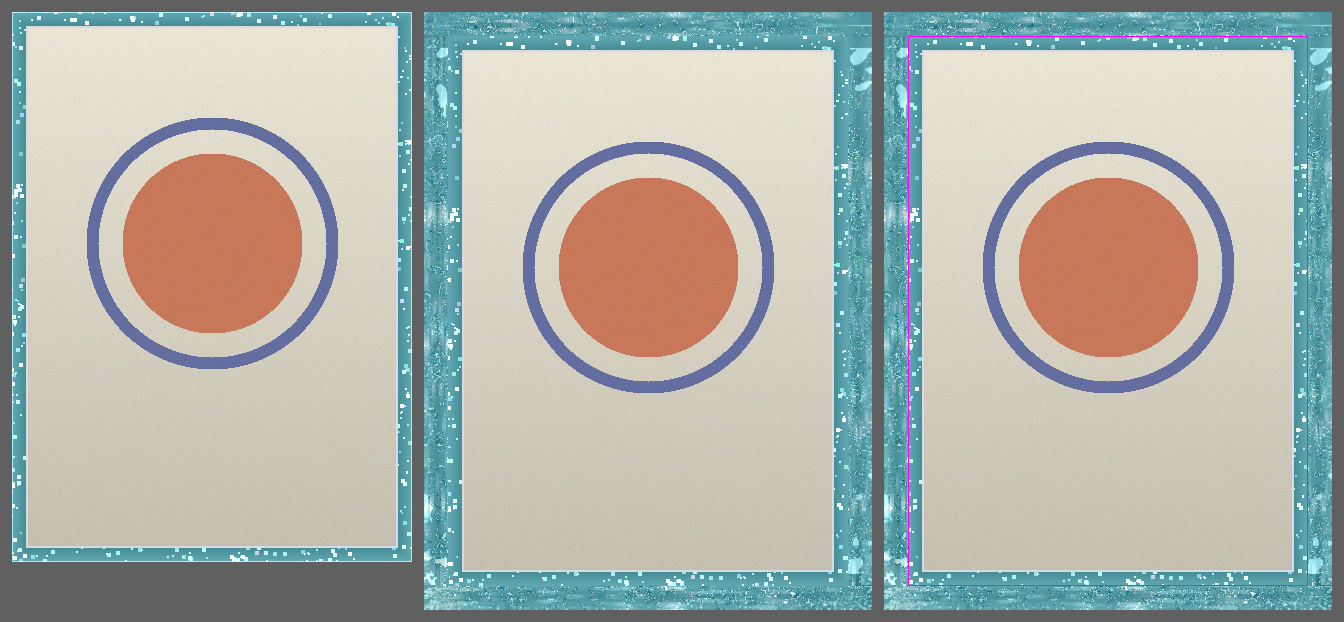
 input, 400×550 |
 output, cardbleed demo_card.png -e 24 |
The demo card is generated by a script (examples/make_demo.py), so the repository contains no copyrighted scans. It has the traits that make real scans annoying: a speckled border, a brightness gradient across it, a scanner-bloom line at the very edge, and an inner frame line. Bloom is trimmed and the frame line is detected automatically, so sampling never crosses into it.
Install
uv tool install cardbleed        # or: pipx install cardbleed
uvx cardbleed card.png           # or run once without installing
Until the first PyPI release, install from GitHub instead:
uv tool install git+https://github.com/ErikBavenstrand/cardbleed
Usage
cardbleed card.png --compare              # extend 16px, write a comparison sheet
cardbleed ./cards/ -e 2.5mm --recursive   # batch a folder, mm-based sizing
cardbleed card.jpg -e 20 --fix-aspect     # pad to the 63x88 ratio, then extend
cardbleed card.png --target 69x94mm       # pad to an exact final size
Outputs are written next to the input (or to --out-dir) with an _ext
suffix. Inputs are never overwritten. --compare also writes a side-by-side
sheet with the original boundary marked, which makes it easy to check the
seam.
Modes
Zoomed left-edge detail, one panel per setting: smart, pattern, naive, mirror, soft.
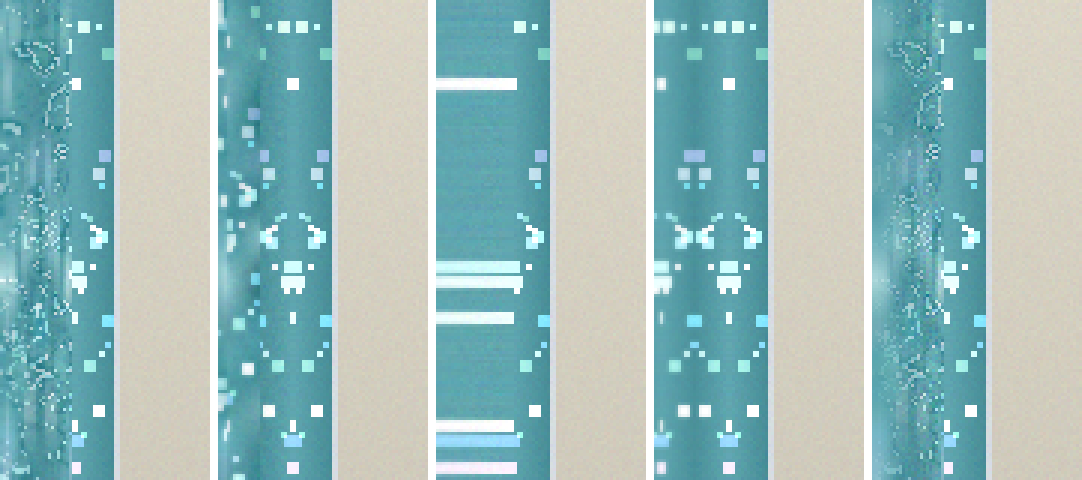
--mode pattern(default) keeps structure intact: every output line is a real contiguous border line, and each outward pass is shifted along the edge by a random offset. If the border has a repeating pattern, detected by autocorrelation, the continuation and the offsets snap to its period so the pattern stays in phase. With--shuffle 0it degrades to a plain deterministic mirror.--mode smartresamples the border band stochastically. Speckle is re-randomized in both directions, so nothing streaks or repeats, at the cost of some texture structure.--mode naivereplicates the outermost line straight outward (plus noise and smudge). Mostly useful as a baseline; it streaks on textured borders.
The gallery variants above, for reference:
 --mode smart |
 --mode naive |
 --smudge 2.5 --noise 0.8 |
 --compare sheet |
Format handling
| Format | What happens to the original data |
|---|---|
| PNG | re-serialized losslessly; pixels bit-identical |
| WebP | written as lossless WebP; decoded pixels preserved exactly |
| JPEG | original quantized DCT blocks are copied bit-exact into a larger coefficient grid; only the new border blocks are encoded, using the file's own quantization tables |
For JPEG the extension amounts have to align to the MCU grid (8 or 16 px). The remainder is shifted between opposite edges, so the final dimensions are still exactly what you asked for.
Options
cardbleed --help has the full reference. The ones worth knowing:
| Flag | Default | Meaning |
|---|---|---|
-e, --extend |
16 |
Amount per edge, px or mm (2.5mm); per-edge overrides via --left etc. |
--fix-aspect |
off | Pad the short axis to the card ratio (--card-size, default 63x88 mm) before extending |
--target |
none | Pad to an exact final size instead, e.g. 69x94mm |
--mode |
pattern |
pattern, smart, or naive (see above) |
--edge-fill |
auto |
Continue the border across transparent / rounded-corner / empty edge rows instead of extending the black gap; off to disable |
--fill-corners |
off | Square rounded/ragged corners: fill edge background (transparent, black, or white — anything that isn't the border) with the nearest border before bleeding. Modifies those background pixels; opaque artwork is untouched. png/webp only |
-k, --sample |
12 |
Band depth to sample from; clamped at detected inner border structure |
--trim |
auto |
Scanner-bloom lines to cut per edge |
--shuffle |
48 |
How far along the edge texture may be borrowed from |
--noise, --smudge |
0.35, 0.6 |
Added grain (relative to the border's own) and ramped blur |
--seed |
0 |
Output is deterministic per file |
How it works
Each edge is analyzed on the original image: bloom lines are trimmed and the sampling band is clamped before inner border structure. The border is split into a smooth tone component, which is continued outward mirrored so gradients stay seam-continuous, and a texture residual, which is resampled according to the selected mode. Noise matched to the border's measured grain and a ramped blur are applied on top. Corners are filled in two passes so they inherit synthesized side texture. All randomness ramps in from zero at the seam, so the first synthesized line is an exact continuation of the edge.
If a card already has rounded corners, the corner triangles are transparent (or
black/empty) in the scan. --edge-fill (on by default) detects those rows per
edge and continues the nearest real border across them, so the added bleed is
border colour rather than a grown black/transparent corner. It's a no-op on
edges with no such background, and stands down when an edge is mostly empty
(nothing to continue). Original pixels are still left untouched — only the
synthesized bleed is affected.
--fill-corners goes one step further and squares the corners themselves: edge
background (transparent, black, or white — anything reachable from the image
border that isn't the card) is flooded and filled with the nearest border, so a
rounded-corner scan becomes a clean rectangle before the bleed is added. Unlike
the rest of cardbleed it does change those background pixels (opaque artwork is
never touched); it's opt-in and png/webp only.
Development
git clone https://github.com/ErikBavenstrand/cardbleed && cd cardbleed
uv run cardbleed --selfcheck            # assertion suite (fixtures)
uv run cardbleed --selfcheck scan.png   # plus checks against a real scan
uv run --group dev ruff check src
uv run --group dev pyright
Module layout: synthesis.py (edge analysis and border synthesis),
formats.py (format-preserving I/O, including the JPEG DCT path),
sizing.py (px/mm/target/aspect math), process.py (per-file pipeline),
cli.py, selfcheck.py.
License
1 maintainer

Metadata
1 maintainer
Release files for cardbleed 0.3.1
For a detailed explanation of source distributions (sdists) and built distributions (wheels), please see the package formats documentation.
Source distribution (sdist)
| File | Size | Uploaded | |
|---|---|---|---|
| cardbleed-0.3.1.tar.gz | 3.7 MB | Details |
Built distribution (wheel)
| File | Interpreter | ABI | Platform | Reset |
|---|---|---|---|---|
| cardbleed-0.3.1-py3-none-any.whl | Python 3 | none | any | Details |
Total release size: 3.7 MB
Release files / cardbleed-0.3.1.tar.gz
| Download URL | cardbleed-0.3.1.tar.gz |
|---|---|
| Size | 3.7 MB |
| Tags | Source |
|
SHA-256 checksum How to use checksums |
ac68ca4d9ee9bcd1b2000b7563fbdcba1bf0f3bcf3f5a83006158c5138f87e55
|
|
BLAKE2b-256 checksum How to use checksums |
8a06af23345cea297e3e679c661b00e92152dab73244b1383bca5ef16e10df09
|
| Upload date | |
|
Uploaded using Trusted Publishing? What is trusted publishing? |
Yes |
| Uploaded via |
twine/6.1.0 CPython/3.13.14
|
Provenance
Provenance describes where a file came from. On PyPI, provenance is shared via attestations, which provide a verifiable record of the build or publishing details. View details, limitations and caveats.


PyPI Publish Attestation
PyPI verified that this artifact, at this checksum, originated from the publisher listed below.
Signed by GitHub Actions, verified by PyPI on Jul 22, 2026.
Transparency logRelease files / cardbleed-0.3.1-py3-none-any.whl
| Download URL | cardbleed-0.3.1-py3-none-any.whl |
|---|---|
| Size | 31.8 kB |
| Tags | Python 3 |
|
SHA-256 checksum How to use checksums |
d8e391a8bfc549d298c78aa54f61ddbe2197646394693f73f248bc150da76701
|
|
BLAKE2b-256 checksum How to use checksums |
e8d1124ca8dded96c3d4e3c7b4cb9ad48f7daa22c9bbb561a59026516945c49e
|
| Upload date | |
|
Uploaded using Trusted Publishing? What is trusted publishing? |
Yes |
| Uploaded via |
twine/6.1.0 CPython/3.13.14
|
Provenance
Provenance describes where a file came from. On PyPI, provenance is shared via attestations, which provide a verifiable record of the build or publishing details. View details, limitations and caveats.
PyPI Publish Attestation
PyPI verified that this artifact, at this checksum, originated from the publisher listed below.
Signed by GitHub Actions, verified by PyPI on Jul 22, 2026.
Transparency log













