
Widget library manager for AI agents — CLI

Project description
Cartograph


A local first reusable code registry for AI agents. Search, install, create, validate, and check in code modules across projects. Only requires Python. Other languages in the repo are native validation scanners for their respective widget types. The tool is designed to use the languages you have installed.
For setups who don't want to tune instructions for their agents, we recommend using the Plugin if you use one of the supported agents. If you run the MCP we would recommend using the cartograph setup --agent [agent] command to support the other features.
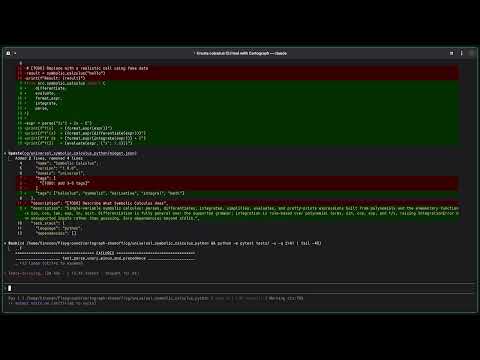
Demonstration of creating, installing, and composing widgets
Why Cartograph
AI agents write a lot of code, but it disappears. Each new project starts from scratch, and agents can't naturally reuse logic across codebases without somewhere to put it.
Cartograph came out of a personal frustration. Features that took 10 to 20 hours to polish with AI coding tools would need to be rebuilt almost from scratch when the next project needed them and most of the hardened logic would be gone. Then I built a basic engine, and those same features could be dropped into a new project in minutes.
Those same widgets have now been reused across many projects and have settled into a quiet loop of continuous improvement. Each time a new edge case surfaces, the fix goes back into the library, and every project that installs it going forward starts with that bug already squashed.
Per aspera ad astra. Through hardships to the stars. This is a tool that takes struggle to get the benefits, and they will compound.
What is a widget?
A widget is a reusable code module with tests, examples, metadata, and declared dependencies. Each widget is self-contained and language-specific.
cg/backend_retry_backoff_python/
  widget.json          # metadata, version, dependencies
  src/                 # source code
  tests/               # test files (80%+ coverage required)
  examples/
    example_usage.py   # must run successfully
Widget IDs follow <domain>-<name>-<language>, for example backend-retry-backoff-python or algorithms-edit-distance-nim.
When installed into a project, widgets live under cg/ in your working directory.
Quick start
pip install cartograph-cli
Set up instructions for your AI agent:
cartograph setup
This auto-detects your agent (Claude, Cursor, Codex, Gemini) and appends Cartograph instructions to the appropriate config file. Use --print to preview without writing.
Example workflow
# Create a new widget
cartograph create backend-retry-backoff-python --language python --domain backend

# Write your code in cg/backend_retry_backoff_python/src/ and tests/

# Validate it (runs tests, coverage, contamination scanning)
cartograph validate cg/backend_retry_backoff_python

# Check it into your library
cartograph checkin cg/backend_retry_backoff_python --reason "initial implementation"

# Later, in a different project:
cartograph search "retry backoff"
cartograph install backend-retry-backoff-python
Philosophy
This CLI tool is built with agents in mind first. Commands are non-interactive and output JSON so both humans and AI agents can consume them.
We only ship what we can validate. Every widget that enters the library has passed a full pipeline: structure checks, manifest validation, coverage enforcement, contamination scanning, example execution, and versioning. If the pipeline can't run it, it doesn't go in.
Supporting a language means owning its full validation pipeline, not just generating files. We add languages as those pipelines are ready, not before.
Common commands
The commands you'll reach for daily. All run from your project root.
cartograph search <query>                              # find a widget
cartograph install <widget_id>                         # install into cg/
cartograph create <name> --domain <d> --language <l>   # scaffold a new widget
cartograph validate [path]                             # run the full pipeline
cartograph checkin [path] --reason "..."               # push edits back
cartograph status                                      # installed widgets
cartograph setup                                       # configure your agent
Full reference: cartograph <command> --help for a single command, or
cartograph setup --print for the complete surface grouped by section.
The reference is generated directly from the CLI, so it never drifts from
what the tool actually supports.
Language support
- Python: pytest, coverage.py, AST-based contamination scanner
- JavaScript/TypeScript: vitest, native JS scanner, React component support
- Nim: nimble, std/unittest, native Nim scanner, stdlib-aware import checking
- OpenSCAD: renders to STL, non-empty mesh check, Python contamination scanner (OpenSCAD has no file I/O). Requires 2021.01+ for
assert()support. BOSL2 optional. - SystemVerilog: Icarus Verilog (iverilog + vvp),
-g2012mode. Enforcesalways_comb/always_ff(legacyalways @(...)blocked). Contamination scanner checks vendor primitives, simulation-only constructs (initial,#delay,$display), blocking/non-blocking assignment misuse, and hardcoded constants. Vendor primitives allowed when the vendor library is declared as a dependency. - Angular: Angular CLI (
ng test+ng build), Karma + Jasmine with ChromeHeadless, 80% coverage viakarma.conf.jsthresholds. Standalone components (Angular 14+). Reuses JS contamination scanner. Example validation:ng build(build artifact, not script execution). Requires@angular/cliglobally and Chrome/Chromium installed. - PHP: Composer + PHPUnit 11, Xdebug or PCOV for coverage, 80% threshold via
--min-coverage. PSR-4 autoloading underCartograph\namespace. Contamination scanner blocks WordPress globals (wp_*,add_action,$wpdb, etc.) andechoin src/ to enforce pure PHP utility widgets. - Terraform:
terraform validateagainst src/, tests/, and examples/ (shape-only - no test runner, no coverage; modules harden through use). Blocks provider/backend blocks in src/, real AWS account IDs, and credential-shaped assignments. Providers cached viaTF_PLUGIN_CACHE_DIR. - Go:
go testwith built-in coverage (80% via-coverpkg),go vet+ build check, nativego/astcontamination scanner. Single-binary toolchain. Widgets are libraries: console output,os.Exit, andpanicininit()are blocked in src/. - Java: Gradle + JUnit 5, JaCoCo line coverage (80%, Gradle core plugin - the whole toolchain is JDK 21+ plus Gradle), native comment/string/text-block-aware scanner run in JDK single-file mode. Widgets own their full build.gradle including plugins (build-time plugins like Fabric Loom work); the engine only requires a JaCoCo XML report from
testand arunExampletask.System.out/err,System.exit, andThread.sleepare blocked in src/.
Each language has its own validation engine. The contamination scanners are written in the target language itself where possible (Python uses AST, JS uses a token-based parser, Nim uses a line-based scanner). OpenSCAD and SystemVerilog use Python-based scanners since neither language has general-purpose file I/O suitable for static analysis tooling.
Cloud registry
The CLI is built around a local registry on your machine. It also supports an optional cloud registry for sharing widgets across teams or publicly.
The hosted registry is in early development. The local engine is more ready and does not depend on cloud availability. If the registry is down or unreachable, everything local continues to work.
To point at your own registry instance:
export CARTOGRAPH_REGISTRY_URL=https://your-registry.example.com
cartograph login opens a browser-based authentication flow provided by whichever registry you're connected to.
Running or building a registry? The protocol contract - endpoints, the widget row schema, search ordering semantics, auth - is documented in REGISTRY.md.
Development
pip install -e .
git config core.hooksPath .githooks   # enable the pre-push hook
pytest
The widget library lives in your platform's user data directory. To override the location, set WIDGET_LIBRARY_PATH. When running from source, a Widget_Library/ directory alongside this repo takes precedence so local edits work without configuration.
Run cartograph doctor to check that all language engine dependencies (pytest, coverage, node, npx, vitest, nim, nimble, openscad, iverilog, terraform, go, cargo, cargo-llvm-cov, ngspice, godot, java, gradle) are installed correctly.
Pre-push checks and release preflight
The tracked .githooks/pre-push hook runs two fast checks in ~20-30 seconds before every push:
- Import smoke (catches syntax errors).
- Wheel-install smoke (build into a tempdir venv, verify
cartograph setup --printstill works — catches the dogfood-path-resolution class of bug that v0.5.29 shipped).
For a release push, run the full gauntlet first (~5-6 minutes, includes pytest):
./scripts/preflight.sh && git push origin master
# then tag:
git tag vX.Y.Z && git push origin vX.Y.Z
Release history Release notifications | RSS feed


Download files
Download the file for your platform. If you're not sure which to choose, learn more about installing packages.
Source Distribution
Built Distribution
Filter files by name, interpreter, ABI, and platform.
If you're not sure about the file name format, learn more about wheel file names.
Copy a direct link to the current filters
File details
Details for the file cartograph_cli-0.7.16.tar.gz.
File metadata
- Download URL: cartograph_cli-0.7.16.tar.gz
- Upload date:
- Size: 658.2 kB
- Tags: Source
- Uploaded using Trusted Publishing? Yes
- Uploaded via: twine/6.1.0 CPython/3.13.12
File hashes
| Algorithm | Hash digest | |
|---|---|---|
| SHA256 |
778bf548cc30823cd2f9118fb5295ccb72d98f201eb67147327526d7fa735234
|
|
| MD5 |
2416b0bbedbc3747a70759532f51b3eb
|
|
| BLAKE2b-256 |
9b698aec2c752fe0a35393dc7b41b21df6f9bfe79642dbd128de18eabf1d60ed
|
Provenance
The following attestation bundles were made for cartograph_cli-0.7.16.tar.gz:
Publisher:
publish.yml on benteigland11/Cartograph
-
Statement:
-
Statement type:
https://in-toto.io/Statement/v1 -
Predicate type:
https://docs.pypi.org/attestations/publish/v1 -
Subject name:
cartograph_cli-0.7.16.tar.gz -
Subject digest:
778bf548cc30823cd2f9118fb5295ccb72d98f201eb67147327526d7fa735234 - Sigstore transparency entry: 2122414462
- Sigstore integration time:
-
Permalink:
benteigland11/Cartograph@00b2d72384504c634d1fe62fc9575ddcd0681d4d -
Branch / Tag:
refs/tags/v0.7.16 - Owner: https://github.com/benteigland11
-
Access:
public
-
Token Issuer:
https://token.actions.githubusercontent.com -
Runner Environment:
github-hosted -
Publication workflow:
publish.yml@00b2d72384504c634d1fe62fc9575ddcd0681d4d -
Trigger Event:
workflow_dispatch
-
Statement type:
File details
Details for the file cartograph_cli-0.7.16-py3-none-any.whl.
File metadata
- Download URL: cartograph_cli-0.7.16-py3-none-any.whl
- Upload date:
- Size: 518.8 kB
- Tags: Python 3
- Uploaded using Trusted Publishing? Yes
- Uploaded via: twine/6.1.0 CPython/3.13.12
File hashes
| Algorithm | Hash digest | |
|---|---|---|
| SHA256 |
0bd0e7bc2690b86484d695bf3b02e7d805ce9761cfe4c2ad8999b3b2c7a5dc6a
|
|
| MD5 |
0e1fa8412a03d12bb5d1e3d435e42e46
|
|
| BLAKE2b-256 |
4daa30fc07a5ab37bc5108d1414a634bc0efbaa99a850738aa56360dd689be33
|
Provenance
The following attestation bundles were made for cartograph_cli-0.7.16-py3-none-any.whl:
Publisher:
publish.yml on benteigland11/Cartograph
-
Statement:
-
Statement type:
https://in-toto.io/Statement/v1 -
Predicate type:
https://docs.pypi.org/attestations/publish/v1 -
Subject name:
cartograph_cli-0.7.16-py3-none-any.whl -
Subject digest:
0bd0e7bc2690b86484d695bf3b02e7d805ce9761cfe4c2ad8999b3b2c7a5dc6a - Sigstore transparency entry: 2122414581
- Sigstore integration time:
-
Permalink:
benteigland11/Cartograph@00b2d72384504c634d1fe62fc9575ddcd0681d4d -
Branch / Tag:
refs/tags/v0.7.16 - Owner: https://github.com/benteigland11
-
Access:
public
-
Token Issuer:
https://token.actions.githubusercontent.com -
Runner Environment:
github-hosted -
Publication workflow:
publish.yml@00b2d72384504c634d1fe62fc9575ddcd0681d4d -
Trigger Event:
workflow_dispatch
-
Statement type:






