
No project description provided


Project description
Overview
The cas_visualizerlibrary can be used to transform a Common Analysis System (CAS) data structure into an annotated HTML string.
The library visualizes annotations with an underlined (default) or highlighted style.
Quick start
(see self-contained example)
We require a CAS file or cassis.Cas object that contains a text, e.g.
Die Fernuniversität in Hagen (Eigenschreibweise: FernUniversität) ist die erste und einzige staatliche Fernuniversität in Deutschland. Ihr Sitz befindet sich in Hagen in Nordrhein-Westfalen.
Nach Angaben des Statistischen Bundesamtes war sie, ohne Berücksichtigung von Akademie- und Weiterbildungsstudierenden, mit über 76.000 Studierenden im Wintersemester 2016/2017[3] die größte deutsche Universität.[4]
The CAS is based on a type system file or cassis.TypeSystem object and specifies annotation types, e.g.
de.tudarmstadt.ukp.dkpro.core.api.ner.type.NamedEntity
To transform the text into an HTML string with underlined annotations of type NamedEntity, we run:
from cas_visualizer.visualizer import SpanVisualizer

cas = '../data/hagen.txt.xmi'
ts = '../data/TypeSystem.xml'

span_vis = SpanVisualizer(ts)

span_vis.add_type(name='NamedEntity')

html = span_vis.visualize(cas)
Finally, in a browser we can then render the HTML string:
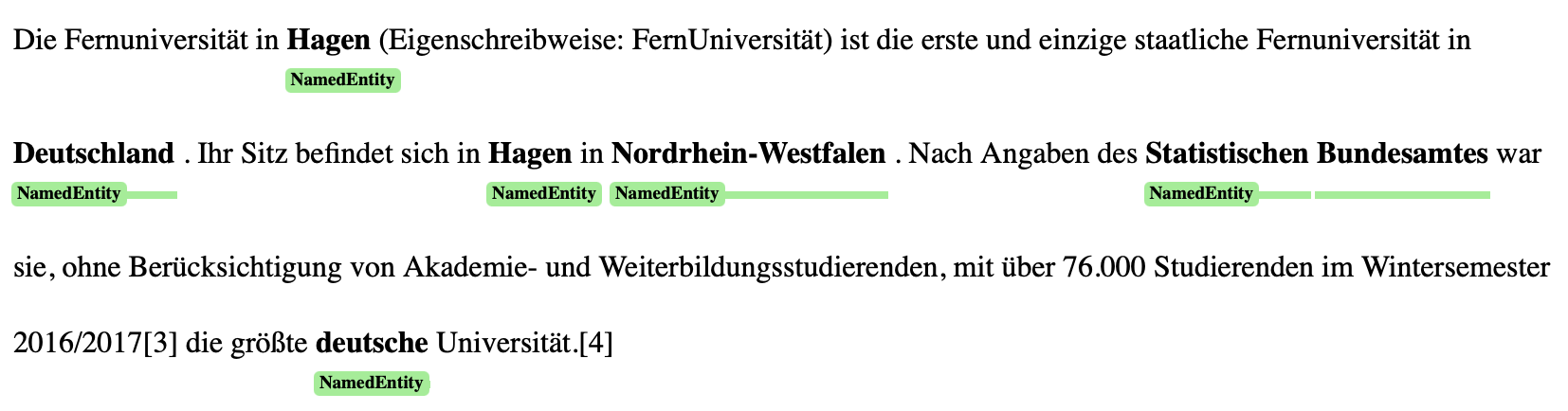
Before visualizing the CAS, you can switch to the highlighted style by calling:
span_vis.selected_span_type = "HIGHLIGHT"

How to publish a new version:
- Increase the version number in
pyproject.toml - Run
poetry build - [Optional] If no token is configured:
- Create an API-Token by visiting: https://pypi.org/manage/account/#api-tokens
- Replace
TOKENwith the string of the API-Token and runpoetry config pypi-token.pypi TOKEN
- Run
poetry publish
Release history Release notifications | RSS feed


Download files
Download the file for your platform. If you're not sure which to choose, learn more about installing packages.
Source Distribution
Built Distribution
Filter files by name, interpreter, ABI, and platform.
If you're not sure about the file name format, learn more about wheel file names.
Copy a direct link to the current filters
File details
Details for the file cas_visualizer-0.1.2.tar.gz.
File metadata
- Download URL: cas_visualizer-0.1.2.tar.gz
- Upload date:
- Size: 6.3 kB
- Tags: Source
- Uploaded using Trusted Publishing? No
- Uploaded via: poetry/1.8.4 CPython/3.9.13 Darwin/24.6.0
File hashes
| Algorithm | Hash digest | |
|---|---|---|
| SHA256 |
f2f007b8f87327c145882cf9be229465547cadc016973efa538c87554951ff42
|
|
| MD5 |
3946c9b086f4f7d96dbeffed41732605
|
|
| BLAKE2b-256 |
7137f58ebeb326c10aedcffcd9d2273d3c7fd9e8b62f6fd36ba2a453d426fa8c
|
File details
Details for the file cas_visualizer-0.1.2-py3-none-any.whl.
File metadata
- Download URL: cas_visualizer-0.1.2-py3-none-any.whl
- Upload date:
- Size: 7.1 kB
- Tags: Python 3
- Uploaded using Trusted Publishing? No
- Uploaded via: poetry/1.8.4 CPython/3.9.13 Darwin/24.6.0
File hashes
| Algorithm | Hash digest | |
|---|---|---|
| SHA256 |
9fdd23c06c3c7c5d3d05d68a74060279216be6e1ad4eb0b7d96847d106e47b8a
|
|
| MD5 |
d6083b6a30bee8d4548ee71ab2644b17
|
|
| BLAKE2b-256 |
30c0997cddf75caac2748ea8c2b18d00255e3320fdba1f851166190f7676f6d1
|






