




cash is a Python cache that re-runs only what changed. It stores the results of slow work and hands them back when the code and the inputs that produced them have not changed, including the helper functions your code calls and the data files it reads.
You use it in one of two ways:
- In scripts, services and libraries: decorate a slow function with
@cash.cache. - In a notebook: put
import cashand%cash_onin the first cell, and every statement below it caches itself.
What a restore costs: a 100 MB DataFrame comes back from disk in 70 ms on the machine the benchmark table was measured on. Your hardware and disk change that number, so the benchmarks page shows how to measure your own. cash quotes this rather than a speedup, because the speedup depends on how long your code takes to compute.
Install
pip install cash-lib
That one install is all cash needs. A few features, such as the Redis backend, need a package of their own; see installation.
Decorator
import cash
import pandas as pd

def clean(frame):                 # a plain function, not decorated
    return frame.dropna()

@cash.cache
def features(path):
    return clean(pd.read_csv(path))["feature_a"].mean()

features("large_dataset.csv")     # runs
features("large_dataset.csv")     # restored, and again in the next process
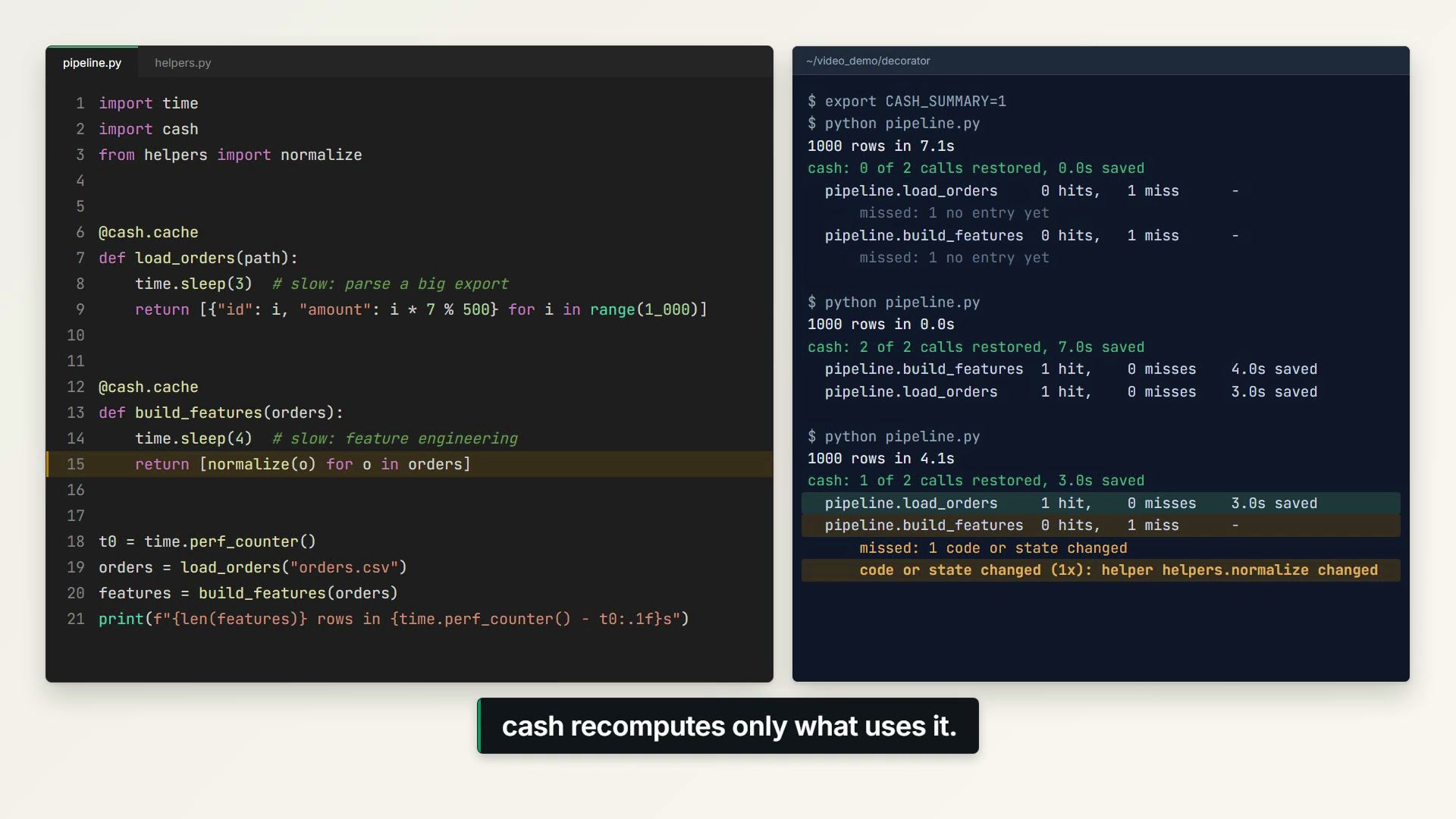
- The key is the arguments (DataFrames and arrays are hashed by content), the
function's source and the source of the helpers it calls. Edit
cleanand the next call recomputes. - Files the function reads are tracked: change
large_dataset.csvand the next call recomputes. - Every result is written to disk, so a new process gets it back.
- Side effects (HTTP calls, file writes) are flagged, because they run on the first call only.
A 30-second video of @cash.cache in a script (click to play):
Decorator quick start · @cash.cache guide
Notebook
Cell 1, on its own:
import cash
%cash_on
Cell 2 and below, your code:
import pandas as pd
df = pd.read_csv("large_dataset.csv")
summary = df.describe()
Re-run it, and cash puts a badge above the cell's output saying what it did:
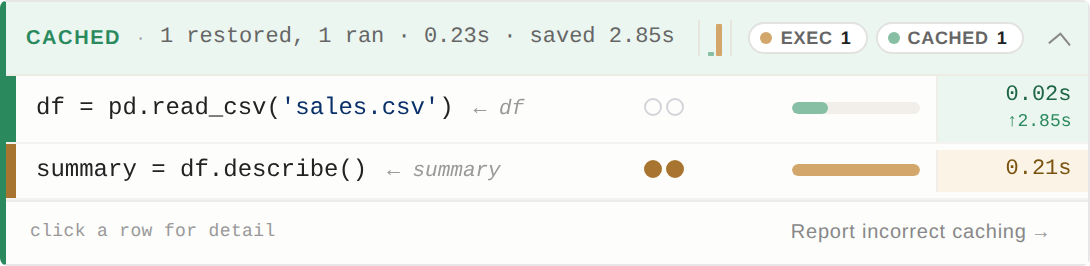
Here the file had not changed, so the load was restored; describe() had been
edited, so only that line ran.
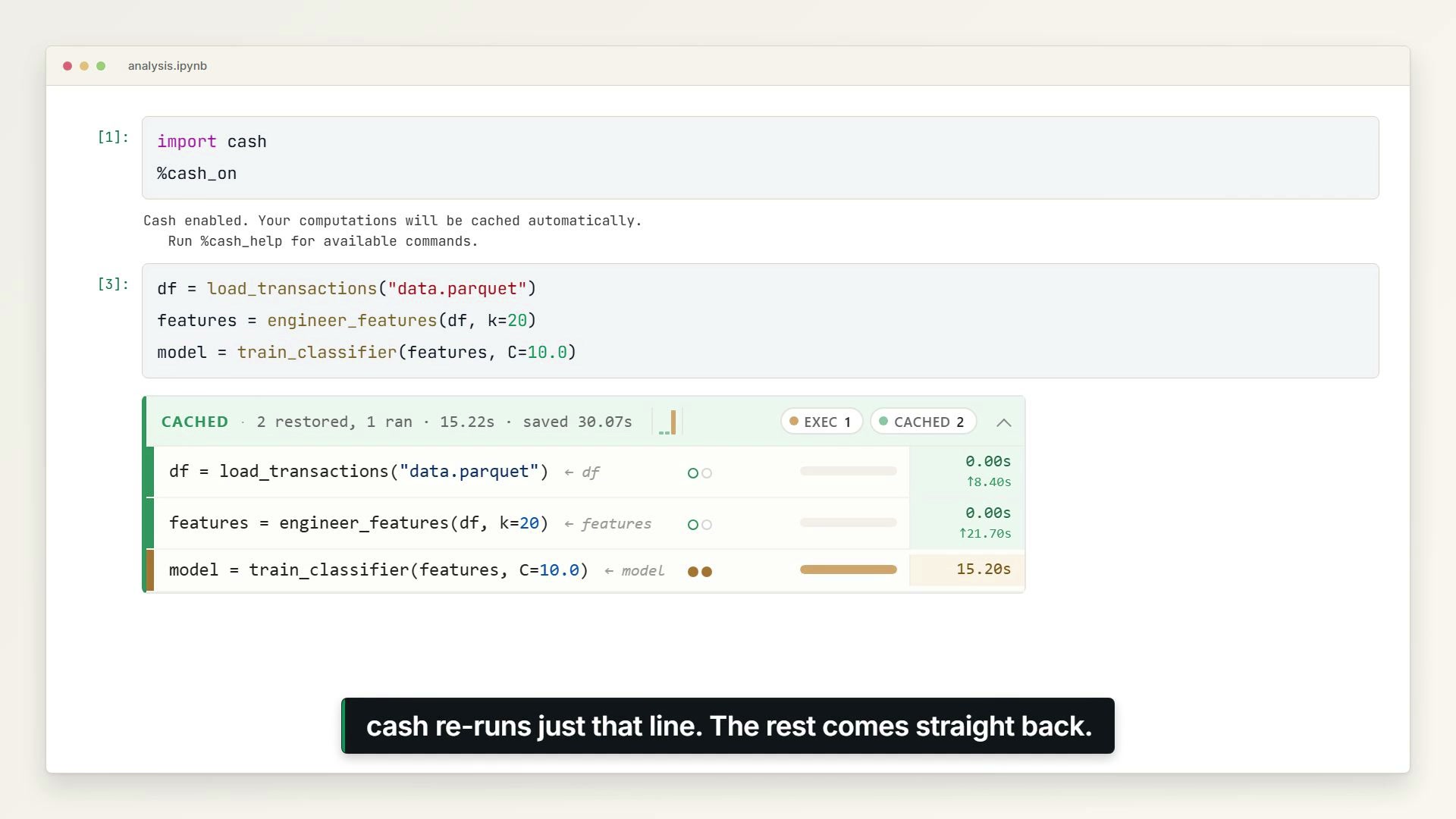
- Each statement is cached on its own: edit one line and only that line and what depends on it re-run.
- Files a statement reads are tracked, and in-place changes such as
df["x"] = ...oritems.append(...)are detected. - Expensive results are saved to disk and come back after a kernel restart.
A 30-second video of cash in a notebook (click to play):
Or try it in your browser with no install:


Notebook quick start · Reading the badge
Learn more
- Why cash?: what each path does, and a comparison with joblib, lru_cache, diskcache and others
- FAQ · Command-line interface · Configuration
- Writing cache-safe cells · Benchmarks · Versioning
Status
Beta. This is a 0.x release: a minor release can change the API. cash clears a cache written in an older format by itself. See versioning and the known limitations.
How cash is tested: ~11,450 tests across 15 platform combinations, documentation whose code is executed and whose prose is pinned to the source, and what that still misses.
Bug reports are welcome: use the badge's "Report a bug" button, the links at the end of %cash_help, or open an issue.
Contributing
See CONTRIBUTING.md. Good first issues are tagged on the tracker.
License
MIT — see LICENSE.
1 maintainer

Metadata
1 maintainer
Release files for cash-lib 0.12.0
For a detailed explanation of source distributions (sdists) and built distributions (wheels), please see the package formats documentation.
Source distribution (sdist)
| File | Size | Uploaded | |
|---|---|---|---|
| cash_lib-0.12.0.tar.gz | 1.2 MB | Details |
Built distribution (wheel)
| File | Interpreter | ABI | Platform | Reset |
|---|---|---|---|---|
| cash_lib-0.12.0-py3-none-any.whl | Python 3 | none | any | Details |
Total release size: 2.5 MB
Release files / cash_lib-0.12.0.tar.gz
| Download URL | cash_lib-0.12.0.tar.gz |
|---|---|
| Size | 1.2 MB |
| Tags | Source |
|
SHA-256 checksum How to use checksums |
c7ef4747021ab0d50d28e79f47f62d6909292ab536646225bcd667d1a7a3f55d
|
|
BLAKE2b-256 checksum How to use checksums |
bb3d1a652ffe024295e7913323eadf0c49e81b55cd3ec8729c68a03890314fa7
|
| Upload date | |
|
Uploaded using Trusted Publishing? What is trusted publishing? |
Yes |
| Uploaded via |
twine/7.0.0 CPython/3.13.14
|
Provenance
Provenance describes where a file came from. On PyPI, provenance is shared via attestations, which provide a verifiable record of the build or publishing details. View details, limitations and caveats.


PyPI Publish Attestation
PyPI verified that this artifact, at this checksum, originated from the publisher listed below.
Signed by GitHub Actions, verified by PyPI on Sep 27, 2026.
Transparency logRelease files / cash_lib-0.12.0-py3-none-any.whl
| Download URL | cash_lib-0.12.0-py3-none-any.whl |
|---|---|
| Size | 1.3 MB |
| Tags | Python 3 |
|
SHA-256 checksum How to use checksums |
73feda81997143eb5890d3f3d285e31ce0a26337745e1410b0f9bcf69b56bb1c
|
|
BLAKE2b-256 checksum How to use checksums |
27039693deffa460a125b248aab3124a5ff057e090af87a131acbc5b74045521
|
| Upload date | |
|
Uploaded using Trusted Publishing? What is trusted publishing? |
Yes |
| Uploaded via |
twine/7.0.0 CPython/3.13.14
|
Provenance
Provenance describes where a file came from. On PyPI, provenance is shared via attestations, which provide a verifiable record of the build or publishing details. View details, limitations and caveats.
PyPI Publish Attestation
PyPI verified that this artifact, at this checksum, originated from the publisher listed below.
Signed by GitHub Actions, verified by PyPI on Sep 27, 2026.
Transparency log













