




Two lines. Zero config. Restart-and-run-all in seconds instead of minutes.
import cash
%cash_on
That's it. The next time you re-run the notebook, every statement that hasn't changed is restored from cache instead of recomputed. Outside notebooks, the same engine wraps any function as @cash.cache.
The number that matters: a 100 MB DataFrame comes back from disk in 166 ms. Whatever it cost you to compute, that is what every re-run hands back. Cash publishes what a restore costs rather than a speedup multiplier — here's why.
📺 Watch the 90-second demo — Cash caching a real notebook, end to end:
https://github.com/user-attachments/assets/3f376660-aeb5-4794-89cc-532a04f82f32
Or try it live in your browser — no install:


Two ways to use cash
Pick the path that matches how you write code — both ride the same engine:
- In a notebook — add
%cash_onand every cell caches itself, statement-level, with a badge above each cell's output. For interactive work in Jupyter, Colab, or VS Code. - In a script — wrap a function with
@cash.cacheand it caches by its arguments and its own source. For modules, pipelines, and batch jobs.
Why Cash is different
Most caching tools key on the arguments you pass. Cash also keys on the code that runs — a function's own source, the helpers it calls, and the files it reads — so editing any of them recomputes instead of handing back a stale answer.
Both paths get:
- Change-awareness that follows callees. It is not only the decorated function's own source that is keyed — edit a plain, undecorated helper it calls, several levels down, and the next call recomputes.
- File-awareness.
pd.read_csv,np.load,open, … are intercepted. Replacedata.csvand whatever read it recomputes. - Dependency-awareness. Cash builds a lineage graph, so touching an upstream value re-runs only what transitively depends on it.
- Persistence across processes. The cache lives on disk by default — a restart, a fresh process, or a shared backend across machines.
- Native pandas / numpy / polars / PyArrow hashing. A DataFrame or an array can be an argument or a tracked input, content-hashed rather than keyed by identity.
In a notebook, additionally:
- Statement-level, not cell-level. Change one line in a 20-line cell → that line and its dependents recompute. The other 19 stay cached.
- Mutation-aware.
df.append(...)and+=are detected, so you don't get stale reads. - Zero-config.
%cash_onand you're done. No decorators, no config file.
Cash saves time on re-runs — restoring an unchanged result instead of recomputing it, not speeding the first execution up. The more a statement costs to compute relative to the size of its result, the more a restore saves; %cash_stats reports your actual numbers, and says so plainly when caching cost you time. See the benchmarks for how that plays out on real workloads.
Weighing cash against a tool you already use? The comparison matrix does that properly, tool by tool.
Install
pip install cash-lib
Optional extras: pip install "cash-lib[all]" (pandas, polars, redis, s3, …). See installation.
Quick start
In a notebook
Cell 1 — turn it on:
import cash
%cash_on
Cell 2 — your normal code:
import pandas as pd
df = pd.read_csv("large_dataset.csv")   # tracked: file change → recompute
summary = df.describe()
Re-run it, and Cash puts a badge above the cell's output saying exactly what it did. Here is one from a cell of the same shape — a load, then a summary:
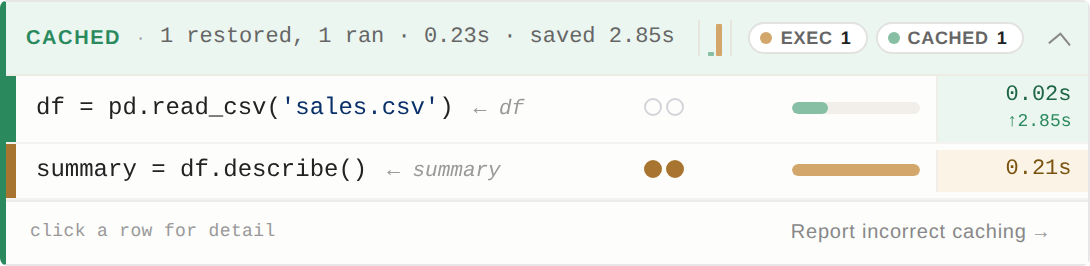
Two statements, one cell, two different decisions. The file hadn't changed, so
the load was restored; describe() had been edited, so only that line
ran — the two rails and the CACHED 1 / EXEC 1 chips say which is which.
That is what statement-level means in practice: a cell-level cache would have
had to redo both.
- ✅ Nothing changed → every row reads
CACHED. - 🔄 The CSV changed → the rows that read it flip to
EXECUTED. - ⚡ Only the analysis changed → the load stays
CACHED, the analysis re-runs.
In the notebook the badge is expandable — click any row for its cache key, storage tier and timing. Full anatomy in Reading the Cash badge.
In a script
@cash.cache caches any Python function across processes — keyed by its
arguments and by the code that produced the result.
import cash
import pandas as pd

def clean(frame):                 # a plain function, not decorated
    return frame.dropna()

@cash.cache
def features(path):
    return clean(pd.read_csv(path))["feature_a"].mean()

features("large_dataset.csv")     # runs
features("large_dataset.csv")     # restored — and again in the next process
Now edit clean: the next call recomputes, even though features's own
source never changed. Same if large_dataset.csv changes on disk.
That reach into a plain, undecorated helper — not just the decorated function's own source — is what keeps a cached result honest while you refactor around it.
Impure functions (LLM calls, HTTP, file writes) are flagged by default, since their side effects only run on the first call.
Full walkthrough in the decorator guide.
Learn more
- Documentation home · Why Cash? · Quick start
- Reading the badge · Magic commands · Annotations
- The decorator · Backends · Command-line interface
- Known limitations · Benchmarks · Versioning & compatibility
Status
Beta. The public API is stabilizing, but this is a 0.x release — the cache format may still change between minor versions, so run %cash_repair --full after upgrading (see versioning & compatibility). The known limitations are documented honestly.
A cache is only worth as much as your trust in it, so how cash is tested is written down: ~9,000 tests across 15 platform combinations, documentation whose code is executed and whose prose is pinned to the source that decides it, and a section on what all of that still fails to catch.
Bug reports welcome: the badge has a "Report a bug" button, %cash_feedback prints how, or open an issue.
Contributing
See CONTRIBUTING.md. Good first issues are tagged on the tracker.
License
MIT — see LICENSE.
1 maintainer

Metadata
1 maintainer
Release files for cash-lib 0.9.3
For a detailed explanation of source distributions (sdists) and built distributions (wheels), please see the package formats documentation.
Source distribution (sdist)
| File | Size | Uploaded | |
|---|---|---|---|
| cash_lib-0.9.3.tar.gz | 828.1 kB | Details |
Built distribution (wheel)
| File | Interpreter | ABI | Platform | Reset |
|---|---|---|---|---|
| cash_lib-0.9.3-py3-none-any.whl | Python 3 | none | any | Details |
Total release size: 1.7 MB
Release files / cash_lib-0.9.3.tar.gz
| Download URL | cash_lib-0.9.3.tar.gz |
|---|---|
| Size | 828.1 kB |
| Tags | Source |
|
SHA-256 checksum How to use checksums |
fcee2db96d543d2188e904ac14d791b5a0e7b3069eba320cc216ed4dfdf7141a
|
|
BLAKE2b-256 checksum How to use checksums |
df23146e3fa3eb4f06bba28f66b8622ba484d78ea2a9fddb13e99f2fd3881515
|
| Upload date | |
|
Uploaded using Trusted Publishing? What is trusted publishing? |
Yes |
| Uploaded via |
twine/7.0.0 CPython/3.13.14
|
Provenance
Provenance describes where a file came from. On PyPI, provenance is shared via attestations, which provide a verifiable record of the build or publishing details. View details, limitations and caveats.


PyPI Publish Attestation
PyPI verified that this artifact, at this checksum, originated from the publisher listed below.
Signed by GitHub Actions, verified by PyPI on Sep 8, 2026.
Transparency logRelease files / cash_lib-0.9.3-py3-none-any.whl
| Download URL | cash_lib-0.9.3-py3-none-any.whl |
|---|---|
| Size | 894.2 kB |
| Tags | Python 3 |
|
SHA-256 checksum How to use checksums |
c4ad8497c300a68ad65348dfae5738acb989b3e9483bc271d47a6b2eb3d0fadf
|
|
BLAKE2b-256 checksum How to use checksums |
882b68e5315259ca07d05477ce7b47fc5b690f832f78ebe2e62c32df95e130ac
|
| Upload date | |
|
Uploaded using Trusted Publishing? What is trusted publishing? |
Yes |
| Uploaded via |
twine/7.0.0 CPython/3.13.14
|
Provenance
Provenance describes where a file came from. On PyPI, provenance is shared via attestations, which provide a verifiable record of the build or publishing details. View details, limitations and caveats.
PyPI Publish Attestation
PyPI verified that this artifact, at this checksum, originated from the publisher listed below.
Signed by GitHub Actions, verified by PyPI on Sep 8, 2026.
Transparency log













