
catalogify
Turn a repository into a knowledge catalog your AI agent can afford to read.

catalogify generates an Open Knowledge Format (OKF v0.1)
bundle: a directory of cross-linked markdown concepts with YAML frontmatter
describing a codebase's services, modules, APIs, data models and operations.
Where git is available it mines the history for the reasoning behind the code,
and whatever it cannot establish it parks as an open question rather than
inventing an answer.
- Monorepo or single repo. One
Serviceconcept per deployable unit, scoped by folder — a repo with hundreds of services produces the same directory layout as a single-service repo, just wider. - Cheap on large codebases. Scanning 25,917 files and 500,022 lines of Kubernetes takes 2.1 seconds. A service entry is ~676 tokens whether the service is 10k lines or 100k.
- Git optional. History mining and incremental updates need it; everything else does not.
It installs as a portable Agent Skill, so it works in Claude Code, Cursor,
OpenAI Codex, and anything else that reads the open .agents/skills standard.
Your agent follows the skill to generate, update, clarify, or validate a catalog.
The package also provides a CLI for repository scans, history analysis,
bundle checks, and skill installation.
For Spec Kit projects the same workflows
ship as slash commands, built from this repository
(below).
Quickstart
Install the package and its agent skill in your terminal:
uv tool install catalogify
catalogify install
Restart your agent so it loads the skill, then open the repository you want to document. Enter this prompt in the agent chat:
Use the catalogify skill to generate a knowledge catalog for this repo.
Then check what it wrote, because you should not take an agent's word for it:
catalogify validate knowledge/   # structure — is the bundle well-formed?
catalogify verify   knowledge/   # claims — does the repository back them?
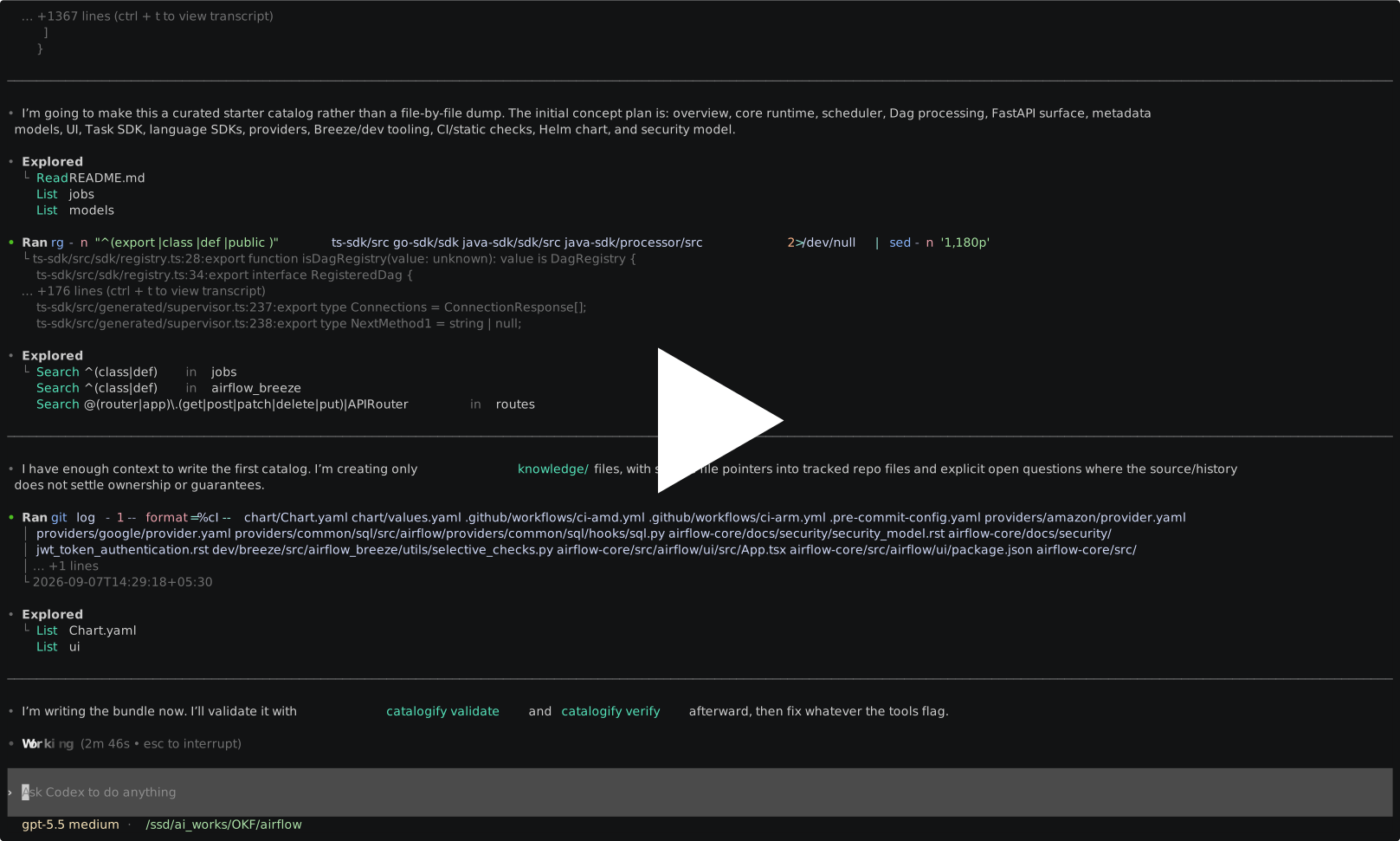
Then ask your agent to clarify what the machine could not work out:
Use the catalogify skill to clarify the open questions in knowledge/.
Enter this in the agent chat. Clarify is an agent skill workflow, so there
is no catalogify clarify shell subcommand and it does not appear in
catalogify --help. Replace knowledge/ with your bundle path if needed.
Answer the agent's questions in the same conversation; you can skip a question
or say you do not know, and it will remain open.
This is the step that matters most, and it is the only one a machine cannot do for you.
Whatever the generator could not establish from code and history — is this timeout a contract
or an implementation detail, what happens on partial failure, who owns this — it parks as an
open_questions entry instead of inventing an answer. The clarify workflow walks you through those
questions, folds your answers into the concepts, and marks each one with a sentinel so later
regenerations never overwrite it. Your answer outranks the machine's inference permanently.
Everything above this line can be regenerated in six minutes. What you add here cannot.
Worked examples
Two finished catalogs, published unedited. Start at the architecture overview in either and click through.
| Apache Airflow | Online Boutique | |
|---|---|---|
| Lines of code | 1,805,835 | 8,103 |
| Tracked files | 13,954 | 392 |
| Commits of history | 40,823 | 2,690 |
| Languages | Python, TypeScript, Go, JS | Go, C#, Node, Python, Java |
| Reading the source would cost | ~17,900,000 tokens | ~70,000 tokens |
| The catalog it produced | 17 concepts, ~9,700 tokens | 20 concepts, ~11,600 tokens |
| Compression | 1,838 : 1 | 6 : 1 |
| Fresh input to generate it | 101,559 tokens | 117,850 tokens |
| Wall clock | 6 min 29 s | 8 min 19 s |
Read the last four rows together. Airflow is 1.8 million lines of code — 223 times the size of Online Boutique — and its catalog is smaller, took fewer uncached tokens, and finished faster.
That is the whole property. Cost tracks the number of things worth naming, not the size of the tree, so the catalog stays inside one context window no matter how big the repository gets. Over 91% of each run was served from cache, so the billed figure is lower again.
Every run behind those figures — including the ones that went wrong — is recorded in EXPERIMENTS.md, with what it cost and what the checker found.
Already installed? Upgrading is two steps, not one.
Why it exists
Giving an agent "context on the codebase" is two problems.
Routing — which of our 90 services does this spec touch? Wide and shallow. You need a little about everything.
Reaching — inside that service, what changes? Narrow and deep. You need everything about a little.
A code graph such as Graphify —
which parses your code with tree-sitter and builds a queryable graph of every
symbol and call edge — is excellent at reaching and will beat prose every
time. Ask it "what breaks if I change this function" and it answers precisely.
catalogify targets routing instead, where the winning property is being
small enough that an agent can read the whole estate in one call.
The two compose well: route with catalogify to pick the services, then run Graphify inside the one you picked. They are not alternatives.
Measured on pkg/kubelet from kubernetes/kubernetes (108,648 lines of Go),
with Graphify run over the same directory:
| Artifact | Size | Tokens |
|---|---|---|
Graphify graph.json |
14.5 MB | 3,813,486 |
Graphify wiki/ (446 articles) |
1,004 KB | 256,968 |
| catalogify bundle (9 concepts) | 21.9 KB | 5,596 |
| catalogify service entry | 2.6 KB | 676 |
At 676 tokens per service, a 90-service catalog is roughly 61,000 tokens and fits in one call alongside the specification. See Benchmark to reproduce these numbers.
How this relates to what else exists
The brownfield problem is well recognised, and several tools address parts of it. They are worth naming, because they solve a different half.
Brownfield Bootstrap and BrownKit scan an existing project and configure the harness to match it: a constitution derived from your actual conventions, spec and plan templates matched to the detected stack, module boundaries, capability and risk discovery. Both work by static analysis of the working tree. Neither reads your git history, which is where the invariants live — the reverts, the hotfixes, the rule somebody learned at 2am and never wrote down. catalogify starts there.
Repomix and similar context loaders put the codebase in front of the model before work begins. That is the right instinct and it is bounded by arithmetic: Airflow's source is roughly 17.9 million tokens. Its catalog is 9,700.
Code graphs (Graphify, tree-sitter indexers) answer reaching — what breaks if I change this function — and answer it better than prose ever will. See above: the two compose.
Agentic search, as Claude Code does it, has largely replaced precomputed indexes for the reaching problem. That is one reason catalogify does not build one. It operates a layer above, on the question you have to answer before searching is worth anything: which parts of this system does this change touch?
What is left uncovered by all of the above is a durable, cheap description of the estate, grounded in history and checkable against the code. That is the only thing this tool tries to be.
What it runs on
Monorepos and single repos alike. Concepts are scoped by folder, so a
repository holding hundreds of services gets one Service concept per
deployable unit and its own modules/, apis/ and data/ concepts
underneath — the same directory layout a single-service repo produces, just
wider. Point it at the whole tree or at one subdirectory.
Large codebases stay cheap, because the catalog describes the repo rather
than reproducing it. Scanning all of kubernetes/kubernetes — 25,917 files
and 500,022 lines of Go — takes 2.1 seconds and yields a 56 KB inventory
(~14,000 tokens) for the agent to plan from. Cost scales with the number of
things worth naming, not with lines of code: a service entry is ~676 tokens
whether the service is 10k lines or 100k.
With or without git. History mining is a bonus, not a requirement:
| With git | Without git | |
|---|---|---|
| Inventory, concepts, indexes, validation | yes | yes |
| Churn ranking, the "why" from reverts and hotfixes | yes | — |
Commit citations, resource: URLs from the remote |
yes | — |
Incremental update |
yes | — (re-run generate) |
| Conformant bundle | yes | yes |
Outside a repository the inventory reports git.is_git_repo: false, history
prints a notice and exits cleanly, timestamps come from file modification
times, and log.md records Commit: `none` , which the validator accepts.
The agent is told to raise more open_questions in that case, since without
history the reasoning behind the code can only come from you.
What a concept looks like
---
type: Module
title: Container Manager (cm)
description: Owns cgroup hierarchy, CPU/memory/device allocation, and the
  on-disk checkpoints that let those allocations survive a kubelet restart.
tags: [cgroups, cpumanager, checkpoint, qos]
source_files: [pkg/kubelet/cm]
open_questions:
  - "After the V2→V3 migration fix was reverted, is the V3→V2 hybrid-state
     hazard still live, or was it addressed another way?"
---

# Gotchas

Checkpoint format changes are the highest-risk edit in this module, and the
hazard is the fallback path. When a V3 checkpoint has an invalid checksum,
restore falls back to V2, but the V3 fields already read stay in the struct,
producing a hybrid of V2 and V3 data (`83f1cae9656`, reverted by
`76100602564`).
That gotcha is not in a comment, a docstring, or an ADR. It was recovered from the commit log by following a revert back to the commit it reverted.
source_files maps the concept to code, which is what makes incremental
updates possible. open_questions is where uncertainty goes instead of into
prose. Both are producer extension fields permitted by OKF §4.1.
Why mine history at all
The gotcha in that example exists in no comment, no docstring, and no design document — in Kubernetes, a project with KEPs, a design-proposals archive, and reviewers who demand rationale. It survived only as a revert.
That is not an oversight, it is the normal condition. Michael Polanyi called it tacit knowledge in 1966: "we know more than we can tell." Peter Naur applied it to software in Programming as Theory Building (1985), arguing that the real product of programming is the theory of the system held in the developers' heads, and that program text and documentation are insufficient carriers of it. A program whose original team has dispersed is, in his terms, dead — and a new team patching it produces characteristically wrong fixes that erode the system's conceptual integrity.
That is precisely the position an AI agent is in on first contact with your repository. It arrives after the team has dispersed, holding the artefacts and none of the theory.
Nor does writing a specification escape it. Fred Brooks, in No Silver Bullet: "the complexity of software is an essential property, not an accidental one," so "descriptions of a software entity that abstract away its complexity often abstract away its essence." That ceiling applies whether a human or a model wrote the spec.
Commit history is a narrow exception. Nobody writes a revert as documentation;
they write it because production broke, leaving a dated, attributed, immutable
record of a place where the theory and the code disagreed. catalogify history
goes looking for exactly those.
This recovers fragments, not the theory. For everything still missing, the
generator raises an open_question and the clarify workflow asks a human while
there is still a human to ask.
The four workflows
These workflows run through the agent skill. Ask your agent in plain language, mention catalogify, and include the repository or bundle path. The skill picks the appropriate workflow:
| Workflow | What it does |
|---|---|
| generate | Inventory scan, git-history mining, concept plan, concept documents, index.md files, log.md, validation. |
| update | Diffs since the last logged commit; refreshes only stale concepts, deprecates orphans, adds new ones, preserves human curation. |
| clarify | Asks you about the open_questions the other workflows parked, then folds the answers in as cited, curation-protected knowledge. |
| validate | OKF §9 conformance check plus a quality spot-check. |
Commands
The CLI provides five analysis and checking subcommands, plus install for
managing the agent skill. Run these in your terminal, with or without an agent.
Each accepts --help. The generate, update, and clarify workflows are invoked
through your agent; they are not CLI subcommands.
catalogify inventory                        # repo facts + git churn, as JSON
catalogify history pkg/foo --limit 5        # the reverts and hotfixes behind a path
catalogify cochange pkg/foo --depth 3       # what changes when this changes
catalogify validate knowledge/              # OKF v0.1 §9 conformance (structure)
catalogify verify knowledge/                # do its claims survive the repo?
catalogify install [--list] [--uninstall]   # manage the agent skill
inventorywrites JSON: file tree, languages, entry points, dependency manifests, API definitions, schemas, CI/CD, docs, ADRs, per-file commit churn, and any untracked subtrees found on disk so they can be named and skipped rather than mistaken for part of the project. On the full Kubernetes tree (500k lines, 25,917 files) it takes 2.1 seconds and produces 56 KB.historyreturns the creation commit, recent subjects, and the revert / hotfix / risk-flagged commits where invariants hide, each with the files it touched. A commit that changed only test files is marked[TEST-ONLY]so a "fix goroutine leak in foo_test.go" is never mistaken for a production invariant. Diff-free by default so historical secrets do not leak;--patchopts in.cochangemines logical coupling from history: units that keep changing in the same commit, scored by support, confidence and lift. Two services can be coupled through a wire contract, a shared schema or a deployment ordering rule while sharing no import at all, and that relationship exists in no import graph, no call graph and no snapshot of the working tree. It shows up only in commits.validateenforces OKF §9: four error classes, ten warning classes. W9 catches links that validate against the spec and 404 on GitHub — a leading/means bundle root to OKF and repository root to every renderer, so bundle-relative links break whenever the bundle sits in a subdirectory. This is a check on structure.verifyis a check on truth, and it is the one that matters. Every commit the bundle cites must exist and must touch that concept's ownsource_files; a commit that changed only test files cannot back a production invariant; every symbol in an# Interfacestable must appear in non-test code; a# Gotchassection that cites nothing is an unsupported claim; and everysource_filespath must be tracked by git, so a vendored dependency or an imported project sitting in your working tree cannot be written up as if it were yours. Run it in CI and an agent can no longer quietly write a confident sentence with nothing behind it.
Each is also installed under a bare okf- name (okf-inventory,
okf-history, okf-cochange, okf-validate, okf-verify); the first two and
okf-validate carry over from the package's previous life as okf_skill.
Requirements
- Python 3.9+
bash— present on Linux and macOS; on Windows the wrapper finds thebash.exethat ships with Git for Windows.git— optional. Used for churn ranking, history mining and incremental updates. Everything else works without it; see What it runs on.
Install
uv tool install catalogify     # or: pip install catalogify
catalogify install             # copy the skill into your agents
Restart your agent afterwards so it picks up the skill.
To move an existing install to a newer version, see Upgrade — it is
two steps, not one. catalogify install
copies it into every agent's user-global skills directory
(~/.claude/skills, ~/.cursor/skills, ~/.codex/skills,
~/.agents/skills). Use --agents claude,cursor to target specific ones and
--scope project to install into ./.<agent>/skills instead.
The bundled install.sh / install.ps1 do both steps, install uv if it is
missing, and fall back to pip install --user.
Upgrade
Upgrading is two steps, and skipping the second one silently does nothing.
catalogify install copies the skill into each agent's skills directory. Those
copies do not track the package, so a new version of the CLI leaves your agents
following the old instructions.
uv tool upgrade catalogify     # 1. the CLI
catalogify install             # 2. the skill copies (overwrites by default)
Check that both actually moved — they are versioned independently:
catalogify --version                                  # the CLI
grep -m1 version: ~/.claude/skills/catalogify/SKILL.md # the skill your agent reads
Then restart your agent so it reloads the skill.
Installing an unreleased version
uv tool upgrade only sees what is on PyPI. To run a branch, a tag, or a local
checkout, force a reinstall over the existing one:
uv tool install --force git+https://github.com/alexcpn/catalogify   # from main
uv tool install --force /path/to/catalogify                         # from a checkout
catalogify install                                                  # then the skill, as always
catalogify install already forces overwrites, so it needs no flag of its own.
--force there exists only for --scope project, which refuses to clobber an
existing project-local skill without it.
Project-scoped installs
--scope project copies the skill into ./.<agent>/skills instead of your home
directory. Those copies are upgraded the same way, but only from inside the
project:
cd /path/to/your/repo
catalogify install --scope project --force
catalogify install --list shows every location the skill is installed, which is
the quickest way to find copies you have forgotten about.
Telling which version wrote a bundle
Every concept records the generator in its frontmatter:
grep -rh generated_by knowledge --include='*.md' | sort -u
A bundle generated by an older version was written under that version's rules — worth checking before trusting it, and worth regenerating after a correctness-affecting upgrade.
Using it with Spec Kit
The same workflows are also packaged as a Spec Kit extension, for teams who prefer explicit slash commands over asking in plain language. It is built from this repository and attached to every release, so it runs the same scripts and follows the same workflow as the version of catalogify it ships with. It does not need catalogify installed.
specify extension add okf --from \
  https://github.com/alexcpn/catalogify/releases/download/v0.9.2/speckit-okf-0.9.2.zip
| Spec Kit command | Equivalent here |
|---|---|
/speckit.okf.generate |
"generate a knowledge catalog for this repo" |
/speckit.okf.update |
"refresh the catalog" |
/speckit.okf.clarify |
"resolve the open questions" |
/speckit.okf.validate |
catalogify validate knowledge/ |
/speckit.okf.verify |
catalogify verify knowledge/ |
The extension reads its config from .specify/extensions/okf/okf-config.yml.
It used to live in a separate repository,
alexcpn/speckit_okf, which is being
retired; its last release there was 0.6.0. To build the extension from a checkout,
see integrations/speckit/.
Both produce the same OKF v0.1 bundle. Use catalogify if you want the
standalone CLI and an agent skill that loads on its own; use the extension if
your project already runs Spec Kit and you want the workflows as commands
alongside your other /speckit.* ones. Installing both would register two
skills covering the same ground, so pick one.
Usage
Enter one of these prompts in your agent chat after installing the skill:
Use catalogify to generate a knowledge catalog for this repo.
Use catalogify to update knowledge/ for changes since its last logged commit.
Use catalogify to clarify the open questions in knowledge/.
Use catalogify to validate knowledge/.
These are prompts for your agent. For a terminal-only structure check, run
catalogify validate knowledge/; to check repository-backed claims, run
catalogify verify knowledge/.
Output lands in knowledge/ (configurable), ready to commit next to the code:
knowledge/
├── index.md            # okf_version: "0.1" + directory of everything
├── log.md              # dated history, each block records a commit SHA
├── architecture/
│   └── overview.md     # type: Reference — the "start here" concept
├── services/…          # type: Service
├── modules/…           # type: Module
├── apis/…              # type: API Endpoint / API Resource
├── data/…              # type: Data Model / Database Table
└── operations/…        # type: Pipeline / Configuration / Playbook
On a monorepo, start with granularity: coarse and raise
OKF_INVENTORY_CAP above its default of 150. Raw churn skews toward generated
files and build config, so invest in the exclude list.
Configuration
Everything works with no config. To change the bundle directory, resource URI base, excludes, type mappings, layout, granularity, or the clarify question budget, copy the annotated template into your repo root:
cp ~/.claude/skills/catalogify/okf-config.template.yml .okf-config.yml
catalogify inventory --config .okf-config.yml and catalogify validate <dir> --config .okf-config.yml honor its exclude list; the agent passes it through
automatically once the file exists.
Safety properties
- Never guesses. Unverifiable facts become
open_questions, resolved by the clarify workflow and marked with<!-- clarified: ... -->sentinels that later updates will not overwrite. Your answer outranks the machine's inference permanently. - Never deletes curation. Removed code marks a concept
status: deprecatedrather than deleting it. Human prose survives every refresh. - Never emits secrets. Config values are described by shape, never value, including from history. The validator flags anything that slips through (W5).
- Never touches source code. All writes stay inside the bundle directory.
Benchmark
To reproduce the table above:
git clone --filter=blob:none --no-tags \
  https://github.com/kubernetes/kubernetes.git k8s

# Graphify, for comparison
pip install graphifyy
graphify update k8s/pkg/kubelet
cd k8s/pkg/kubelet && graphify export wiki
wc -c graphify-out/graph.json          # 15,253,944
cat graphify-out/wiki/*.md | wc -c     # 1,027,874

# catalogify
cd ../..                               # back to the k8s repo root
catalogify inventory                   # 2.1s, 56 KB of JSON
catalogify history pkg/kubelet/cm --limit 3

# then ask your agent to generate the catalog, and check it:
catalogify validate knowledge/
Token counts are bytes ÷ 4. Measured against kubernetes/kubernetes at commit
d5ccf7968e5. The structural graph was built AST-only (no API key), so its
wiki lacks LLM community labels.
Uninstall
catalogify install --uninstall    # remove from every agent's skills dir
uv tool uninstall catalogify
Run catalogify install --list first to see where it is installed.
License
MIT
1 maintainer

Metadata
1 maintainer
Release files for catalogify 0.9.2
For a detailed explanation of source distributions (sdists) and built distributions (wheels), please see the package formats documentation.
Source distribution (sdist)
| File | Size | Uploaded | |
|---|---|---|---|
| catalogify-0.9.2.tar.gz | 70.6 kB | Details |
Built distribution (wheel)
| File | Interpreter | ABI | Platform | Reset |
|---|---|---|---|---|
| catalogify-0.9.2-py3-none-any.whl | Python 3 | none | any | Details |
Total release size: 140.8 kB
Release files / catalogify-0.9.2.tar.gz
| Download URL | catalogify-0.9.2.tar.gz |
|---|---|
| Size | 70.6 kB |
| Tags | Source |
|
SHA-256 checksum How to use checksums |
6d06109dc9a4f390df120f92a93e8a6def544fbc1375b93bf2c178b99c01e421
|
|
BLAKE2b-256 checksum How to use checksums |
4d857b00fe08de4c77144ac64c4592cb4d53d7addbd6e5f76101caa0a6171227
|
| Upload date | |
|
Uploaded using Trusted Publishing? What is trusted publishing? |
No |
| Uploaded via |
twine/7.0.0 CPython/3.10.12
|
Release files / catalogify-0.9.2-py3-none-any.whl
| Download URL | catalogify-0.9.2-py3-none-any.whl |
|---|---|
| Size | 70.1 kB |
| Tags | Python 3 |
|
SHA-256 checksum How to use checksums |
defc0d770bbd904c383983322636478c00512d02432fd1759be1b530109902fd
|
|
BLAKE2b-256 checksum How to use checksums |
bbd7784a1a0bb3f2daf577fea4da2084bf06d6e17897cf0572e32a424c2bffb6
|
| Upload date | |
|
Uploaded using Trusted Publishing? What is trusted publishing? |
No |
| Uploaded via |
twine/7.0.0 CPython/3.10.12
|














