
autocatpath




Reaction-pathway explorer for catalyst surfaces, driven by ML interatomic potentials. Give it an environment (a metal surface), a substrate, and a target; it builds the reaction network, relaxes every intermediate, finds the barriers with climbing-image NEB, and reports energies with honest uncertainty — pooled across random seeds and across ML potentials.
- Reaction networks — curated templates or rule-based autodetection of
intermediates (
network: auto). - Pluggable ML potentials —
mace,chgnet,fairchem(UMA),grace, orauto(best installed).emtis a dependency-free dev backend. - Barriers — climbing-image NEB with automatic retry on non-convergence, and a mid-band detachment guard that flags a barrier through a geometry where the adsorbate flew off the slab.
- Electrochemistry (CHE) — optional post-processing over a computed network: closed-form limiting potential and span-minimizing operating potential (V vs RHE), no extra relax/NEB calls.
- Screening vs verify —
search.screeningskips NEB for a cheap thermodynamic-only ranking pass. The ammonia network'scoadsorbedtemplate — both dissociated fragments tracked jointly until a product desorbs — is the default; fragment parking (template: parked) is an explicit opt-in approximation, honestly referenced by the gas ledger. - Cross-model comparison — run the same network under several potentials and box-plot where they agree and disagree (intermediates, barriers, and which transition state is the true rate-limiting "highest point").
- Reproducible — every run writes a provenance snapshot; unstable results are flagged low-confidence rather than reported as precise numbers.
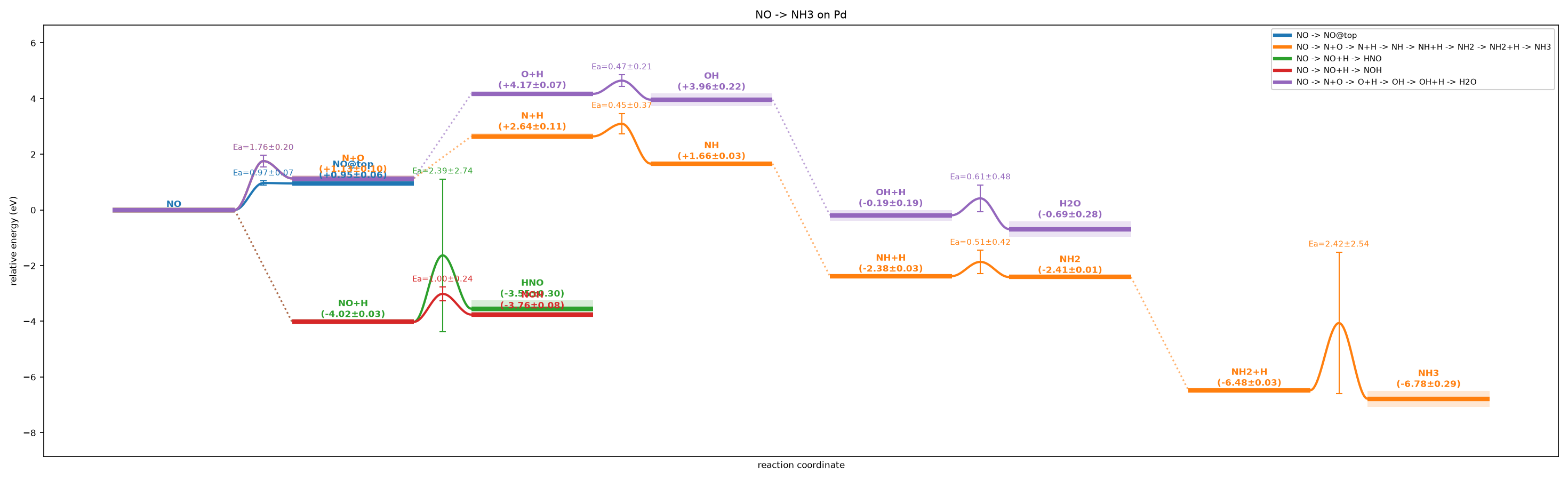
NO→NH₃ on Pd (EMT demo — set mlip.backend: mace for near-DFT energies):
span-ranked competing routes at full gas-ledger composition, transition states
as barrier bumps with Ea, ± uncertainty bands, ⚠ kinetic-trap flags, and the
CO site-competition panel — one autocatpath run. → more outputs and their commands in the
gallery.
Install
pip install autocatpath
The default emt backend is pure numpy/ASE (no torch, no GPU) and runs the
whole pipeline anywhere — great for trying it out and for CI. For real numbers,
add exactly one ML backend (their dependencies conflict, so one per
environment):
pip install "autocatpath[mace]"      # MACE-MP-0 universal potential (GPU)
pip install "autocatpath[chgnet]"    # CHGNet (CPU-friendly)
pip install "autocatpath[fairchem]"  # Meta FAIRChem / UMA (adsorbates on metals)
pip install "autocatpath[grace]"     # GRACE foundation models
Quickstart
# no config file needed — set the chemistry on the command line:
autocatpath run --substrate NO --target NH3 --element Pd --network auto

# or point at a YAML config (see examples/):
autocatpath run examples/no_to_no3_pd.yaml

# discover the intermediates automatically, on a real ML potential:
autocatpath run examples/auto_ammonia.yaml --backend auto
Run autocatpath --help (or autocatpath run --help) for every flag. Config files and
flags mix freely — flags override the file.
Outputs land in runs/<name>/:
| File | Contents |
|---|---|
graph_thumbs.png |
reaction energy-profile with active-site structure thumbnails |
graph_network.png |
node/DAG view of the network (red = low-confidence) |
energy_map.png |
substrate × intermediate heatmap; ★ = rate-limiting state |
results.json |
nodes, edges, barriers, mean ± spread, warnings |
methods.md |
a deterministic methods paragraph for your write-up |
config.snapshot.yaml |
provenance snapshot for exact reproduction |
Compare several ML potentials
Because the backends can't share an environment, run states / barriers in
each one's env, then compare the JSONs:
autocatpath states   my.yaml --backend chgnet   --out s_chgnet.json
autocatpath states   my.yaml --backend fairchem --out s_uma.json
autocatpath compare  --states s_*.json --out intermediates.png     # box plot per state

autocatpath barriers my.yaml --backend chgnet   --out b_chgnet.json
autocatpath compare  --states b_*.json --out barriers.png          # Ea, rate-limiting ringed
autocatpath compare  --states b_*.json --heights s_*.json --out ts_heights.png
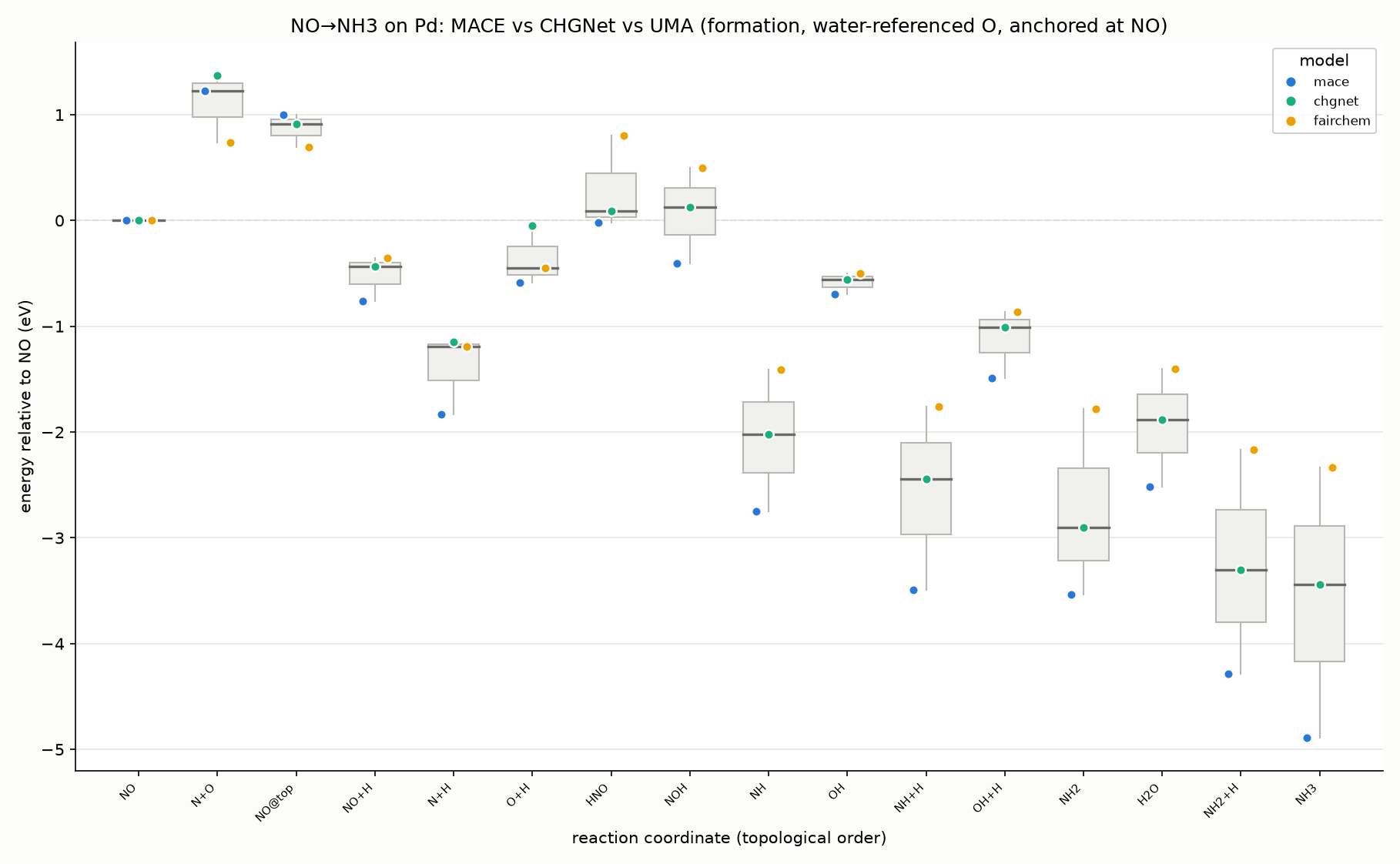
State energies are referenced to per-element gas-phase chemical potentials
computed in each potential, so composition-changing states are comparable
across models. See the gallery and
examples/README.md for the full set of commands.
CLI
autocatpath run <cfg>            # all seeds in-process + outputs
autocatpath states <cfg>         # relax states only (no NEB) -> per-model JSON
autocatpath barriers <cfg>       # NEB for every step -> per-model JSON
autocatpath compare --states ... # box plots (states or barriers, auto-detected)
autocatpath multi <cfg>          # several substrates -> union energy map
autocatpath sweep <cfg> --elements Pd,Pt,Cu   # same network across surfaces
Everything is one YAML file — see docs/CONFIG.md for every
field, and docs/USAGE.md for extension points.
Development
uv sync --extra dev
uv run ruff check src tests
uv run pytest
Contributing
Issues and PRs welcome — see CONTRIBUTING.md. Maintained by
Reto Stamm.
Acknowledgements
autocatpath was requested by Muhammad Umer, whose help shaping what it should do got the project off the ground.
Built with Claude (Anthropic) via Claude Code, with research assistance from Perplexity.
License
GPL-3.0-or-later. Built on ASE (LGPL) and RDKit (BSD).
1 maintainer

Download files
Download the file for your platform. If you're not sure which to choose, learn more about installing packages.
Source Distribution
Built Distribution
Filter files by name, interpreter, ABI, and platform.
If you're not sure about the file name format, learn more about wheel file names.
Copy a direct link to the current filters
File details
Details for the file catpath-0.9.0.tar.gz.
File metadata
- Download URL: catpath-0.9.0.tar.gz
- Upload date:
- Size: 2.6 MB
- Tags: Source
- Uploaded using Trusted Publishing? Yes
- Uploaded via:
twine/7.0.0 CPython/3.13.14
File hashes
| Algorithm | Hash digest | |
|---|---|---|
| SHA256 |
8a0a5d8fb7c06e093079b5a8065b2ae8aa1d612b78335ccc9f8754b8593a13ed
|
|
| MD5 |
002cd7375120086a5b7bd160516eb743
|
|
| BLAKE2b-256 |
fec644fa009c16171c4cae9c3e9f132855e3b456d89441ecdda9e63aae903a19
|
Provenance
The following attestation bundles were made for catpath-0.9.0.tar.gz:
Publisher:
workflow.yml on retospect/catpath
-
Statement:
-
Statement type:
https://in-toto.io/Statement/v1 -
Predicate type:
https://docs.pypi.org/attestations/publish/v1 -
Subject name:
catpath-0.9.0.tar.gz -
Subject digest:
8a0a5d8fb7c06e093079b5a8065b2ae8aa1d612b78335ccc9f8754b8593a13ed - Sigstore transparency entry: 2394575137
- Sigstore integration time:
-
Permalink:
retospect/catpath@0d3463828c305a328f85fcb661cc432841b9a182 -
Branch / Tag:
refs/tags/v0.9.0 - Owner: https://github.com/retospect
-
Access:
public
-
Token Issuer:
https://token.actions.githubusercontent.com -
Runner Environment:
github-hosted -
Publication workflow:
workflow.yml@0d3463828c305a328f85fcb661cc432841b9a182 -
Trigger Event:
release
-
Statement type:
File details
Details for the file catpath-0.9.0-py3-none-any.whl.
File metadata
- Download URL: catpath-0.9.0-py3-none-any.whl
- Upload date:
- Size: 130.9 kB
- Tags: Python 3
- Uploaded using Trusted Publishing? Yes
- Uploaded via:
twine/7.0.0 CPython/3.13.14
File hashes
| Algorithm | Hash digest | |
|---|---|---|
| SHA256 |
529dc996ddef58ba208d4392f41b1aab42e6f250ff1c30df5da01e00f86d04cd
|
|
| MD5 |
fa281287e9f235d23e78f5db6be827c9
|
|
| BLAKE2b-256 |
ab1f2a97e6debdbadcb04f0cab6e6c0335d7b742753653517584988bd13afc40
|
Provenance
The following attestation bundles were made for catpath-0.9.0-py3-none-any.whl:
Publisher:
workflow.yml on retospect/catpath
-
Statement:
-
Statement type:
https://in-toto.io/Statement/v1 -
Predicate type:
https://docs.pypi.org/attestations/publish/v1 -
Subject name:
catpath-0.9.0-py3-none-any.whl -
Subject digest:
529dc996ddef58ba208d4392f41b1aab42e6f250ff1c30df5da01e00f86d04cd - Sigstore transparency entry: 2394576611
- Sigstore integration time:
-
Permalink:
retospect/catpath@0d3463828c305a328f85fcb661cc432841b9a182 -
Branch / Tag:
refs/tags/v0.9.0 - Owner: https://github.com/retospect
-
Access:
public
-
Token Issuer:
https://token.actions.githubusercontent.com -
Runner Environment:
github-hosted -
Publication workflow:
workflow.yml@0d3463828c305a328f85fcb661cc432841b9a182 -
Trigger Event:
release
-
Statement type:














