
caws
configure AWS responsibly using profile names and environment vars.
rather than changing your AWS SDK credentials with aws configure, AWS suggests
setting the ENV var AWS_DEFAULT_PROFILE to a [profile] in your ~/.aws/credentials.
when set, this ENV var will over-ride the profile set with aws configure.
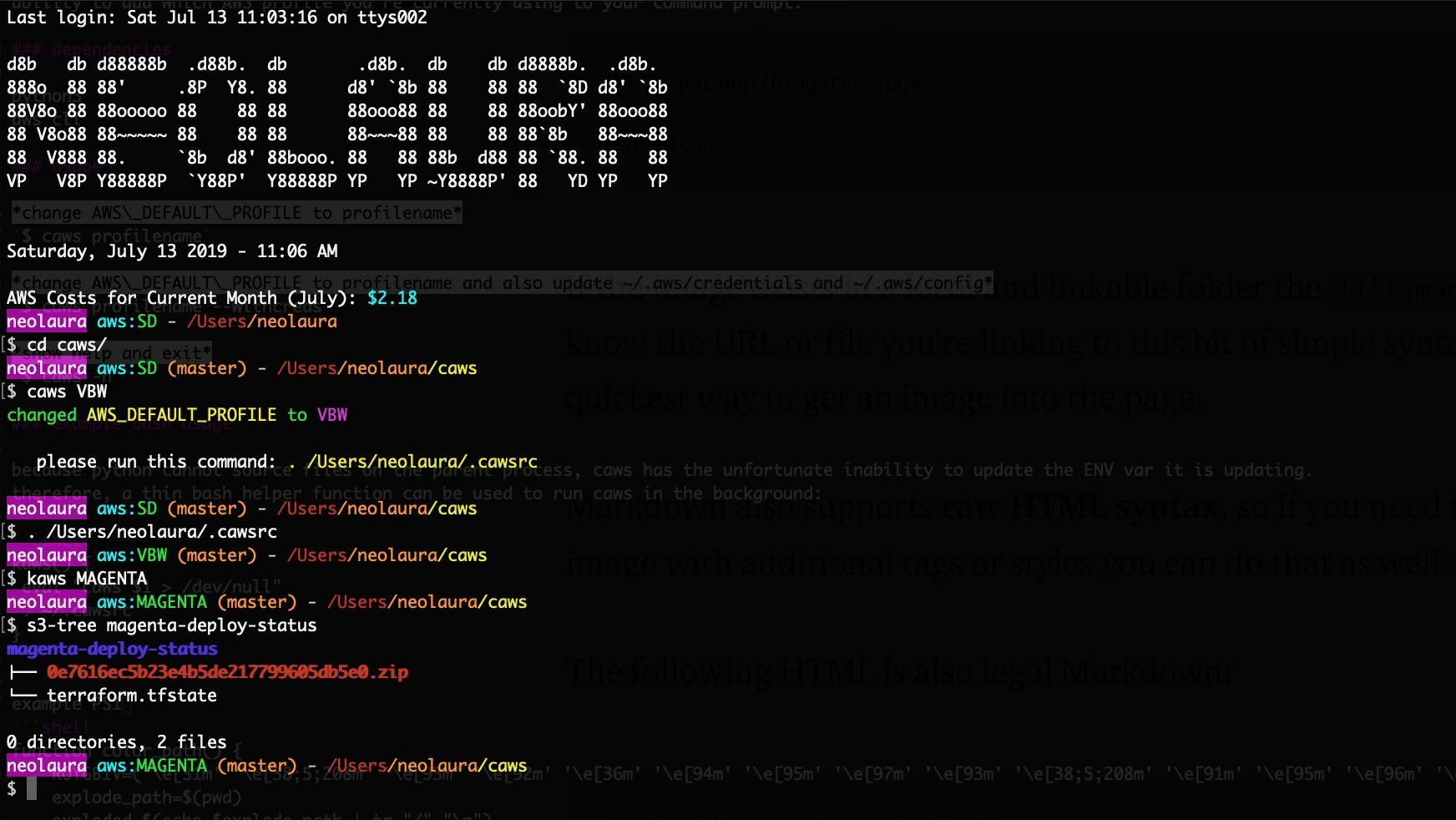
caws will write to an rc file setting AWS_DEFAULT_PROFILE to the given profile name.
if you do not have the rc file caws will create it for you.
you'll need to add . .cawsrc to your RC file (using bash: .bashrc or .bash_profile)
add new profiles using $ aws configure --profile newname
one benefit of using AWS_DEFAULT_PROFILE method instead of aws configure is the
ability to add which AWS profile you're currently using to your command prompt.
dependencies
python3
aws cli
usage
change AWS_DEFAULT_PROFILE to profilename
$ caws profilename
change AWS_DEFAULT_PROFILE to profilename and also update ~/.aws/credentials and ~/.aws/config
$ caws profilename --withcreds
show help and exit
$ caws -h
example bash usage
because python cannot source files on the parent process, caws has the unfortunate inability to update the ENV var it is updating.
therefore, a thin bash helper function can be used to run caws in the background:
kaws() {
 eval "caws $1 > /dev/null"
 . ~/.cawsrc
}
example PS1 with colored path parts!
function color_path() {
    ROYGBIV=('\e[31m' '\e[38;5;208m' '\e[93m' '\e[92m' '\e[36m' '\e[94m' '\e[95m' '\e[97m' '\e[93m' '\e[38;5;208m' '\e[91m' '\e[95m' '\e[96m' '\e[34m' '\e[92m')
    explode_path=$(pwd)
    exploded=$(echo $explode_path | tr "/" "\n")
    final=""
    sep="/"
    x=0
    for part in $exploded
    do
        final+="${ROYGBIV[$x]}$sep$part\e[0m"
        x=$(expr $x + 1)
    done
    printf $final
}
parse_git_branch() {
    local b=$(git symbolic-ref HEAD 2> /dev/null)
    if [ "${b#refs/heads/}" != "" ]
    then
        printf " \e[38;5;208m(${b#refs/heads/})\e[0m"
    fi
}
PS1='\[\033[45m\]\u\[\033[0;96m\] aws:\[\033[92m\]$AWS_DEFAULT_PROFILE`parse_git_branch` \[\033[37m\]- `color_path`\[\033[37m\]\n$ \[\033[0m\]'
1 maintainer

Download files
Download the file for your platform. If you're not sure which to choose, learn more about installing packages.
Source Distribution
Built Distribution
Filter files by name, interpreter, ABI, and platform.
If you're not sure about the file name format, learn more about wheel file names.
Copy a direct link to the current filters
File details
Details for the file caws-0.2.0.tar.gz.
File metadata
- Download URL: caws-0.2.0.tar.gz
- Upload date:
- Size: 5.6 kB
- Tags: Source
- Uploaded using Trusted Publishing? No
- Uploaded via:
twine/6.1.0 CPython/3.11.3
File hashes
| Algorithm | Hash digest | |
|---|---|---|
| SHA256 |
c46a8d3efa4ad33581e9a70a5952bac5d6d35fe39e290082c0285b72b05ff3be
|
|
| MD5 |
fdc0422119bf1bcb7d6fa8b5ac83ea27
|
|
| BLAKE2b-256 |
54c6f643ace6c954ccd66e76e83490572489b4a51294d8332292a0e29d1787a4
|
File details
Details for the file caws-0.2.0-py3-none-any.whl.
File metadata
- Download URL: caws-0.2.0-py3-none-any.whl
- Upload date:
- Size: 6.2 kB
- Tags: Python 3
- Uploaded using Trusted Publishing? No
- Uploaded via:
twine/6.1.0 CPython/3.11.3
File hashes
| Algorithm | Hash digest | |
|---|---|---|
| SHA256 |
166359211f9c7abdf5a5c8f07cf3e5ff3285c9efb721c418ecf5090030640f50
|
|
| MD5 |
9ae8c3e849e1c0b9612ed1fb3470caae
|
|
| BLAKE2b-256 |
0935f03869c9144c541706f0c8bfe6c18ef1654ee8af4d4e244db29fe4728478
|














