
caws
configure AWS responsibly using profile names and environment vars.
rather than changing your AWS SDK credentials with aws configure, AWS suggests
setting the ENV var AWS_DEFAULT_PROFILE to a [profile] in your ~/.aws/credentials.
when set, this ENV var will over-ride the profile set with aws configure.
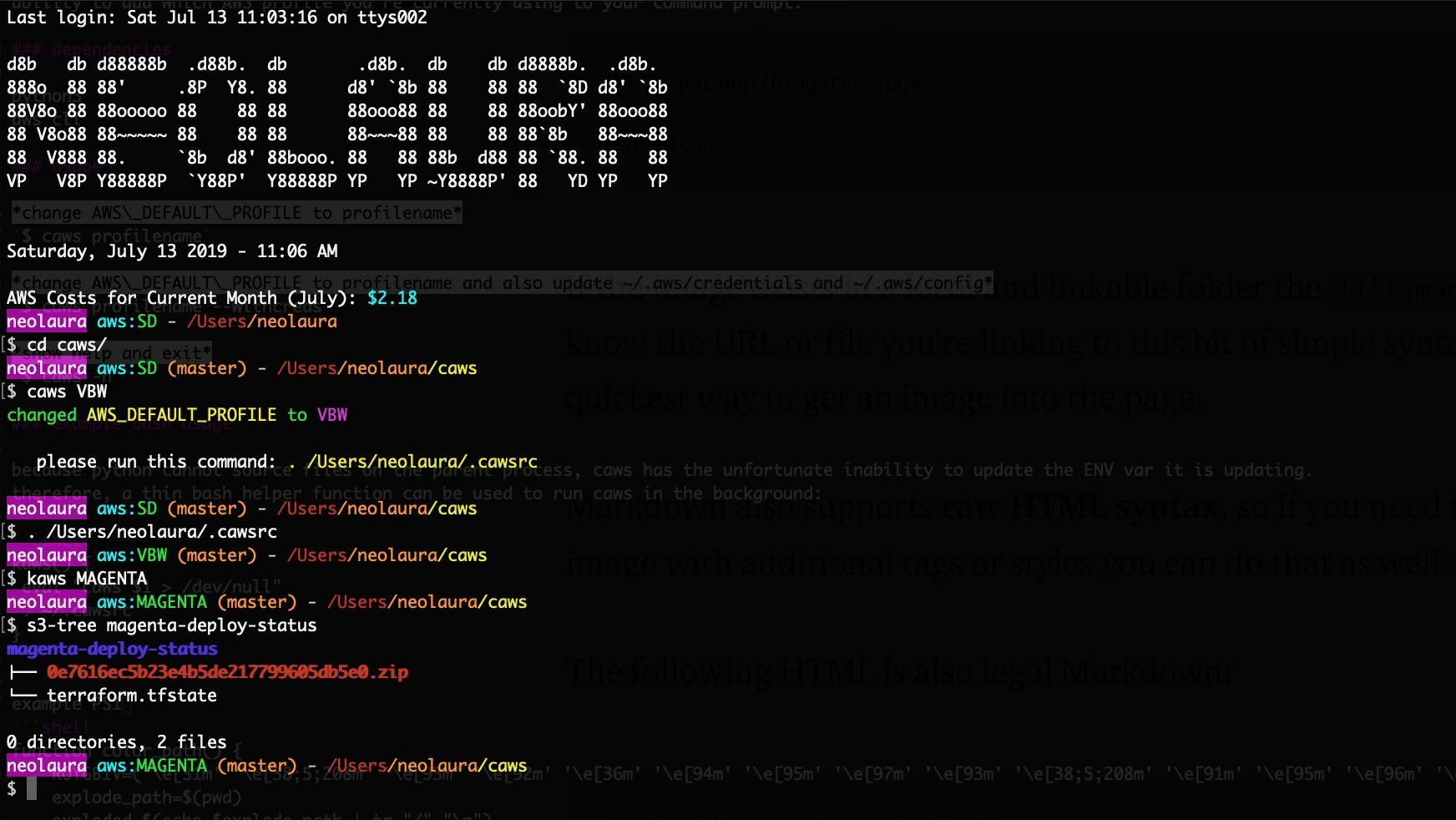
caws will write to an rc file setting AWS_DEFAULT_PROFILE to the given profile name.
if you do not have the rc file caws will create it for you.
you'll need to add . .cawsrc to your RC file (using bash: .bashrc or .bash_profile)
add new profiles using $ aws configure --profile newname
one benefit of using AWS_DEFAULT_PROFILE method instead of aws configure is the
ability to add which AWS profile you're currently using to your command prompt.
dependencies
python3
aws cli
usage
change AWS_DEFAULT_PROFILE to profilename
$ caws profilename
change AWS_DEFAULT_PROFILE to profilename and also update ~/.aws/credentials and ~/.aws/config
$ caws profilename --withcreds
sso profiles
profiles that only live in ~/.aws/config (aws configure sso, credential_process, role chains) work too.
with --withcreds, caws copies the whole [profile NAME] block to [default] in ~/.aws/config
and removes [default] from ~/.aws/credentials, so old static keys can't override the sso settings.
for iam user profiles, --withcreds copies the keys to [default] in credentials and region/output to [default] in config.
both files are backed up to a new *.caws.bak.YYYYmmddHHMMSS (mode 600) on every run, so earlier backups are never overwritten.
if the iam user's profile has no region/output, the existing [default] values in config are kept.
show help and exit
$ caws -h
example bash usage
because python cannot source files on the parent process, caws has the unfortunate inability to update the ENV var it is updating.
therefore, a thin bash helper function can be used to run caws in the background:
kaws() {
 eval "caws $1 > /dev/null"
 . ~/.cawsrc
}
example PS1 with colored path parts!
function color_path() {
    ROYGBIV=('\e[31m' '\e[38;5;208m' '\e[93m' '\e[92m' '\e[36m' '\e[94m' '\e[95m' '\e[97m' '\e[93m' '\e[38;5;208m' '\e[91m' '\e[95m' '\e[96m' '\e[34m' '\e[92m')
    explode_path=$(pwd)
    exploded=$(echo $explode_path | tr "/" "\n")
    final=""
    sep="/"
    x=0
    for part in $exploded
    do
        final+="${ROYGBIV[$x]}$sep$part\e[0m"
        x=$(expr $x + 1)
    done
    printf $final
}
parse_git_branch() {
    local b=$(git symbolic-ref HEAD 2> /dev/null)
    if [ "${b#refs/heads/}" != "" ]
    then
        printf " \e[38;5;208m(${b#refs/heads/})\e[0m"
    fi
}
PS1='\[\033[45m\]\u\[\033[0;96m\] aws:\[\033[92m\]$AWS_DEFAULT_PROFILE`parse_git_branch` \[\033[37m\]- `color_path`\[\033[37m\]\n$ \[\033[0m\]'
1 maintainer

Metadata
1 maintainer
Release files for caws 0.3.0
For a detailed explanation of source distributions (sdists) and built distributions (wheels), please see the package formats documentation.
Source distribution (sdist)
| File | Size | Uploaded | Provenance | |
|---|---|---|---|---|
| caws-0.3.0.tar.gz | 9.1 kB | Without provenance | Details |
Built distribution (wheel)
| File | Interpreter | ABI | Platform | Reset |
|---|---|---|---|---|
| caws-0.3.0-py3-none-any.whl | Python 3 | none | any | Details |
Total release size: 17.0 kB
Release files / caws-0.3.0.tar.gz
| Download URL | caws-0.3.0.tar.gz |
|---|---|
| Size | 9.1 kB |
| Tags | Source |
|
SHA-256 checksum How to use checksums |
835d77cbdae0849db2699ec0a35979829a3cd8662bb4066459b6de204c12a778
|
|
BLAKE2b-256 checksum How to use checksums |
fc86daf01daead4020bf701c59b26c01fda5762009281a8f6c8fe5568cbe929f
|
| Upload date | |
|
Uploaded using Trusted Publishing? What is trusted publishing? |
No |
| Uploaded via |
twine/7.0.0 CPython/3.11.3
|
Release files / caws-0.3.0-py3-none-any.whl
| Download URL | caws-0.3.0-py3-none-any.whl |
|---|---|
| Size | 8.0 kB |
| Tags | Python 3 |
|
SHA-256 checksum How to use checksums |
88c4d2ca710508d2711953a21b16f4e7f62955fb021e2d6a9b7d1d9347666290
|
|
BLAKE2b-256 checksum How to use checksums |
2e45830dc01c54abfbf07fb75d0d95ab91ce10baa9cb48f5fc6ec5e21c7c6c78
|
| Upload date | |
|
Uploaded using Trusted Publishing? What is trusted publishing? |
No |
| Uploaded via |
twine/7.0.0 CPython/3.11.3
|
Security for caws 0.3.0
Provenance
Provenance describes where a file came from. On PyPI, provenance is shared via attestations, which provide a verifiable record of the build or publishing details. View details, limitations and caveats.
No provenance found
None of the files in this release were uploaded with provenance metadata.
A note on package security
PyPI is a repository for distributing packages, not a service for auditing them. While third-party security researchers and our staff do their best to detect and remove malicious packages, PyPI cannot guarantee the quality, security or suitability of any given package.
To learn more about protecting yourself from malicious actors, visit our package security documentation.














