
cc-monitor
Real-time token usage and cost monitor for Claude Code sessions, in your terminal.





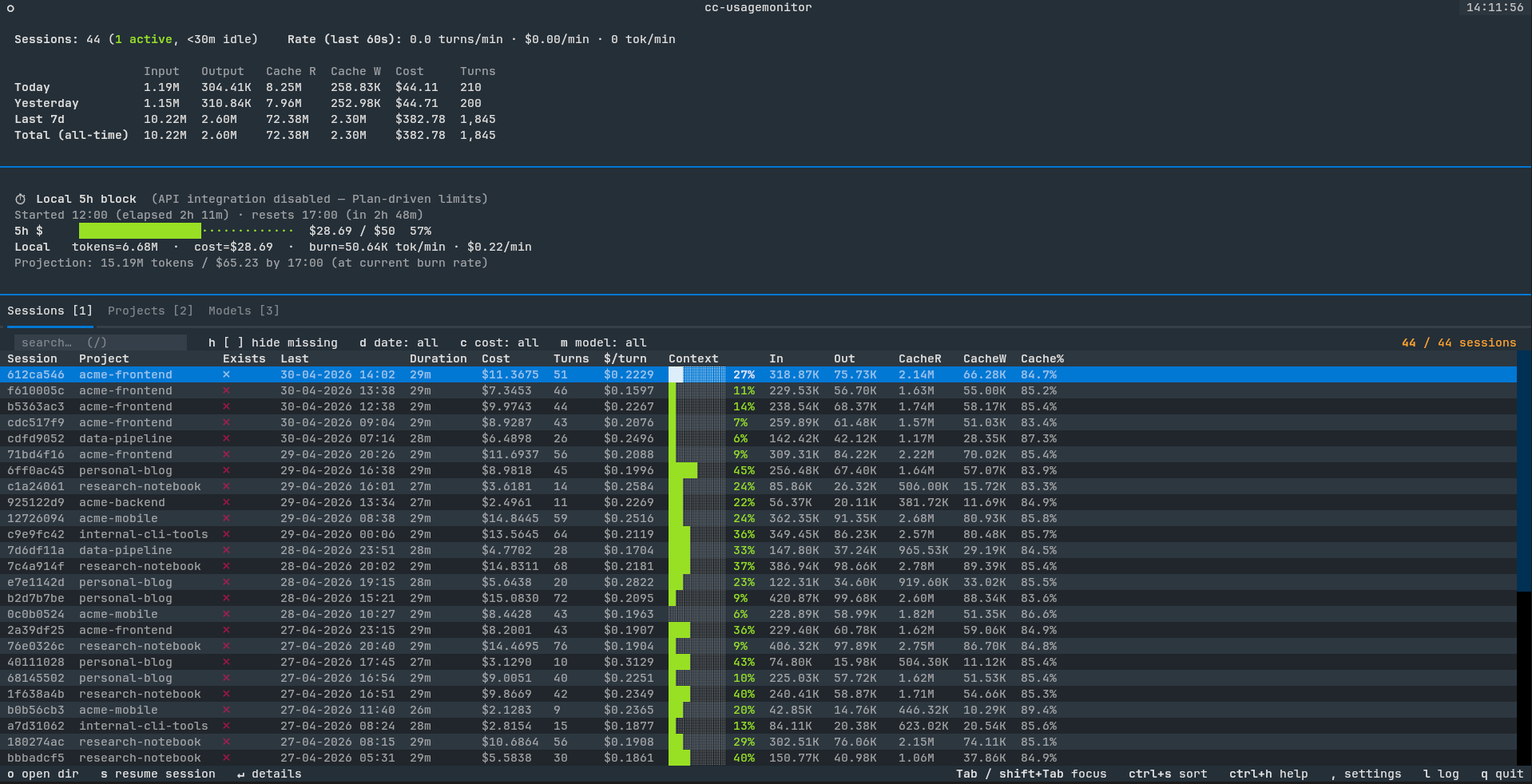
A Textual TUI that tails Claude Code's session logs, correlates them with the hook event stream, and gives you a live view of every active project, every session, and every model — with live 5h-block tracking so you know how close you are to your plan limit before the bill (or the rate limit) catches you off guard.
Table of contents
- Features
- Screenshots
- Installation
- Quick start
- CLI flags
- Configuration
- Development
- Acknowledgements
- License
Features
- Live 5h-block tracking — progress bar against your Anthropic plan limit
(auto-derived P90 in offline mode; authoritative
/api/oauth/usagenumbers when OAuth is available) - Toast notifications at 80% and 100% of cost ceiling so you don't have to babysit the screen
- Sessions / Projects / Models tabs with click-to-sort columns, date / cost / model filters, and full keyboard navigation
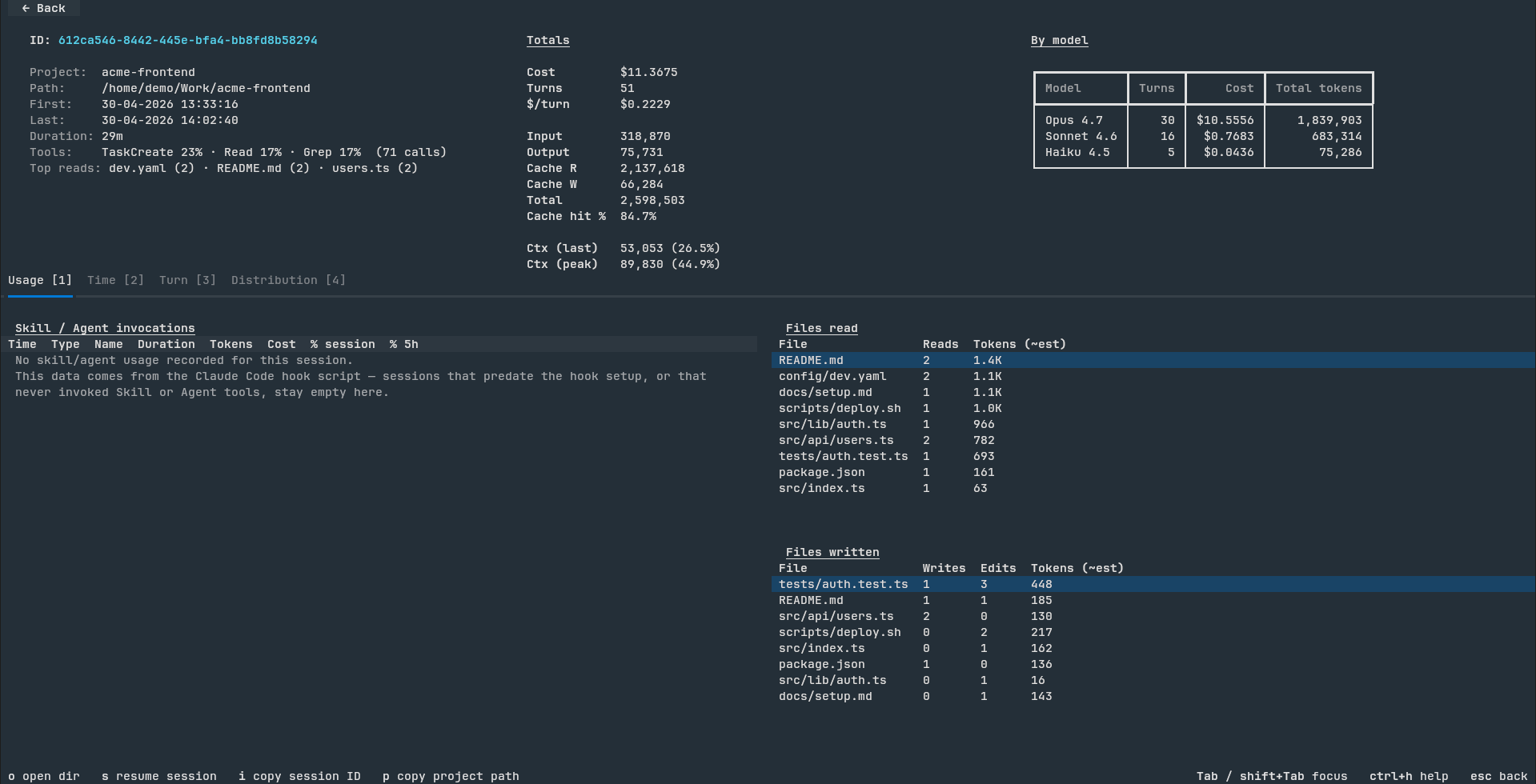
- Per-session detail screen — usage charts, tool counts, file-read / file-write hot lists, full per-turn context window utilization
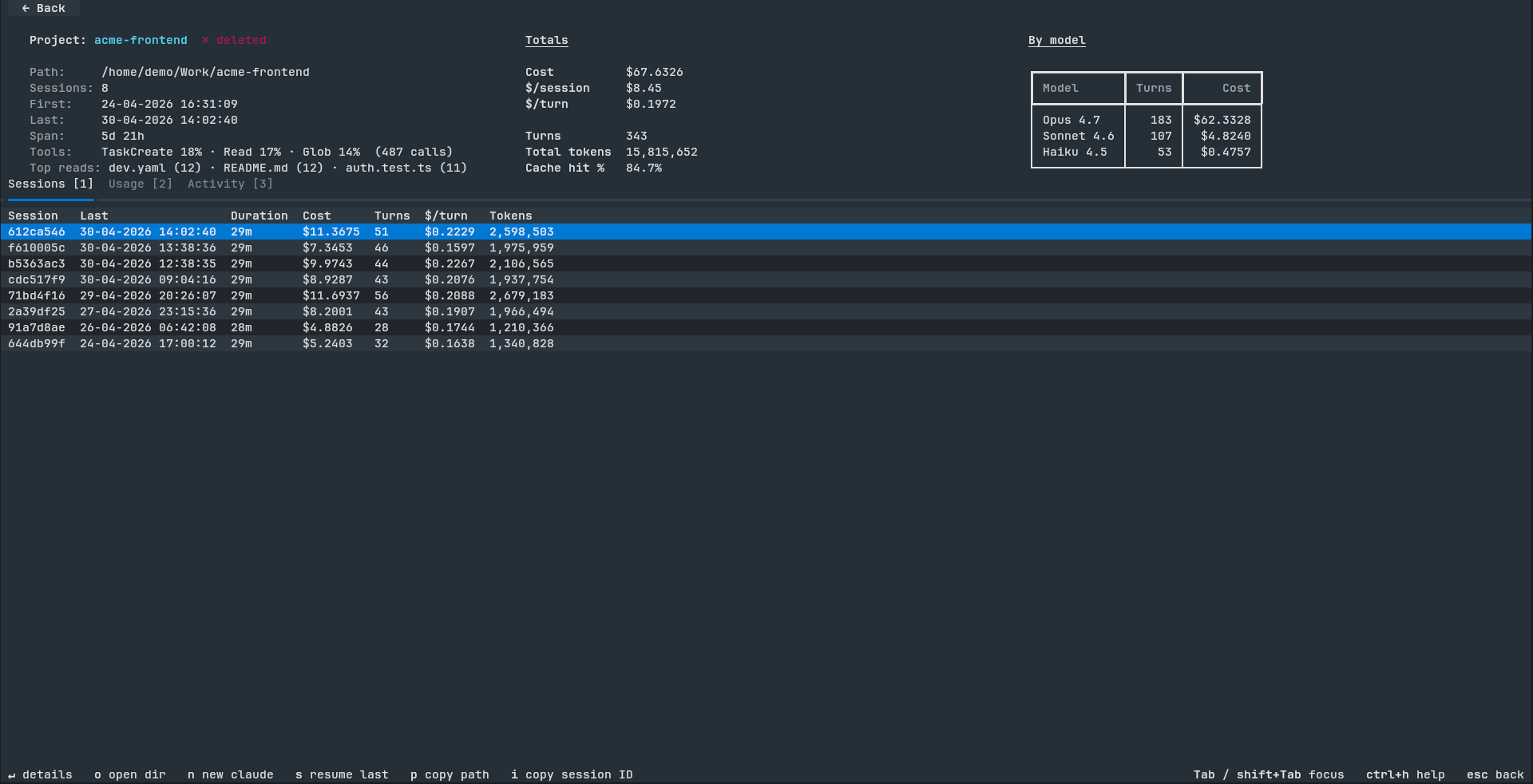
- Project detail screen — same metrics rolled up across every session in the project, plus 7-day cumulative cost / token charts
- CSV / JSON export of sessions, projects, and models for pandas / Excel analysis
- Cross-run state snapshot — quit and relaunch in <1s even with hundreds of sessions and an 8-day archive
- Cache-aware detail screens — first open parses the JSONL once; re-opens are instant
- Mouse and keyboard fully wired — clickable filter chips, back button,
sort headers, drill-in rows; or use
1/2/3///,/?for everything - In-app update notifications — an unobtrusive PyPI check on launch surfaces a one-click "Update?" modal (uv / pipx / pip aware) when a newer release is available, so you never miss a fix
- Archive-viewer mode — point cc-monitor at copied
~/.claude/projects/data on a machine without Claude Code installed and it'll still render costs, tokens, and per-session breakdowns over the historical data
Screenshots
| Main view (Sessions tab) | Session detail |
|---|---|
 |
 |
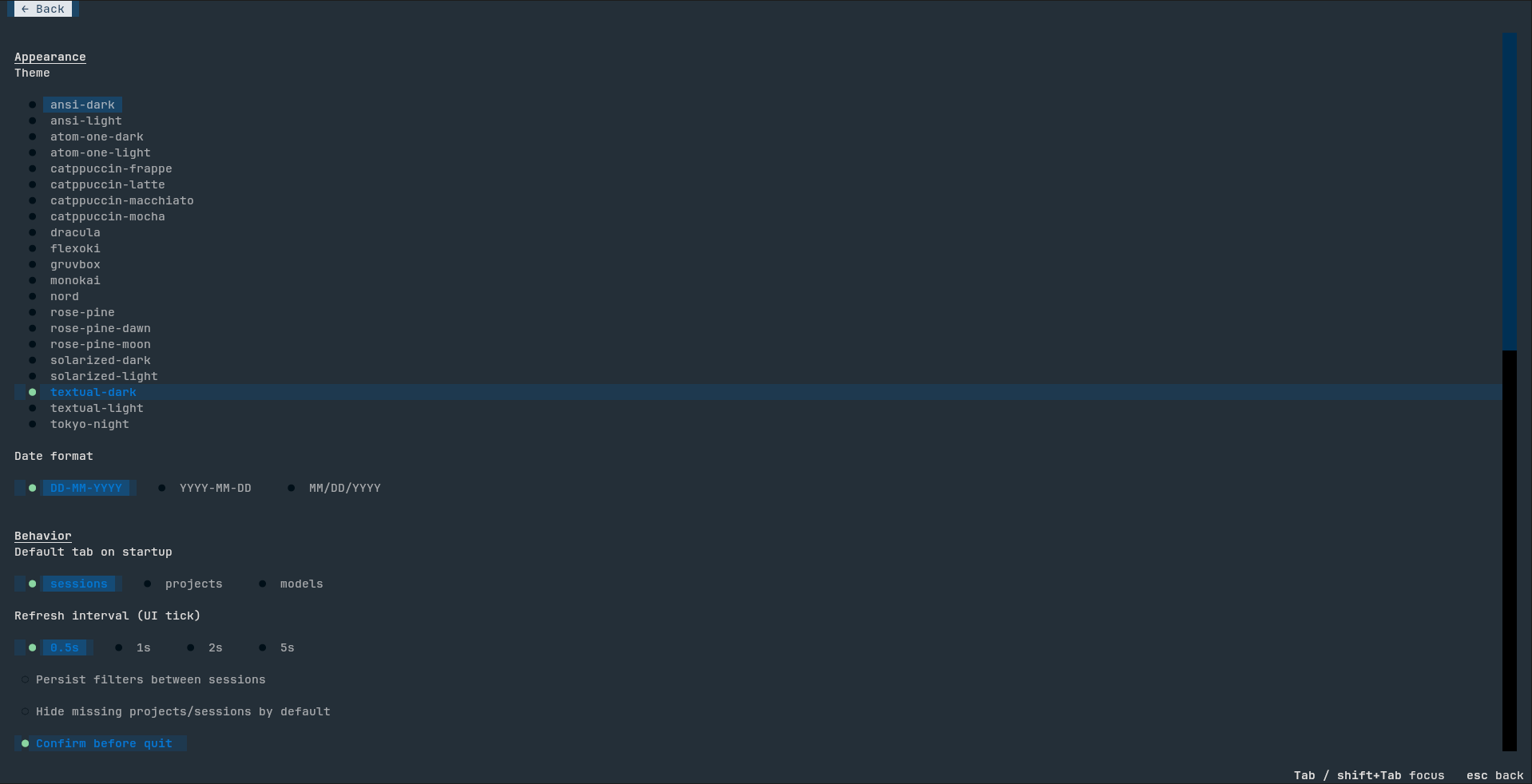
| Project detail | Settings |
|---|---|
 |
 |
Installation
Supported platforms: Linux, macOS, and Windows. cc-monitor works the same way on all three — including archive-viewer mode on machines without Claude Code installed (just point it at copied
~/.claude/projects/data). Please open an issue if you hit platform-specific bugs.
Prerequisites
You need Python 3.11 or newer. Check with python3 --version
(POSIX) or python --version (Windows). If you don't have it:
- Linux:
apt install python3/dnf install python3/ your distro's package manager - macOS:
brew install pythonor grab the installer from python.org - Windows:
winget install Python.Python.3.12or download from python.org
uv (recommended)
uv is the fastest option — installs cc-monitor into an isolated
virtualenv, sidesteps PEP 668 ("externally-managed-environment") on
modern Linux, works identically on macOS and Windows.
Install uv (one-time):
- Linux / macOS:
curl -LsSf https://astral.sh/uv/install.sh | sh
- Windows (PowerShell):
powershell -ExecutionPolicy ByPass -c "irm https://astral.sh/uv/install.ps1 | iex"
- See docs.astral.sh/uv for other options (Homebrew, MacPorts, etc.).
Install cc-monitor:
uv tool install cc-monitor
pipx
pipx is a good alternative if you already use it for other CLI tools.
Install pipx (one-time): see pipx.pypa.io.
pipx install cc-monitor
pip
Last-resort path; prefer uv or pipx because they isolate the
install. Plain pip may fail on Debian/Ubuntu/Fedora and recent macOS
homebrew Python (PEP 668 marks the system Python as
"externally-managed").
pip install --user cc-monitor
If you hit error: externally-managed-environment, switch to uv or
pipx above.
From source
git clone https://github.com/boldsamurai/cc-monitor.git
cd cc-monitor
uv tool install .
If cc-monitor isn't on PATH after install, run uv tool dir to see
where uv put the shim and add that directory to your shell's PATH.
Typical locations:
- Linux / macOS:
~/.local/bin(already on PATH for most shells) - Windows:
%USERPROFILE%\AppData\Roaming\uv\tools\cc-monitor\Scripts
Quick start
Just run:
cc-monitor
Windows users: launch from Windows Terminal (preinstalled on Windows 11, free in the Microsoft Store on Windows 10), not the classic
cmd.exe. Textual TUIs need ANSI/VT support that classic cmd doesn't reliably provide — you'd see escape-code garbage instead of the rendered interface.
On first launch it will:
- Install a hook into
~/.claude/settings.jsonso Claude Code feeds ittool_start/tool_endevents (idempotent, safe to re-run). - Replay every JSONL in
~/.claude/projects/to populate the 8-day archive. - Auto-detect OAuth credentials. If found, pull authoritative 5h / 7d utilization from Anthropic. Otherwise fall back to a P90-derived local ceiling.
- Drop you into the Sessions tab.
Press ? at any time for the keyboard cheatsheet (ctrl+h and F1
also work).
CLI flags
| Flag | Default | Notes |
|---|---|---|
--poll N |
0.5 |
Polling interval (seconds) for the JSONL tailer. |
--max-5h-cost X |
— | Pin a custom USD ceiling for the 5h-block progress bar. Without it, --no-api mode auto-derives a P90 ceiling from your last 8 days. |
--no-api |
off | Disable Anthropic /api/oauth/usage polling. Stay fully offline; falls back to the local P90 ceiling. |
--debug |
off | DEBUG-level logging to ~/.cache/cc-monitor/usagemonitor.log (rotates at 10 MB). |
--reinstall-hook |
— | Re-run the hook installer and exit without launching the TUI. Idempotent — safe in provisioning scripts. |
--rescan |
— | Discard the cached state snapshot before launch so the next run replays every JSONL from scratch. CLI equivalent of Settings → Force re-scan. |
--no-update-check |
— | Skip the once-per-hour check against PyPI for a newer cc-monitor release. The check runs in the background, never blocks startup, and shows a one-click Update? modal when a new version is available. |
--skip-claude-check |
— | Skip the startup probe that warns when Claude Code is missing. The probe checks for the claude binary on PATH and a non-empty ~/.claude/projects/, and blocks the main view behind a Continue/Quit modal when both signals are absent. Useful for CI / scripted runs. |
Everything else (theme, date format, default tab, refresh interval, filter
persistence, confirms) is editable from the in-app Settings screen — ,
key from the main view.
Configuration
| Path | Purpose |
|---|---|
~/.config/cc-monitor/config.json |
Settings persisted from the in-app Settings screen. |
~/.cache/cc-monitor/state.pickle |
Cross-run state snapshot. Missing / corrupt / version-mismatched → fall back to full replay. |
~/.cache/cc-monitor/usagemonitor.log |
Rolling log file (10 MB cap). |
~/.cache/cc-monitor/exports/ |
Timestamped CSV / JSON dumps from Settings → Export. |
~/.cache/cc-monitor/version-check.json |
Cached PyPI version probe (TTL 1h). Auto-invalidates when you upgrade past the cached value. |
~/.cache/cc-monitor/upgrade.log |
Reserved for legacy upgrade output. As of 0.1.18 the in-app Update modal runs uv tool upgrade blockingly in your terminal on POSIX and in a separate cmd window on Windows; nothing is written here unless an older version generated it. |
Cross-platform paths:
~is your home directory.
- Linux:
/home/<user>/- macOS:
/Users/<user>/- Windows:
C:\Users\<user>\(Python'sPath.home()resolves~to%USERPROFILE%, then we use literal.config\cc-monitor\and.cache\cc-monitor\subdirectories — non-standard for Windows but consistent across platforms).
None of the above is committed to your repo.
Development
git clone https://github.com/boldsamurai/cc-monitor.git
cd cc-monitor
uv sync                      # install runtime + dev deps
uv run pytest                # 115 tests
uv run cc-monitor            # launch from source
Acknowledgements
Built with Textual and plotext (via textual-plotext). The 5h-block detection algorithm is informed by Maciek-roboblog/Claude-Code-Usage-Monitor.
License
MIT — see LICENSE.
1 maintainer

Download files
Download the file for your platform. If you're not sure which to choose, learn more about installing packages.
Source Distribution
Built Distribution
Filter files by name, interpreter, ABI, and platform.
If you're not sure about the file name format, learn more about wheel file names.
Copy a direct link to the current filters
File details
Details for the file cc_monitor-0.1.28.tar.gz.
File metadata
- Download URL: cc_monitor-0.1.28.tar.gz
- Upload date:
- Size: 123.9 kB
- Tags: Source
- Uploaded using Trusted Publishing? No
- Uploaded via:
uv/0.11.9 {"installer":{"name":"uv","version":"0.11.9","subcommand":["publish"]},"python":null,"implementation":{"name":null,"version":null},"distro":{"name":"Ubuntu","version":"24.04","id":"noble","libc":null},"system":{"name":null,"release":null},"cpu":null,"openssl_version":null,"setuptools_version":null,"rustc_version":null,"ci":true}
File hashes
| Algorithm | Hash digest | |
|---|---|---|
| SHA256 |
53e8c86bd5e5b5d55eb62b400782f2bf1f43e952f3112a3e9582f47c10dfbbf2
|
|
| MD5 |
c50dbf070327b82eac24bfeec9dd519a
|
|
| BLAKE2b-256 |
60629253a67c4a497fa20ac34f1b8d288d29d81aa28940bc288f73c78abba0a5
|
File details
Details for the file cc_monitor-0.1.28-py3-none-any.whl.
File metadata
- Download URL: cc_monitor-0.1.28-py3-none-any.whl
- Upload date:
- Size: 126.6 kB
- Tags: Python 3
- Uploaded using Trusted Publishing? No
- Uploaded via:
uv/0.11.9 {"installer":{"name":"uv","version":"0.11.9","subcommand":["publish"]},"python":null,"implementation":{"name":null,"version":null},"distro":{"name":"Ubuntu","version":"24.04","id":"noble","libc":null},"system":{"name":null,"release":null},"cpu":null,"openssl_version":null,"setuptools_version":null,"rustc_version":null,"ci":true}
File hashes
| Algorithm | Hash digest | |
|---|---|---|
| SHA256 |
07bf55bda8d82322d0ff9be86332d1834b4a235c1383a5eb6bd803267437dc3b
|
|
| MD5 |
aa54dca0f2e198448a56f45269fa7840
|
|
| BLAKE2b-256 |
ae5b3ec17e7c7fde3944a9691f7ef370fab6e67d7856d5db27a0e6c857725983
|







