
cc-monitor
Real-time token usage and cost monitor for Claude Code sessions, in your terminal.





A Textual TUI that tails Claude Code's session logs, correlates them with the hook event stream, and gives you a live view of every active project, every session, and every model — with live 5h-block tracking so you know how close you are to your plan limit before the bill (or the rate limit) catches you off guard.
Table of contents
- Features
- Screenshots
- Installation
- Quick start
- CLI flags
- Configuration
- Development
- Acknowledgements
- License
Features
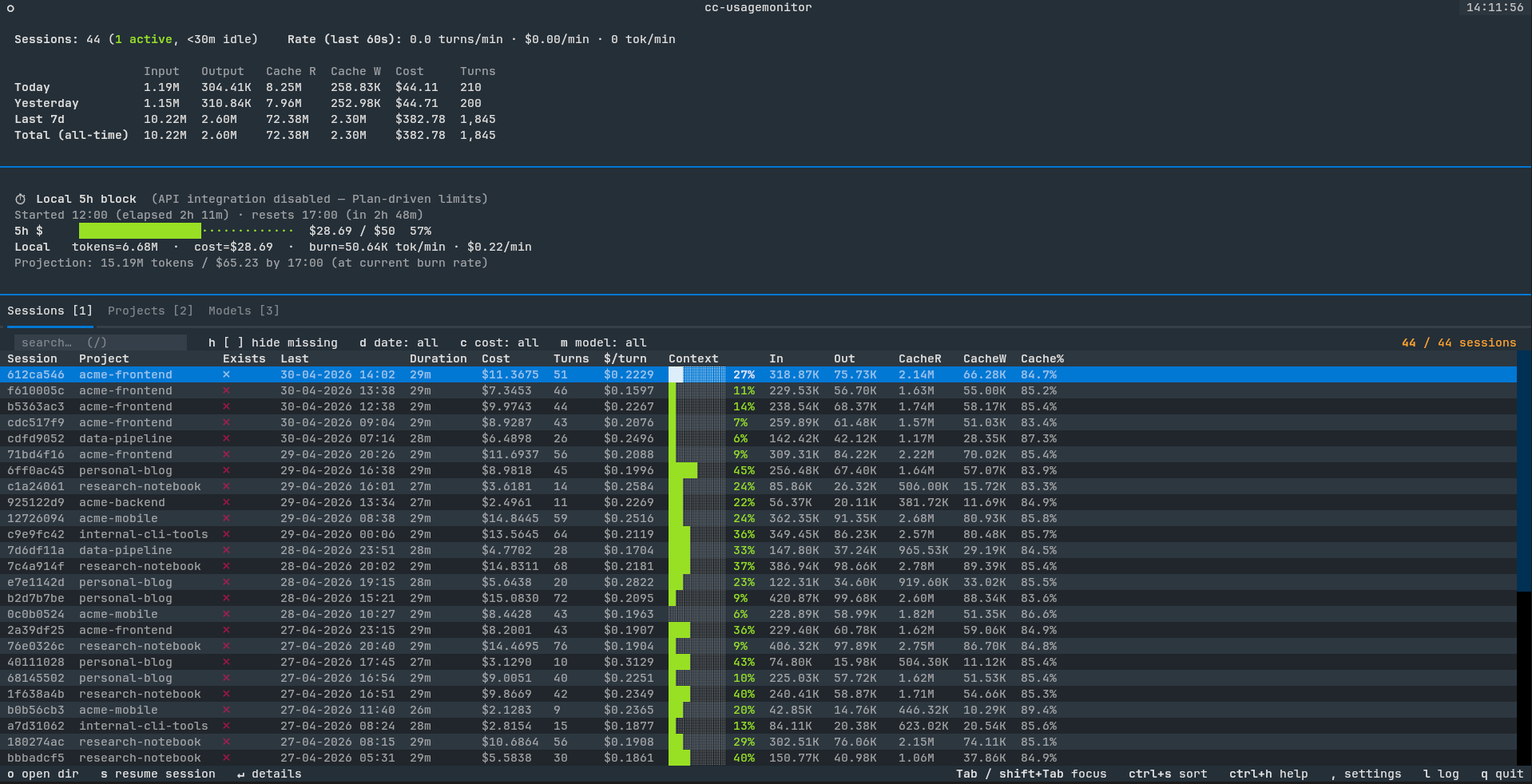
- Live 5h-block tracking — progress bar against your Anthropic plan limit
(auto-derived P90 in offline mode; authoritative
/api/oauth/usagenumbers when OAuth is available) - Toast notifications at 80% and 100% of cost ceiling so you don't have to babysit the screen
- Sessions / Projects / Models tabs with click-to-sort columns, date / cost / model filters, and full keyboard navigation
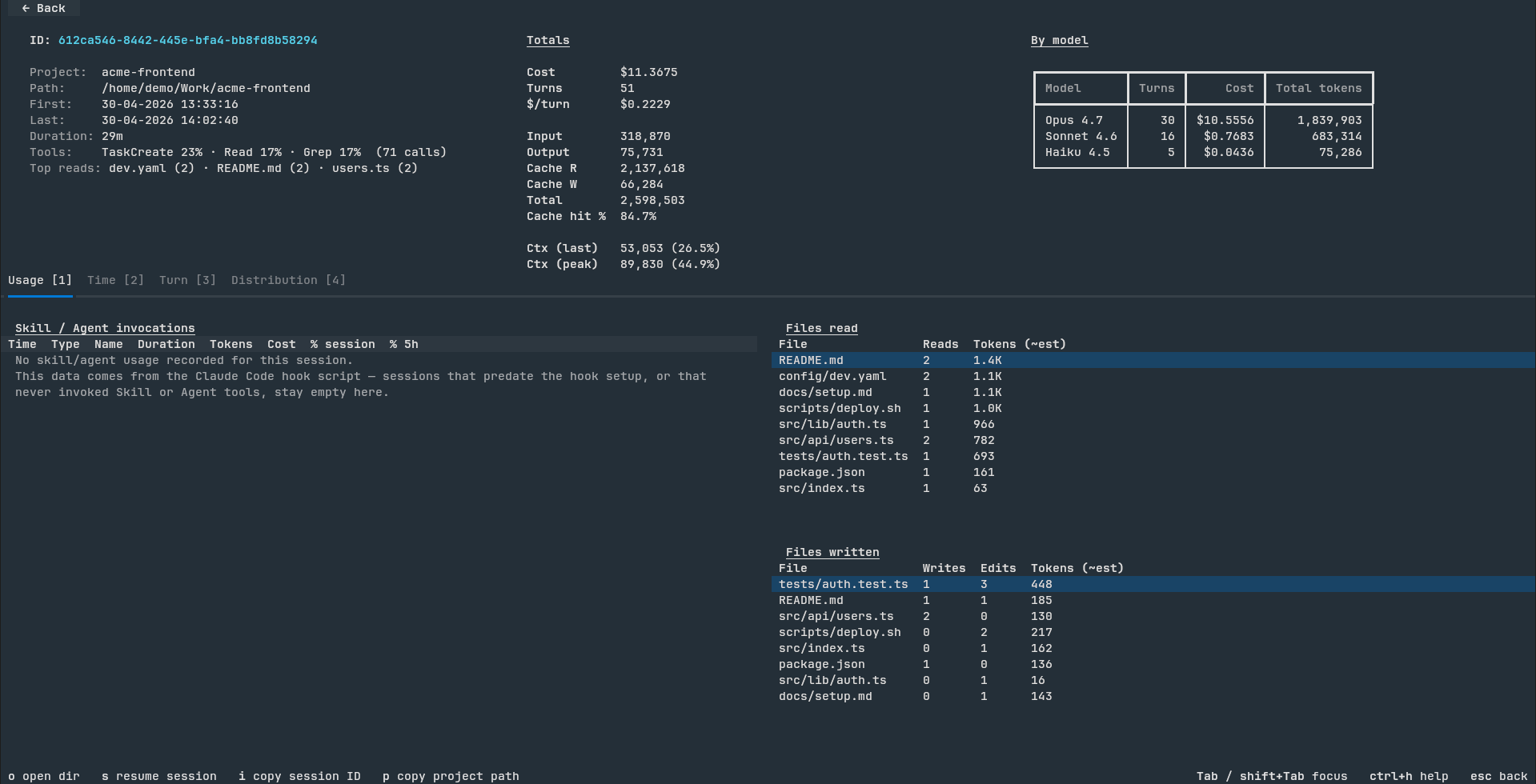
- Per-session detail screen — usage charts, tool counts, file-read / file-write hot lists, full per-turn context window utilization
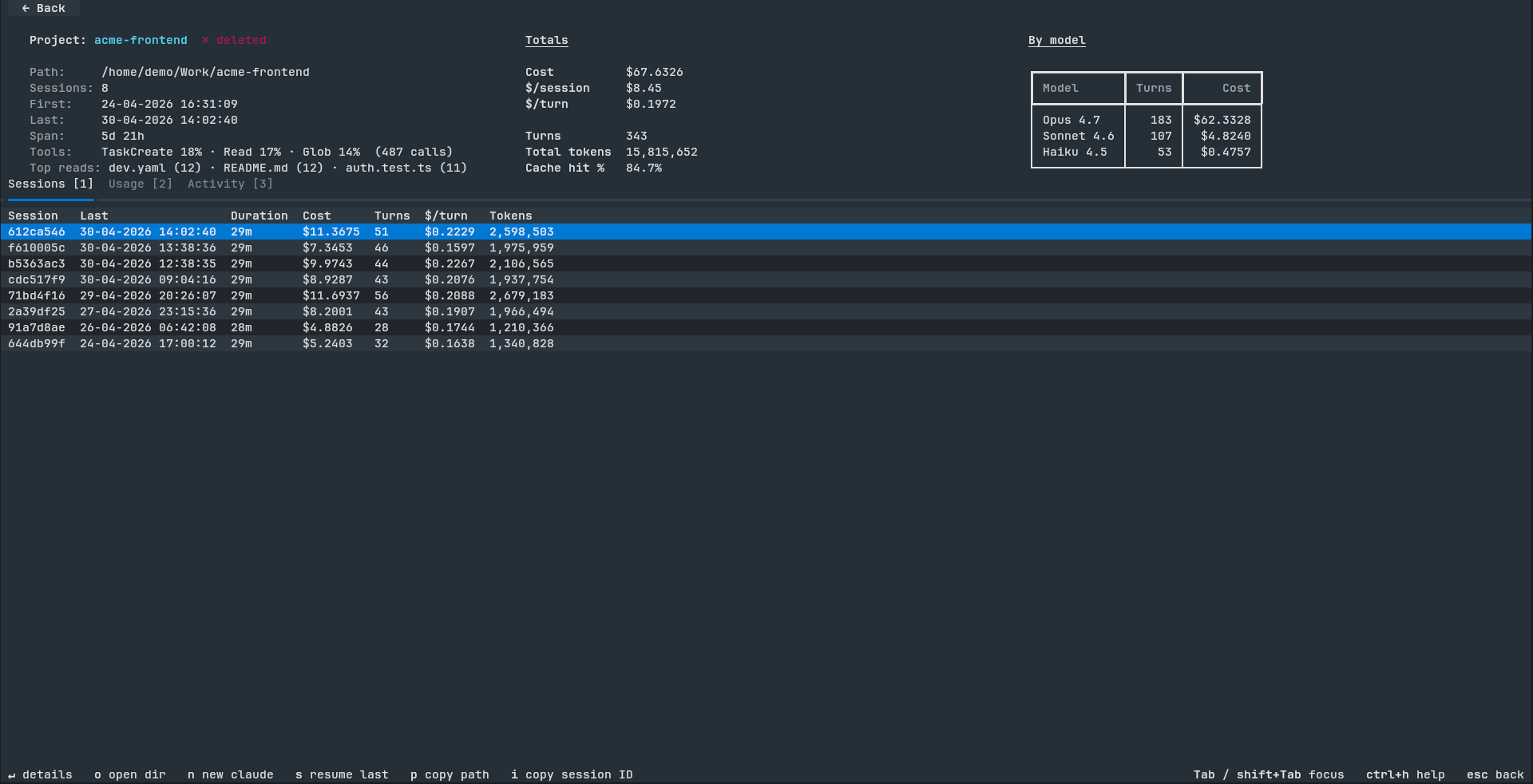
- Project detail screen — same metrics rolled up across every session in the project, plus 7-day cumulative cost / token charts
- CSV / JSON export of sessions, projects, and models for pandas / Excel analysis
- Cross-run state snapshot — quit and relaunch in <1s even with hundreds of sessions and an 8-day archive
- Cache-aware detail screens — first open parses the JSONL once; re-opens are instant
- Mouse and keyboard fully wired — clickable filter chips, back button,
sort headers, drill-in rows; or use
1/2/3///,/?for everything - In-app update notifications — an unobtrusive PyPI check on launch surfaces a one-click "Update?" modal (uv / pipx / pip aware) when a newer release is available, so you never miss a fix
- Archive-viewer mode — point cc-monitor at copied
~/.claude/projects/data on a machine without Claude Code installed and it'll still render costs, tokens, and per-session breakdowns over the historical data
Screenshots
| Main view (Sessions tab) | Session detail |
|---|---|
 |
 |
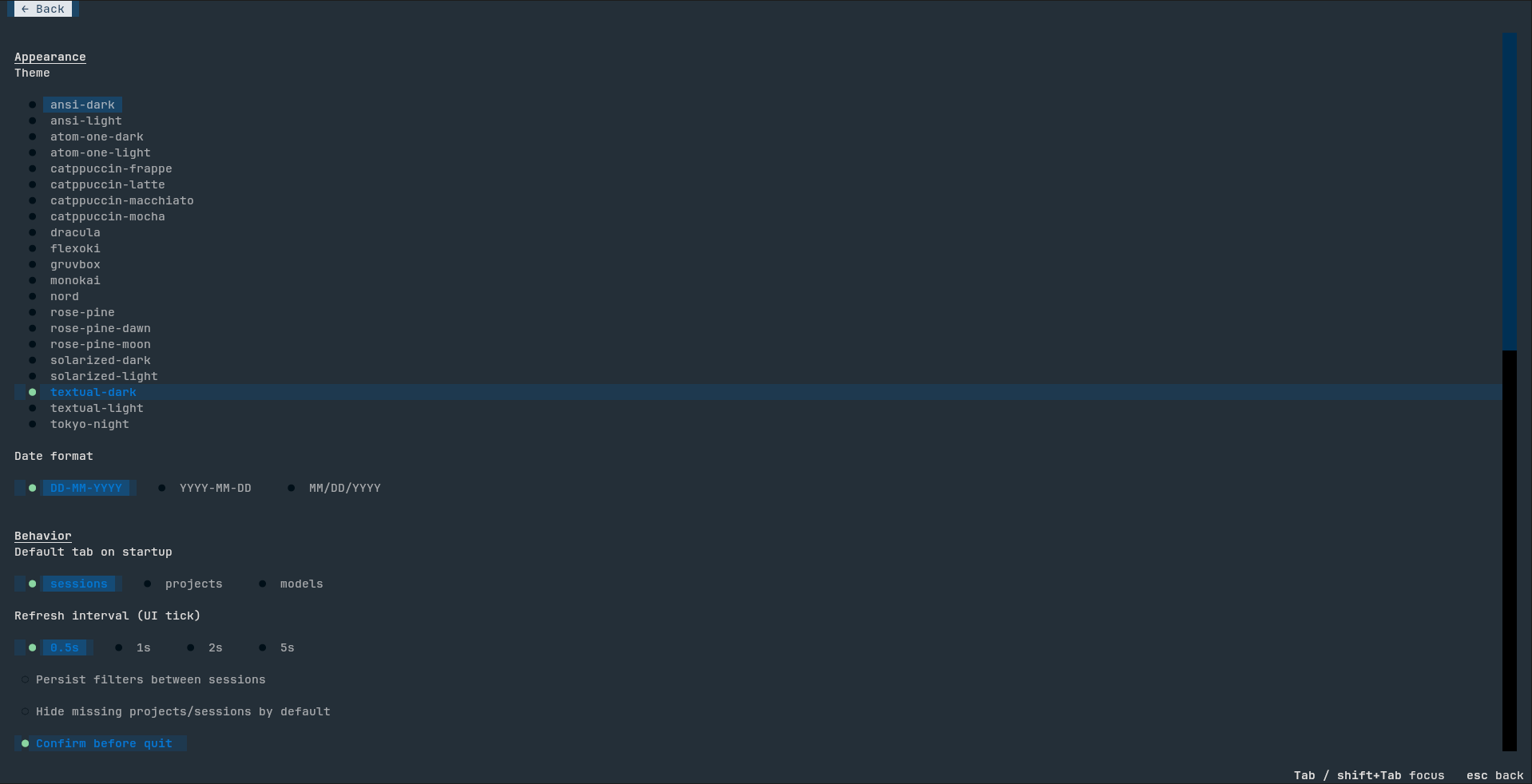
| Project detail | Settings |
|---|---|
 |
 |
Installation
Supported platforms: Linux, macOS, and Windows. cc-monitor works the same way on all three — including archive-viewer mode on machines without Claude Code installed (just point it at copied
~/.claude/projects/data). Please open an issue if you hit platform-specific bugs.
Prerequisites
You need Python 3.11 or newer. Check with python3 --version
(POSIX) or python --version (Windows). If you don't have it:
- Linux:
apt install python3/dnf install python3/ your distro's package manager - macOS:
brew install pythonor grab the installer from python.org - Windows:
winget install Python.Python.3.12or download from python.org
uv (recommended)
uv is the fastest option — installs cc-monitor into an isolated
virtualenv, sidesteps PEP 668 ("externally-managed-environment") on
modern Linux, works identically on macOS and Windows.
Install uv (one-time):
- Linux / macOS:
curl -LsSf https://astral.sh/uv/install.sh | sh
- Windows (PowerShell):
powershell -ExecutionPolicy ByPass -c "irm https://astral.sh/uv/install.ps1 | iex"
- See docs.astral.sh/uv for other options (Homebrew, MacPorts, etc.).
Install cc-monitor:
uv tool install cc-monitor
pipx
pipx is a good alternative if you already use it for other CLI tools.
Install pipx (one-time): see pipx.pypa.io.
pipx install cc-monitor
pip
Last-resort path; prefer uv or pipx because they isolate the
install. Plain pip may fail on Debian/Ubuntu/Fedora and recent macOS
homebrew Python (PEP 668 marks the system Python as
"externally-managed").
pip install --user cc-monitor
If you hit error: externally-managed-environment, switch to uv or
pipx above.
From source
git clone https://github.com/boldsamurai/cc-monitor.git
cd cc-monitor
uv tool install .
If cc-monitor isn't on PATH after install, run uv tool dir to see
where uv put the shim and add that directory to your shell's PATH.
Typical locations:
- Linux / macOS:
~/.local/bin(already on PATH for most shells) - Windows:
%USERPROFILE%\AppData\Roaming\uv\tools\cc-monitor\Scripts
Quick start
Just run:
cc-monitor
Windows users: launch from Windows Terminal (preinstalled on Windows 11, free in the Microsoft Store on Windows 10), not the classic
cmd.exe. Textual TUIs need ANSI/VT support that classic cmd doesn't reliably provide — you'd see escape-code garbage instead of the rendered interface.
On first launch it will:
- Install a hook into
~/.claude/settings.jsonso Claude Code feeds ittool_start/tool_endevents (idempotent, safe to re-run). - Replay every JSONL in
~/.claude/projects/to populate the 8-day archive. - Auto-detect OAuth credentials. If found, pull authoritative 5h / 7d utilization from Anthropic. Otherwise fall back to a P90-derived local ceiling.
- Drop you into the Sessions tab.
Press ? at any time for the keyboard cheatsheet (ctrl+h and F1
also work).
CLI flags
| Flag | Default | Notes |
|---|---|---|
--poll N |
0.5 |
Polling interval (seconds) for the JSONL tailer. |
--max-5h-cost X |
— | Pin a custom USD ceiling for the 5h-block progress bar. Without it, --no-api mode auto-derives a P90 ceiling from your last 8 days. |
--no-api |
off | Disable Anthropic /api/oauth/usage polling. Stay fully offline; falls back to the local P90 ceiling. |
--debug |
off | DEBUG-level logging to ~/.cache/cc-monitor/usagemonitor.log (rotates at 10 MB). |
--reinstall-hook |
— | Re-run the hook installer and exit without launching the TUI. Idempotent — safe in provisioning scripts. |
--rescan |
— | Discard the cached state snapshot before launch so the next run replays every JSONL from scratch. CLI equivalent of Settings → Force re-scan. |
--no-update-check |
— | Skip the once-per-hour check against PyPI for a newer cc-monitor release. The check runs in the background, never blocks startup, and shows a one-click Update? modal when a new version is available. |
--skip-claude-check |
— | Skip the startup probe that warns when Claude Code is missing. The probe checks for the claude binary on PATH and a non-empty ~/.claude/projects/, and blocks the main view behind a Continue/Quit modal when both signals are absent. Useful for CI / scripted runs. |
Everything else (theme, date format, default tab, refresh interval, filter
persistence, confirms) is editable from the in-app Settings screen — ,
key from the main view.
Configuration
| Path | Purpose |
|---|---|
~/.config/cc-monitor/config.json |
Settings persisted from the in-app Settings screen. |
~/.cache/cc-monitor/state.pickle |
Cross-run state snapshot. Missing / corrupt / version-mismatched → fall back to full replay. |
~/.cache/cc-monitor/usagemonitor.log |
Rolling log file (10 MB cap). |
~/.cache/cc-monitor/exports/ |
Timestamped CSV / JSON dumps from Settings → Export. |
~/.cache/cc-monitor/version-check.json |
Cached PyPI version probe (TTL 1h). Auto-invalidates when you upgrade past the cached value. |
~/.cache/cc-monitor/upgrade.log |
Reserved for legacy upgrade output. As of 0.1.18 the in-app Update modal runs uv tool upgrade blockingly in your terminal on POSIX and in a separate cmd window on Windows; nothing is written here unless an older version generated it. |
Cross-platform paths:
~is your home directory.
- Linux:
/home/<user>/- macOS:
/Users/<user>/- Windows:
C:\Users\<user>\(Python'sPath.home()resolves~to%USERPROFILE%, then we use literal.config\cc-monitor\and.cache\cc-monitor\subdirectories — non-standard for Windows but consistent across platforms).
None of the above is committed to your repo.
Development
git clone https://github.com/boldsamurai/cc-monitor.git
cd cc-monitor
uv sync                      # install runtime + dev deps
uv run pytest                # 115 tests
uv run cc-monitor            # launch from source
Acknowledgements
Built with Textual and plotext (via textual-plotext). The 5h-block detection algorithm is informed by Maciek-roboblog/Claude-Code-Usage-Monitor.
License
MIT — see LICENSE.
1 maintainer

Metadata
1 maintainer
Release files for cc-monitor 0.1.28
For a detailed explanation of source distributions (sdists) and built distributions (wheels), please see the package formats documentation.
Source distribution (sdist)
| File | Size | Uploaded | |
|---|---|---|---|
| cc_monitor-0.1.28.tar.gz | 123.9 kB | Details |
Built distribution (wheel)
| File | Interpreter | ABI | Platform | Reset |
|---|---|---|---|---|
| cc_monitor-0.1.28-py3-none-any.whl | Python 3 | none | any | Details |
Total release size: 250.5 kB
Release files / cc_monitor-0.1.28.tar.gz
| Download URL | cc_monitor-0.1.28.tar.gz |
|---|---|
| Size | 123.9 kB |
| Tags | Source |
|
SHA-256 checksum How to use checksums |
53e8c86bd5e5b5d55eb62b400782f2bf1f43e952f3112a3e9582f47c10dfbbf2
|
|
BLAKE2b-256 checksum How to use checksums |
60629253a67c4a497fa20ac34f1b8d288d29d81aa28940bc288f73c78abba0a5
|
| Upload date | |
|
Uploaded using Trusted Publishing? What is trusted publishing? |
No |
| Uploaded via |
uv/0.11.9 {"installer":{"name":"uv","version":"0.11.9","subcommand":["publish"]},"python":null,"implementation":{"name":null,"version":null},"distro":{"name":"Ubuntu","version":"24.04","id":"noble","libc":null},"system":{"name":null,"release":null},"cpu":null,"openssl_version":null,"setuptools_version":null,"rustc_version":null,"ci":true}
|
Release files / cc_monitor-0.1.28-py3-none-any.whl
| Download URL | cc_monitor-0.1.28-py3-none-any.whl |
|---|---|
| Size | 126.6 kB |
| Tags | Python 3 |
|
SHA-256 checksum How to use checksums |
07bf55bda8d82322d0ff9be86332d1834b4a235c1383a5eb6bd803267437dc3b
|
|
BLAKE2b-256 checksum How to use checksums |
ae5b3ec17e7c7fde3944a9691f7ef370fab6e67d7856d5db27a0e6c857725983
|
| Upload date | |
|
Uploaded using Trusted Publishing? What is trusted publishing? |
No |
| Uploaded via |
uv/0.11.9 {"installer":{"name":"uv","version":"0.11.9","subcommand":["publish"]},"python":null,"implementation":{"name":null,"version":null},"distro":{"name":"Ubuntu","version":"24.04","id":"noble","libc":null},"system":{"name":null,"release":null},"cpu":null,"openssl_version":null,"setuptools_version":null,"rustc_version":null,"ci":true}
|














