
Real-time token usage and cost monitor for Claude Code sessions, in your terminal.

Project description
cc-monitor
Real-time token usage and cost monitor for Claude Code sessions, in your terminal.





A Textual TUI that tails Claude Code's session logs, correlates them with the hook event stream, and gives you a live view of every active project, every session, and every model — with live 5h-block tracking so you know how close you are to your plan limit before the bill (or the rate limit) catches you off guard.
Table of contents
- Features
- Screenshots
- Installation
- Quick start
- CLI flags
- Configuration
- Development
- Acknowledgements
- License
Features
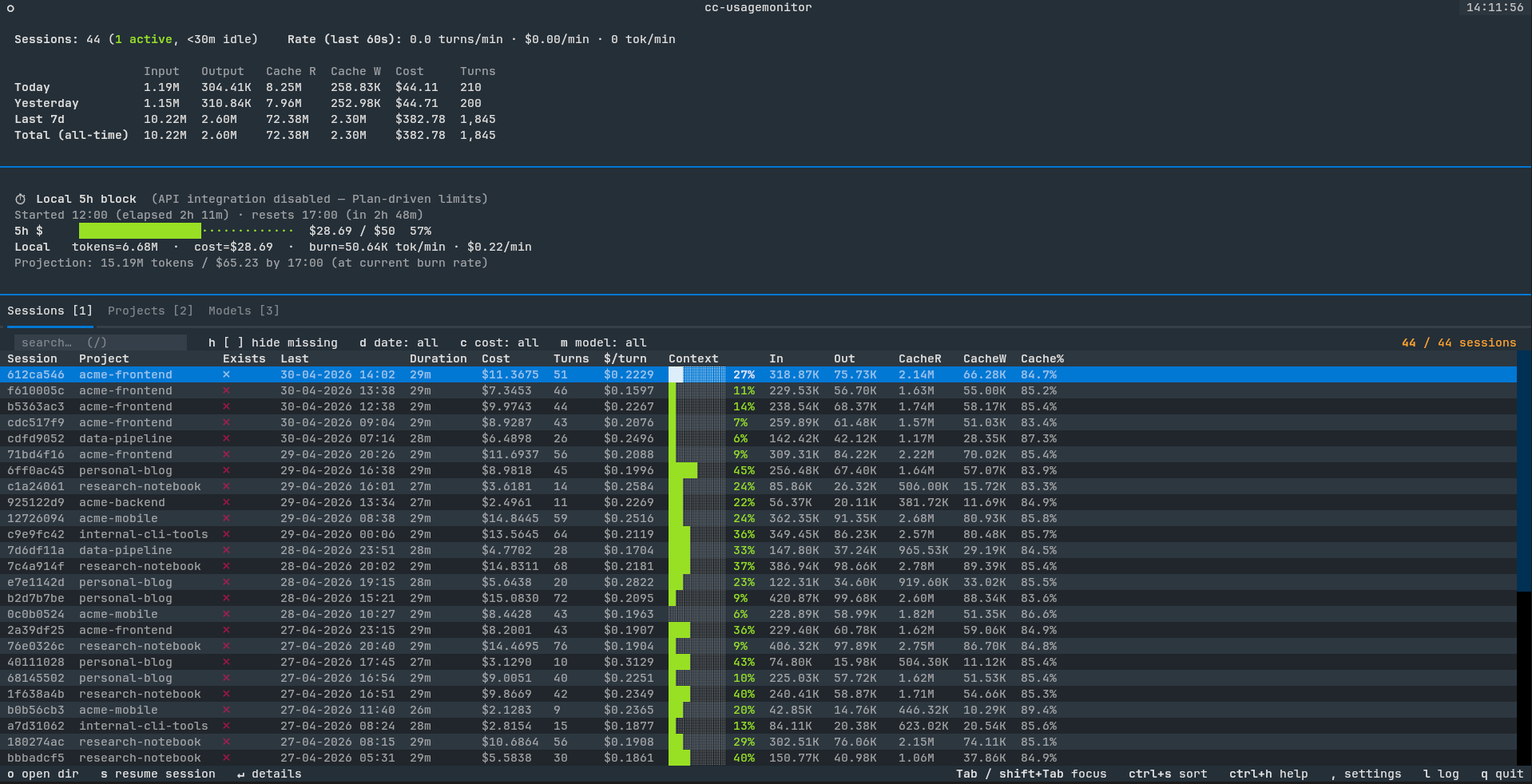
- Live 5h-block tracking — progress bar against your Anthropic plan limit
(auto-derived P90 in offline mode; authoritative
/api/oauth/usagenumbers when OAuth is available) - Toast notifications at 80% and 100% of cost ceiling so you don't have to babysit the screen
- Sessions / Projects / Models tabs with click-to-sort columns, date / cost / model filters, and full keyboard navigation
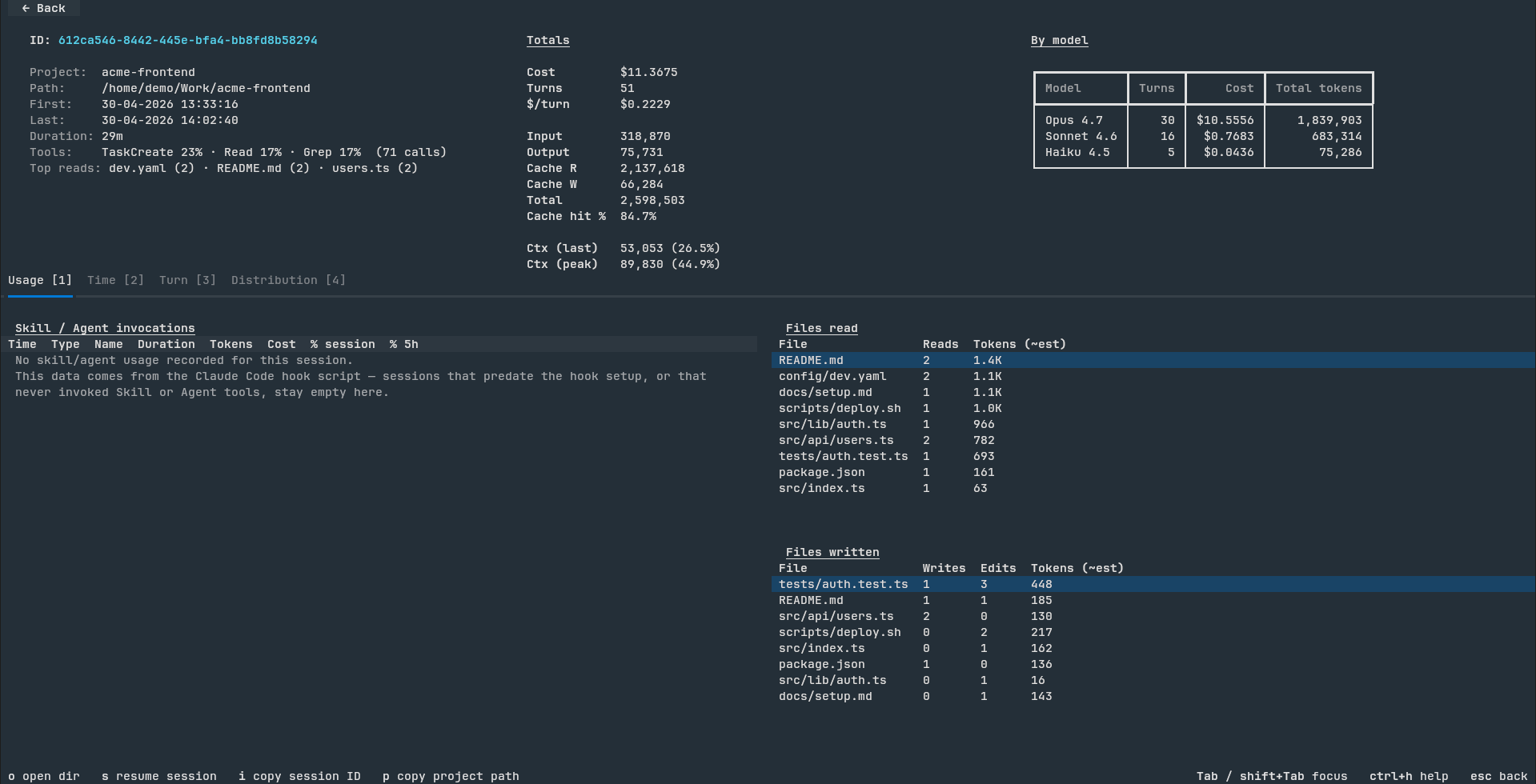
- Per-session detail screen — usage charts, tool counts, file-read / file-write hot lists, full per-turn context window utilization
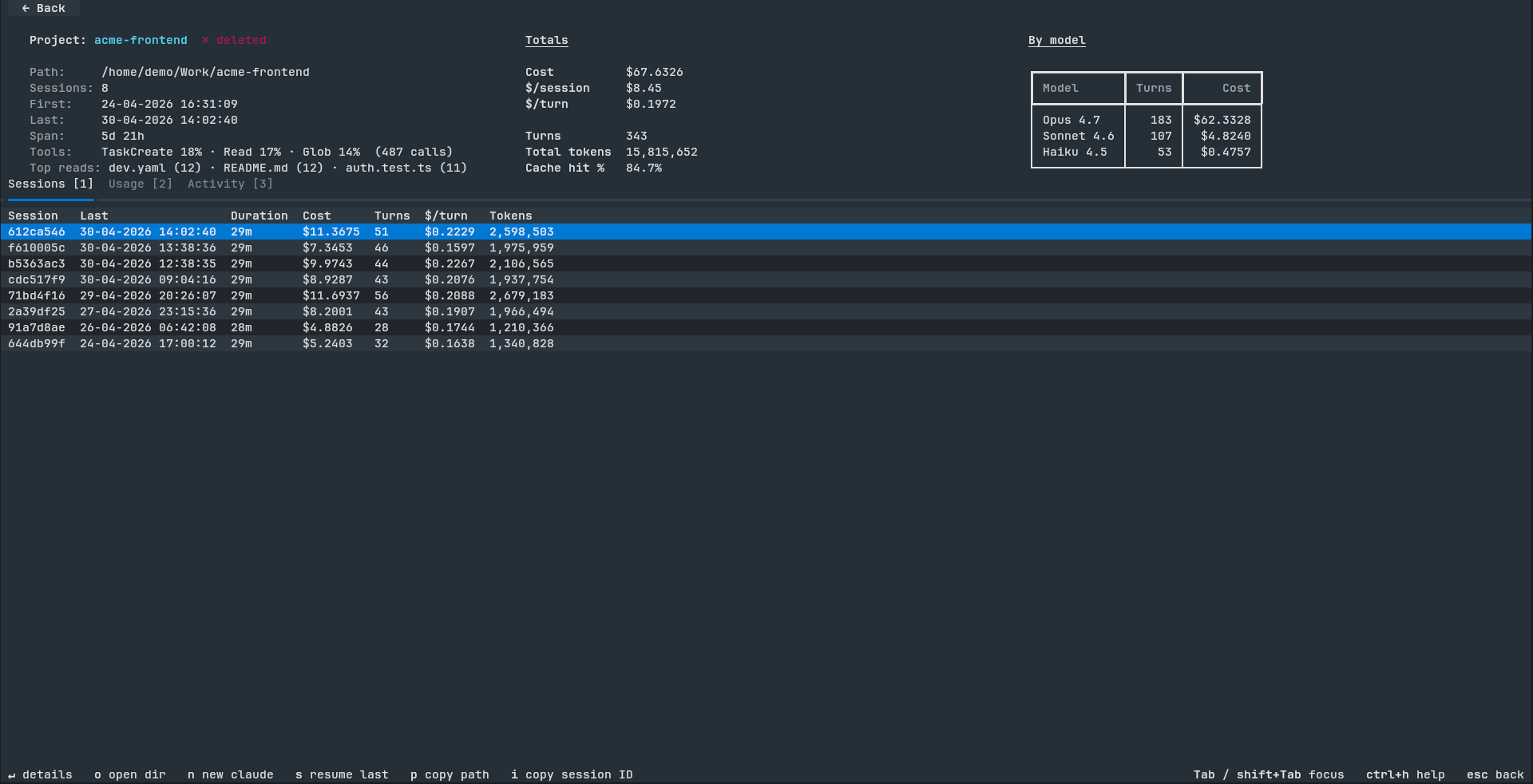
- Project detail screen — same metrics rolled up across every session in the project, plus 7-day cumulative cost / token charts
- CSV / JSON export of sessions, projects, and models for pandas / Excel analysis
- Cross-run state snapshot — quit and relaunch in <1s even with hundreds of sessions and an 8-day archive
- Cache-aware detail screens — first open parses the JSONL once; re-opens are instant
- Mouse and keyboard fully wired — clickable filter chips, back button,
sort headers, drill-in rows; or use
1/2/3///,/?for everything
Screenshots
| Main view (Sessions tab) | Session detail |
|---|---|
 |
 |
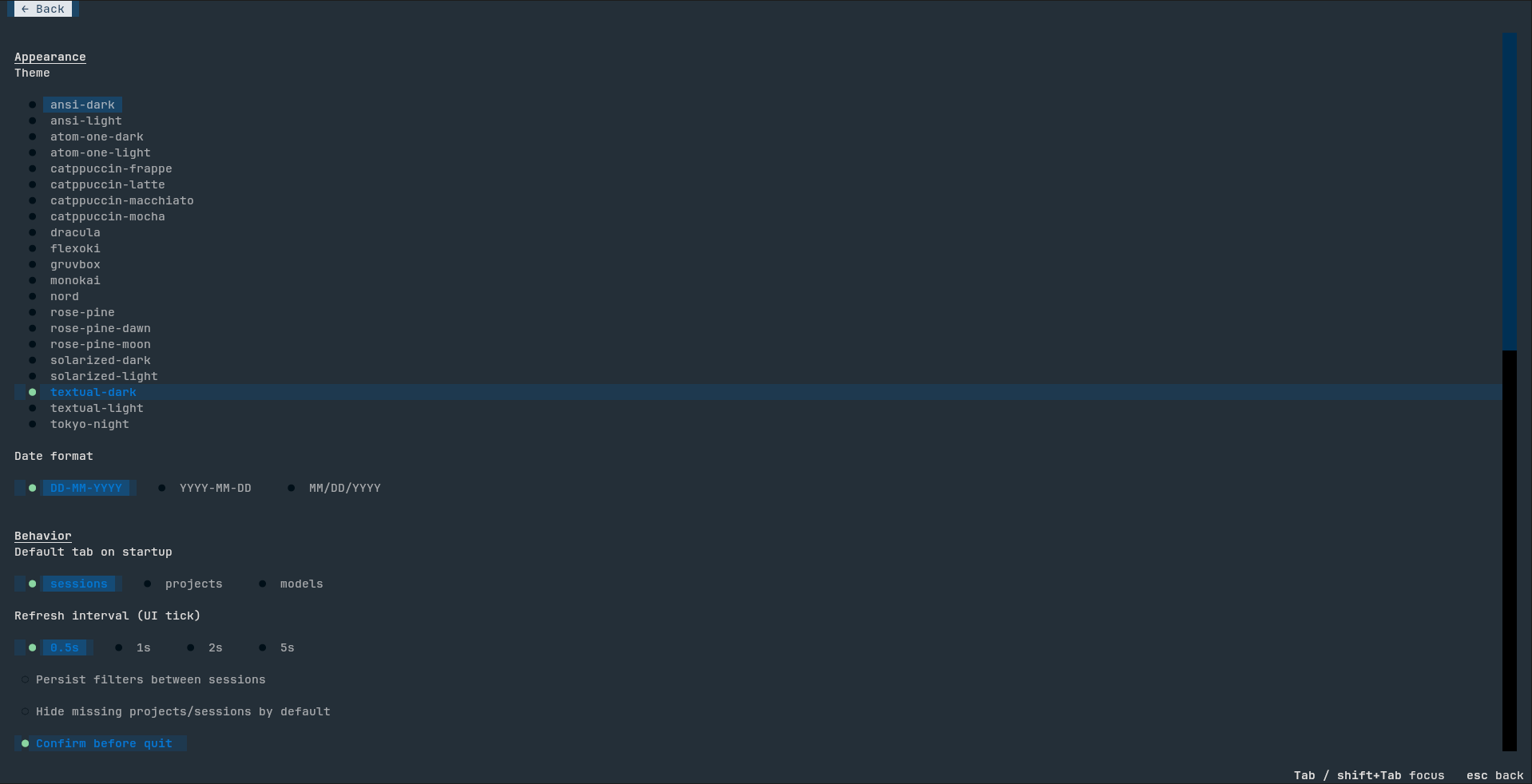
| Project detail | Settings |
|---|---|
 |
 |
Installation
Supported platforms: Linux and macOS. Windows is not officially supported in v0.1.0 — the code has best-effort cross-platform branches but is untested. Please open an issue if you'd like Windows support tracked.
uv (recommended)
uv tool install cc-monitor
uv tool creates an isolated environment automatically, sidesteps PEP 668
("externally-managed-environment") errors on modern Linux, and adds the
entry-point shim to ~/.local/bin without touching system Python.
pipx
pipx install cc-monitor
pip
pip install --user cc-monitor
On Debian/Ubuntu/Fedora-based systems with system Python you'll need
--user to bypass PEP 668. Prefer uv or pipx instead.
From source
git clone https://github.com/boldsamurai/cc-monitor.git
cd cc-monitor
uv tool install .
If cc-monitor isn't on PATH after install, add ~/.local/bin to
your shell's PATH.
Quick start
Just run:
cc-monitor
On first launch it will:
- Install a hook into
~/.claude/settings.jsonso Claude Code feeds ittool_start/tool_endevents (idempotent, safe to re-run). - Replay every JSONL in
~/.claude/projects/to populate the 8-day archive. - Auto-detect OAuth credentials. If found, pull authoritative 5h / 7d utilization from Anthropic. Otherwise fall back to a P90-derived local ceiling.
- Drop you into the Sessions tab.
Press ? (or ctrl+h) at any time for the keyboard cheatsheet.
CLI flags
| Flag | Default | Notes |
|---|---|---|
--poll N |
0.5 |
Polling interval (seconds) for the JSONL tailer. |
--max-5h-cost X |
— | Pin a custom USD ceiling for the 5h-block progress bar. Without it, --no-api mode auto-derives a P90 ceiling from your last 8 days. |
--no-api |
off | Disable Anthropic /api/oauth/usage polling. Stay fully offline; falls back to the local P90 ceiling. |
--debug |
off | DEBUG-level logging to ~/.cache/cc-monitor/usagemonitor.log (rotates at 10 MB). |
--reinstall-hook |
— | Re-run the hook installer and exit without launching the TUI. Idempotent — safe in provisioning scripts. |
--rescan |
— | Discard the cached state snapshot before launch so the next run replays every JSONL from scratch. CLI equivalent of Settings → Force re-scan. |
Everything else (theme, date format, default tab, refresh interval, filter
persistence, confirms) is editable from the in-app Settings screen — ,
key from the main view.
Configuration
| Path | Purpose |
|---|---|
~/.config/cc-monitor/config.json |
Settings persisted from the in-app Settings screen. |
~/.cache/cc-monitor/state.pickle |
Cross-run state snapshot. Missing / corrupt / version-mismatched → fall back to full replay. |
~/.cache/cc-monitor/usagemonitor.log |
Rolling log file (10 MB cap). |
~/.cache/cc-monitor/exports/ |
Timestamped CSV / JSON dumps from Settings → Export. |
None of the above is committed to your repo.
Development
git clone https://github.com/boldsamurai/cc-monitor.git
cd cc-monitor
uv sync                      # install runtime + dev deps
uv run pytest                # 88 tests
uv run cc-monitor       # launch from source
Acknowledgements
Built with Textual and plotext (via textual-plotext). The 5h-block detection algorithm is informed by Maciek-roboblog/Claude-Code-Usage-Monitor.
License
MIT — see LICENSE.
Release history Release notifications | RSS feed


Download files
Download the file for your platform. If you're not sure which to choose, learn more about installing packages.
Source Distribution
Built Distribution
Filter files by name, interpreter, ABI, and platform.
If you're not sure about the file name format, learn more about wheel file names.
Copy a direct link to the current filters
File details
Details for the file cc_monitor-0.1.1.tar.gz.
File metadata
- Download URL: cc_monitor-0.1.1.tar.gz
- Upload date:
- Size: 101.1 kB
- Tags: Source
- Uploaded using Trusted Publishing? No
- Uploaded via: uv/0.11.8 {"installer":{"name":"uv","version":"0.11.8","subcommand":["publish"]},"python":null,"implementation":{"name":null,"version":null},"distro":{"name":"Linux Mint","version":"22.2","id":"zara","libc":null},"system":{"name":null,"release":null},"cpu":null,"openssl_version":null,"setuptools_version":null,"rustc_version":null,"ci":null}
File hashes
| Algorithm | Hash digest | |
|---|---|---|
| SHA256 |
f162f6795548a92af97b6affcd26cac022af680ae66d55a491ee3ddb3fe75d47
|
|
| MD5 |
d82e43ae1a478065f177b654f51c8874
|
|
| BLAKE2b-256 |
f7f00563b68ead65f3f30e96b4384517ad01ccf52b5042c5e7f896c027603427
|
File details
Details for the file cc_monitor-0.1.1-py3-none-any.whl.
File metadata
- Download URL: cc_monitor-0.1.1-py3-none-any.whl
- Upload date:
- Size: 106.4 kB
- Tags: Python 3
- Uploaded using Trusted Publishing? No
- Uploaded via: uv/0.11.8 {"installer":{"name":"uv","version":"0.11.8","subcommand":["publish"]},"python":null,"implementation":{"name":null,"version":null},"distro":{"name":"Linux Mint","version":"22.2","id":"zara","libc":null},"system":{"name":null,"release":null},"cpu":null,"openssl_version":null,"setuptools_version":null,"rustc_version":null,"ci":null}
File hashes
| Algorithm | Hash digest | |
|---|---|---|
| SHA256 |
f23375d4e44010b808259d1d9521ff4290640d8c3bfbe89e8c0b452c8b01c81a
|
|
| MD5 |
286249a84aeb22dc0cf66e1b1fd2ed25
|
|
| BLAKE2b-256 |
9451222721d79316a82a869415f0944320d545a73ca1646c83854ab830711bef
|






