
cctop




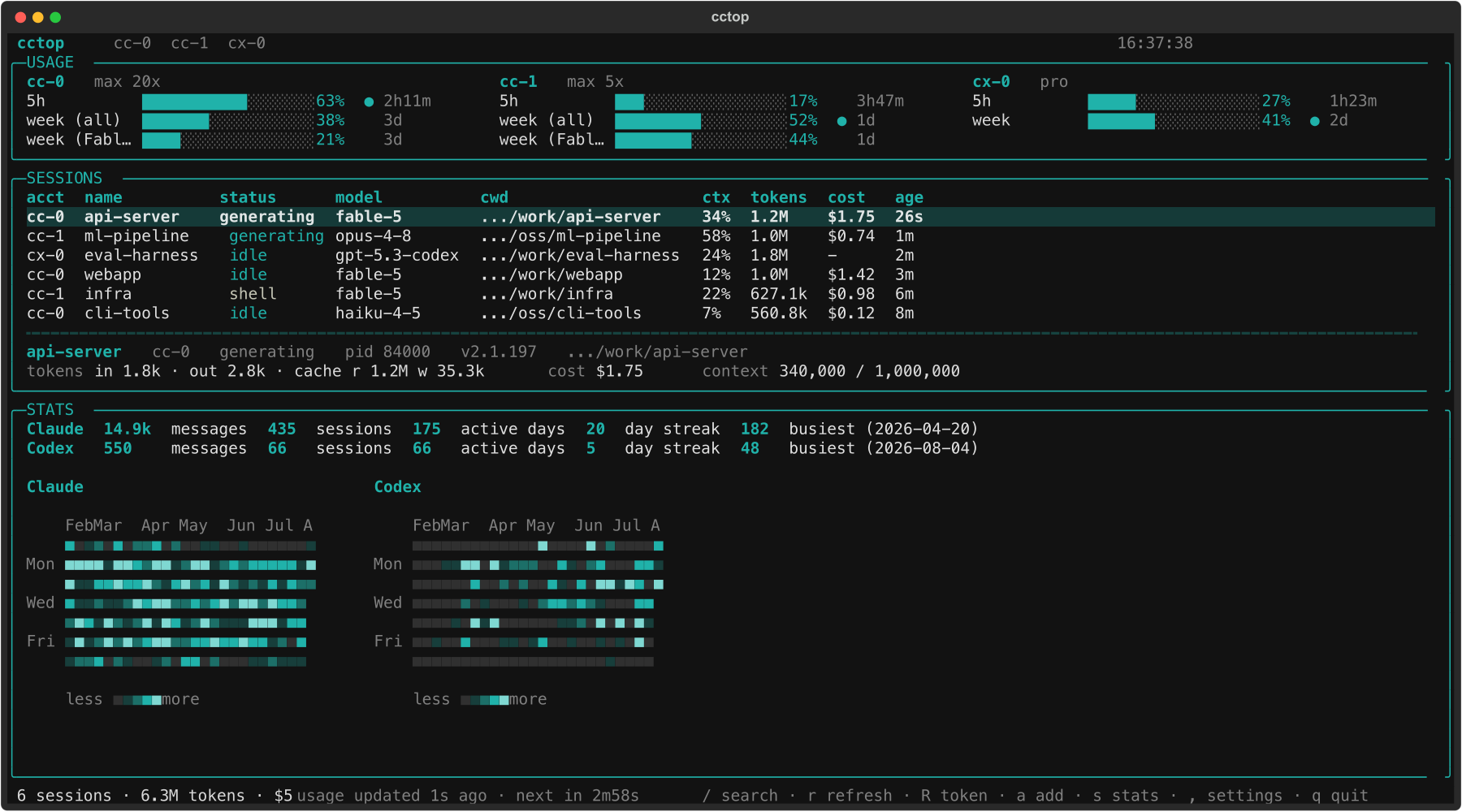
A live terminal monitor for your Claude Code and OpenAI Codex usage, in
the spirit of nvtop/htop. It auto-detects your accounts (your Claude
account and your Codex account both work out of the box, no setup), shows real
usage-limit gauges and every running session, and gives a GitHub-style view of
your activity over time. Running more than one Claude subscription? It picks
those up too.
Everything is read from files the tools already write plus a couple of free, read-only usage reads; nothing here ever spends message quota. cctop touches your credentials only to make those reads, never logs or transmits a token, and is read-only except for two explicit, additive account actions. See SECURITY.md for the full trust statement.
(Screenshots show generated demo data; scripts/demo_screenshots.py rebuilds
them from a fabricated fleet, so they contain nothing real.)
What it shows
- Usage limits (top panel), per account, side by side: the 5-hour, weekly
(all models), and weekly (Fable) windows with utilization, reset countdown,
and the currently-binding window marked. These are the real numbers from
Anthropic's
GET /api/oauth/usageendpoint (the same one/usageuses) — a free read, no tokens consumed. - Sessions (table): every live Claude Code process, tagged by account, with status, model, cwd, context %, cumulative tokens, cost, and age. Selecting a row opens a detail panel (full cwd, pid, version, token/cost/context breakdown).
- Statistics (press
s): a GitHub-style daily-activity heatmap, lifetime totals (messages, sessions, tool calls, active days, longest streak, busiest day), a top-models-by-tokens chart, and a per-account breakdown, all merged from each account'sstats-cache.json.
Install
Requires macOS and Python 3.9+ (Linux support is planned).
The package is cctop-tui; the command it installs is cctop.
uv tool install cctop-tui       # or: pipx install cctop-tui  -> then run: cctop
uvx --from cctop-tui cctop      # run without installing
Or from a clone:
cd cctop
uv venv --python 3.12
uv pip install -e .           # add ".[dev]" for the test/lint tooling
cctop
Usage
cctop                 # launch the live TUI (default)
cctop --once          # print a one-shot snapshot and exit
cctop --json          # emit the snapshot as JSON (for scripting)
cctop --no-limits     # skip the usage fetch (no network, session table only)

cctop search "query"  # search conversation history across every account
cctop setup           # pick a provider; hand off to its agent to help configure
cctop accounts        # list discovered accounts (read-only)
cctop doctor          # read-only self-check (platform, binaries, token/expiry)
cctop config init     # write a starter ~/.config/cctop/config.toml (optional)
cctop add-account     # provision a new account (dry-run; see Accounts below)
TUI keys: / search history · r refresh now · R refresh token · a add
account · s stats · , settings · q quit. The footer shows a live countdown
to the next auto refresh; r refreshes immediately and resets it.
History search (/, cctop search)
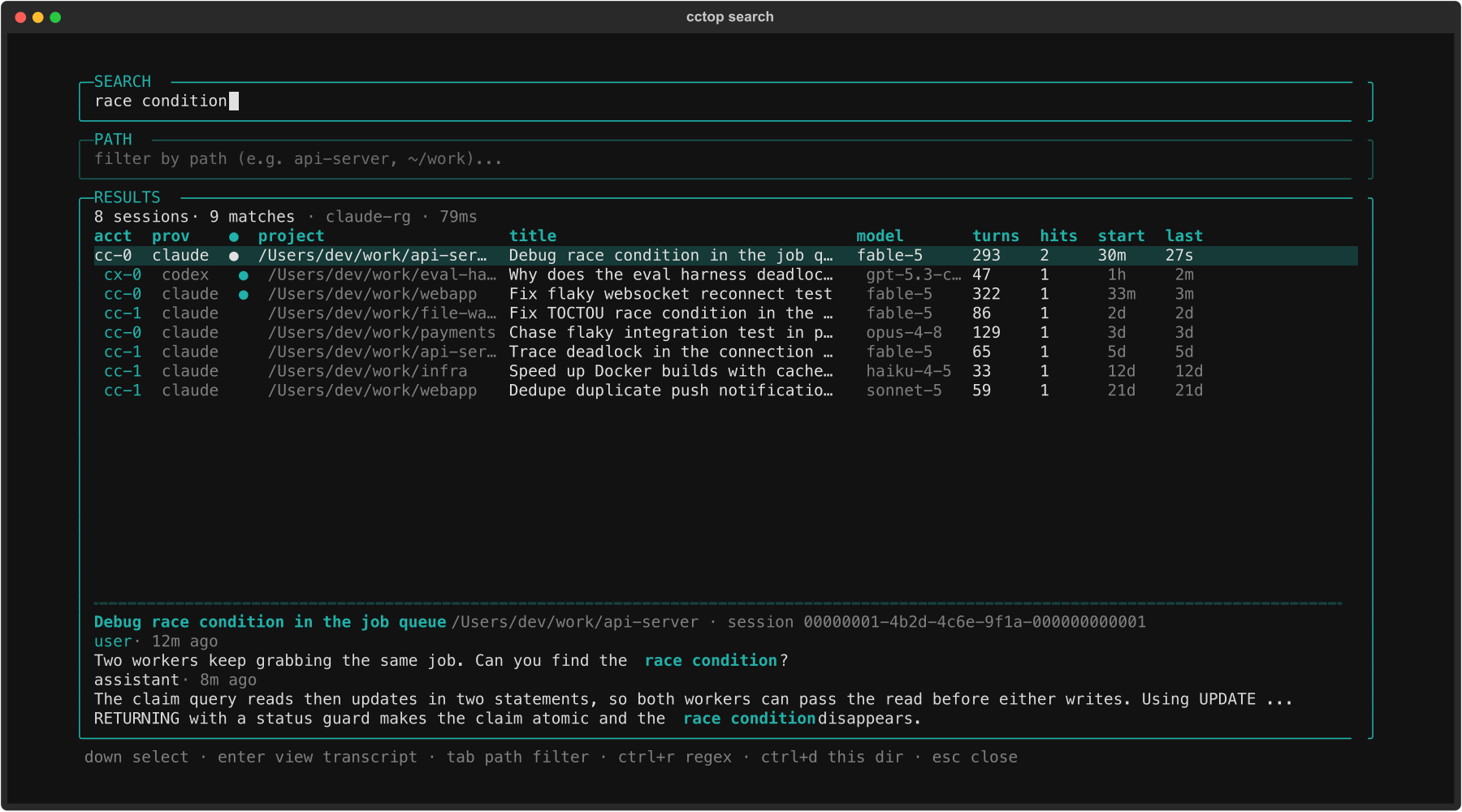
Search every conversation you have ever had, across all accounts and both
providers, live as you type. Results are grouped by session and show the
owning account, the provider, a live marker (● when that session's process
is running right now), the project, a title from the session's own metadata,
the model, a turns count, and start/last-activity times; the preview pane
shows the matching messages highlighted. A second bar (Tab) filters by path:
type any fragment of a project path (cctop, ~/master/interp) to narrow the
results to matching sessions (--path TEXT on the CLI). Ctrl+R toggles
regex mode; Ctrl+D scopes to the exact directory you launched from (or pass
--dir PATH).
Press Enter to open the transcript viewer: read the conversation (tool
noise hidden, matches highlighted, starting at the first match) to make sure
it is the one you want. From there, Enter/o resumes it in the current
terminal (cctop suspends and comes back when you exit), or t opens it in a
new Terminal window and leaves cctop where it is. Either way the session is
resumed under the account that owns it: cctop pins CLAUDE_CONFIG_DIR and
the session's working directory and hands off to claude --resume /
codex resume.
With an empty search bar the screen is a session browser: it opens on your
recent sessions across every account, newest first, and the PATH bar alone
narrows them ("what ran in this repo"). Browse and search behave identically;
a query just adds match counts and snippets. No result is selected while you
type; Down/Up move one cursor vertically through search bar, path bar,
and results (or click a session), then Enter reads the selected one.
cctop search on its own opens the same search TUI standalone;
cctop search "query" opens it with the query already entered. With --json
or a piped stdout it prints instead, so scripts still work (no query lists
recent sessions as {"type": "session", ...} rows):
cctop search "query" [--regex] [--account NAME] [--dir PATH] [--limit N] [--json], where --json emits one {"type": "match", ...} row per hit plus
a trailing {"type": "summary", ...} row.
It is fast because the scan is ripgrep: a real rg from PATH when present,
otherwise the ripgrep embedded inside the Claude Code binary itself (validated
before use), otherwise a pure-Python fallback so search always works. Matches
are post-filtered so the query must occur in actual message text, never in
metadata like a session id. No index, no cache, nothing written anywhere.
Token refresh (automatic, and R)
A Claude Code OAuth access token lives only ~12-15h, and the CLI refreshes it
lazily when you use an account, so an account you are merely monitoring
drifts past expiry. cctop keeps tokens fresh automatically: each usage
poll renews any token at or near expiry, and a 401 mid-cycle triggers one
renewal and an immediate refetch, so the "token expired" state is never shown
while the refresh path works. The renewal is always delegated: cctop runs
claude mcp list under the account's config dir (a quota-free command whose
startup renews and rewrites the Keychain record). cctop never writes a
credential itself — it only triggers the owner binary and reads the result.
Failed attempts back off and go quiet until you actually /login (a dead
refresh token is the one thing only a fresh /login can fix; cctop then
says exactly that, once). Disable with auto_refresh_tokens = false in the
config or the settings screen; R remains the manual, force-it-now version.
Accounts
cctop auto-detects your accounts with zero setup: your Claude Code account
(~/.claude) and your Codex account (~/.codex) are picked up automatically.
For most people that is the whole story: install, run cctop, done. Run
cctop accounts to see what it found.
Multiple Claude accounts (optional). If you run more than one Claude
subscription in separate config dirs (via CLAUDE_CONFIG_DIR), cctop shows them
all side by side. To add one without leaving cctop, press a (or run
cctop add-account --login): it creates the config dir, optionally clones your
existing config, and signs you in. It is strictly additive — it never
deletes, overwrites, or modifies existing config, credentials, or sessions, and
only writes a shell alias if you explicitly ask for one.
Configuration (optional)
cctop needs no configuration. If you want to rename, hide, reorder, or add accounts (for a layout auto-detection can't guess, like a config dir in a custom location or one managed by an account switcher), generate a starter file and edit it:
cctop config init # writes ~/.config/cctop/config.toml, pre-filled with what it detected
It is layered over auto-detection, so anything you leave out falls back to the
default. Rename an account with name, drop one with hidden = true, reorder by
moving blocks, or add a block pointing dir at any Claude/Codex config
directory. Delete the file to go back to pure auto-detection. Nothing is ever
written to it unless you run config init.
How it works
| Data | Claude source | Codex source | Cost |
|---|---|---|---|
| Live sessions | ~/.claude*/sessions/<pid>.json |
ps + ~/.codex/sessions/ rollouts |
free (file/ps) |
| Tokens / context | transcript JSONL, tailed | rollout token_count events |
free (file) |
| Usage limits | GET /api/oauth/usage (Keychain token) |
GET chatgpt.com/backend-api/codex/usage (~/.codex/auth.json token) |
free (GET) |
| Statistics | ~/.claude*/stats-cache.json |
aggregated from rollout files | free (file) |
| History search | transcript JSONL, ripgrep scan | rollout files, same scan | free (file) |
Providers
cctop tracks both Claude Code and OpenAI Codex side by side. Claude
accounts are cc-0/cc-1/…; a Codex account (cx-0, from ~/.codex) is added
automatically when present. Usage windows and stats are read per provider (they
differ in shape: Codex exposes primary/secondary windows plus per-model limits,
and its stats come from rollout files rather than a stats cache). Codex sessions
show token/context but no dollar cost, since Codex is subscription-based.
The credential for the usage read is resolved per account from the macOS
Keychain service Claude Code-credentials-<sha256(config_dir)[:8]>, used only to
authenticate to Anthropic's own API, never logged or persisted. The usage
response's org is verified against the account so one account can never show
another's numbers.
Undocumented, version-internal formats (the sessions registry, transcript
schema, usage JSON) are all read defensively and isolated to the collector core
(registry, transcript, usage, stats, monitor, pricing, status,
codex* for the Codex provider, authctl for delegated token refresh,
histsearch/ripgrep for history search, and manage for additive account
provisioning), with a thin Textual presentation layer on top.
Notes
- Pricing (
pricing.py) is a small editable table; update it as rates change. - The palette is the house teal (
#20B2AA) on monochrome terminal. Usage bars stay teal even when maxed (fullness is the signal); red is reserved for a blocked or dead session.
Author
Ryan 'RyanIRL' Peters
1 maintainer

Download files
Download the file for your platform. If you're not sure which to choose, learn more about installing packages.
Source Distribution
Built Distribution
Filter files by name, interpreter, ABI, and platform.
If you're not sure about the file name format, learn more about wheel file names.
Copy a direct link to the current filters
File details
Details for the file cctop_tui-0.3.0.tar.gz.
File metadata
- Download URL: cctop_tui-0.3.0.tar.gz
- Upload date:
- Size: 953.7 kB
- Tags: Source
- Uploaded using Trusted Publishing? No
- Uploaded via: twine/7.0.0 CPython/3.11.11
File hashes
| Algorithm | Hash digest | |
|---|---|---|
| SHA256 |
6c0eb917f762211880099249ddb879f3605a24e691e51de5f89850e4dbc58445
|
|
| MD5 |
c7a2420f9530b5877a205f4ef779fa05
|
|
| BLAKE2b-256 |
68c661ca878c46f802d884d6620360f2d83a7dcf7b860d5a551908e940acf31d
|
File details
Details for the file cctop_tui-0.3.0-py3-none-any.whl.
File metadata
- Download URL: cctop_tui-0.3.0-py3-none-any.whl
- Upload date:
- Size: 90.0 kB
- Tags: Python 3
- Uploaded using Trusted Publishing? No
- Uploaded via: twine/7.0.0 CPython/3.11.11
File hashes
| Algorithm | Hash digest | |
|---|---|---|
| SHA256 |
3e6cca59b7ccde5bb9b39f3ffba7932f87aeada241a48919610b8237d78ed2e5
|
|
| MD5 |
9e4323080e402ddf4b14c9daa8e8c0c5
|
|
| BLAKE2b-256 |
0719e088268b06f21d3bf29ec6f88f90336de8bf533e0cc68b63942bab59fd8f
|







