
Deploy Bash Lambda Functions with AWS CDK

Project description



cdk-lambda-bash
Deploy Bash Lambda Functions with AWS CDK
Why
AWS Lambda has the docker container image support since AWS re:Invent 2020 which allows you to run your Lambda code in a custom container image. Inspired by nikovirtala/cdk-eks-experiment, cdk-lambda-bash allows you to specify a local shell script and bundle it up as a custom resource in your cdk stack. On cdk deployment, your shell script will be executed in a Lambda container environment.
BashExecFunction
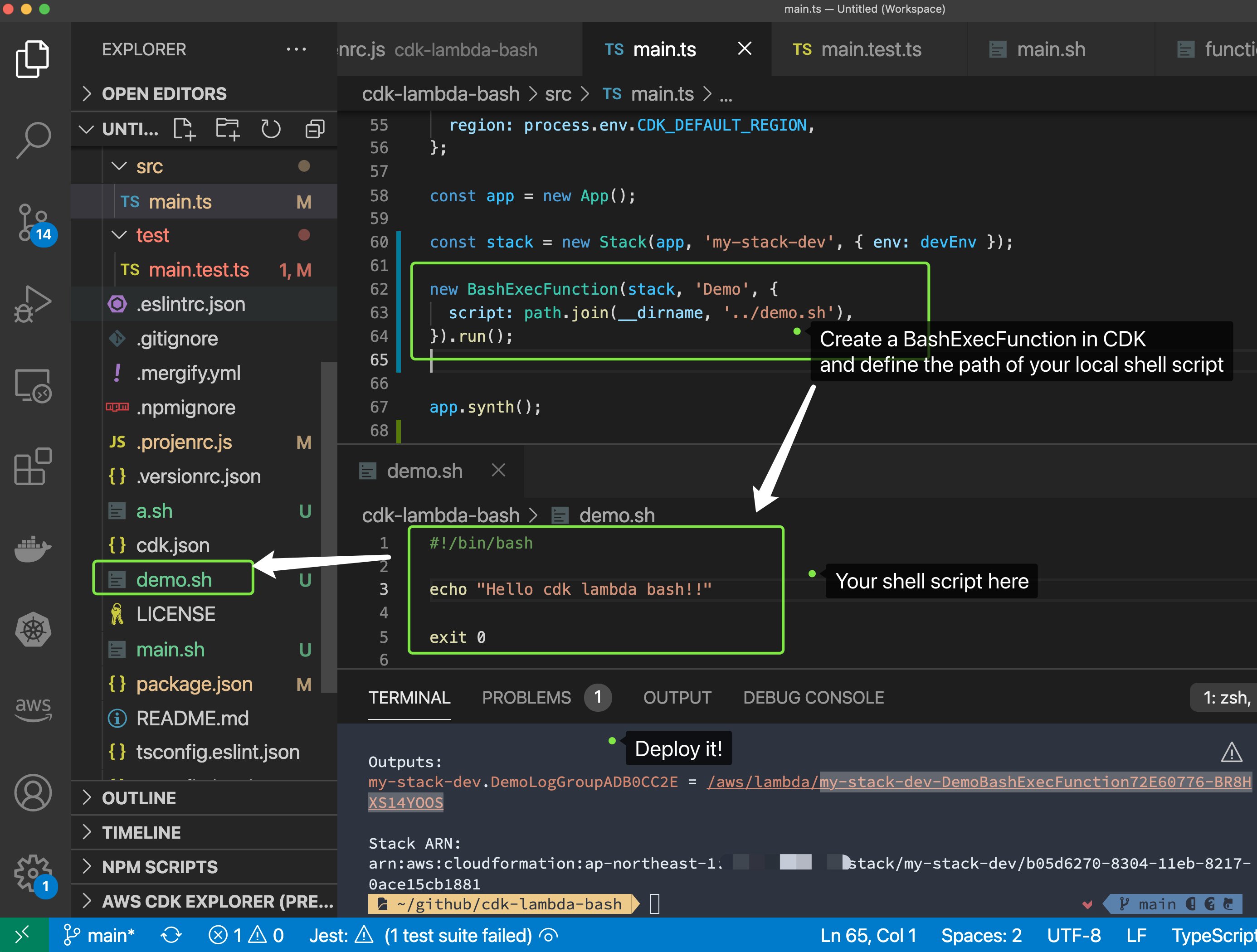
At this moment, we are offering BashExecFunction construct class which is a high-level abstraction of lambda.Function. By defining the script property which poins to your local shell script, on cdk deploy, this script will be bundled into a custom docker image and published as a lambda.DockerImageFunction.
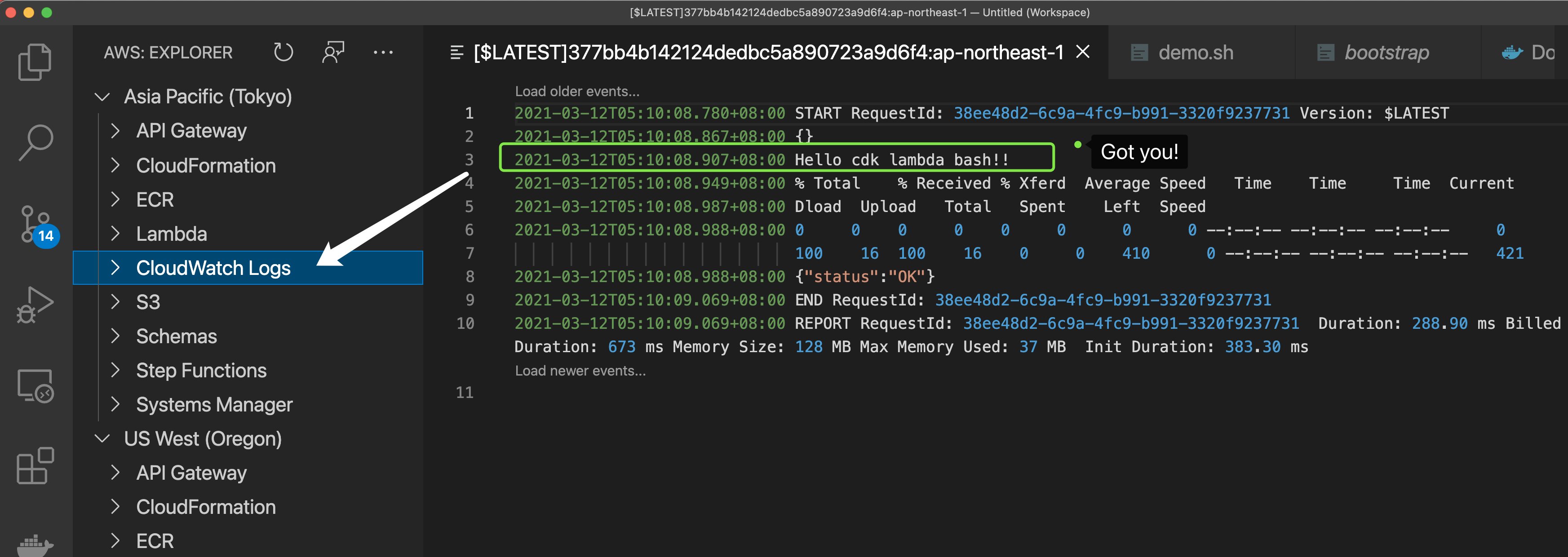
If you fn.run(), a custom resource will be created and the lambda.DockerImageFunction will be executed on deployment.
Install
Use the npm dist tag to opt in CDKv1 or CDKv2:
// for CDKv2
npm install cdk-lambda-bash
or
npm install cdk-lambda-bash@latest

// for CDKv1
npm install cdk-lambda-bash@cdkv1
Sample
const app = new cdk.App();

const stack = new cdk.Stack(app, 'my-stack');

// bundle your Lambda function to execute the local demo.sh in container
const fn = new BashExecFunction(stack, 'Demo', {
  script: path.join(__dirname, '../demo.sh'),
})

// run it as custom resource on deployment
fn.run();
Re-execution on assets update
By default, if you update your shell script or Dockerfile and re-deploy your CDK application, the BashExecFunction
will not be re-executed. Use runOnUpdate to enable the re-execution on update.
fn.run({ runOnUpdate: true });
Custom Dockerfile
In some cases, you may customize your own Dockerfile, for instances:
- You need extra tools or utilities such as
kubectlorhelm - You need build from your own base image
In these cases, create a custom Dockerfile as below and add extra utilities i.e. kubectl:
click and view custom Dockerfile sample
FROM public.ecr.aws/lambda/provided:al2

RUN yum install -y unzip jq

# install aws-cli v2
RUN curl "https://awscli.amazonaws.com/awscli-exe-linux-x86_64.zip" -o "awscliv2.zip" && \
  unzip awscliv2.zip && \
  ./aws/install

# install kubectl
RUN curl -o kubectl https://amazon-eks.s3.us-west-2.amazonaws.com/1.19.6/2021-01-05/bin/linux/amd64/kubectl && \
  chmod +x kubectl && \
  mv kubectl /usr/local/bin/kubectl

COPY bootstrap /var/runtime/bootstrap
COPY function.sh /var/task/function.sh
COPY main.sh /var/task/main.sh
RUN chmod +x /var/runtime/bootstrap /var/task/function.sh /var/task/main.sh

WORKDIR /var/task
CMD [ "function.sh.handler" ]
Specify your own Dockerfile with the dockerfile property.
new BashExecFunction(stack, 'Demo', {
  script: path.join(__dirname, '../demo.sh'),
  dockerfile: path.join(__dirname, '../Dockerfile'),
});
Conditional Execution
In the user script(e.g. demo.sh), you are allowed to determine the event type and act accordingly.
For example
const installArgoCD = new BashExecFunction(...)

installArgoCD.run({runOnUpdate: true});
When you run this sample, demo.sh will receive onCreate event and you can run your custom logic to "install ArgoCD" like kubectl apply -f URL. However, if you comment it off and deploy again:
const installArgoCD = new BashExecFunction(...)

//installArgoCD.run({runOnUpdate: true});
Under the hood, demo.sh will receive onDelete event and you can run your custom logic to "uninstall ArgoCD"
like kubectl delete -f URL.
Check the full sample code below:
Click and view the sample code
#!/bin/bash

# implement your business logic below
function onCreate() {
  echo "running kubectl apply -f ..."
}

function onUpdate() {
  echo "do nothing on update"
}

function onDelete() {
  echo "running kubectl delete -f ..."
}

function getRequestType() {
  echo $1 | jq -r .RequestType
}

function conditionalExec() {
  requestType=$(getRequestType $EVENT_DATA)

  # determine the original request type
  case $requestType in
    'Create') onCreate $1 ;;
    'Update') onUpdate $1 ;;
    'Delete') onDelete $1 ;;
  esac
}

echo "Hello cdk lambda bash!!"

conditionalExec

exit 0
In Action
See this tweet
Release history Release notifications | RSS feed


Download files
Download the file for your platform. If you're not sure which to choose, learn more about installing packages.
Source Distribution
Built Distribution
Filter files by name, interpreter, ABI, and platform.
If you're not sure about the file name format, learn more about wheel file names.
Copy a direct link to the current filters
File details
Details for the file cdk-lambda-bash-2.0.255.tar.gz.
File metadata
- Download URL: cdk-lambda-bash-2.0.255.tar.gz
- Upload date:
- Size: 40.8 kB
- Tags: Source
- Uploaded using Trusted Publishing? No
- Uploaded via: twine/4.0.2 CPython/3.11.1
File hashes
| Algorithm | Hash digest | |
|---|---|---|
| SHA256 |
d1706c8c36d8e052cdee308549edd06dbb22643c6511d3ce1551724721819b8c
|
|
| MD5 |
58629116a95ab0a5c52351dcf42a173f
|
|
| BLAKE2b-256 |
db306c2eefb4da913f5f539c62350c8fc06c147b4434840e121a058150be9587
|
File details
Details for the file cdk_lambda_bash-2.0.255-py3-none-any.whl.
File metadata
- Download URL: cdk_lambda_bash-2.0.255-py3-none-any.whl
- Upload date:
- Size: 39.4 kB
- Tags: Python 3
- Uploaded using Trusted Publishing? No
- Uploaded via: twine/4.0.2 CPython/3.11.1
File hashes
| Algorithm | Hash digest | |
|---|---|---|
| SHA256 |
147a607178937f989008a1ed5832648b816f2eba77631b9c157d866dc1b240ca
|
|
| MD5 |
048532af292bd0673b4b54e0523f9cff
|
|
| BLAKE2b-256 |
db973b6912e944755a334f6229a6bfddd6ab062e4cd359ed4d94522f385f5154
|






