
A construct for deploying a Lambda function that can be invoked every time unit less than one minute.

Project description
cdk-lambda-subminute






| npm (JS/TS) | PyPI (Python) | Maven (Java) | Go | NuGet |
|---|---|---|---|---|
| Link | Link | Link | Link | Link |
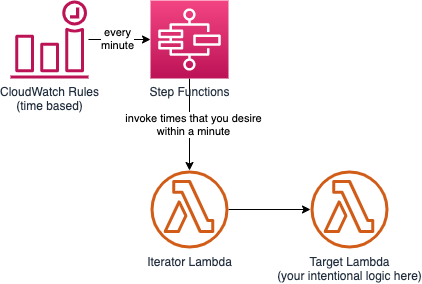
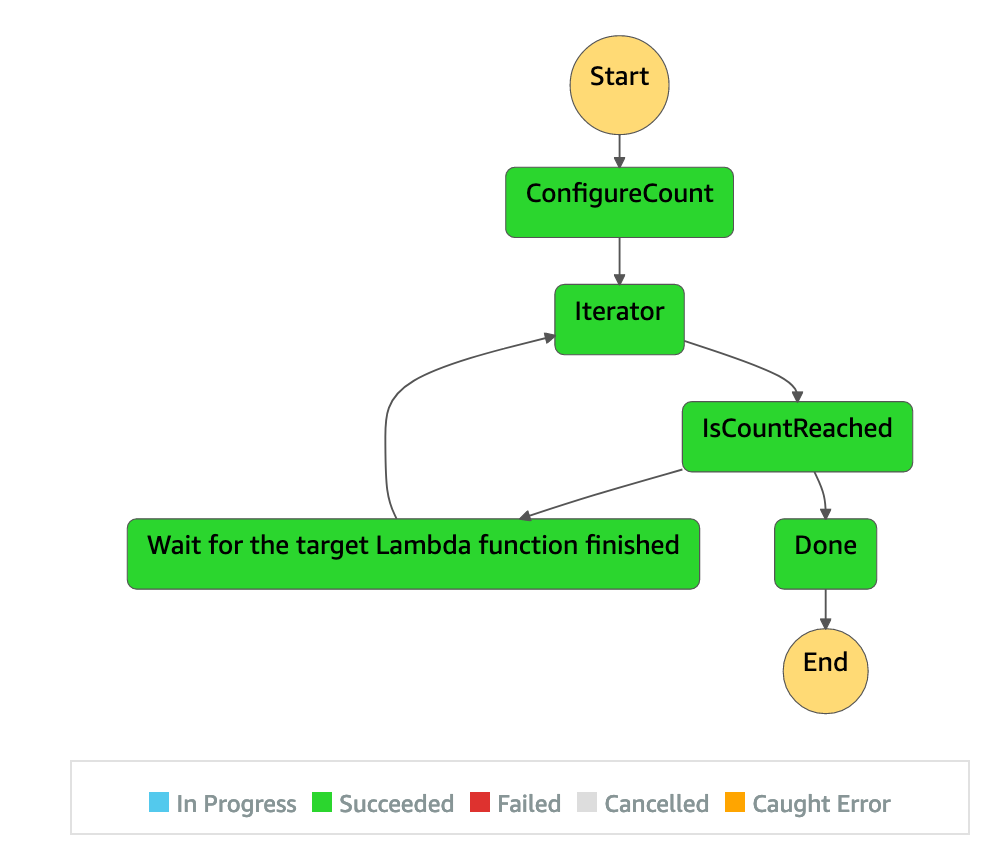
This construct creates a state machine that can invoke a Lambda function per time unit which can be less than one minute, such as invoking every 10 seconds. You only need to craft a Lambda function and then assign it as an argument into the construct. An example is included.
Serverless Architecture
Introduction
This construct library is reffered to thie AWS Architecture blog post, A serverless solution for invoking AWS Lambda at a sub-minute frequency, written by Emanuele Menga. I made it as a constrcut library where you only need to care about a target Lambda function, how frequent and how long you want to execute.
Example
Typescript
You could also refer to here.
$ cdk --init language typescript
$ yarn add cdk-lambda-subminute
class TypescriptStack extends cdk.Stack {
  constructor(scope: cdk.Construct, id: string, props?: cdk.StackProps) {
    super(scope, id, props);

    const targetLabmda = new Function(this, 'targetFunction', {
      code: Code.fromInline('exports.handler = function(event, ctx, cb) { return cb(null, "hi"); })'), // It's just a simple function for demonstration purpose only.
      functionName: 'testTargetFunction',
      runtime: Runtime.NODEJS_18_X,
      handler: 'index.handler',
    });
    const cronJobExample = 'cron(50/1 15-17 ? * SUN-SAT *)';
    const subminuteMaster = new LambdaSubminute(this, 'LambdaSubminute', { targetFunction: targetLabmda, cronjobExpression: cronJobExample });

    new cdk.CfnOutput(this, 'OStateMachineArn', { value: subminuteMaster.stateMachineArn });
    new cdk.CfnOutput(this, 'OIteratorFunctionArn', { value: subminuteMaster.iteratorFunction.functionArn });
  }
}

const app = new cdk.App();
new TypescriptStack(app, 'TypescriptStack', {
});
Python
You could also refer to here.
# upgrading related Python packages
$ python -m ensurepip --upgrade
$ python -m pip install --upgrade pip
$ python -m pip install --upgrade virtualenv
# initialize a CDK Python project
$ cdk init --language python
# make packages installed locally instead of globally
$ source .venv/bin/activate
$ cat <<EOL > requirements.txt
aws-cdk.core
aws-cdk.aws-lambda
cdk-lambda-subminute
EOL
$ python -m pip install -r requirements.txt
from aws_cdk import core as cdk
from aws_cdk.aws_lambda import Code, Function, Runtime
from cdk_lambda_subminute import LambdaSubminute

class PythonStack(cdk.Stack):
    def __init__(self, scope: cdk.Construct, construct_id: str, **kwargs) -> None:
        super().__init__(scope, construct_id, **kwargs)

        target_lambda = Function(
            self, "targetFunction",
            code=Code.from_inline(
                "exports.handler = function(event, ctx, cb) { return cb(null, \"hi\"); })"),
            function_name="testTargetFunction",
            runtime=Runtime.NODEJS_18_X,
            handler="index.handler"
        )
        cron_job_example = "cron(10/1 4-5 ? * SUN-SAT *)"
        subminute_master = LambdaSubminute(
            self, "LambdaSubminute",
            target_function=target_lambda,
            cronjob_expression=cron_job_example,
            frequency=7,
            interval_time=8)

        cdk.CfnOutput(self, "OStateMachineArn",
                      value=subminute_master.state_machine_arn)
        cdk.CfnOutput(self, "OIteratorFunctionArn",
                      value=subminute_master.iterator_function.function_arn)
$ deactivate
Java
You could also refer to here.
$ cdk init --language java
$ mvn package
.
.
<properties>
      <project.build.sourceEncoding>UTF-8</project.build.sourceEncoding>
      <cdk.version>2.87.0</cdk.version>
      <constrcut.verion>2.0.201</constrcut.verion>
      <junit.version>5.7.1</junit.version>
</properties>
 .
 .
 <dependencies>
     <!-- AWS Cloud Development Kit -->
      <dependency>
            <groupId>software.amazon.awscdk</groupId>
            <artifactId>core</artifactId>
            <version>${cdk.version}</version>
      </dependency>
      <dependency>
            <groupId>software.amazon.awscdk</groupId>
            <artifactId>lambda</artifactId>
            <version>${cdk.version}</version>
      </dependency>
      <dependency>
            <groupId>io.github.hsiehshujeng</groupId>
            <artifactId>cdk-lambda-subminute</artifactId>
            <version>${constrcut.verion}</version>
      </dependency>
     .
     .
     .
 </dependencies>
package com.myorg;

import software.amazon.awscdk.core.CfnOutput;
import software.amazon.awscdk.core.CfnOutputProps;
import software.amazon.awscdk.core.Construct;
import software.amazon.awscdk.core.Stack;
import software.amazon.awscdk.core.StackProps;
import software.amazon.awscdk.services.lambda.Code;
import software.amazon.awscdk.services.lambda.Function;
import software.amazon.awscdk.services.lambda.FunctionProps;
import software.amazon.awscdk.services.lambda.Runtime;
import io.github.hsiehshujeng.cdk.lambda.subminute.LambdaSubminute;
import io.github.hsiehshujeng.cdk.lambda.subminute.LambdaSubminuteProps;

public class JavaStack extends Stack {
    public JavaStack(final Construct scope, final String id) {
        this(scope, id, null);
    }

    public JavaStack(final Construct scope, final String id, final StackProps props) {
        super(scope, id, props);

        Function targetLambda = new Function(this, "targetFunction",
          FunctionProps.builder()
              .code(Code.fromInline("exports.handler = function(event, ctx, cb) { return cb(null, \"hi\"); })"))
              .functionName("estTargetFunction")
              .runtime(Runtime.NODEJS_18_X)
              .handler("index.handler")
              .build());
        String cronJobExample = "cron(50/1 4-5 ? * SUN-SAT *)";
        LambdaSubminute subminuteMaster = new LambdaSubminute(this, "LambdaSubminute", LambdaSubminuteProps.builder()
              .targetFunction(targetLambda)
              .cronjobExpression(cronJobExample)
              .frequency(6)
              .intervalTime(9)
              .build());

        new CfnOutput(this, "OStateMachineArn",
                CfnOutputProps.builder()
                  .value(subminuteMaster.getStateMachineArn())
                  .build());
        new CfnOutput(this, "OIteratorFunctionArn",
                CfnOutputProps.builder()
                  .value(subminuteMaster.getIteratorFunction().getFunctionName())
                  .build());
    }
}
C#
You could also refer to here.
$ cdk init --language csharp
$ dotnet add src/Csharp package Amazon.CDK.AWS.Lambda
$ dotnet add src/Csharp package Lambda.Subminute --version 2.0.201
using Amazon.CDK;
using Amazon.CDK.AWS.Lambda;
using ScottHsieh.Cdk;

namespace Csharp
{
    public class CsharpStack : Stack
    {
        internal CsharpStack(Construct scope, string id, IStackProps props = null) : base(scope, id, props)
        {
            var targetLambda = new Function(this, "targetFunction", new FunctionProps
            {
                Code = Code.FromInline("exports.handler = function(event, ctx, cb) { return cb(null, \"hi\"); })"),
                FunctionName = "testTargetFunction",
                Runtime = Runtime.NODEJS_18_X,
                Handler = "index.handler"
            });
            string cronJobExample = "cron(50/1 6-7 ? * SUN-SAT *)";
            var subminuteMaster = new LambdaSubminute(this, "LambdaSubminute", new LambdaSubminuteProps
            {
                TargetFunction = targetLambda,
                CronjobExpression = cronJobExample,
                Frequency = 10,
                IntervalTime = 6,
            });

            new CfnOutput(this, "OStateMachineArn", new CfnOutputProps
            {
                Value = subminuteMaster.StateMachineArn
            });
            new CfnOutput(this, "OIteratorFunctionArn", new CfnOutputProps
            {
                Value = subminuteMaster.IteratorFunction.FunctionArn
            });
        }
    }
}
GO
# Initialize a new AWS CDK application in the current directory with the Go programming language
cdk init app -l go
# Add this custom CDK construct to your project
go get github.com/HsiehShuJeng/cdk-lambda-subminute-go/cdklambdasubminute/v2@v2.0.226
# Ensure all dependencies are properly listed in the go.mod file and remove any unused ones
go mod tidy
# Upgrade all Go modules in your project to their latest minor or patch versions
go get -u ./...
Statemachine Diagram
Known issue
Originally, I utilized PythonFuncion in the module of @aws-cdk/aws-lambda-python to build the iterator Lambda function. Every thing works fine, including test, on my local machine (MacBook Pro M1), until it comes to the CI in Github Actions, it awlays gave me the following message:
## cdk version: 1.105.0 (build 4813992)
Bundling did not produce any output. Check that content is written to /asset-output.

      64 |     }));
      65 |
    > 66 |     this.function = new PythonFunction(this, 'Iterator', {
         |                     ^
      67 |       functionName: 'lambda-subminute-iterator',
      68 |       description: 'A function for breaking the limit of 1 minute with the CloudWatch Rules.',
      69 |       logRetention: RetentionDays.THREE_MONTHS,

      at AssetStaging.bundle (node_modules/@aws-cdk/core/lib/asset-staging.ts:484:13)
      at AssetStaging.stageByBundling (node_modules/@aws-cdk/core/lib/asset-staging.ts:328:10)
      at stageThisAsset (node_modules/@aws-cdk/core/lib/asset-staging.ts:194:35)
      at Cache.obtain (node_modules/@aws-cdk/core/lib/private/cache.ts:24:13)
      at new AssetStaging (node_modules/@aws-cdk/core/lib/asset-staging.ts:219:44)
      at new Asset (node_modules/@aws-cdk/aws-s3-assets/lib/asset.ts:127:21)
      at AssetCode.bind (node_modules/@aws-cdk/aws-lambda/lib/code.ts:277:20)
      at new Function (node_modules/@aws-cdk/aws-lambda/lib/function.ts:583:29)
      at new PythonFunction (node_modules/@aws-cdk/aws-lambda-python/lib/function.ts:106:5)
      at new IteratorLambda (src/cdk-lambda-subminute.ts:66:21)
      at new LambdaSubminute (src/cdk-lambda-subminute.ts:25:22)
      at Object.<anonymous>.test (test/integ.test.ts:23:3)
I actually have tried many different methods according to the following threads but to no avail. I'll attempt to test some thoughts or just post the issue onto the CDK Github repo.
Release history Release notifications | RSS feed


Download files
Download the file for your platform. If you're not sure which to choose, learn more about installing packages.
Source Distribution
Built Distribution
Filter files by name, interpreter, ABI, and platform.
If you're not sure about the file name format, learn more about wheel file names.
Copy a direct link to the current filters
File details
Details for the file cdk_lambda_subminute-2.0.262.tar.gz.
File metadata
- Download URL: cdk_lambda_subminute-2.0.262.tar.gz
- Upload date:
- Size: 11.3 MB
- Tags: Source
- Uploaded using Trusted Publishing? No
- Uploaded via: twine/4.0.2 CPython/3.11.5
File hashes
| Algorithm | Hash digest | |
|---|---|---|
| SHA256 |
4c74f738d943eca3ecfb2addcc02405a795d726d2d9500f9224ab1af5c4bf18c
|
|
| MD5 |
696c77954a661d5d7190a8bcb8e07b20
|
|
| BLAKE2b-256 |
9e565dc99b762acd9bc1dc9e437115e39221a68b94469d9ac342017660a8e1fc
|
File details
Details for the file cdk_lambda_subminute-2.0.262-py3-none-any.whl.
File metadata
- Download URL: cdk_lambda_subminute-2.0.262-py3-none-any.whl
- Upload date:
- Size: 11.3 MB
- Tags: Python 3
- Uploaded using Trusted Publishing? No
- Uploaded via: twine/4.0.2 CPython/3.11.5
File hashes
| Algorithm | Hash digest | |
|---|---|---|
| SHA256 |
3143e3dfa21f945fd2f875ea3f300cfca92f0af9380910edaae74ebf296c534f
|
|
| MD5 |
649c13445e3bf441e235b9d99201574c
|
|
| BLAKE2b-256 |
838c21211954aa642cc44bb3af4425d69436e6e5d09acf054572cad2820d4a18
|






