
Basic Python Tools; upgraded cdxbasics

Project description
cdxcore documentation
This module contains a number of lightweight tools, developed for managing data analytics and machine learning projects.
Install using:
pip install -U cdxcore
Documentation can be found here: https://quantitative-research.de/docs/cdxcore. cdxcore is best used with Python 3.12 and above, but is tested vs Python 3.10 onwards.
Highlights
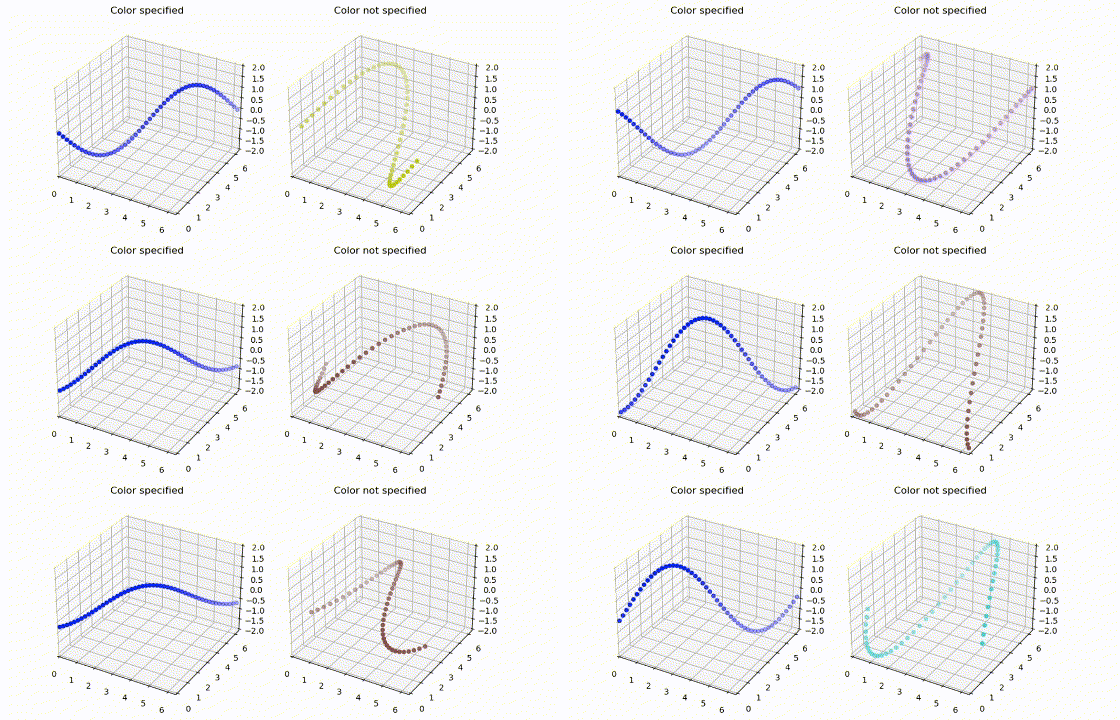
- Dynamic plotting: simple live/animated plots built on Matplotlib.
- Config management: validated, discoverable configurations with automatic help.
- Versioning & caching: code-versioned I/O and reproducible hashing for pipelines.
- PrettyObject: dictionary-like objects that allow attribute access.
- Utilities: formatting helpers, binary I/O, shared-memory arrays, and more.
Main Functionality
-
cdxcore.dynaplotis a framework for simple dynamic graphs withmatplotlib. It has a simple methodology for animated updates for graphs (e.g. during training runs), and allows generation of plot layouts without knowing upfront the number of plots (e.g. for plotting a list of features). -
cdxcore.configallows robust management of configurations. It automates help, validation checking, and detects misspelled configuration arguments.from cdxcore.config import Config, Int, Float class Network(object): def __init__( self, config ): self.depth = config("depth", 1, Int>0, "Depth of the network") self.width = config("width", 1, Int>0, "Width of the network") self.activation = config("activation", "selu", str, "Activation function") config.done() # see below config = Config() config.network.depth = 10 config.network.width = 100 config.network.activation = 'relu' network = Network(config.network) config.done()
-
cdxcore.subdirwraps various file and directory functions into convenient objects. Useful if files have common extensions.from cdxcore.subdir import SubDir import numpy as np root = SubDir("!") # current temp directory subdir = root("test") # sub-directory 'test' subdir.write("data", np.zeros((10,2))) data = subdir.read("data")
-
Caching:
SubDirsupports code-versioned file i/o which is used by@cdxcore.subdir.SubDir.cachefor an efficient code-versioned caching protocol for functions and objects:
from cdxcore.subdir import SubDir
cache   = SubDir("!/.cache;*.bin")

@cache.cache("0.1")
def f(x,y):
   return x*y

_ = f(1,2)    # function gets computed and the result cached
_ = f(1,2)    # restore result from cache
_ = f(2,2)    # different parameters: compute and store result
-
Code versioning is implemented in
cdxcore.version:from cdxbasics.version import version @version("0.0.1") def f(x): return x print( f.version.full ) # -> 0.0.1
-
Hashing (which is used for caching above) is implemented in
cdxcore.uniquehash:class A(object): def __init__(self, x): self.x = x self._y = x*2 # protected member will not be hashed by default from cdxcore.uniquehash import UniqueHash uniqueHash = UniqueHash(length=12) a = A(2) print( uniqueHash(a) ) # --> "2d1dc3767730"
-
cdxcore.prettyprovides aPrettyObjectclass whose objects operate like dictionaries. This is for users who prefer attribute.notation over item access when building structured output.from cdxbasics.prettydict import PrettyObject pdct = PrettyObject(z=1) pdct.num_samples = 1000 pdct.num_batches = 100 pdct.method = "signature"
General purpose utilities
-
cdxcore.verboseprovides user-controllable context output for providing progress updates to users. -
cdxcore.utiloffers a number of utility functions such as standard formatting for dates, big numbers, lists, dictionaries etc. -
cdxcore.npioprovides a low level binary i/o interface for numpy files. -
cdxcore.npshmprovides shared memory numpy arrays.
Release history Release notifications | RSS feed


Download files
Download the file for your platform. If you're not sure which to choose, learn more about installing packages.
Source Distribution
Built Distribution
Filter files by name, interpreter, ABI, and platform.
If you're not sure about the file name format, learn more about wheel file names.
Copy a direct link to the current filters
File details
Details for the file cdxcore-0.1.73.tar.gz.
File metadata
- Download URL: cdxcore-0.1.73.tar.gz
- Upload date:
- Size: 256.3 kB
- Tags: Source
- Uploaded using Trusted Publishing? No
- Uploaded via: twine/6.2.0 CPython/3.13.5
File hashes
| Algorithm | Hash digest | |
|---|---|---|
| SHA256 |
c4abdd6911943b5552f29d64ca1b12f41f7917f76391b25b5399841456576057
|
|
| MD5 |
cda7ecd03d5313041e45f34d5616e539
|
|
| BLAKE2b-256 |
e40b51088a1989b53afdb826052189387660df3a6b510e9c43ea5a7f7a0d2838
|
File details
Details for the file cdxcore-0.1.73-py3-none-any.whl.
File metadata
- Download URL: cdxcore-0.1.73-py3-none-any.whl
- Upload date:
- Size: 273.9 kB
- Tags: Python 3
- Uploaded using Trusted Publishing? No
- Uploaded via: twine/6.2.0 CPython/3.13.5
File hashes
| Algorithm | Hash digest | |
|---|---|---|
| SHA256 |
630aa0472bcdba907b092310c045d47e24e611566f6984369967f0b1a54e29a7
|
|
| MD5 |
5159182b6f421113d444b60a39e06224
|
|
| BLAKE2b-256 |
445144398b5dad7acb32879d40a6e247ca3dfd13f9294931791497fea87b465e
|






