
Database-backed celery beat schedule for SQLAlchemy with predefined views for sqladmin package.

Project description
About
This package enables you to store crontab periodic celery tasks in an SQLAlchemy compatible database. It was specifically developed to manage the periodic tasks from sqladmin admin interface for SQLAlchemy, but in theory any other solution can be used.
NOTE: the package was developed and tested with a PostgreSQL backend.
Inspired by django-celery-beat
Installation
Install from PyPi:
$ pip install celery-beat-sqlalchemy
Configuration
- Set
beat_db_scheduler_dsnconf variable in your celery application:from celery import Celery celery_app = Celery(__name__) celery_app.conf.beat_db_scheduler_dsn = <DB_DSN> # must be synchronous - In case you use sqladmin, add
CeleryTasksAdminandCeleryTasksScheduleAdminmodels to admin panel:from celery_beat_sqlalchemy.admin import CeleryTasksAdmin, CeleryTasksScheduleAdmin <YOUR_ADMIN_APP>.add_view(CeleryTasksAdmin) <YOUR_ADMIN_APP>.add_view(CeleryTasksScheduleAdmin) - Start celery worker:
$ celery -A <YOUR_APP> worker -l info - Start celery beat with
DatabaseScheduleras scheduler:$ celery -A <YOUR_APP> beat -S celery_beat_sqlalchemy.scheduler:DatabaseScheduler -l info
Usage
The following examples are for sqladmin interface.
View application available tasks
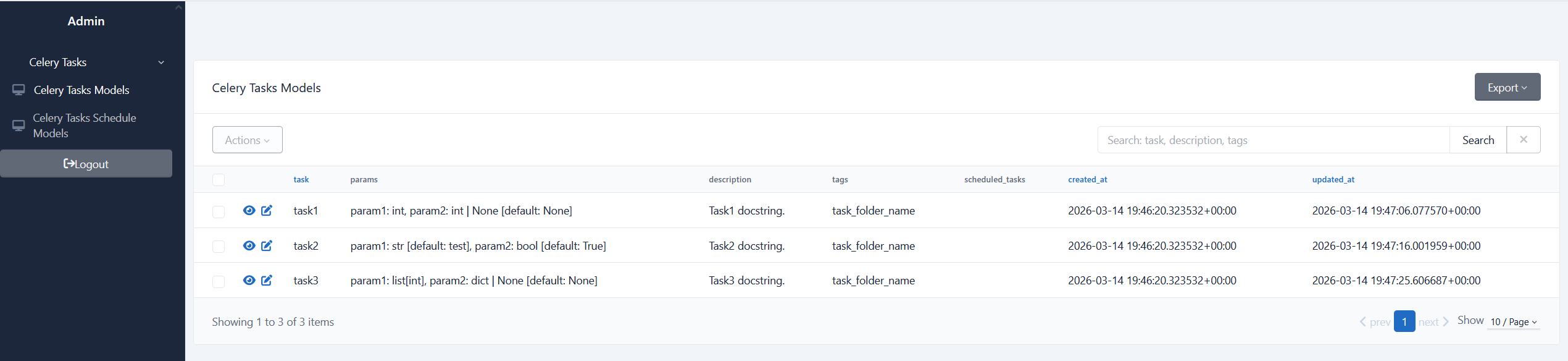
Your application up-to-date list of tasks can be seen in Celery Tasks Models view. New tasks are downloaded on the application start automatically, as well as the removed ones are deleted:
Add new periodic task
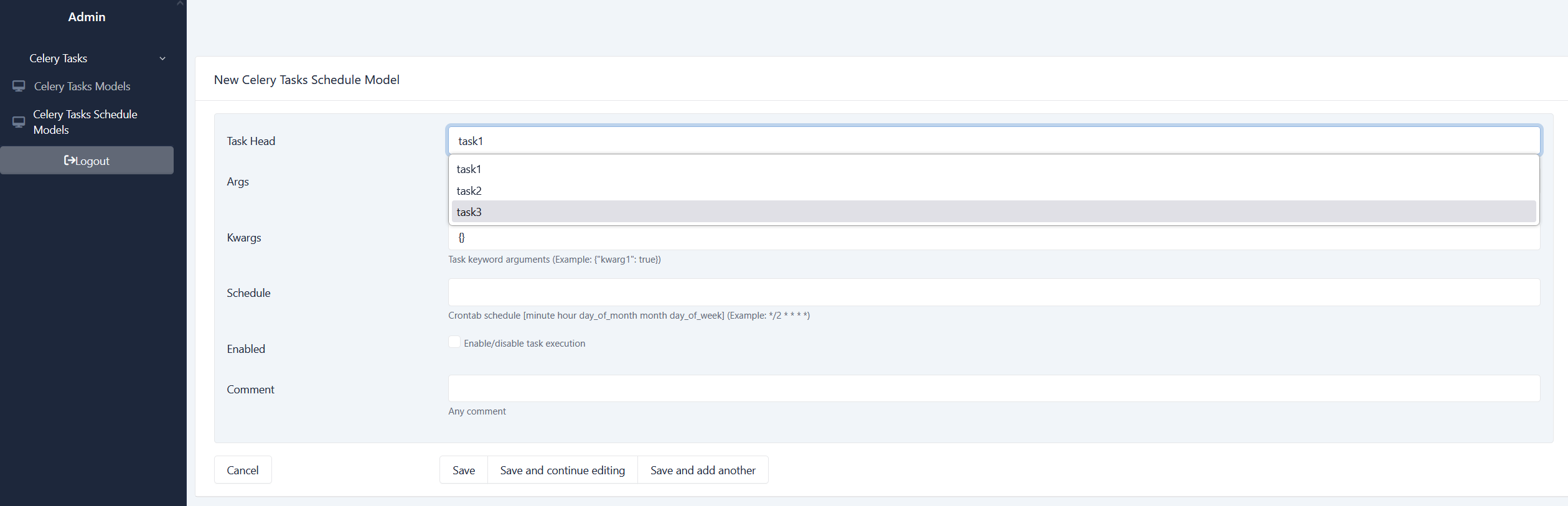
To add a new scheduled task you select it from the dropdown list:
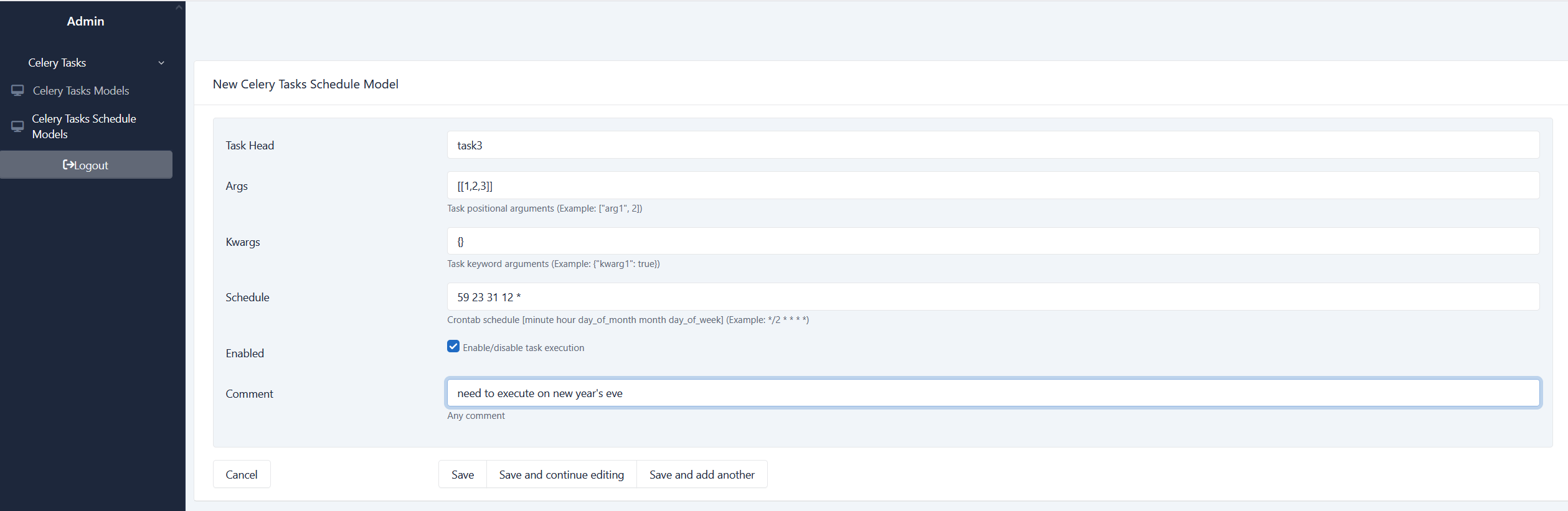
and fill in all necessary arguments and the desired schedule:
Implementation details
Models
CeleryTasksModel
This model represents a task in your application. When downloaded during startup, tasks' arguments and docstrings are parsed for more detailed view in an admin interface.CeleryTasksScheduleModel
This model defines a single periodic task to be run. The same task can be run with different args/kwargs, and they are different entries for celery beat. To uniquely identify those entries the combination of task_name-args-kwargs is used as a unique constraint in the table.CeleryTasksScheduleMetaModel
Keeps time when celery_tasks_schedule table was last updated and serves as a signal to reload the schedule from the database.
Schedule
To change the schedule of a task, just update the corresponding db entry. The next time the DatabaseScheduler synchronizes, it will acknowledge the new schedule.
NOTE: synchronization is done in the middle of a minute (between 20th and 50th seconds) to avoid overriding the current heap. The main reason of this implementation is to "save" rare tasks from sudden elimination from the schedule because of the reload.
Other synchronization rules:
- On each reload the scheduler is filled with enabled db entries
- Reload is done after any update in
CeleryTasksScheduleModelor every 5 minutes if there are no update events - New scheduled task in code, that is not in db: new db entry is created automatically
- Scheduled task in code as well as in db: schedule in db is used to run task
- Tasks that are deleted in code will be removed from db after redeploy


Download files
Download the file for your platform. If you're not sure which to choose, learn more about installing packages.
Source Distribution
Built Distribution
Filter files by name, interpreter, ABI, and platform.
If you're not sure about the file name format, learn more about wheel file names.
Copy a direct link to the current filters
File details
Details for the file celery_beat_sqlalchemy-0.0.5.tar.gz.
File metadata
- Download URL: celery_beat_sqlalchemy-0.0.5.tar.gz
- Upload date:
- Size: 125.9 kB
- Tags: Source
- Uploaded using Trusted Publishing? No
- Uploaded via: twine/6.2.0 CPython/3.12.3
File hashes
| Algorithm | Hash digest | |
|---|---|---|
| SHA256 |
c470d771664298d744b8716e73db61b62b45e4cf25eafe28433adca525f8ccd9
|
|
| MD5 |
a402a101563606eab2b82624487af63b
|
|
| BLAKE2b-256 |
e0674de5009fe7ed6cafca1fdf4b446f2d73b971ff83fae778fa395fd483d729
|
File details
Details for the file celery_beat_sqlalchemy-0.0.5-py3-none-any.whl.
File metadata
- Download URL: celery_beat_sqlalchemy-0.0.5-py3-none-any.whl
- Upload date:
- Size: 14.1 kB
- Tags: Python 3
- Uploaded using Trusted Publishing? No
- Uploaded via: twine/6.2.0 CPython/3.12.3
File hashes
| Algorithm | Hash digest | |
|---|---|---|
| SHA256 |
3335736368ea3c2b13fe553608fe6d4e9a57f36195c463a6556d0ba22b573015
|
|
| MD5 |
2e7d98c6e1ada2a97419759630b8c22a
|
|
| BLAKE2b-256 |
762fda1ec7d7367f93fc148d23b748dd12ce722c017a2319a8b160ddca80a198
|






