
CelestialFlow Web - CelestialFlow 的独立任务监控与交互界面




GitHub | CelestialFlow | 中文文档
CelestialFlow Web 是从 CelestialFlow 主仓库中拆分出的独立 Web 仓库,提供基于 FastAPI + TypeScript 的任务图监控界面,用于展示任务结构、节点状态、错误日志、图分析信息,以及通过页面向运行中的任务图注入任务或终止符。
它本身不负责任务调度,而是作为 TaskReporter 与浏览器之间的中转层:
- 后端通过
push_*接口持续上报结构、状态、分析和错误 - 前端通过
pull_*接口按版本号增量拉取数据 - Web 页面可直接下发任务注入和终止符注入请求
- 错误记录持久化到 SQLite,支持分页、过滤和错误类型聚合
项目结构(Project Structure)
flowchart LR

    %% ===== WebUI =====
    subgraph WU[WebUI]
        JS
        HTML
    end

    style WU fill:#f0e9ff,stroke:#8a6bc9,stroke-width:1px,rx:10px,ry:10px
    style JS fill:#ffffff,stroke:#8a6bc9,rx:5px,ry:5px
    style HTML fill:#ffffff,stroke:#8a6bc9,rx:5px,ry:5px

    %% ===== WebServer =====
    WS[WebServer]
    style WS fill:#f0e9ff,stroke:#8a6bc9,stroke-width:1px,rx:10px,ry:10px

    %% ===== CelestialFlow Web =====
    subgraph CFB[CelestialFlow Web]
        WU
        WS
    end

    style CFB fill:#ffeaf0,stroke:#d66b8c,stroke-width:2px,rx:10px,ry:10px

    %% ===== Links =====
    CF[TaskGraph] --> WS
    WS --> CF
    WS --> WU
    WU --> WS

    %% 美化 TaskGraph 外框
    style CF fill:#e8f2ff,stroke:#6b93d6,stroke-width:2px,color:#0b1e3f,rx:10px,ry:10px
快速开始(Quick Start)
如果你只想启动 Web 服务本身,可以单独安装本项目。
如果你希望它与 CelestialFlow 任务图联动,则还需要在同一环境中安装 celestialflow。
安装
# 推荐用 uv
uv pip install celestialflow-web

# 或者使用 pip
pip install celestialflow-web
如果你要接入实际运行中的 CelestialFlow 图任务,还需要额外安装主框架:
uv pip install celestialflow
启动 Web 服务
# 默认监听 0.0.0.0:5000
celestialflow-web

# 指定端口
celestialflow-web --port 5005

# 指定主机和端口
celestialflow-web --host 127.0.0.1 --port 5005
也可以直接在代码中启动:
from celestialflow_web import TaskWebServer

server = TaskWebServer(host="127.0.0.1", port=5005, log_level="info")
server.start_server()
启动后访问:
页面可查看任务结构、节点状态、错误日志、错误类型分布,以及实时注入任务。
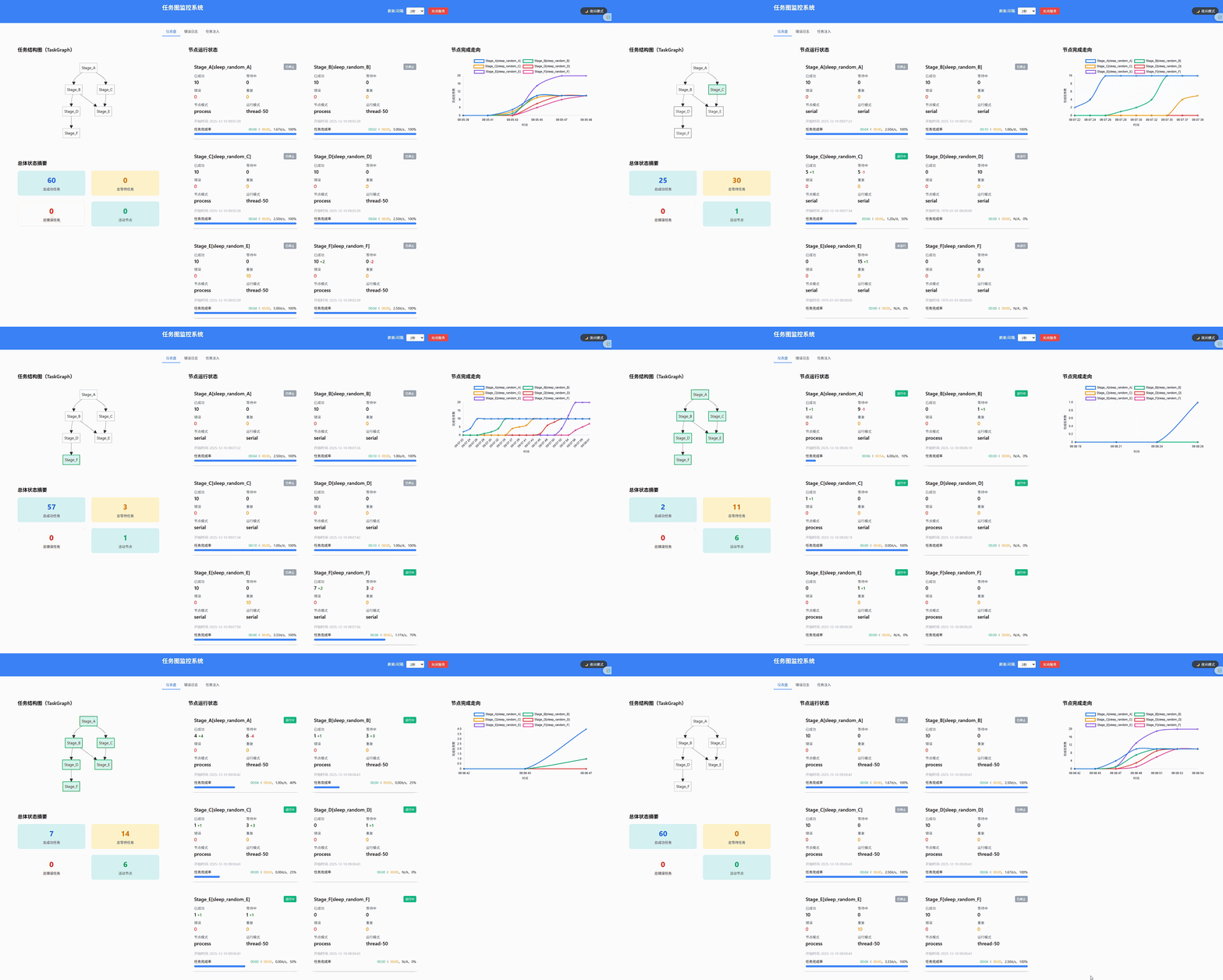
gif图压缩了过多细节(。•́︿•̀。)
在 CelestialFlow 中启用 Reporter
以当前主机和端口为例:
graph.set_reporter(True, host="127.0.0.1", port=5005)
一个更完整的接入示例:
from celestialflow import TaskGraph, TaskStage


def process(x: int) -> int:
    return x * 2


stage = TaskStage("StageA", process, execution_mode="thread")
graph = TaskGraph(name="DemoGraph")
graph.set_stages(stages=[stage])
graph.set_reporter(True, host="127.0.0.1", port=5005)
graph.start_graph({stage.get_name(): [1, 2, 3]})
深入阅读(Further Reading)
如果你想了解这个 Web 仓库的后端结构和前端模块,下面这些文档最值得先看:
推荐阅读顺序:
flowchart TD
    classDef core fill:#e6efff,stroke:#3b82f6,color:#1e3a8a;
    classDef runtime fill:#e9f8ef,stroke:#22c55e,color:#14532d;
    classDef route fill:#fff6e6,stroke:#f59e0b,color:#78350f;
    classDef templates fill:#f3e8ff,stroke:#a855f7,color:#581c87;

    A[TaskWebServer.md]
    A --> B[PullRoute.md]
    A --> C[PushRoute.md]
    A --> D[UtilModels.md]
    A --> E[UtilConfig.md]
    B --> H[index.md]
    C --> H[index.md]

    class A core;
    class D,E runtime;
    class B,C route;
    class H templates;
API 概览(API Overview)
Pull 接口
用于前端拉取数据,核心特点是 known_rev 版本号守卫:
| 端点 | 作用 |
|---|---|
GET /api/pull_server_state |
获取 Reporter 同步所需的服务端状态 |
GET /api/pull_config |
获取前端配置 |
GET /api/pull_status |
获取节点状态快照 |
GET /api/pull_structure |
获取图结构 |
GET /api/pull_errors |
获取分页错误日志 |
GET /api/pull_analysis |
获取图分析结果 |
GET /api/pull_error_type_counts |
获取错误类型聚合统计 |
GET /api/pull_injection |
取出并清空待注入任务与终止符 |
Push 接口
用于 Reporter 或前端向服务端推送数据:
| 端点 | 作用 |
|---|---|
POST /api/push_config |
保存前端配置并更新刷新间隔 |
POST /api/push_structure |
推送图结构 |
POST /api/push_analysis |
推送图分析结果 |
POST /api/push_status |
推送状态快照 |
POST /api/push_errors |
推送错误记录 |
POST /api/push_injection_tasks |
前端提交任务注入 |
POST /api/push_injection_terminations |
前端提交终止符注入 |
环境要求(Requirements)
| 依赖项 | 说明 |
|---|---|
| Python >= 3.12 | 运行环境 |
| fastapi | Web API 服务 |
| uvicorn | ASGI Server |
| jinja2 | HTML 模板渲染 |
| pydantic | 请求/响应与配置模型 |
开发与测试常用依赖:
| 依赖项 | 说明 |
|---|---|
| pytest | 单元测试 |
| pytest-asyncio | 异步测试支持 |
| httpx2 | FastAPI TestClient 相关依赖 |
| build / twine | 打包与发布 |
开发命令(Development)
# 安装开发依赖
uv sync --group dev

# 运行测试
uv run pytest -q

# 构建包
uv build

# 本地编译前端 TS
cd src/celestialflow_web
npm install
npm run build
文件结构(File Structure)
当前仓库主要分为以下几个区域:
src/celestialflow_web/
  __init__.py
  config.json
  server/
  routes/
  runtime/
  templates/
  static/
tests/
docs/zh-CN/
server/:TaskWebServer与 CLI 入口routes/:Pull / Push 接口注册runtime/:配置、模型、SQLite 和参数归一化工具templates/:Jinja2 HTML 模板static/ts/:前端 TypeScript 源码tests/:服务端 API 与状态一致性测试
版本日志(Version Log)
0.1.0- 从
CelestialFlow主仓库拆分为独立 Web 项目 - 收口为合法 Python 包
celestialflow_web - 将后端结构整理为
server/、routes/、runtime/ - 保留 FastAPI + TypeScript 的独立任务监控与交互能力
- 从
Star History
如果这个项目对你有帮助,欢迎点一个 Star。
如果你在使用过程中遇到问题,也欢迎提交 Issues 或 Discussions。

许可(License)
This project is licensed under the MIT License - see the LICENSE file for details.
作者(Author)
Author: Mr-xiaotian
Email: mingxiaomingtian@gmail.com
Project Link: https://github.com/Mr-xiaotian/celestialflow-web
1 maintainer

Metadata
1 maintainer
Release files for celestialflow-web 0.1.3
For a detailed explanation of source distributions (sdists) and built distributions (wheels), please see the package formats documentation.
Source distribution (sdist)
| File | Size | Uploaded | Provenance | Actions |
|---|---|---|---|---|
| celestialflow_web-0.1.3.tar.gz | 1.6 MB | Without provenance | Details for celestialflow_web-0.1.3.tar.gz |
Built distribution (wheel)
| File | Interpreter | ABI | Platform | Actions Reset |
|---|---|---|---|---|
| celestialflow_web-0.1.3-py3-none-any.whl | Python 3 | none | any | Details for celestialflow_web-0.1.3-py3-none-any.whl |
Total release size: 3.2 MB
Release files / celestialflow_web-0.1.3.tar.gz
| Download URL | celestialflow_web-0.1.3.tar.gz |
|---|---|
| Size | 1.6 MB |
| Tags | Source |
|
SHA-256 checksum How to use checksums |
06dd2c693636e8cddaec4f3a1ad0366ea60d86ceaa8c2a2dc68446a8418e9f17
|
|
BLAKE2b-256 checksum How to use checksums |
e112770164943c78803519aebbf07fb1900f4f975e17cbd2ec76d1bcf1f3f2a8
|
| Upload date | |
|
Uploaded using Trusted Publishing? What is trusted publishing? |
No |
| Uploaded via |
uv/0.10.6 {"installer":{"name":"uv","version":"0.10.6","subcommand":["publish"]},"python":null,"implementation":{"name":null,"version":null},"distro":null,"system":{"name":null,"release":null},"cpu":null,"openssl_version":null,"setuptools_version":null,"rustc_version":null,"ci":null}
|
Release files / celestialflow_web-0.1.3-py3-none-any.whl
| Download URL | celestialflow_web-0.1.3-py3-none-any.whl |
|---|---|
| Size | 1.6 MB |
| Tags | Python 3 |
|
SHA-256 checksum How to use checksums |
44a55ab93e484ca1f425a22bb2a9c2edd4b812f4ec20951e942cf25b8b190ef3
|
|
BLAKE2b-256 checksum How to use checksums |
46251e4dba8173bf38aef34b504391a935241998a9189be3fbde41ea2cbbbc13
|
| Upload date | |
|
Uploaded using Trusted Publishing? What is trusted publishing? |
No |
| Uploaded via |
uv/0.10.6 {"installer":{"name":"uv","version":"0.10.6","subcommand":["publish"]},"python":null,"implementation":{"name":null,"version":null},"distro":null,"system":{"name":null,"release":null},"cpu":null,"openssl_version":null,"setuptools_version":null,"rustc_version":null,"ci":null}
|
Security for celestialflow-web 0.1.3
Provenance
Provenance describes where a file came from. On PyPI, provenance is shared via attestations, which provide a verifiable record of the build or publishing details. View details, limitations and caveats.
No provenance found
None of the files in this release were uploaded with provenance metadata.
A note on package security
PyPI is a repository for distributing packages, not a service for auditing them. While third-party security researchers and our staff do their best to detect and remove malicious packages, PyPI cannot guarantee the quality, security or suitability of any given package.
To learn more about protecting yourself from malicious actors, visit our package security documentation.














