
Cellular Annotation & Perception Pipeline
Description
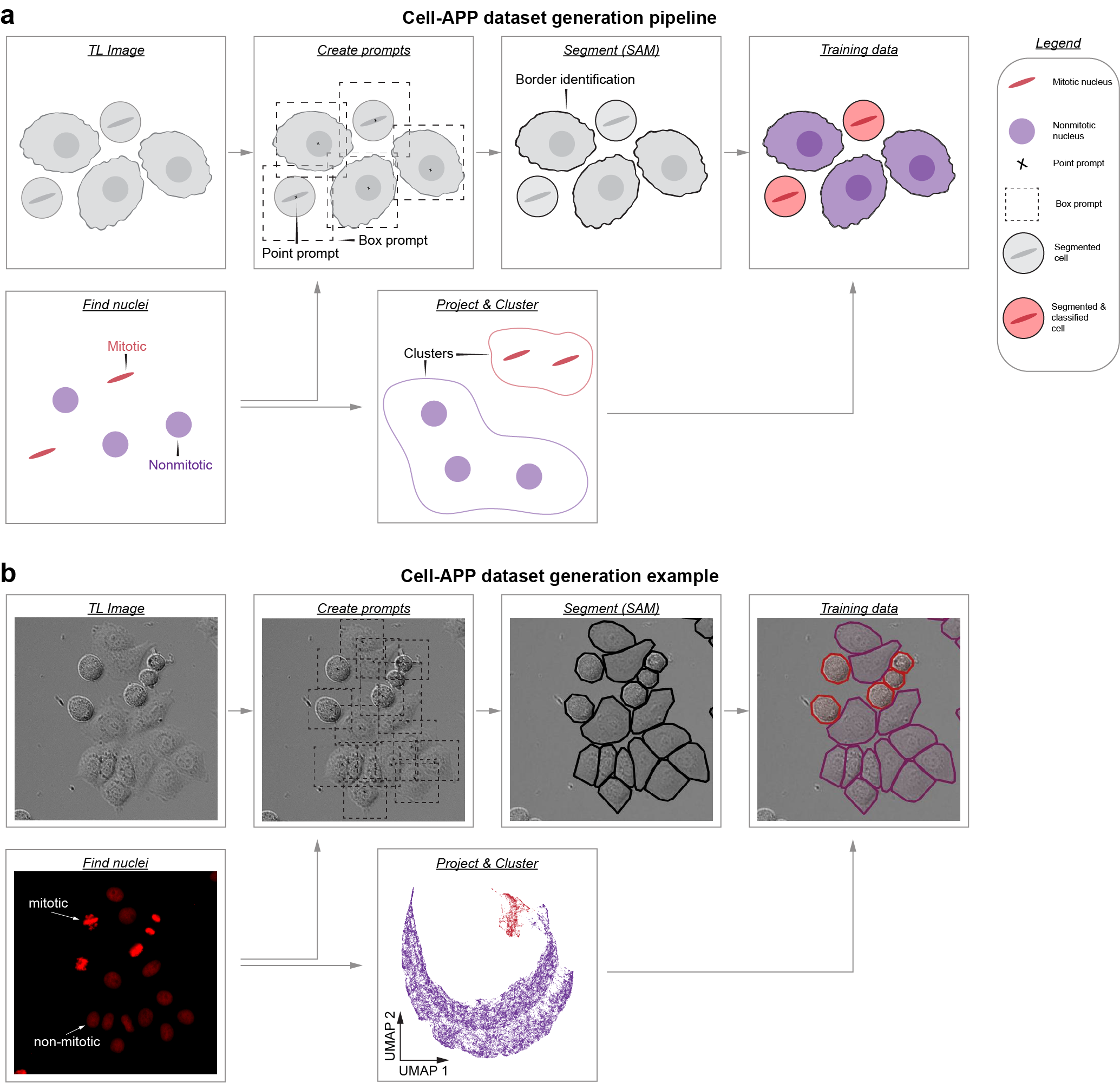
Cell-APP automates the generation of cell masks (and classifications too!), enabling users to create custom instance segmentation training datasets in transmitted-light microscopy.
To learn more, read our preprint: https://www.biorxiv.org/content/10.1101/2025.01.23.634498v2.
For questions regarding installation or usage, contact: anishjv@umich.edu
Usage
-
Users who wish to segment HeLa, U2OS, HT1080, or RPE-1 cell lines may try our pre-trained model. These models can be used through our GUI (see Installation) and their weights can be downloaded at: https://zenodo.org/communities/cellapp/records?q=&l=list&p=1&s=10. To learn about using pre-trained models through the GUI, see this video:
-
Users who wish to segment their own cell lines may: (a) try our "general" model (GUI/weight download) or (b) train a custom model by creating an instance segmentation dataset via our Dataset Generation GUI (see Installation). To learn about creating custom datasets through the GUI, see this video:
Installation
cell-AAP requires Python 3.11–3.12. We recommend installing into a clean virtual environment (via conda or venv) to avoid dependency conflicts.
1. Create and activate an environment
With conda:
conda create -n cellapp -c conda-forge python=3.11
conda activate cellapp
Or with venv:
python -m venv cellapp
source cellapp/bin/activate  # Linux/Mac
cellapp\Scripts\activate     # Windows PowerShell
2. Install Pytorch:
conda install -c pytorch -c conda-forge pytorch torchvision #Mac
pip install torch torchvision #Linux/Windows
3. Install Cell-APP:
pip install cell-AAP
4. Finally, detectron2 must be built from source atop Cell-APP:
#Mac
git clone https://github.com/facebookresearch/detectron2.git
CC=clang CXX=clang++ ARCHFLAGS="-arch arm64" python -m pip install -e detectron2 --no-build-isolation

#Linux/Windows
git clone https://github.com/facebookresearch/detectron2.git
python -m pip install -e detectron2 --no-build-isolation
Napari Plugin Usage
- To open napari simply type "napari" into the command line, ensure that you are working the correct environment
- To instantiate the plugin, navigate to the "Plugins" menu and hover over "cell-AAP"
- You should see three plugin options; two relate to Usage 1; one relates to Usage 2.
1 maintainer

Metadata
1 maintainer
Release files for cell-AAP 1.0.7
For a detailed explanation of source distributions (sdists) and built distributions (wheels), please see the package formats documentation.
Source distribution (sdist)
| File | Size | Uploaded | |
|---|---|---|---|
| cell_aap-1.0.7.tar.gz | 73.6 MB | Details |
Built distribution (wheel)
| File | Interpreter | ABI | Platform | Reset |
|---|---|---|---|---|
| cell_aap-1.0.7-py3-none-any.whl | Python 3 | none | any | Details |
Total release size: 73.7 MB
Release files / cell_aap-1.0.7.tar.gz
| Download URL | cell_aap-1.0.7.tar.gz |
|---|---|
| Size | 73.6 MB |
| Tags | Source |
|
SHA-256 checksum How to use checksums |
f55e3440dec5c6e45d4c08b0dcb149e5dacde5ab59842c54b89c8bca7e01b785
|
|
BLAKE2b-256 checksum How to use checksums |
7062f7dae7c4882257bf8e0edba426ee0826be351a57fb121fef61e72f3d9e4f
|
| Upload date | |
|
Uploaded using Trusted Publishing? What is trusted publishing? |
No |
| Uploaded via |
twine/6.1.0 CPython/3.12.2
|
Release files / cell_aap-1.0.7-py3-none-any.whl
| Download URL | cell_aap-1.0.7-py3-none-any.whl |
|---|---|
| Size | 60.5 kB |
| Tags | Python 3 |
|
SHA-256 checksum How to use checksums |
6e5528187ab3577fe709df04ab3c233f36d1ec3d8283cf98a73b737ea4e78a9c
|
|
BLAKE2b-256 checksum How to use checksums |
43399c56f6ddc18bdef0ea54a71e70ffb5de928ecd2b68146db37af6a9f2664b
|
| Upload date | |
|
Uploaded using Trusted Publishing? What is trusted publishing? |
No |
| Uploaded via |
twine/6.1.0 CPython/3.12.2
|














