
chassis-sim
English | 简体中文


A small, dependency-light Gymnasium benchmark for three chassis types — Ackermann steering, differential drive, and mecanum — with normalized actions, a pure-NumPy simulator, a composable observation spec, declarative sensors, reference controllers, and a one-line API that makes, evaluates and records an environment.
The exact release lives in pyproject.toml. Python 3.10+.
At a glance
Every environment exposes a normalized action space, Box(-1, 1, (d,), float32).
The chassis turns that normalized action into physical quantities; the environment
never asks a user to supply volts, wheel torques, or raw steering angles.
| Gymnasium id | Chassis | Action dim | Action layout | Default obs dim | Physical limits with default config |
|---|---|---|---|---|---|
ChassisSim-Ackermann-v0 |
Ackermann | 2 | [steer, speed] |
128 | v ∈ [-0.6, 1.2] m/s, δ ∈ [-0.526, 0.526] rad, ` |
ChassisSim-DiffDrive-v0 |
differential drive | 2 | [speed, yaw] |
128 | v ∈ [-1.2, 1.2] m/s, ` |
ChassisSim-Mecanum-v0 |
mecanum | 3 | [vx, vy, yaw] |
129 | v_x ∈ [-1.2, 1.2] m/s, ` |
The limits above are what env.chassis.describe()["limits"] reports with the default
EnvConfig; they are not duplicated in the environment. A different EnvConfig (or a
different Chassis instance) changes the physical mapping and the action semantics
together. For the Ackermann chassis, delta_max and curvature_action decide whether
the first action axis means steering angle or curvature.
The default observation is the four-segment spec
ObsSpec.default(action_dim, points=30) — odometry, reference path, goal, and the
previous normalized action — so it is 128 values wide on the two 2-action chassis and
129 on the mecanum. There is no built-in 494-dimension preset: you write the
nine-segment ObsSpec yourself, as shown under
Observation and action contract.
Installation
The package is on PyPI:
pip install "chassis-sim[viz]"
pip install "chassis-sim[viz]==X.Y.Z"   # pin to a release tag
Drop the [viz] suffix for a core install, or use [planning] for the Hybrid-A* map
generator. To pin to a tag instead of PyPI, every tag carries a wheel on its
GitHub release page.
From a checkout, with the development tools:
git clone https://github.com/ravenkernel/chassis-sim.git
cd chassis-sim
pip install -e ".[dev]"
Extras
| Extra | Installs | Purpose |
|---|---|---|
planning |
numba>=0.56 |
Hybrid-A* map generation for the planning scenarios |
viz |
matplotlib>=3.7, rich>=13.0, imageio>=2.28 |
rendering, GIF export, and rich terminal helpers |
dev |
pytest>=7.0, ruff>=0.4, mypy |
test suite, linter, type check |
The core install depends only on numpy, gymnasium, and pyyaml. matplotlib is
needed only for rendering and imageio only for GIF export; both come with the viz
extra, which is what cs.record(), cs.snapshot() and examples/gallery.py need.
The library ships exactly one built-in simulator: the pure-NumPy SimpleBridge.
No external simulator is required, and there is no optional extra for one: ROS 2 and
Gazebo style backends are out of scope. PhysicalCommandBridge is the documented seam
for plugging your own physics engine into the same observation/reward pipeline.
Quickstart
One import, one constructor, one evaluator:
import chassis_sim as cs

env = cs.make("ackermann", seed=0)
print("obs:", env.observation_space.shape)
print("describe:", env.obs_spec_describe())

ctrl = cs.make_controller("pp", env=env)
res = cs.evaluate(env, ctrl, episodes=20)
print(
    "success_rate:", f"{res.success_rate:.0%}", "mean_steps:", f"{res.mean_steps:.1f}"
)
print(res.markdown().splitlines()[2])

rec = cs.record(env, ctrl, out="demo.gif", every=4, fps=12)
print("gif:", rec.path, "frames:", rec.frames, "steps:", rec.steps)

auto = cs.evaluate(cs.make("ackermann"), episodes=3)
print("controller omitted ->", auto.controller, "|", auto.successes, "of", auto.n)
Output:
obs: (128,)
describe: {'odom': slice(0, 4, None), 'path': slice(4, 124, None), 'goal': slice(124, 126, None), 'act': slice(126, 128, None)}
success_rate: 100% mean_steps: 65.0
| controller | ackermann |
gif: demo.gif frames: 17 steps: 65
controller omitted -> PurePursuitController | 3 of 3
cs.make() resolves every field as kwargs > EnvConfig field > library default,
so cs.make(cfg, v_max=0.8) overrides cfg.v_max without mutating cfg. The first
argument is positional-only and takes either a chassis name or an EnvConfig
instance; everything else is a keyword argument.
cs.evaluate(env, controller=None, *, episodes=...) runs the controller and returns an
EvalResult. Omitting the controller is supported: the evaluator binds
PurePursuitController to env.unwrapped.chassis and runs that, which is why the
four-line version needs no controller object at all. Pass a controller when you want a
different one — cs.make_controller("pp", env=env) and
cs.make_controller("dwa", env=env) return controllers already calibrated to that
chassis.
cs.record(env, controller, out="demo.gif", every=4, fps=12) replays one episode
through the renderer and writes a GIF (17 frames for a 65-step episode at
every=4); it returns a RecordingResult with path, frames, steps,
total_reward, terminated and truncated. cs.snapshot(env, "hero.png") writes a
single still of the current state.
Gallery
Eleven assets, all regenerated by one command at scenario seed 0:
python examples/gallery.py --out assets
The five clips are 12 fps replays of real closed-loop runs: the controller drives the
env from a seed-0 reset, and the recorded action sequence is then replayed from the
identical reset state, so every clip is reproducible and every clip reaches the goal.
The six stills are the initial state of a scenario (step 0 after reset, chassis
ackermann, no controller) and carry the obstacle field, the reference path, the
body, and the chassis and scenario names in the corner. Each image links to the
full-size file under assets/.
Chassis kinematics — one reference path, one controller
All three chassis drive the same obstacles_sparse path with the same
pure_pursuit controller, so the only thing that changes is the kinematics.
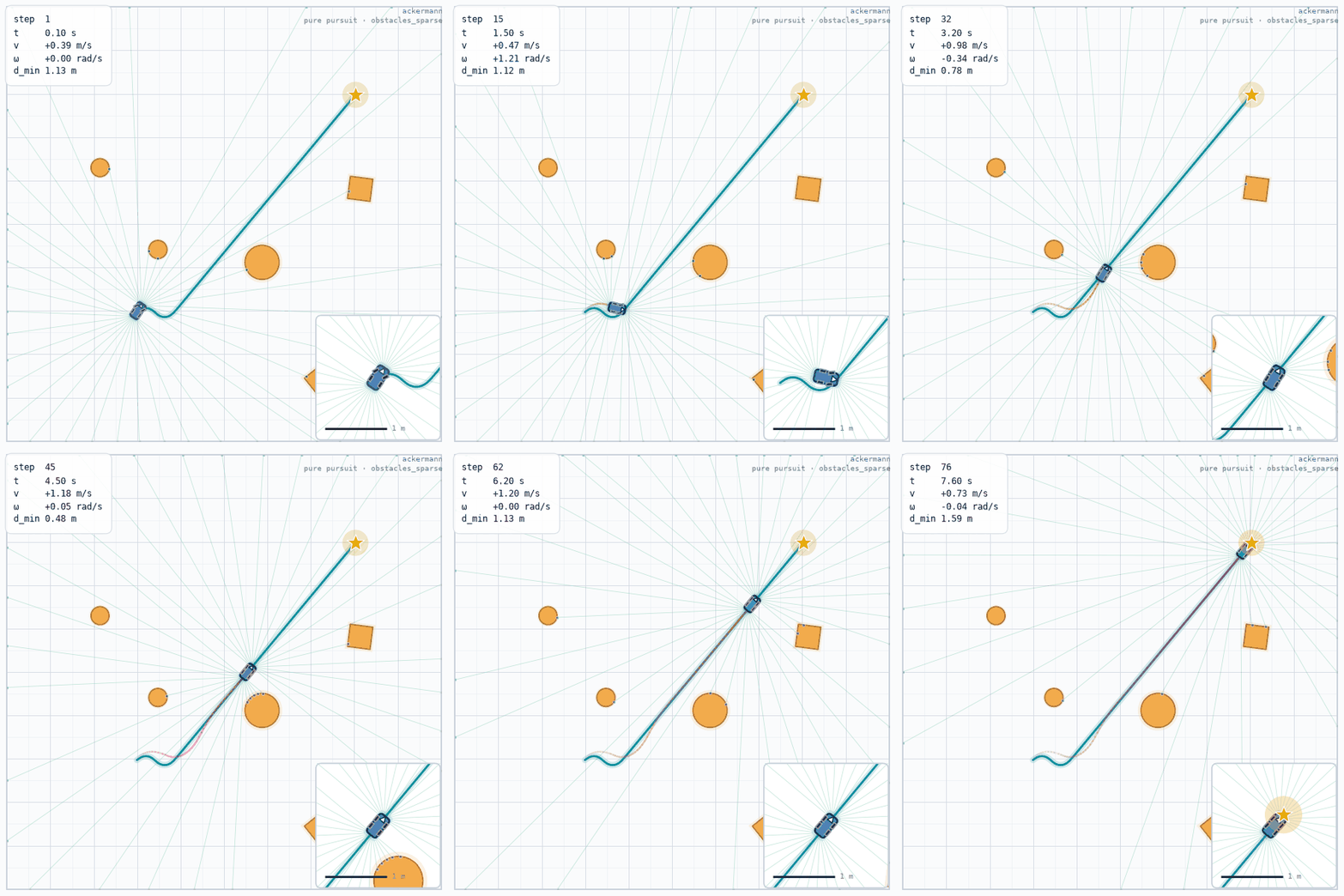 chassis_ackermann.gifobstacles_sparse · ackermann · pure_pursuit |
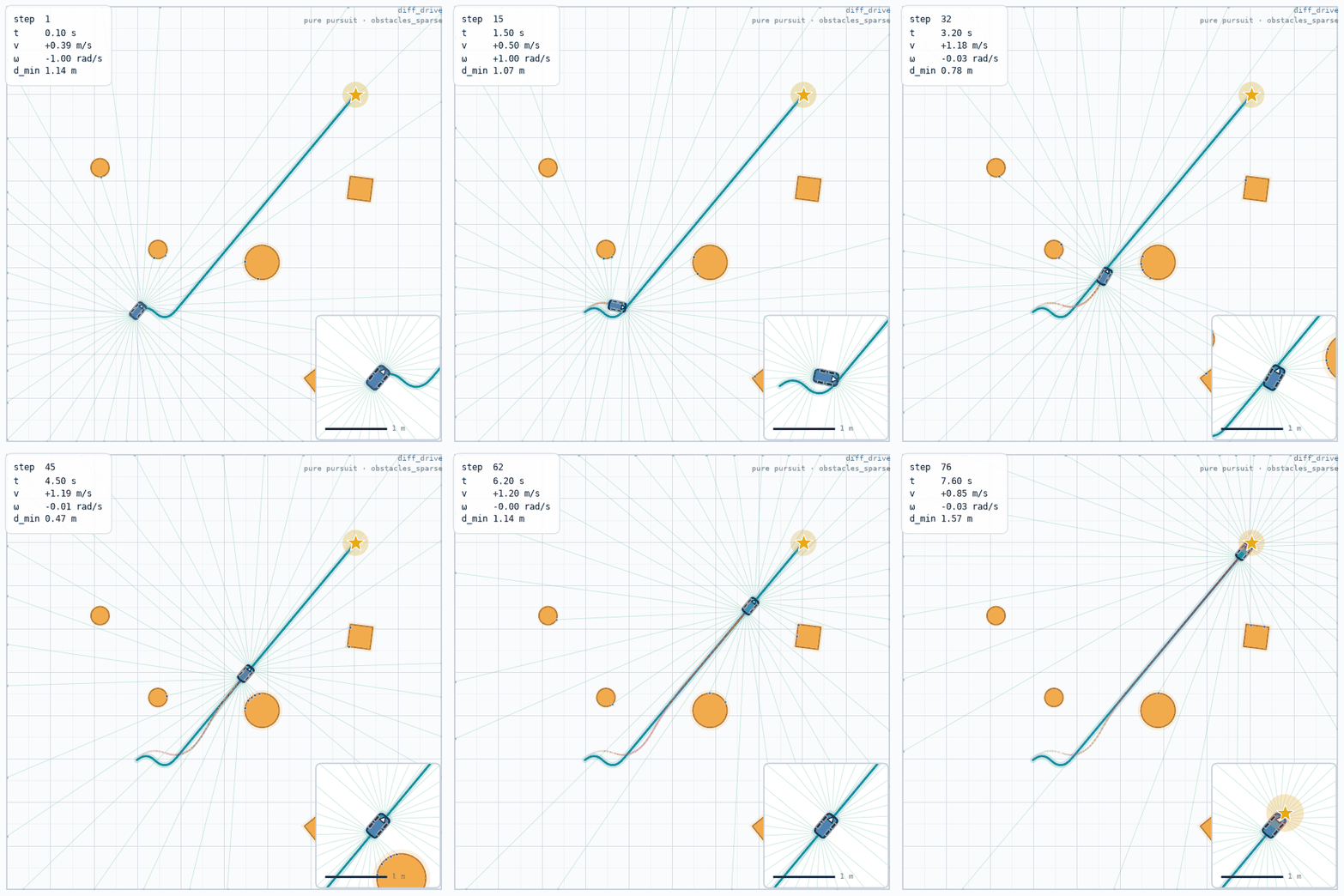 chassis_diff_drive.gifobstacles_sparse · diff_drive · pure_pursuit |
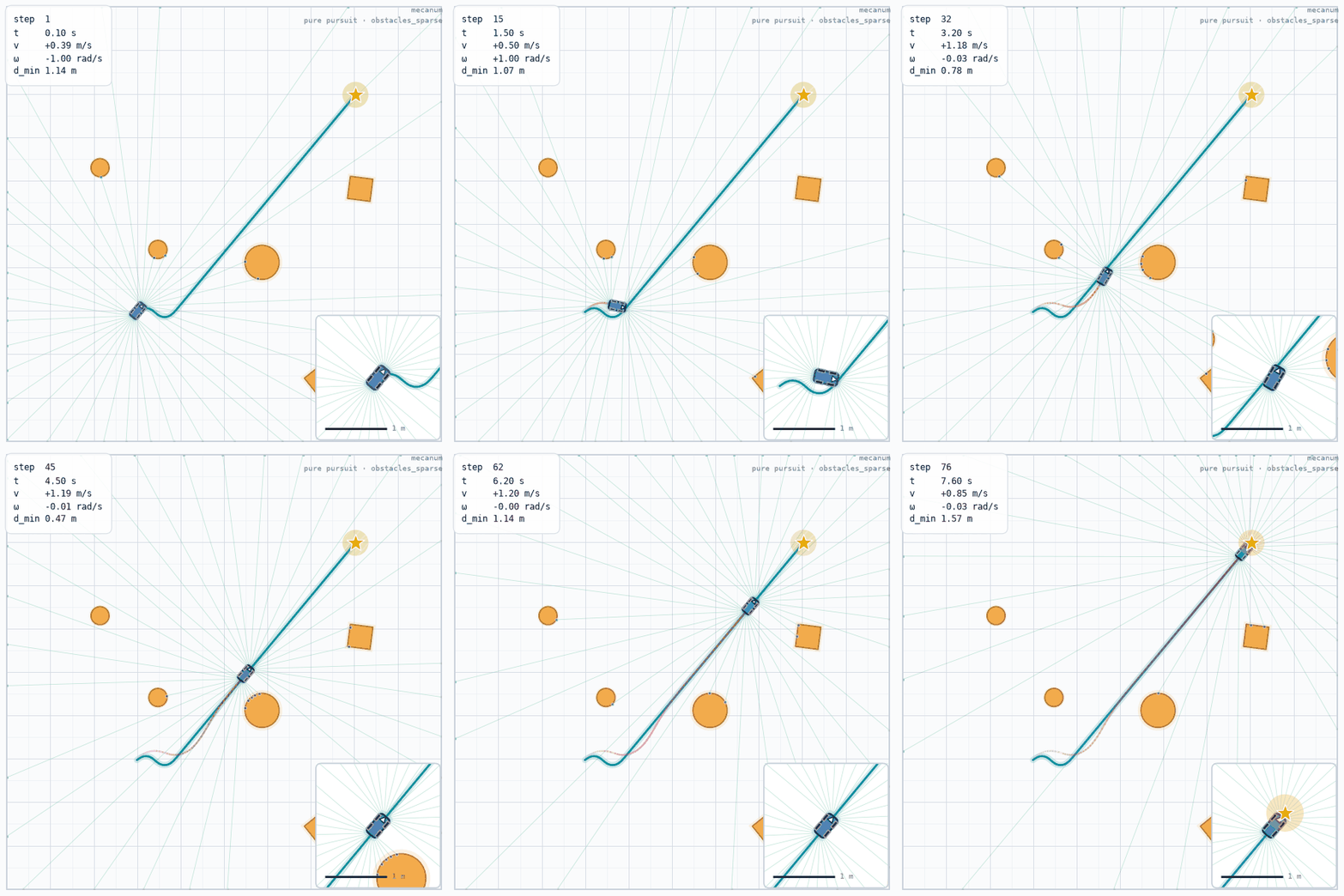 chassis_mecanum.gifobstacles_sparse · mecanum · pure_pursuit |
Front-wheel steering is bounded by the minimum turning radius, so the Ackermann car has to swing wide through a corner. With no lateral degree of freedom the differential-drive turn comes from the wheel-speed difference alone, which reads as a tighter fold on the same path. The mecanum chassis adds the orthogonal velocity component and corrects laterally on the body itself, so it tracks the reference line most closely.
Controllers — one chassis, one scene
Both clips run the ackermann chassis on dense_static, so the difference is the
controller.
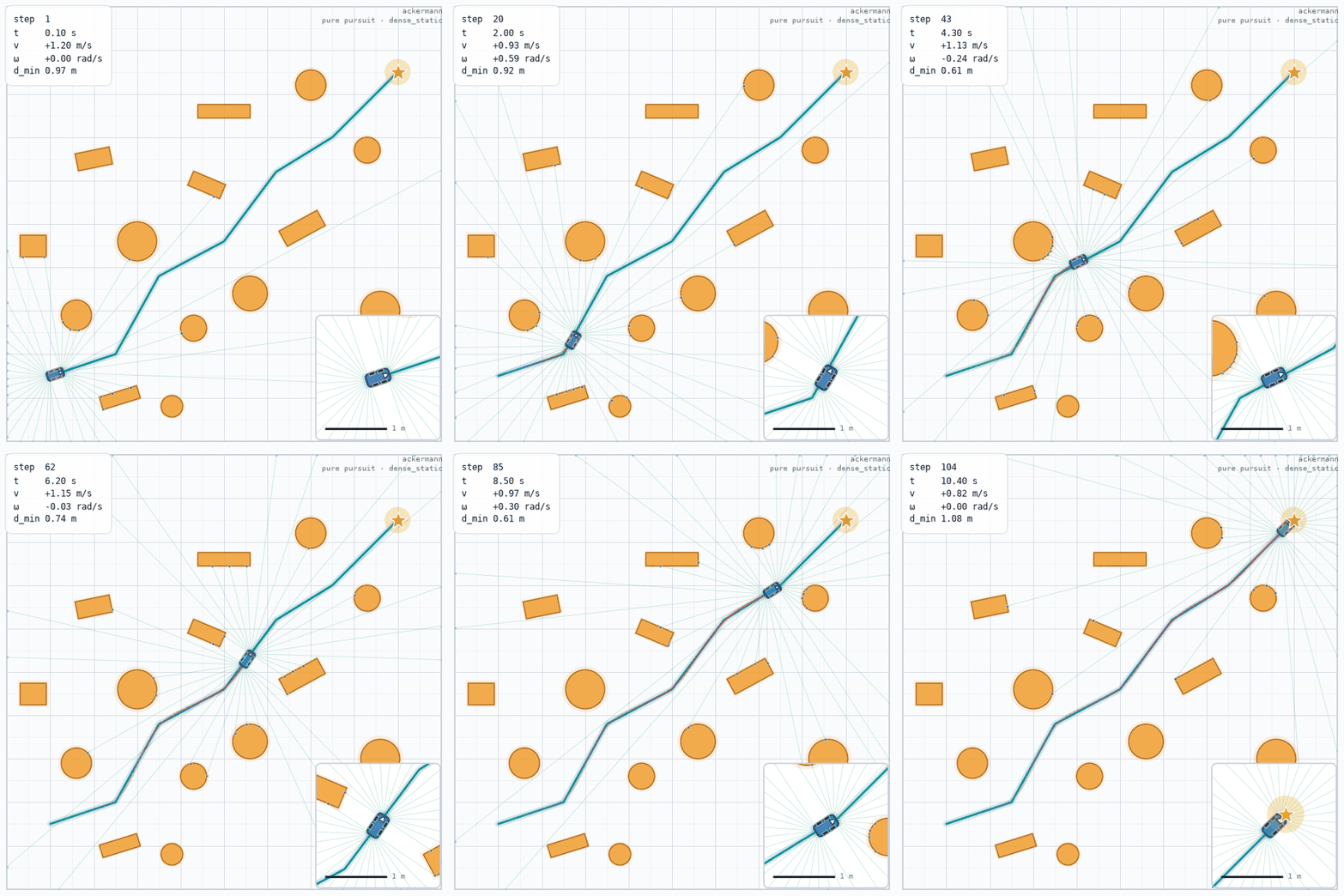 controller_pure_pursuit.gifdense_static · ackermann · pure_pursuit |
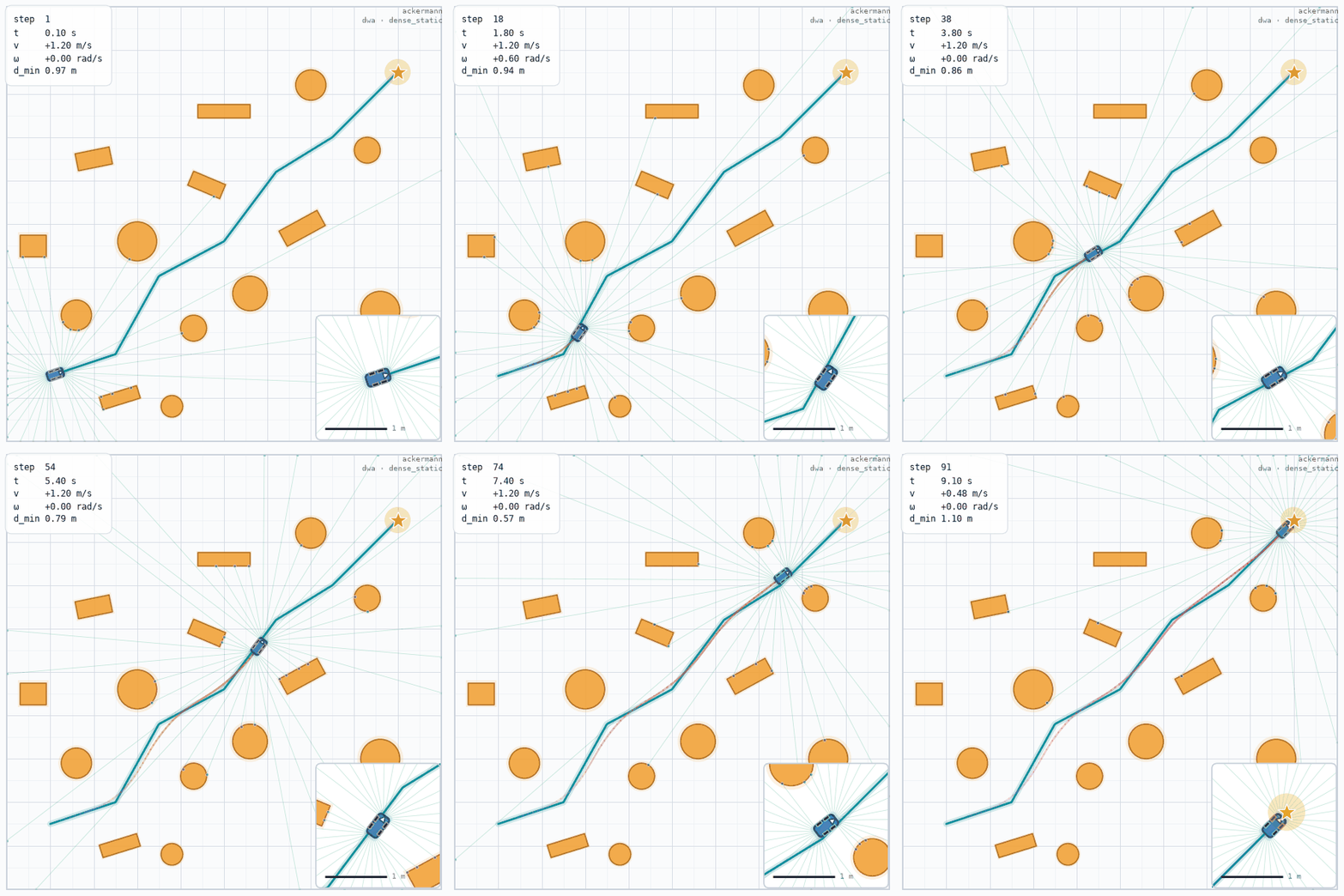 controller_dwa.gifdense_static · ackermann · dwa |
One lookahead arc gives smooth tracking with pure pursuit, but the corners are cut and the body passes closer to the obstacles. Velocity-window sampling plus an obstacle cost makes DWA take the more conservative line and finish in fewer steps.
Scenarios — top-down view
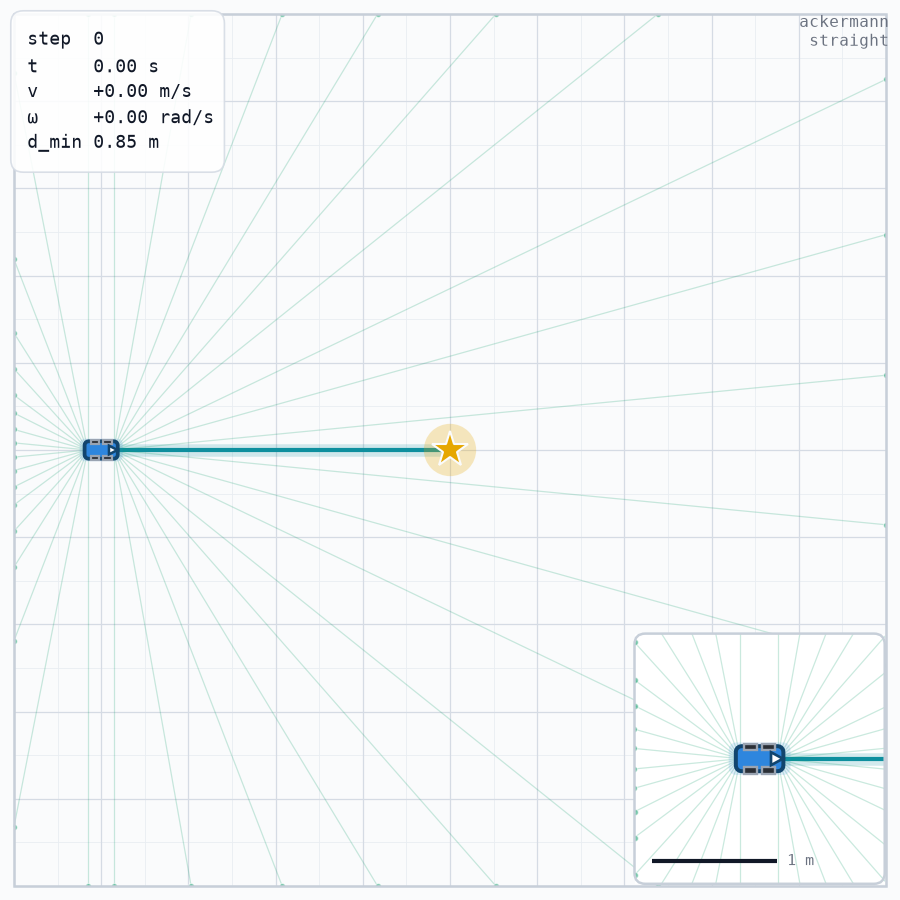 scene_straight.pngstraight · seed 0 · step 0 after reset |
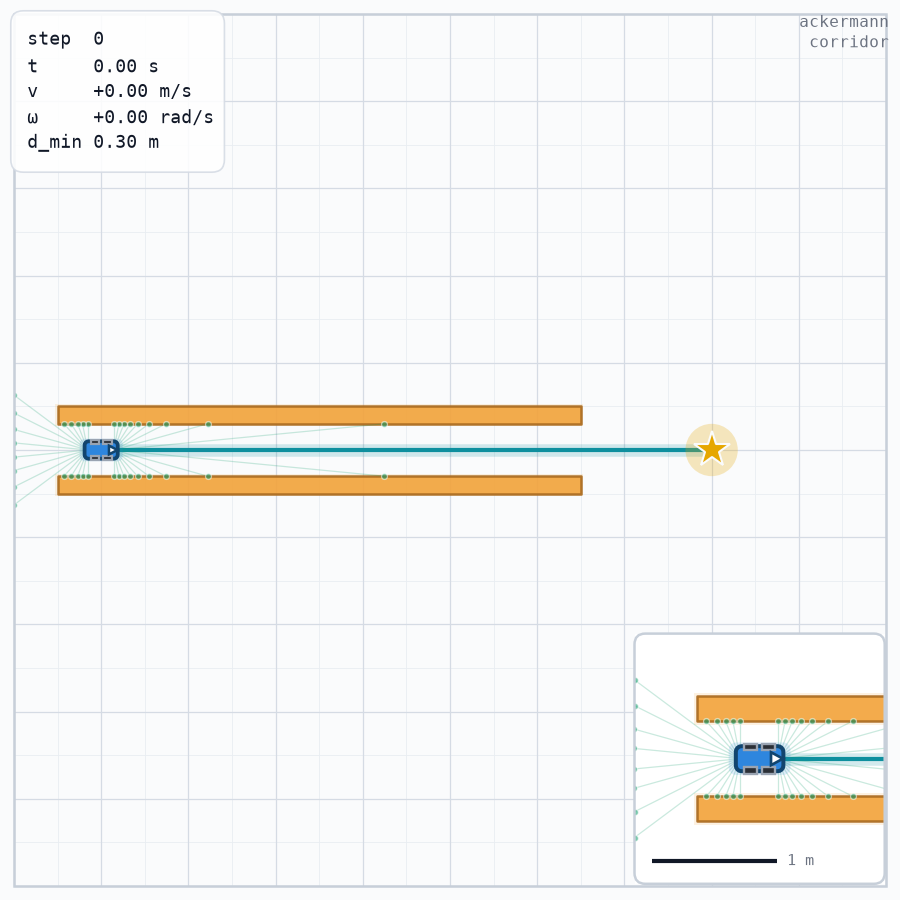 scene_corridor.pngcorridor · seed 0 · step 0 after reset |
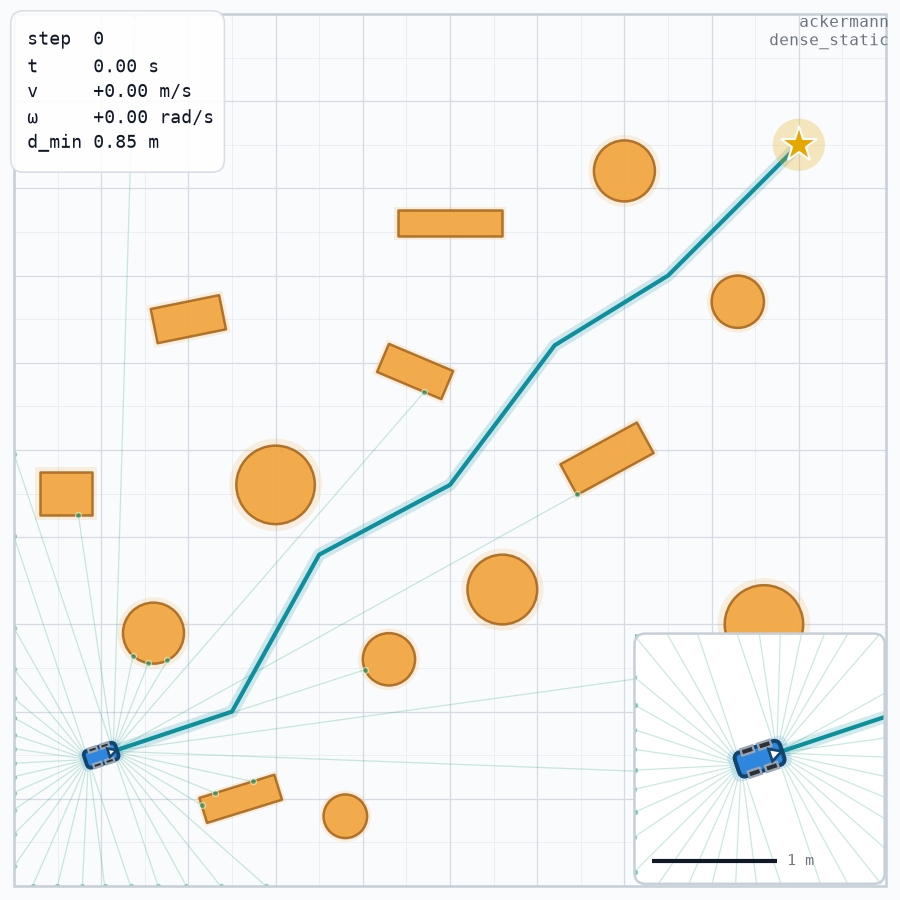 scene_dense_static.pngdense_static · seed 0 · step 0 after reset |
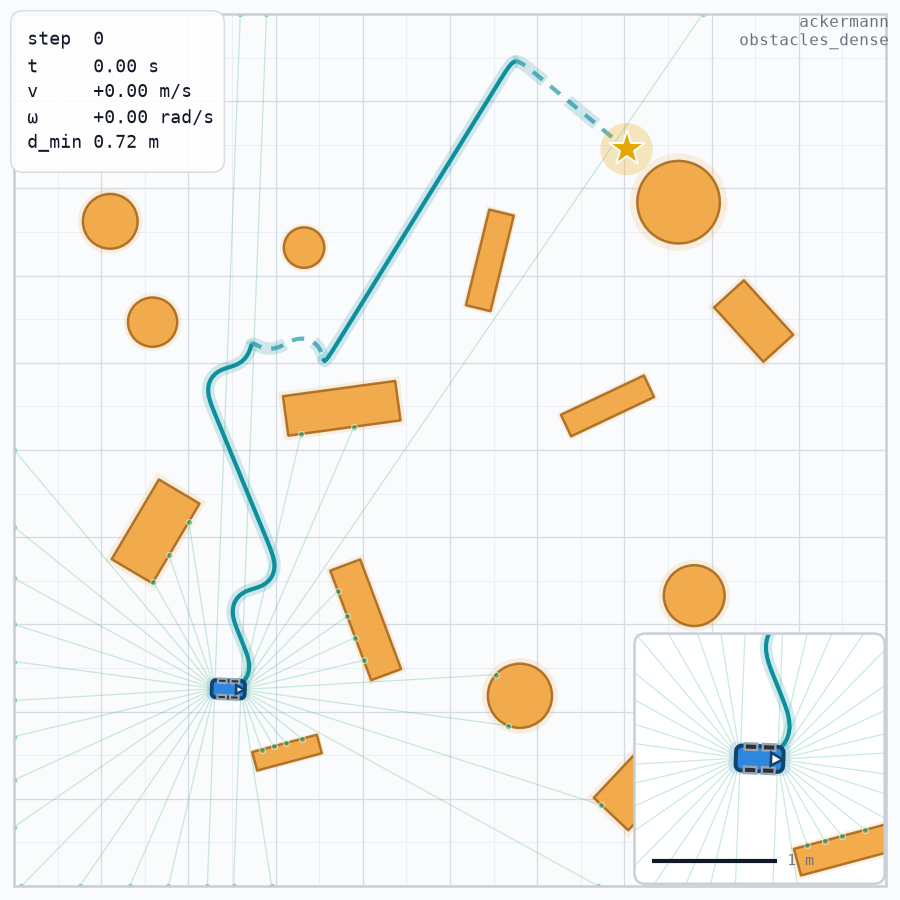 scene_obstacles_dense.pngobstacles_dense · seed 0 · step 0 after reset |
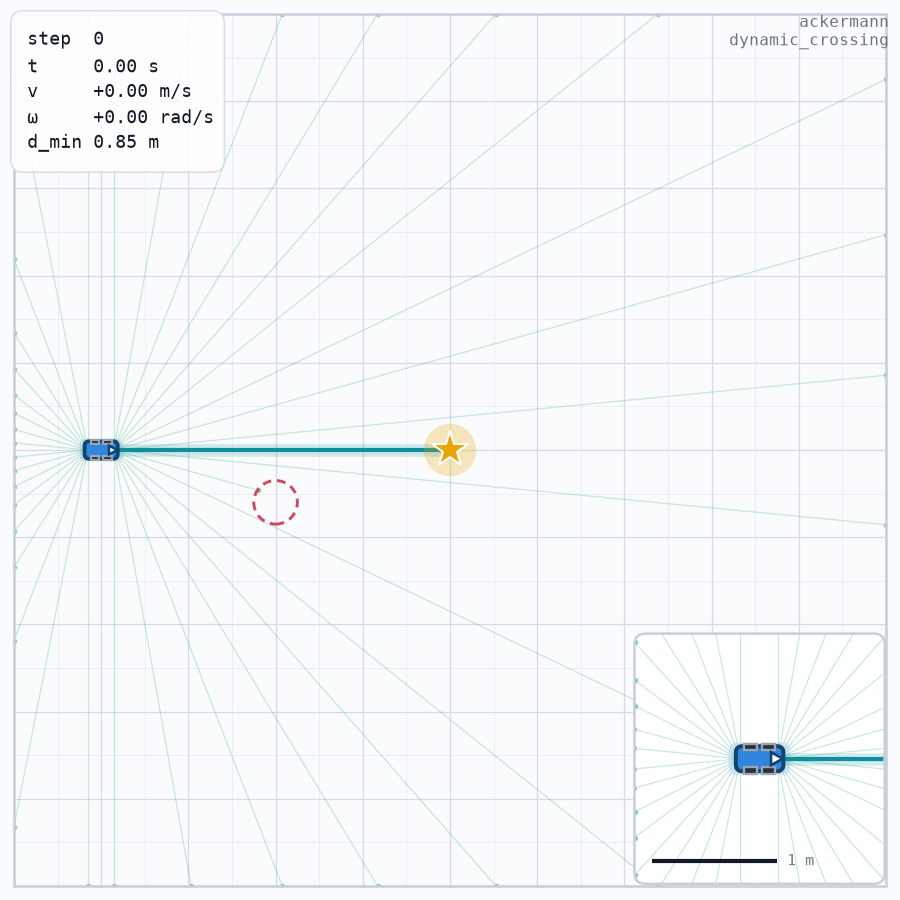 scene_dynamic_crossing.pngdynamic_crossing · seed 0 · step 0 after reset |
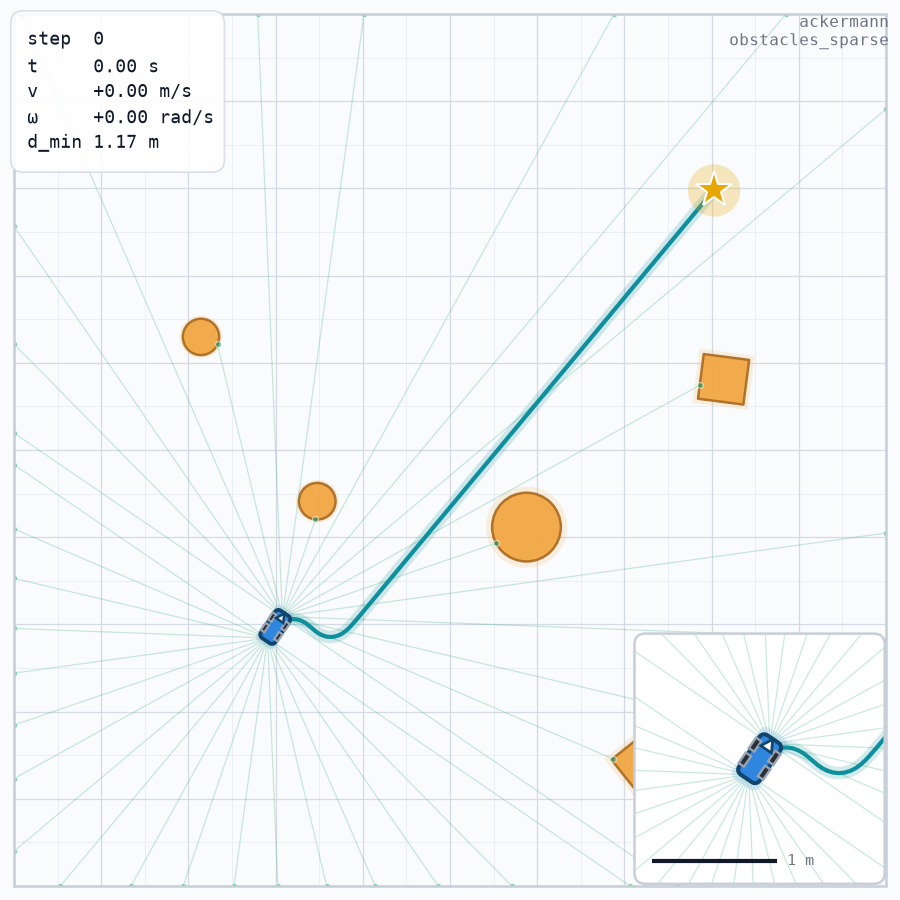 scene_obstacles_sparse.pngobstacles_sparse · seed 0 · step 0 after reset |
straight is the clean baseline: no obstacle, a 4 m reference line at y = 5.
corridor squeezes the feasible region into a 0.6 m band between two long
rectangles, so wall clearance reads off directly. dense_static packs 14 circles
and rectangles against the reference path, hand-written and needing no planner.
obstacles_dense and obstacles_sparse come from the Hybrid-A* map generator, so
their obstacle field is generated per seed rather than stored in YAML: dense draws
9–15 obstacles close to the path, sparse draws 2–5 over open space.
dynamic_crossing has a 0.25 m circle crossing the path at 0.3 m/s on a 20 s
ping-pong cycle, drawn at its t = 0 pose.
Observation and action contract
The observation is a single float32 vector assembled from an ordered list of
segments. ObsSpec.default(action_dim, points=30) is the default list:
ObsSpec((Odom(), PathSegment(points=30), Goal(), Act(action_dim=action_dim))) —
odometry, reference path, goal and the previous normalized action, in that order.
| Segment | Constructor | Width | Meaning |
|---|---|---|---|
Odom |
Odom() |
4 | body-frame [dx*10, dy*10, v, ω] |
PathSegment |
PathSegment(points=30) |
4 * points = 120 |
reference path in the body frame, [x, y, ψ, s] per point |
Goal |
Goal() |
2 | goal in the body frame [x, y] |
Act |
Act(action_dim=d) |
d |
previous normalized action |
That is 4 + 120 + 2 + d: 128 on the Ackermann and the differential drive,
129 on the mecanum (the third action component). obs_spec_describe() returns
the authoritative slice table, so no consumer needs a hard-coded offset:
import chassis_sim as cs

env = cs.make("ackermann")
print(
    "default obs:", env.observation_space.shape, "dtype:", env.observation_space.dtype
)
print("describe:", env.obs_spec_describe())

mecanum = cs.make("mecanum")
print("mecanum obs:", mecanum.observation_space.shape)
print("describe:", mecanum.obs_spec_describe())
default obs: (128,) dtype: float32
describe: {'odom': slice(0, 4, None), 'path': slice(4, 124, None), 'goal': slice(124, 126, None), 'act': slice(126, 128, None)}
mecanum obs: (129,)
describe: {'odom': slice(0, 4, None), 'path': slice(4, 124, None), 'goal': slice(124, 126, None), 'act': slice(126, 129, None)}
The explicit 494 value preset
The 494-value layout is a nine-segment spec (`lidar 360 + odom 4 + path 120 + goal 2 + act 2 + err 2 + goal_sig 2 + path_valid 1
- path_progress 1
, foraction_dim=2`). Every one of those segments is still available, but the library ships no preset built from them, because the LiDAR segment only makes sense when you declare the sensors it reads. Write the spec out:
import numpy as np

import chassis_sim as cs

env = cs.make(
    "ackermann",
    scenario="obstacles_dense",
    sensors=[
        cs.Lidar("front", mount=(0.145, 0, 0), n_rays=180),
        cs.Lidar("rear", mount=(-0.155, 0, np.pi), n_rays=180),
    ],
    obs=cs.ObsSpec(
        (
            cs.LidarSegment("lidar", sensors=("front", "rear")),
            cs.Odom(),
            cs.PathSegment(points=30),
            cs.Goal(),
            cs.Act(action_dim=2),
            cs.Err(),
            cs.GoalSig(),
            cs.PathValid(),
            cs.PathProgress(),
        )
    ),
)
print("obs:", env.observation_space.shape)
for name, span in env.obs_spec_describe().items():
    print(f"  {name:14s} {span.start:3d}-{span.stop:3d}")
obs: (494,)
  lidar            0-360
  odom           360-364
  path           364-484
  goal           484-486
  act            486-488
  err            488-490
  goal_sig       490-492
  path_valid     492-493
  path_progress  493-494
Segment order is the constructor order, so the slice table above is the contract:
lidar 0-360 (two 180-ray scans concatenated), odom 360-364, path 364-484,
goal 484-486, act 486-488, err 488-490, goal_sig 490-492,
path_valid 492-493, path_progress 493-494. obs= is the documented alias of
obs_spec= in cs.make().
Physical-command bridges
A third-party physics backend (ROS 2, Gazebo, or your own integrator) takes
physical commands, not a normalized action. PhysicalCommandBridge maps with
chassis.physical_action() (never step() — the backend owns its own steering lag)
and forwards sensors untouched. The vector order is the chassis's own:
| chassis | physical vector |
|---|---|
ackermann |
[delta (rad), v (m/s)] |
diff_drive |
[v (m/s), omega (rad/s)] |
mecanum |
[v (m/s), vy (m/s), omega (rad/s)] |
bridge.step() still takes the normalized action and hands
chassis.physical_action(action) to inner.step(); bridge.to_physical(action)
exposes that mapping as a pure function, so a normalized action always produces the
same physical vector regardless of the actuator state. The actuator lag must be
applied exactly once, by the inner physical simulator: the adapter never
advances the chassis state and never calls chassis.reset_state().
from chassis_sim.bridges import PhysicalCommandBridge
from chassis_sim.chassis import AckermannChassis


class InnerBridge:
    """stands in for an external simulator that speaks physical commands"""

    def __init__(self):
        self.commands = []

    def step(self, commands):
        self.commands.append([float(value) for value in commands])


chassis = AckermannChassis()
inner = InnerBridge()
bridge = PhysicalCommandBridge(inner, chassis)
print("physical_action([1.0, 0.5]):", chassis.physical_action([1.0, 0.5]))
bridge.step([0.3, 0.6])
print("inner received:", inner.commands)
physical_action([1.0, 0.5]): [0.52558379 0.5       ]
inner received: [[0.1722752169535286, 0.6]]
Sensors
Sensors are declared as a list of immutable specs: you build the sensors you want
and pass them to cs.make(sensors=[...], seed=...). A default environment carries
no sensor at all.
| Spec | Fields (defaults) |
|---|---|
Lidar |
name, mount=(x, y, yaw) (0, 0, 0), fov=π, n_rays=180, max_range=10.0, range_min=0.05, noise_std=0.0, quant_step=0.0, latency_steps=0, dropout_prob=0.0 |
Imu |
name, noise_std=0.0 |
WheelOdom |
name, track_width=None (falls back to the chassis width), noise_std=0.0 |
Readings are exposed through the info dict of reset() and step(), keyed by
the sensor name, and never enter the observation by themselves:
| Key | Value |
|---|---|
info[<lidar name>] |
{"scan": (n_rays,) float32 or None, "scan_meta": {...}} |
info[<imu name>] |
{"ax", "ay", "yaw_rate", "yaw", "t"} |
info[<wheel name>] |
{"v_left", "v_right", "v", "t"} |
bridge.get_sensor_reading() is the single raw entry point and returns the same
dictionary the info keys are taken from. There is no per-sensor convenience
accessor: one method covers every sensor, whatever its name or parameters. With no
sensors configured info carries no sensor keys at all.
import numpy as np

import chassis_sim as cs

plain = cs.make("ackermann")
plain.reset(seed=0)
obs, reward, terminated, truncated, info = plain.step(np.zeros(2, dtype=np.float32))
print("default info keys:", sorted(info))
print("d_min:", info["d_min"], "bridge.max_range:", plain.unwrapped.bridge.max_range)

sensed = cs.make(
    "ackermann",
    sensors=[
        cs.Lidar("front", mount=(0.145, 0, 0), n_rays=180, noise_std=0.01),
        cs.Imu("imu", noise_std=0.02),
        cs.WheelOdom("wheel", noise_std=0.01),
    ],
    seed=7,
)
sensed.reset(seed=0)
obs, reward, terminated, truncated, info = sensed.step(np.zeros(2, dtype=np.float32))
print("sensor info keys:", sorted(info))
print("front scan:", info["front"]["scan"].shape, info["front"]["scan"].dtype)
print(
    "front meta:",
    {k: info["front"]["scan_meta"][k] for k in ("valid", "dropped", "range_max")},
)
print("imu:", {k: round(float(v), 6) for k, v in info["imu"].items()})
print("wheel:", {k: round(float(v), 6) for k, v in info["wheel"].items()})
print("d_min:", round(float(info["d_min"]), 4))
print(
    "bridge.get_sensor_reading:", sorted(sensed.unwrapped.bridge.get_sensor_reading())
)
default info keys: ['collision', 'cte', 'd_min', 'goal_reached', 'map_fallback', 'mapped_action', 'path_deviation', 'path_deviation_cte', 'path_dir', 'path_dir_gate', 'progress', 'reverse_triggered', 'reward_components', 'safety_brake', 'step', 'stuck', 'termination_reason', 'timeout']
d_min: 10.0 bridge.max_range: 10.0
sensor info keys: ['collision', 'cte', 'd_min', 'front', 'goal_reached', 'imu', 'map_fallback', 'mapped_action', 'path_deviation', 'path_deviation_cte', 'path_dir', 'path_dir_gate', 'progress', 'reverse_triggered', 'reward_components', 'safety_brake', 'step', 'stuck', 'termination_reason', 'timeout', 'wheel']
front scan: (180,) float32
front meta: {'valid': True, 'dropped': False, 'range_max': 10.0}
imu: {'ax': 0.019794, 'ay': -0.005537, 'yaw_rate': 0.033798, 'yaw': 0.0, 't': 0.1}
wheel: {'v_left': -0.010802, 'v_right': -0.005745, 'v': -0.008273, 't': 0.1}
d_min: 4.9867
bridge.get_sensor_reading: ['front', 'imu', 'wheel']
Two consequences are worth reading twice. First, info["d_min"] is 10.0 — exactly
bridge.max_range — until a LiDAR is declared, because nothing measured an obstacle
distance: the obstacle term of the reward degenerates to a constant in that
configuration. Second, the observation is bit-identical with and without sensors
unless a LidarSegment names them.
Missing frames and the LiDAR observation segment
A LidarSegment observation segment publishes the scan of the named sensors inside
the observation vector; chassis_sim.sensors.Lidar is the sensor spec that produces
that scan. The bridge produces a real first frame immediately after reset(), and
that frame is the one the reset observation carries.
When a frame is missing — a delayed frame still inside the latency ring, or a
dropped frame — the segment keeps the last valid scan (zero-order hold). If no
valid frame has ever been delivered, the segment is filled with max_range.
env.reset() clears the hold cache. The observation itself carries no validity bit:
scan_meta["valid"] and scan_meta["dropped"] in info remain the only place that
says the frame was missing.
LiDAR processing order is fixed: clip to [range_min, range_max], add Gaussian
noise, clip again, quantize, cast to float32, push through the latency ring, then
apply dropout at delivery time. Delayed frames therefore carry the noise of their
acquisition step, and a dropped frame is the one that would have been delivered.
Each sensor owns its own random stream, derived from (sensor_seed, name), so
adding or removing one sensor never shifts the noise of the others.
Controllers
| Class | Role | Key defaults |
|---|---|---|
PurePursuitController |
geometric path tracking | lookahead=0.6, adaptive=False, lookahead_gain=0.8 |
DwaController |
sampling-based local planner | dt=0.1, horizon=10, gear_mode="off" |
Construct one through make_controller(), which is the only documented spelling:
import chassis_sim as cs

try:
    cs.PurePursuitController()
except TypeError as exc:
    print("TypeError:", exc)

env = cs.make("ackermann")
pp = cs.make_controller("pp", env=env)
dwa = cs.make_controller("dwa", env=env)
print("pp:", type(pp).__name__, "dwa:", type(dwa).__name__)

same = cs.make_controller("pp", chassis=env.unwrapped.chassis)
print("explicit chassis:", type(same).__name__)

result = cs.evaluate(env, pp, episodes=5)
print("with explicit controller:", result.n, f"{result.success_rate:.0%}")

auto = cs.evaluate(cs.make("ackermann"), episodes=5)
print("controller omitted:", auto.controller, f"{auto.success_rate:.0%}")
TypeError: Controller 需要 chassis= 或 kind= 之一来确定车型
pp: PurePursuitController dwa: DwaController
explicit chassis: PurePursuitController
with explicit controller: 5 100%
controller omitted: PurePursuitController 100%
A bare PurePursuitController() raises TypeError on purpose: a controller normalizes
its output with one chassis's limits, and the environment de-normalizes with
env.unwrapped.chassis. A controller calibrated on the wrong chassis silently scales
every command (a controller built from make_chassis("diff_drive") against an
Ackermann env asks for 0.5 m/s and drives 0.6 m/s), so there is no default chassis
anywhere in the package. evaluate() compares both sides' limits and raises
ValueError before running when they differ; allow_mismatch=True is the explicit
override.
DwaController.gear_mode="off" is the default on purpose. In that mode candidate
trajectories span the entire [v_min, v_max] range and the cost has no gear
(forward/reverse) term; reversing is handled by the arc-length lookahead reference.
gear_mode="auto" is an optional ablation: it infers the gear from the path
segment, truncates candidates to one half-axis, scores heading against the motion
direction, and needs a minimum speed to avoid stopping. It is sensitive to
heading_lookahead, so it is not the default.
Custom controllers
evaluate() does not import a concrete controller; it only needs the duck-typed
protocol:
| Member | Required | Contract |
|---|---|---|
reset() |
yes | reset internal state |
set_path(path_world) |
yes | (N, 3) world-frame [x, y, θ]; θ is the nose heading |
act(observation) |
yes | return a normalized action |
to_chassis_action(v, omega, vy=0.0) |
no | helper used by the shipped controllers |
The observation dict passed to act() has pose (3 values), optional
obstacles, and optional dt. The Controller base class implements
to_chassis_action() for you. examples/eval_matrix.py contains a small
RandomController that implements only reset(), set_path() and act(); it is
the minimal integration example. The package does not bundle an MPC controller.
Evaluation
evaluate(env, controller=None, *, episodes, seed=0, max_steps=None, reset_options=None, labels=None, allow_mismatch=False) runs the controller for
episodes episodes and returns an EvalResult. The episode count is a keyword-only
argument named episodes.
import chassis_sim as cs

env = cs.make("ackermann", max_steps=300)
res = cs.evaluate(env, episodes=10, seed=0)
print(
    "n:",
    res.n,
    "success:",
    f"{res.success_rate:.0%}",
    "steps:",
    f"{res.mean_steps:.1f}",
    "collisions:",
    res.collisions,
)
print("distinct_maps:", res.distinct_maps, "maps_independent:", res.maps_independent)
print(res.markdown().splitlines()[2])

md = res.markdown(title="my run")
print("markdown title:", md.splitlines()[0], "| rows:", len(md.splitlines()))
n: 10 success: 100% steps: 65.0 collisions: 0
distinct_maps: 1 maps_independent: False
| controller | ackermann |
markdown title: **my run** | rows: 11
EvalResult exposes n, successes, collisions, timeouts, success_rate,
collision_rate, timeout_rate, mean_steps, mean_return,
min_obstacle_clearance, success_interval, success_ci, map_fingerprints,
distinct_maps, maps_independent, same_map_repeated, plus to_dict() and the
Markdown renderers markdown() (alias of to_markdown()). success_ci is
max(success_rate - low, high - success_rate), the larger Wilson half-width; the
interval itself is asymmetric.
distinct_mapsis the number of distinct map fingerprints in the run.0means the maps could not be fingerprinted.maps_independentisTruewhenn <= 1, or when every episode has a non-empty fingerprint and all fingerprints are distinct.same_map_repeatedisTruewhen the run contains a repeated map.
A fixed reset-options dict is accepted, but it replays one map: the evaluator warns
on stderr, the Markdown table flags the row as ⚠固定地图, and the confidence
interval must not be quoted as an independent-sample CI. Pass a callable instead —
scenario_reset_options_factory(name, base_seed=0) builds a fresh map per episode
index and exposes factory.stats. examples/eval_matrix.py is the runnable
protocol: 3 controllers × 3 chassis × 10 independent maps, both Markdown tables on
stdout, JSON under /tmp:
python examples/eval_matrix.py
wilson_interval(successes, n, *, z=1.959963984540054) returns the Wilson score
interval at 95% by default.
CLI
The package installs a chassis-sim console script, and python -m chassis_sim is
the same program:
chassis-sim list-scenarios
chassis-sim record --out demo.gif --scenario obstacles_sparse --controller pp --steps 300 --every 4 --fps 12 --seed 0
chassis-sim eval --scenario obstacles_sparse --controller dwa --episodes 10 --seed 0
chassis-sim render --out frame.png --scenario straight --seed 0

python -m chassis_sim list-scenarios
python -m chassis_sim eval --scenario dense_static --controller pp --episodes 5
| Subcommand | Flags |
|---|---|
list-scenarios |
— |
record |
--out demo.gif, --scenario S, --controller pp|dwa, --steps N, --every K, --fps F, --seed S |
eval |
--scenario S, --controller pp|dwa, --episodes N, --seed S |
render |
--out frame.png, --scenario S, --seed S |
The console script comes from the distribution's entry point, so an editable checkout
that predates it needs one pip install -e ".[dev]" before chassis-sim is on PATH;
python -m chassis_sim always works and needs no entry point.
record and render are the two subcommands that need the viz extra. When
matplotlib or imageio is missing they exit with status 2 and a one-line
Chinese hint naming pip install "chassis-sim[viz]" — not a traceback.
The default --scenario is corridor, which needs neither viz nor planning, so
eval and record work on a minimal install. Scenarios that need the planning
extra (obstacles_dense and friends) must be requested explicitly and exit 2 with a
hint naming pip install "chassis-sim[planning]" when numba is missing. One
consequence of the planning-free default: a core scenario is a fixed map from its YAML,
so eval over it prints [WARN][eval] ... identical map fingerprint and marks the row
fixed map; for per-episode re-rolled maps use a planning scenario.
Configuration
EnvConfig is a dataclass with 45 fields and the single source of truth for every
knob: chassis, dynamics, action limits, observation, sensors, reward components,
domain randomization, world bounds. cs.make(cfg, **kwargs) resolves each field as
kwargs > cfg field > library default, and EnvConfig.to_yaml() /
from_yaml() round-trip the whole configuration, so a run is reproducible from one
snapshot file.
import chassis_sim as cs

cfg = cs.EnvConfig(chassis="ackermann", dt=0.1, v_max=1.2, max_steps=500)
print("fields:", len(cfg.__dataclass_fields__))
print("domain_rand_enabled:", cfg.domain_rand_enabled)

path = cfg.to_yaml("/tmp/run.yaml")
print("snapshot:", path.name, "->", path.read_text().splitlines()[0])
print("roundtrip:", cs.EnvConfig.from_yaml(path) == cfg)

cfg_seeded = cs.EnvConfig(seed=3)
print("seed:", cfg_seeded.seed, "| sensor_seed field:", cfg_seeded.sensor_seed)
print("derived sensor_seed:", cs.make(cfg_seeded).sensor_seed)

env = cs.make(cfg, v_max=0.8)
print("kwargs > cfg:", env.unwrapped.chassis.v_max, "(cfg:", cfg.v_max, ")")
print("cfg carries max_steps:", env.max_steps)
print(
    "domain_rand: library default",
    cs.make("ackermann").unwrapped.domain_rand,
    "| cfg",
    cs.make(cs.EnvConfig(domain_rand_enabled=True)).unwrapped.domain_rand,
    "| kwargs",
    cs.make(
        cs.EnvConfig(domain_rand_enabled=True), domain_rand=False
    ).unwrapped.domain_rand,
)
fields: 45
domain_rand_enabled: False
snapshot: run.yaml -> delta_max: 0.526
roundtrip: True
seed: 3 | sensor_seed field: None
derived sensor_seed: 3
kwargs > cfg: 0.8 (cfg: 1.2 )
cfg carries max_steps: 500
domain_rand: library default False | cfg True | kwargs False
EnvConfig.domain_rand_enabled defaults to False: the library is deterministic
unless you ask otherwise. The resolution is three layers — cs.make(domain_rand=True)
wins over cfg.domain_rand_enabled, which wins over the library False.
to_yaml() writes all 45 fields, so from_yaml() restores an identical config and
the snapshot compares equal to the object it came from.
EnvConfig.seed is the run seed and is None by default. When it is set, the
environment hands it to the bridge it builds itself, so the domain-randomization
noise (LiDAR additive noise and odometry drift) draws from a bridge-owned
np.random.default_rng(seed): two runs with the same seed are bit-identical, and the
global np.random is left alone. With seed=None those noises keep drawing from the
global generator — unchanged bit for bit. EnvConfig.sensor_seed
is None by default too and only seeds the sensor random streams; the derivation rule
lives in one place (config.schema.resolve_sensor_seed):
sensor_seed if sensor_seed is not None else (seed if seed is not None else 0)
So cs.make(seed=3) produces exactly the same sensor readings as before, while
cs.make(seed=3, sensor_seed=5) uses 3 for the
domain-randomization stream and 5 for the sensors — the two are independent inputs,
not aliases.
Scenarios
Eleven YAML scenarios ship with the package. The first five are core scenarios and
need only the base install. The last six use Hybrid-A* and Reeds-Shepp planning and
declare requires: planning.
| Scenario | Requires | Seed | Static obstacles | Notes |
|---|---|---|---|---|
circle |
core | 0 | 0 | circular reference path |
corridor |
core | 0 | 2 | narrow corridor |
dense_static |
core | 0 | 14 | dense static field |
dynamic_crossing |
core | 0 | 0 | moving obstacles supplied through reset options |
straight |
core | 0 | 0 | straight reference path |
obstacles_sparse |
planning |
0 | 0 | generated sparse field |
obstacles_medium |
planning |
0 | 0 | generated medium field |
obstacles_dense |
planning |
0 | 0 | generated dense field |
obstacles_dense_reverse |
planning |
0 | 0 | dense field with reverse-oriented paths |
foldback_reverse |
planning |
0 | 0 | reverse folds, cusp-filtered |
maze_grid |
planning |
1 | 0 | grid maze (YAML seed 1) |
cs.make(scenario=...) loads the scenario and translates it into reset options,
which it stores in env.default_reset_options. reset() consumes them
automatically when you pass no options, so the scenario is live with nothing
else to remember. The priority is one sentence long: options you give explicitly —
including the empty dict {} — are used verbatim, and only options=None falls back
to env.default_reset_options. A misspelled scenario still raises
ScenarioNotFoundError instead of being ignored.
import chassis_sim as cs

env = cs.make("ackermann", scenario="corridor", max_steps=100)
print("scenario:", env.scenario.name, "requires:", env.scenario.requires)
print("reset option keys:", sorted(env.default_reset_options))

obs, info = env.reset(seed=0)  # options default to env.default_reset_options
print(
    "obs:",
    obs.shape,
    "obstacles:",
    len(env.unwrapped._obstacles),
    "path:",
    env.unwrapped.bridge.get_path_global().shape,
)

for name in ("straight", "corridor", "dense_static"):
    scenario = cs.load_scenario(name)
    print(
        f"{name:14s} obstacles={len(scenario.obstacles):2d} "
        f"requires={scenario.requires} seed={scenario.seed}"
    )
scenario: corridor requires: None
reset option keys: ['initial_heading', 'obstacles', 'path_waypoints']
obs: (128,) obstacles: 2 path: (141, 3)
straight       obstacles= 0 requires=None seed=0
corridor       obstacles= 2 requires=None seed=0
dense_static   obstacles=14 requires=None seed=0
Reusing one dict for every episode replays the same map. That is fine for a demo and
wrong for a benchmark: scenario_reset_options_factory(name, base_seed=0) returns a
callable that generates a fresh map per episode index, and scenario_to_reset_options
remains the one-shot form. cs.list_scenarios() and cs.load_scenario() are part
of the top-level API.
Dynamics
The actuator model has three levels. Select one with the constructor argument or
with EnvConfig.dynamics; the constructor argument overrides the config.
| Level | Semantics | Defaults |
|---|---|---|
none |
pure kinematics; dynamics.py is not imported or called; no info["dynamics"] key |
— |
limits |
acceleration and steering-rate limits | accel_max = 1.5 m/s², steer_rate_max = 3.0 rad/s |
wheel |
limits plus first-order wheel lag, deadband, and slip | v_tau = 0.15 s, omega_tau = 0.10 s, v_deadband = 0.0, wheel_slip = 0.0 |
EnvConfig.accel_max and EnvConfig.steer_rate_max default to 0.0. For
limits and wheel, a non-positive value means "unset" and resolves to the
1.5 m/s² / 3.0 rad/s defaults shown above; none leaves the configured values
untouched. wheel applies
v += (v_cmd - v) * (1 - exp(-dt / v_tau)), the same first-order update for
ω, then multiplies by (1 - wheel_slip); a command inside v_deadband is
forced to zero.
The none path is bit-identical to the behavior before the switch: it does not
import the dynamics module, does not call it, and consumes no random numbers. The
snippet below checks dynamics=None against dynamics="none" over 20 steps and
prints True. It reads the odometry through obs_spec_describe() rather than a
hard-coded slice.
import numpy as np

import chassis_sim as cs


def run(level, **overrides):
    cfg = cs.EnvConfig(chassis="diff_drive", dynamics=level, **overrides)
    env = cs.make(cfg, max_steps=10)
    obs, info = env.reset(seed=0)
    obs, reward, terminated, truncated, info = env.step(
        np.array([1.0, 0.0], dtype=np.float32)
    )
    return obs[env.obs_spec_describe()["odom"]], info.get("dynamics")


for level in ("none", "limits", "wheel"):
    odom, dynamics_info = run(level)
    print(f"{level:6s} odom={np.round(odom, 6)} info.dynamics={dynamics_info}")

default_env = cs.make("diff_drive", max_steps=20)
none_env = cs.make("diff_drive", dynamics="none", max_steps=20)
default_obs, _ = default_env.reset(seed=3)
none_obs, _ = none_env.reset(seed=3)
identical = np.array_equal(default_obs, none_obs)
for _ in range(20):
    action = np.array([0.4, 0.3], dtype=np.float32)
    default_obs, *_ = default_env.step(action)
    none_obs, *_ = none_env.step(action)
    identical = identical and np.array_equal(default_obs, none_obs)
print("dynamics=None vs 'none' obs bit-identical over 20 steps:", identical)
none   odom=[1.2 0.  1.2 0. ] info.dynamics=None
limits odom=[0.15 0.   0.15 0.  ] info.dynamics={'level': 'limits', 'accel_max': 1.5, 'steer_rate_max': 3.0}
wheel  odom=[0.072987 0.       0.072987 0.      ] info.dynamics={'level': 'wheel', 'accel_max': 1.5, 'steer_rate_max': 3.0, 'v_tau': 0.15, 'omega_tau': 0.1, 'alpha_v': 0.486582880967408, 'alpha_omega': 0.6321205588285577, 'v_deadband': 0.0, 'wheel_slip': 0.0}
dynamics=None vs 'none' obs bit-identical over 20 steps: True
Planning
pip install "chassis-sim[planning]" adds numba. The extra provides
MapGenerator, hybrid_astar_search, and the Reeds-Shepp primitives
(reeds_shepp_path, reeds_shepp_path_pose, reeds_shepp_length).
The cusp filter rejects reference paths whose reverse folds are too short or too
close to a forward leg. Defaults from config/curriculum.yaml:
| Key | Default | Effect |
|---|---|---|
min_cusp_fold_arc |
0.8 m | reject a maximal reverse segment shorter than this |
min_cusp_leg_separation |
0.35 m | reject a reverse leg closer than this to a forward leg |
cusp_min_arc_gap |
1.0 m | only compare leg pairs separated by at least this arc length |
Set a threshold to 0 to disable that criterion. A rejected candidate is
resampled; MapGenerator.cusp_rejections counts the rejections.
Without numba, core scenarios still run; planning scenarios raise an ImportError
whose message contains the install hint:
import sys

import chassis_sim as cs
from chassis_sim.planning import MapGenerator, hybrid_astar_search, reeds_shepp_length
from chassis_sim.scenarios import scenario_reset_options_factory

print(
    "planning imports:",
    MapGenerator.__name__,
    hybrid_astar_search.__name__,
    reeds_shepp_length.__name__,
)

factory = scenario_reset_options_factory("obstacles_sparse", base_seed=0)
env = cs.make("ackermann", max_steps=100)
obs, info = env.reset(seed=0, options=factory(0))
print(
    "generated map:",
    f"obstacles={len(env.unwrapped._obstacles)}",
    f"path={env.unwrapped.bridge.get_path_global().shape}",
    f"factory.stats={factory.stats}",
)

sys.modules["numba"] = None
try:
    without_numba = scenario_reset_options_factory("obstacles_sparse", base_seed=0)
    without_numba(0)
except ImportError as exc:
    print("ImportError:", exc)
planning imports: MapGenerator hybrid_astar_search reeds_shepp_length
generated map: obstacles=5 path=(152, 3) factory.stats={'attempts': 1, 'retries': 0, 'failures': 0, 'episodes': 1}
ImportError: 场景 'obstacles_sparse' 需要 Hybrid-A* 地图生成器(chassis_sim.planning),它依赖 numba。请先安装 planning extra:pip install chassis-sim[planning]
Rendering
Three layers, three namespaces:
| Layer | Entry point | Writes |
|---|---|---|
| one episode | cs.record(env, controller, out="demo.gif", every=4, fps=12) |
a GIF (or a frame directory when imageio is missing) |
| one still | cs.snapshot(env, "hero.png") |
a PNG of the current state |
| drawing primitives | chassis_sim.render: render_frame, render_to_png, render_episode_frames, save_gif |
PNGs and GIFs, with full control over the scene |
chassis_sim.render draws the current bridge state with matplotlib using the
Agg backend, so it works headless. render_to_png() writes one frame and returns
the path; render_episode_frames() steps the bridge through an action sequence and
writes frames (always including the last step); save_gif() assembles frames.
matplotlib is imported lazily and is only needed for rendering. imageio is
optional: if it is missing, save_gif() writes a directory of frames and emits a
warning instead of raising. examples/gallery.py is built on the same primitives
and produces the assets in the gallery section.
from pathlib import Path

import numpy as np

import chassis_sim as cs
from chassis_sim.render import render_episode_frames, render_to_png

env = cs.make("ackermann", max_steps=50)
obs, info = env.reset(seed=0)
out_dir = Path("/tmp/chassis_sim_readme_render")
out_dir.mkdir(parents=True, exist_ok=True)

png = render_to_png(env.unwrapped.bridge, out_dir / "frame.png", dpi=80)
print("png:", png.name, "exists:", png.exists())

actions = [
    np.array([0.2 * np.sin(index / 5.0), 0.4], dtype=np.float64) for index in range(10)
]
frames = render_episode_frames(
    env.unwrapped.bridge, actions, out_dir, every=5, prefix="step", dpi=80
)
print("frames:", [frame.name for frame in frames])
print("all non-empty:", all(frame.stat().st_size > 0 for frame in frames))
png: frame.png exists: True
frames: ['step_00005.png', 'step_00010.png']
all non-empty: True
Examples
| Script | What it does |
|---|---|
examples/dynamic_demo.py |
static vs dynamic dynamic_crossing with a mounted LiDAR; checks bit-identical replay without dynamic obstacles |
examples/eval_matrix.py |
3 controllers × 3 chassis × 10 independent maps at max_steps=300; writes Markdown and JSON |
examples/gallery.py |
regenerates the eleven gallery assets (five clips at scenario seed 0, six scenario stills) |
examples/render_demo.py |
60 steps, 60 PNG frames, hero stills, and a render timing |
examples/scenario_demo.py |
straight, corridor, and dense_static for 50 random steps each, with a mounted LiDAR |
examples/sensors_demo.py |
IMU, wheel odometry, and a parametric LiDAR with latency and dropout |
Run them from the repository root with the same interpreter that has the package installed.
Known limitations
- A default environment has no LiDAR, so
d_minis not a measurement.cs.make("ackermann")assembles no sensor, thereforeinfo["d_min"]equalsbridge.max_range(10.0 m by default) and the obstacle term of the reward degenerates to a constant. Declaresensors=[cs.Lidar(...)]to get a real clearance and a non-constant obstacle penalty. - A controller cannot be built without a chassis.
PurePursuitController()andDwaController()raiseTypeErrorwith nochassis=/kind=, and there is no implicit Ackermann default: a mecanum env driven by an Ackermann-calibrated controller would silently rescale every command. Usecs.make_controller("pp", env=env)(orchassis=env.unwrapped.chassis), or letcs.evaluate(env, episodes=...)bind pure pursuit to the env's own chassis. - The still-image helper is
cs.snapshot(), notcs.render().chassis_sim.renderis the drawing subpackage, and importing a submodule rebinds the parent attribute of the same name to the module object — any function installed aschassis_sim.renderwould be replaced the first time the renderer is imported (whichcs.record()does). Hence the distinct name; the drawing primitives stay inchassis_sim.render. - Discrete collision test, no swept body. Collision is a discrete per-step test of the current body OBB against circles and oriented rectangles (with a safety margin); there is no swept-body / continuous (CCD) check, so a fast reverse can still clip a corner between ticks.
- A missing LiDAR frame inside the observation is zero-order hold, not truth.
When a frame is delayed or dropped, the
LidarSegmentrepeats the last valid scan (and falls back tomax_rangebefore the first one). The observation carries no validity bit, so a consumer cannot tell a fresh scan from a held one without readingscan_metaininfo. - DWA gear selection is off by default.
gear_mode="auto"truncates candidates to one direction and is sensitive toheading_lookahead; with the discrete collision test above, a hard gear choice can collide during a maneuver that a full-range candidate set would avoid. - No camera. There is no RGB, depth, or segmentation sensor.
- One map per core scenario. Core scenarios are fixed YAML maps; only the planning scenarios (and a custom callable) produce a new map per episode.
- Gallery clips are a 12 fps sample of a 10 Hz loop. A clip skips ticks
between frames and plays faster than real time, so it is an illustration of the
behaviour, not a record of the control sequence; re-run
examples/gallery.pyto regenerate the frames from the current code.
License, contributing, and citation
MIT. See LICENSE.
Contributing — the development environment, the exact gates your pull request must
pass, and what a reviewable PR looks like — is in CONTRIBUTING.md. Security reports
go through the private channel described in SECURITY.md, never a public issue.
Tests and lint:
env -u PYTHONPATH pytest -q
ruff check .
CI runs the test suite on Python 3.10, 3.11, 3.12, and 3.13
(.github/workflows/ci.yml).
If you use this package in academic work, cite the repository — the same metadata is
machine-readable in CITATION.cff, which is what GitHub's "Cite this
repository" button reads:
@software{chassis_sim_2026,
  author = {ravenkernel},
  title = {chassis-sim: Gymnasium environments for Ackermann, differential-drive
           and mecanum chassis},
  year = {2026},
  url = {https://github.com/ravenkernel/chassis-sim}
}
Every version string in this file tracks the release tag it was cut with: the version
number itself is written only in pyproject.toml, which is the single source of truth,
and no version number is hard-coded here. Every python block in this README was
executed as written; the text block under each one is that run's stdout.
1 maintainer

Metadata
1 maintainer
Release files for chassis-sim 2.0.0
For a detailed explanation of source distributions (sdists) and built distributions (wheels), please see the package formats documentation.
Source distribution (sdist)
| File | Size | Uploaded | Provenance | Actions |
|---|---|---|---|---|
| chassis_sim-2.0.0.tar.gz | 477.9 kB | Without provenance | Details for chassis_sim-2.0.0.tar.gz |
Built distribution (wheel)
| File | Interpreter | ABI | Platform | Actions Reset |
|---|---|---|---|---|
| chassis_sim-2.0.0-py3-none-any.whl | Python 3 | none | any | Details for chassis_sim-2.0.0-py3-none-any.whl |
Total release size: 812.6 kB
Release files / chassis_sim-2.0.0.tar.gz
| Download URL | chassis_sim-2.0.0.tar.gz |
|---|---|
| Size | 477.9 kB |
| Tags | Source |
|
SHA-256 checksum How to use checksums |
3eac4cb2f1a9476f57919870ded19c250340e94243fda53b85dce8eaa36d0586
|
|
BLAKE2b-256 checksum How to use checksums |
450e37b9b03e1251023706dd254c33dbe95d9c10b9ae17648c6718387afcffe2
|
| Upload date | |
|
Uploaded using Trusted Publishing? What is trusted publishing? |
No |
| Uploaded via |
twine/7.0.0 CPython/3.12.0
|
Release files / chassis_sim-2.0.0-py3-none-any.whl
| Download URL | chassis_sim-2.0.0-py3-none-any.whl |
|---|---|
| Size | 334.6 kB |
| Tags | Python 3 |
|
SHA-256 checksum How to use checksums |
2950c5b10896d2085b43be6f782055f54f752991a6576a44c01f14da6e93d8e6
|
|
BLAKE2b-256 checksum How to use checksums |
6479802f58ce007f4f684bc4be52682c504c9d3a753c3fdd950f090231700847
|
| Upload date | |
|
Uploaded using Trusted Publishing? What is trusted publishing? |
No |
| Uploaded via |
twine/7.0.0 CPython/3.12.0
|
Security for chassis-sim 2.0.0
Provenance
Provenance describes where a file came from. On PyPI, provenance is shared via attestations, which provide a verifiable record of the build or publishing details. View details, limitations and caveats.
No provenance found
None of the files in this release were uploaded with provenance metadata.
A note on package security
PyPI is a repository for distributing packages, not a service for auditing them. While third-party security researchers and our staff do their best to detect and remove malicious packages, PyPI cannot guarantee the quality, security or suitability of any given package.
To learn more about protecting yourself from malicious actors, visit our package security documentation.














