
chatlas 




Your friendly guide to building LLM chat apps in Python with less effort and more clarity.
Install
Install the latest stable release from PyPI:
pip install -U chatlas
Or, install the latest development version from GitHub:
pip install -U git+https://github.com/posit-dev/chatlas
Quick start
Get started in 3 simple steps:
- Choose a model provider, such as ChatOpenAI or ChatAnthropic.
- Visit the provider's reference page to get setup with necessary credentials.
- Create the relevant
Chatclient and start chatting!
from chatlas import ChatOpenAI

# Optional (but recommended) model and system_prompt
chat = ChatOpenAI(
    model="gpt-4.1-mini",
    system_prompt="You are a helpful assistant.",
)

# Optional tool registration
def get_current_weather(lat: float, lng: float):
    "Get the current weather for a given location."
    return "sunny"

chat.register_tool(get_current_weather)

# Send user prompt to the model for a response.
chat.chat("How's the weather in San Francisco?")
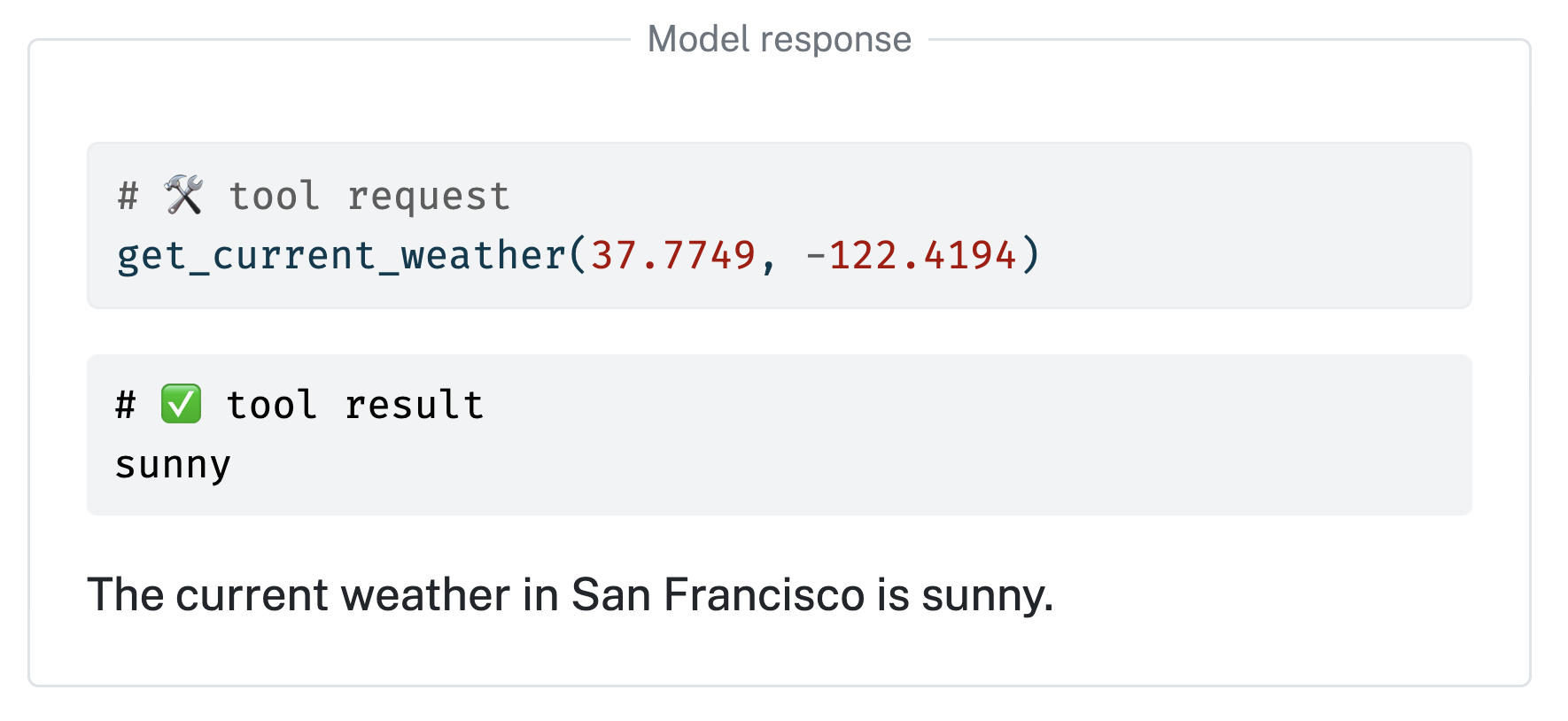
Learn more at https://posit-dev.github.io/chatlas
1 maintainer

Release files for chatlas 0.22.0
For a detailed explanation of source distributions (sdists) and built distributions (wheels), please see the package formats documentation.
Source distribution (sdist)
| File | Size | Uploaded | |
|---|---|---|---|
| chatlas-0.22.0.tar.gz | 13.4 MB | Details |
Built distribution (wheel)
| File | Interpreter | ABI | Platform | Reset |
|---|---|---|---|---|
| chatlas-0.22.0-py3-none-any.whl | Python 3 | none | any | Details |
Total release size: 13.7 MB
Release files / chatlas-0.22.0.tar.gz
| Download URL | chatlas-0.22.0.tar.gz |
|---|---|
| Size | 13.4 MB |
| Tags | Source |
|
SHA-256 checksum How to use checksums |
11ae0f5e74f5ac6925cb663744bcf233b3db92e39285a771322dda0943e39100
|
|
BLAKE2b-256 checksum How to use checksums |
da469297f03af5f4ea579bb49341bc5d3bbb9f1213d2c6181d0163eabdfd7fd9
|
| Upload date | |
|
Uploaded using Trusted Publishing? What is trusted publishing? |
Yes |
| Uploaded via |
twine/7.0.0 CPython/3.13.14
|
Provenance
Provenance describes where a file came from. On PyPI, provenance is shared via attestations, which provide a verifiable record of the build or publishing details. View details, limitations and caveats.


PyPI Publish Attestation
PyPI verified that this artifact, at this checksum, originated from the publisher listed below.
Signed by GitHub Actions, verified by PyPI on Aug 25, 2026.
Transparency logRelease files / chatlas-0.22.0-py3-none-any.whl
| Download URL | chatlas-0.22.0-py3-none-any.whl |
|---|---|
| Size | 254.1 kB |
| Tags | Python 3 |
|
SHA-256 checksum How to use checksums |
318a13d2d14ff6a8407b829118a4f3a9a24d47c209a2c52a4c92b30441527b10
|
|
BLAKE2b-256 checksum How to use checksums |
87ec806cfd356206e52171c965c58c63d4c355e5d4a5f45dd068a77ce791a5b2
|
| Upload date | |
|
Uploaded using Trusted Publishing? What is trusted publishing? |
Yes |
| Uploaded via |
twine/7.0.0 CPython/3.13.14
|
Provenance
Provenance describes where a file came from. On PyPI, provenance is shared via attestations, which provide a verifiable record of the build or publishing details. View details, limitations and caveats.
PyPI Publish Attestation
PyPI verified that this artifact, at this checksum, originated from the publisher listed below.
Signed by GitHub Actions, verified by PyPI on Aug 25, 2026.
Transparency log













