
This project has been archived by its maintainers, and is no longer receiving any updates.
Chatline
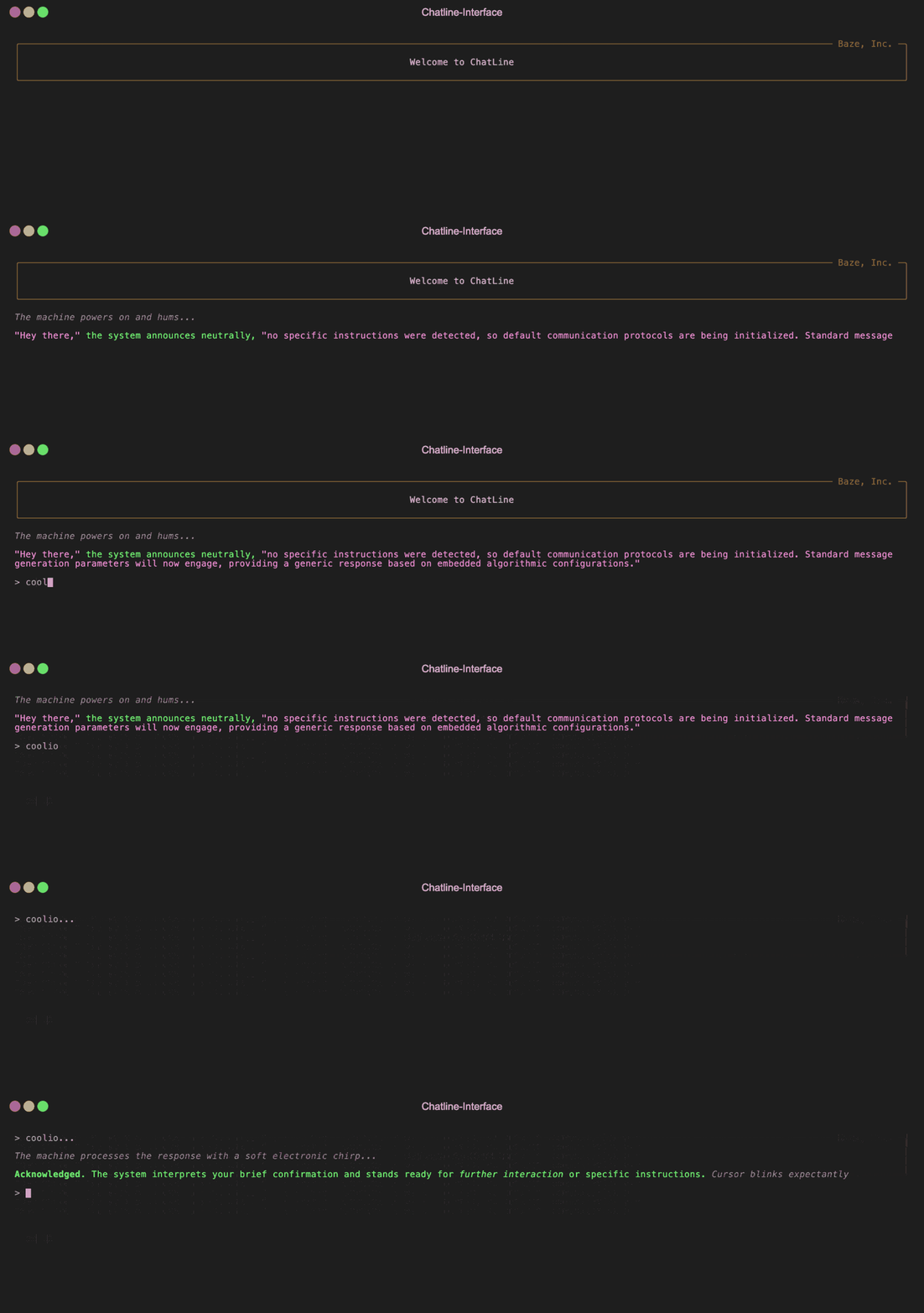
A lightweight CLI library for building terminal-based LLM chat interfaces with minimal effort. Provides rich text styling, animations, and conversation state management.
- Terminal UI: Rich text formatting with styled quotes, brackets, emphasis, and more
- Response Streaming: Real-time streamed responses with loading animations
- State Management: Conversation history with edit and retry functionality
- Multiple Providers: Run with AWS Bedrock, OpenRouter, or connect to a custom backend
- Keyboard Shortcuts: Ctrl+E to edit previous message, Ctrl+R to retry
Installation
pip install chatline
With Poetry:
poetry add chatline
Usage
There are two modes: Embedded (with built-in providers) and Remote (requires response generation endpoint).
Embedded Mode with AWS Bedrock (Default)
The easiest way to get started is to use the embedded generator with AWS Bedrock (the default provider):
from chatline import Interface

chat = Interface()

chat.start()
For more customization:
from chatline import Interface

# Initialize with AWS Bedrock (default provider)
chat = Interface(
    provider="bedrock",  # Optional: this is the default
    model="anthropic.claude-3-5-haiku-20241022-v1:0",
    temperature=0.7,
    provider_config={
        "region": "us-west-2",
        "profile_name": "development",
        "timeout": 120
    },
    preface={
        "text": "Welcome",
        "title": "My App",
        "border_color": "green"
    }
)

# Initialize with custom system and user messages
chat = Interface(
    messages=[
        {"role": "system", "content": "You are a friendly AI assistant that specializes in code generation."},
        {"role": "user", "content": "Can you help me with a Python project?"}
    ],
    provider="bedrock",  # Optional: this is the default
    model="anthropic.claude-3-5-haiku-20241022-v1:0",
    temperature=0.7,
    provider_config={
        "region": "us-west-2",
        "profile_name": "development",
        "timeout": 120
    },
    preface={
        "text": "Welcome",
        "title": "My App",
        "border_color": "green"
    }
)

# Start the conversation
chat.start()
Embedded Mode with OpenRouter
You can also use OpenRouter as your provider: (Just make sure to set your OPENROUTER_API_KEY environment variable first)
from chatline import Interface

# Initialize with OpenRouter provider
chat = Interface(
    provider="openrouter",
    model="deepseek/deepseek-chat-v3-0324",
    temperature=0.7,
    provider_config={
        "top_p": 0.9,
        "frequency_penalty": 0.5,
        "presence_penalty": 0.5,
        "timeout": 60
    }
)

chat.start()
Remote Mode (Custom Backend)
You can also connect to a custom backend by providing the endpoint URL. Passing an empty array allows for the initial messages to be instantiated on the backend:
from chatline import Interface

# Initialize with remote mode and empty messages (backend will provide defaults)
chat = Interface(
    messages=[],
    endpoint="http://localhost:8000/chat"
)

# Start the conversation
chat.start()
You can use generate_stream function (or build your own) in your backend. Here's an example in a FastAPI server:
import json
import uvicorn
from fastapi import FastAPI, Request
from fastapi.responses import StreamingResponse
from chatline import generate_stream

app = FastAPI()

CONVERSATION_STARTER = [
    {"role": "system", "content": "The Assistant is an Alien!!!"},
    {"role": "user", "content": "Introduce yourself to me!"},
]

@app.post("/chat")
async def stream_chat(request: Request):
    # Parse the request body
    body = await request.json()

    # Get conversation state
    state = body.get("conversation_state", {}) or {}

    # Get messages directly from the request body
    messages = body.get("messages", [])

    # Filter out any messages with empty content
    messages = [msg for msg in messages if msg.get("content", "").strip()]

    if not messages:
        messages = CONVERSATION_STARTER.copy()
        state["messages"] = messages

    # Return streaming response with state
    headers = {
        "Content-Type": "text/event-stream",
        "X-Conversation-State": json.dumps(state),
    }

    return StreamingResponse(
        generate_stream(messages, provider="bedrock"),
        headers=headers,
        media_type="text/event-stream",
    )

if __name__ == "__main__":
    uvicorn.run("server:app", host="127.0.0.1", port=8000)
Acknowledgements
Chatline was built with plenty of LLM assistance, particularly from Anthropic, Mistral and Continue.dev.
1 maintainer

Metadata
1 maintainer
Release files for chatline 0.4.0
For a detailed explanation of source distributions (sdists) and built distributions (wheels), please see the package formats documentation.
Source distribution (sdist)
| File | Size | Uploaded | |
|---|---|---|---|
| chatline-0.4.0.tar.gz | 56.4 kB | Details |
Built distribution (wheel)
| File | Interpreter | ABI | Platform | Reset |
|---|---|---|---|---|
| chatline-0.4.0-py3-none-any.whl | Python 3 | none | any | Details |
Total release size: 126.0 kB
Release files / chatline-0.4.0.tar.gz
| Download URL | chatline-0.4.0.tar.gz |
|---|---|
| Size | 56.4 kB |
| Tags | Source |
|
SHA-256 checksum How to use checksums |
8a6f3ce2d2d019ef1ad10ffc0cc1f8967e9d305ce09e1fcbcc98bde5575a62b7
|
|
BLAKE2b-256 checksum How to use checksums |
dd4a396bb75c23b7d672a7b38afd1832dfa0c2b29c8ebb5f9917164cec30df40
|
| Upload date | |
|
Uploaded using Trusted Publishing? What is trusted publishing? |
No |
| Uploaded via |
twine/6.1.0 CPython/3.13.7
|
Release files / chatline-0.4.0-py3-none-any.whl
| Download URL | chatline-0.4.0-py3-none-any.whl |
|---|---|
| Size | 69.6 kB |
| Tags | Python 3 |
|
SHA-256 checksum How to use checksums |
eef6e984f64255059a77f43e35ac54c41b9cf7fae0c6811b2f602a970820be44
|
|
BLAKE2b-256 checksum How to use checksums |
65aad89601c8bc905c17005114a54dcd9ae2b8b24eb24e4a2ffe01ca631b4b88
|
| Upload date | |
|
Uploaded using Trusted Publishing? What is trusted publishing? |
No |
| Uploaded via |
twine/6.1.0 CPython/3.13.7
|














